
1. Introduction
This manual provides essential information for the safe and effective installation, operation, and maintenance of the WPTGODGB EACBDC 2P DC 1000V Solar Mini Circuit Breaker. This device is designed to offer reliable overload and short circuit protection in direct current (DC) photovoltaic (PV) systems. Please read this manual thoroughly before installation and keep it for future reference.
2. Safety Information
- Electrical Hazard: Installation and maintenance should only be performed by qualified personnel.
- Disconnect Power: Always ensure that all power sources are disconnected before installing, servicing, or removing the circuit breaker.
- Rated Values: Do not exceed the rated voltage (DC 1000V) or current (20A for this variant) of the circuit breaker.
- Polarity: Observe correct DC polarity during wiring to prevent damage to the device and system.
- Secure Connections: Ensure all terminal connections are tight and secure to prevent overheating and arcing.
- Environmental Conditions: Install the device in an environment free from excessive moisture, dust, corrosive gases, or extreme temperatures.
3. Product Overview
3.1 Features
- Designed for DC photovoltaic systems.
- Provides overload and short circuit protection.
- Rated for DC 1000V.
- 2-pole configuration.
- DIN-Rail mounting for easy installation.
- Complies with IEC60898 standard.
- High mechanical life of not less than 20,000 operations.
3.2 Components
The circuit breaker consists of a main body, an operating handle, input/output terminals, and a window indicator for operation status.
3.3 Specifications
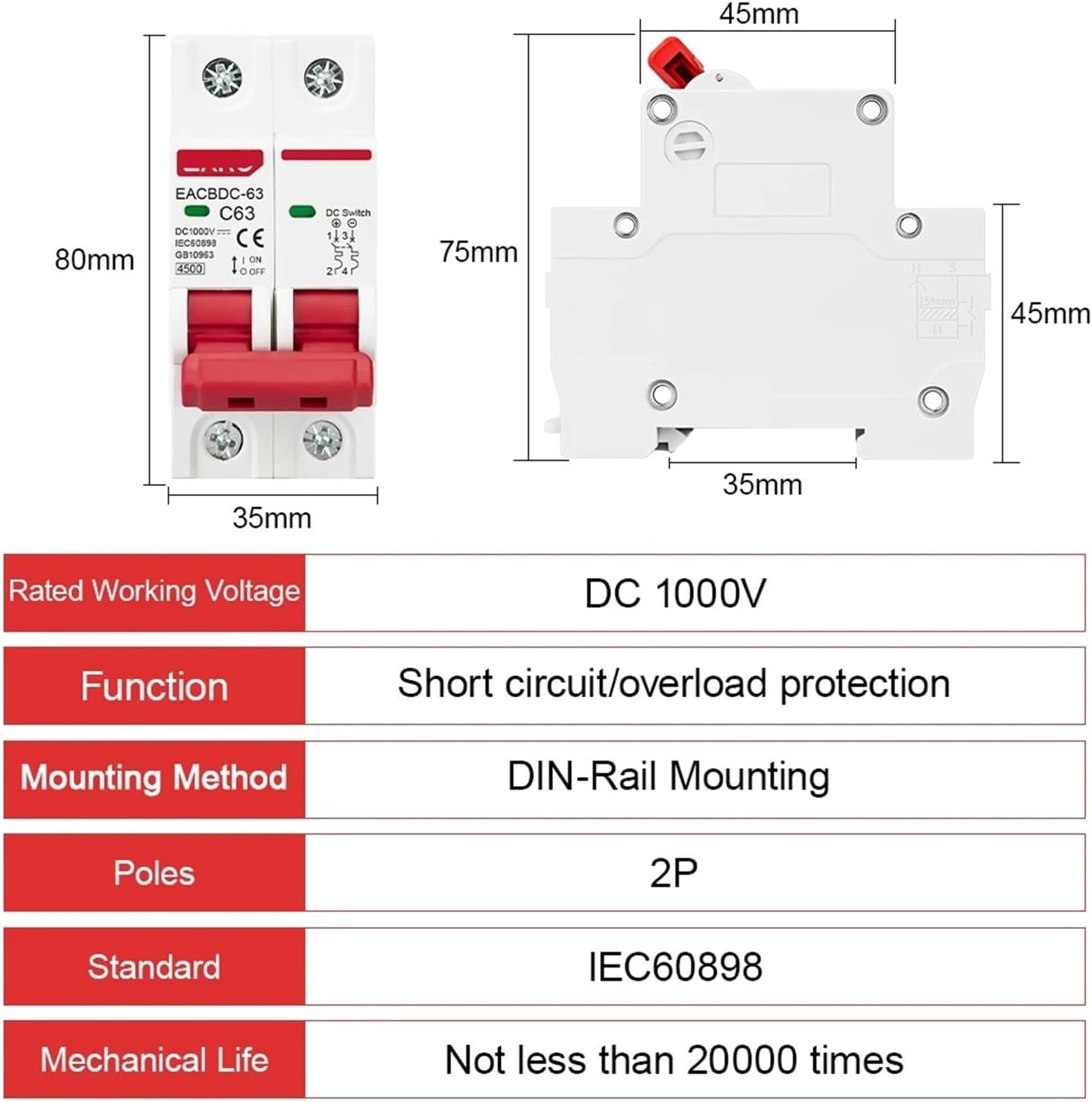
This image illustrates the physical dimensions of the circuit breaker, measuring approximately 80mm in height, 35mm in width, and 45mm in depth. It also presents a table of specifications including a rated working voltage of DC 1000V, short circuit/overload protection function, DIN-Rail mounting method, 2 poles, IEC60898 standard compliance, and a mechanical life of not less than 20000 operations.
| Specification | Value |
|---|---|
| Rated Working Voltage | DC 1000V |
| Function | Short circuit/overload protection |
| Mounting Method | DIN-Rail Mounting |
| Poles | 2P |
| Standard | IEC60898 |
| Mechanical Life | Not less than 20000 times |
| Rated Current (for this variant) | 20A |
| Package Dimensions | 1.18 x 0.79 x 0.39 inches (approximate) |
| Item Weight | 1.76 ounces |
4. Installation (Setup)
Before beginning installation, ensure all power to the system is disconnected. Refer to local electrical codes and standards for proper installation procedures.
- Mounting: Securely attach the circuit breaker onto a standard DIN-rail within an appropriate enclosure.
- Wiring: Connect the DC input wires to the designated input terminals and the DC output wires to the output terminals. Pay close attention to polarity (positive and negative connections).
- Terminal Tightening: Use an appropriate screwdriver to tighten all terminal screws to the recommended torque, ensuring a firm and reliable electrical connection.
- Verification: Double-check all wiring connections for correctness and security before restoring power.

A clear photograph of the EACBDC 2P DC 1000V Solar Mini Circuit Breaker, highlighting its compact design, red operating handle, and terminal connections.
5. Operation
The circuit breaker is operated via its red handle and provides visual status through a window indicator.
- To Close (Turn ON) the Circuit: Push the red handle UP. The indicator window will show RED, signifying that the circuit breaker is closed and the circuit is operating normally.
- To Open (Turn OFF) the Circuit: Pull the red handle DOWN. The indicator window will show GREEN, signifying that the breaker is open and the circuit is not running.
- Automatic Trip: In case of an overload or short circuit, the handle will automatically move to the DOWN (OFF) position, and the indicator will show GREEN.

This image shows the circuit breaker's indicator window and handle positions. When the handle is down, the indicator is green, signifying the breaker is open and the circuit is not running. When the handle is up, the indicator is red, indicating the circuit breaker is closed and the circuit is operating normally.
6. Maintenance
The EACBDC Solar Mini Circuit Breaker is designed for minimal maintenance. However, regular inspections are recommended to ensure optimal performance and safety.
- Visual Inspection: Periodically inspect the circuit breaker for any signs of physical damage, discoloration, or loose connections.
- Cleaning: If necessary, gently clean the exterior of the circuit breaker with a dry, soft cloth. Do not use abrasive cleaners or solvents.
- No User-Serviceable Parts: The internal components of the circuit breaker are not user-serviceable. Do not attempt to open or repair the device.
7. Troubleshooting
If the circuit breaker trips or does not operate as expected, consider the following:
- Breaker Trips Frequently: This indicates an overload or short circuit condition in the protected circuit. Investigate the connected load for faults, excessive current draw, or wiring issues.
- Breaker Does Not Reset: If the breaker trips and cannot be reset (handle does not stay in the UP position), a persistent fault (overload or short circuit) is likely present. Do not force the handle. Disconnect power and thoroughly inspect the circuit for the cause of the fault.
- No Power to Circuit: If the breaker is in the ON position (handle UP, red indicator) but there is no power to the circuit, check upstream power sources and connections.
If troubleshooting steps do not resolve the issue, contact a qualified electrician or the product supplier for assistance.
8. Warranty and Support
Specific warranty details may vary. Please refer to the purchase documentation or contact your seller for information regarding warranty coverage and support services.
For technical assistance or inquiries, please contact WPTGODGB customer support or your authorized distributor.