
Introduction
This manual provides detailed instructions for the setup, operation, and maintenance of your Generic RM-014S+ Universal TV Remote Control. Please read this manual thoroughly before using the device to ensure proper functionality and longevity.
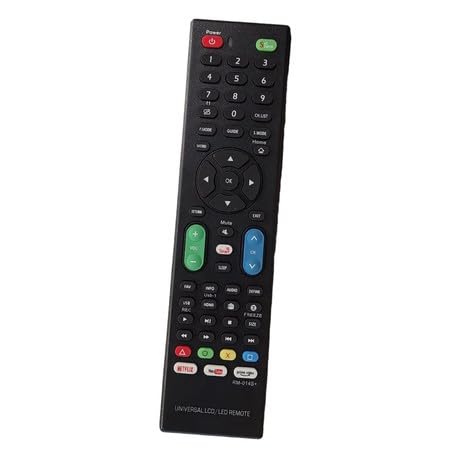
Image: The Generic RM-014S+ Universal TV Remote Control, black in color, showing its compact design.
Setup
1. Battery Installation
- Locate the battery compartment cover on the back of the remote control.
- Slide the cover downwards or press the latch to open it.
- Insert two (2) AAA batteries (not included) into the compartment, ensuring the positive (+) and negative (-) terminals match the diagrams inside the compartment.
- Replace the battery compartment cover by sliding it back into place until it clicks securely.
Note: Always use new batteries and dispose of old batteries responsibly. Do not mix old and new batteries, or different types of batteries.
Operating Instructions
The RM-014S+ remote control is designed for simple, one-button operation for various LCD and LED televisions. It operates using infrared (IR) technology with a maximum transmission distance of 8 meters (approximately 26 feet).
Basic Functions:
- Power On/Off: Press the POWER button to turn your television on or off.
- Channel Selection: Use the CHANNEL UP/DOWN buttons to navigate through channels.
- Volume Control: Adjust the volume using the VOLUME UP/DOWN buttons.
- Mute: Press the MUTE button to silence the television audio.
- Input/Source: Use the INPUT or SOURCE button to switch between different video inputs (e.g., HDMI, AV).
For specific advanced functions, refer to your television's original instruction manual, as the universal remote may not support all proprietary features.
Maintenance
Cleaning the Remote Control
- Wipe the remote control with a soft, dry cloth.
- For stubborn dirt, slightly dampen the cloth with water or a mild, non-abrasive cleaner. Do not use harsh chemicals or solvents.
- Ensure no liquid enters the remote control's interior.
Battery Replacement
If the remote control's performance degrades or it stops responding, replace the batteries as described in the "Battery Installation" section. Remove batteries if the remote will not be used for an extended period to prevent leakage.
Troubleshooting
| Problem | Possible Cause | Solution |
|---|---|---|
| Remote not responding. | Dead or incorrectly inserted batteries. | Replace batteries with new AAA batteries, ensuring correct polarity. |
| Remote has limited range. | Weak batteries; Obstruction between remote and TV. | Replace batteries. Ensure a clear line of sight to the TV's IR receiver. |
| Some TV functions do not work. | Universal remote limitations; TV not fully compatible. | The RM-014S+ is a basic universal remote. Some advanced or proprietary TV functions may not be supported. Refer to your TV's original manual. |
Specifications
- Model: RM-014S+
- Brand: Generic
- Color: Black
- Material: ABS
- Battery Type: 2 x AAA (not included)
- Transmission Distance: 8 meters
- Controller Type: Infrared (IR)
- Compatible Devices: LCD, LED Television
- Special Feature: One-button operation
Warranty Information
This Generic RM-014S+ Universal TV Remote Control comes with a 2-month warranty from the date of purchase. This warranty covers manufacturing defects under normal use. It does not cover damage caused by misuse, accidents, unauthorized modifications, or battery leakage.
Please retain your proof of purchase for warranty claims.
Customer Support
For further assistance, troubleshooting not covered in this manual, or warranty inquiries, please contact the seller or manufacturer through the platform where the product was purchased.
When contacting support, please have your product model (RM-014S+) and proof of purchase ready.