Oticon Intent Desktop Charger User Manual
Model: INTENT DESKTOP CHARGER
Brand: Otto Tech
1. Introduction
This manual provides detailed instructions for the safe and efficient use of your Oticon Intent Desktop Charger. Designed specifically for Oticon Intent 1, 2, 3, and 4 miniRITE R hearing aids, this charger ensures your devices are always ready for use with its advanced and user-friendly design.

Image: The Oticon Intent Desktop Charger shown next to its white packaging box, highlighting its compact design.
2. Compatibility
The Oticon Intent Desktop Charger is exclusively designed for specific Oticon Intent miniRITE R hearing aid models. Please ensure your hearing aids are compatible before use.
2.1 Compatible Models
- Oticon Intent 1 miniRITE R
- Oticon Intent 2 miniRITE R
- Oticon Intent 3 miniRITE R
- Oticon Intent 4 miniRITE R
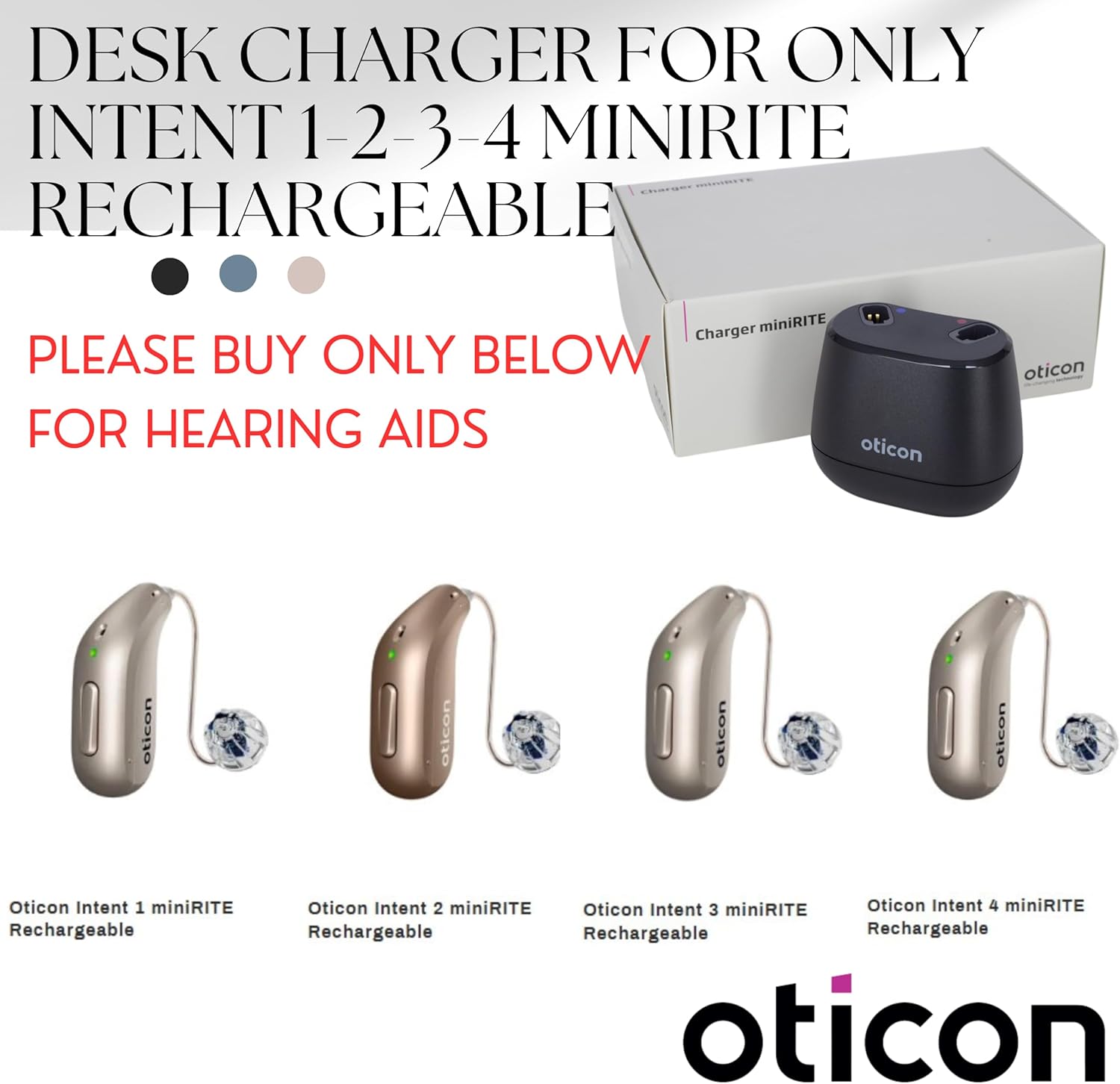
Image: Four different Oticon Intent miniRITE R hearing aid models displayed alongside the desktop charger, indicating compatibility.
2.2 Incompatible Models
This charger is NOT COMPATIBLE with the following hearing aid models:
- Oticon Intent BTE (Behind-The-Ear) hearing aids
- Oticon Real, More, Play, Zircon, Opn S, Ruby, and Opn Play rechargeable hearing aids
- Other brands' hearing aids

Image: A visual comparison showing a compatible Oticon Intent miniRITE R hearing aid with a green checkmark and an incompatible BTE hearing aid with a red cross, clearly illustrating what works and what doesn't.

Image: A warning graphic explicitly stating that the Intent Desk Charger is not compatible with Oticon Intent BTE, Real, More, Play, Zircon, Opn S, Ruby, and Opn Play rechargeable hearing aids, accompanied by an image of an incompatible BTE hearing aid.
3. Setup
Before using your charger, ensure it is properly connected to a power source.
- Connect the USB-C end of the charging cable to the port on the back of the desktop charger.
- Plug the USB-A end of the charging cable into the provided charging adapter.
- Insert the charging adapter into a standard wall outlet.
- A small LED light on the charger will illuminate, indicating it is powered on.

Image: The Oticon Intent Desktop Charger shown with its power adapter and USB cable, demonstrating how to connect it to a power source.
3.1 What's in the Box
Your Oticon Intent Desktop Charger package includes:
- 1 x Oticon Intent Desktop Charger
- 1 x Charging Adapter
- 1 x Charging Cable (USB-A to USB-C)
- 1 x User Manual (this document)

Image: An open box displaying the Oticon Intent Desktop Charger, charging adapter, USB cable, and user manual, illustrating all included components.
4. Operating Instructions
Charging your Oticon Intent miniRITE R hearing aids is simple and convenient.
- Ensure the charger is connected to a power source as described in the Setup section.
- Gently place your Oticon Intent miniRITE R hearing aids into the charging ports on the desktop charger. The charger uses contact-free inductive technology, so simply placing them correctly will initiate charging.
- There is no lid to open, and you do not need to turn off your hearing aids before placing them in the charger.
- Discreet LED lights on the charger indicate the charging status.

Image: The Oticon Intent Desktop Charger with text overlays explaining how to connect to power, easily insert hearing aids, and monitor charging status via LED lights.
4.1 Official Product Video: How to Use
Video: This official video demonstrates the process of connecting the Oticon Intent Desktop Charger and placing the hearing aids into the charging slots, showing the LED indicators and charging progress.
5. Charging Time
The Oticon Intent Desktop Charger provides efficient charging for your hearing aids:
- Hearing aids are fully charged in approximately 2 hours from a completely depleted state.
- Maximum charging time can be up to 6 hours depending on the initial state of the battery.
- Optimal charging temperature range: +15°C to +35°C (+59°F to +95°F).
- Extended charging temperature range: +5°C to +40°C (+41°F to +104°F).
6. Maintenance
To ensure the longevity and optimal performance of your Oticon Intent Desktop Charger, follow these maintenance guidelines:
- Keep the charger clean and free from dust and debris. Use a soft, dry cloth for cleaning.
- Avoid exposing the charger to extreme temperatures, humidity, or direct sunlight.
- Do not attempt to disassemble or repair the charger yourself. Contact authorized service personnel if issues arise.
- Store the charger in a cool, dry place when not in use.
7. Troubleshooting
If you encounter any issues with your Oticon Intent Desktop Charger, refer to the following common solutions:
| Problem | Possible Cause | Solution |
|---|---|---|
| Charger not powering on. | Not properly connected to power source; faulty cable/adapter. | Ensure all connections are secure. Try a different power outlet. Check cable and adapter for damage. |
| Hearing aids not charging. | Hearing aids not correctly seated; incompatible model; charger issue. | Re-seat hearing aids firmly in the charging ports. Verify compatibility (refer to Section 2). Ensure charger is powered on. |
| Slow charging. | Environmental temperature outside optimal range. | Ensure charging is done within the recommended temperature range (+15°C to +35°C). |
If the issue persists, please contact customer support for further assistance.
8. Specifications
| Feature | Detail |
|---|---|
| Product Name | Oticon Charger miniRITE |
| Dimensions (H x W x D) | 2.26 inches x 2.77 inches x 1.75 inches |
| Weight | 92 grams |
| Color | Black |
| Connectivity Technology | USB |
| Connector Type | USB Type A (cable end), USB Type C (charger port) |
| Compatible Devices | Oticon Intent miniRITE R Hearing Aids (1, 2, 3, 4) |
| Included Components | 1 x Charger, 1 x Charging Adapter, 1 x Charging Cable |
| Total USB Ports | 1 |
| Portable | Yes |
| Status Indicator | LED light on charger: Indicates Charger ON/OFF status. LED light on hearing aid when charging: Indicates charging mode. |
| Charging Time (Hearing Aids) | Max 2 hours charging depending on initial state of the battery. Max 6 hours charging depending on initial state of the battery. |
| Optimal Charging Temperature | +15°C to +35°C (+59°F to +95°F) |
| Extended Charging Temperature | +5°C to +40°C (+41°F to +104°F) |
| Charger Input Voltage | 5 V DC |
| Charger Input Current | < 0.1 A (charging two hearing aids), < 5 mA (stand-by, no hearing aids inserted) |
| AC Adapter Input Voltage | 100-240 V AC |
| AC Adapter Input Frequency | 50-60 Hz |
| AC Adapter Output Voltage | 5 V DC |
| AC Adapter Output Current | 1 A |

Image: A detailed table outlining the technical specifications of the Oticon Intent Desktop Charger, including dimensions, weight, power requirements, and compatibility.
9. Warranty and Support
For warranty information and customer support, please refer to the documentation included with your purchase or contact Otto Tech customer service directly.
Legal Disclaimer: Statements regarding dietary supplements have not been evaluated by the FDA and are not intended to diagnose, treat, cure, or prevent any disease or health condition. This product is a medical device accessory.