
CYBERBOT H3TS
CYBERBOT H3TS Lightweight Foldable Weatherproof Electric Wheelchair User Manual
1. Introduction
Welcome to the user manual for your new CYBERBOT H3TS Lightweight Foldable Weatherproof Electric Wheelchair. This manual provides essential information for the safe and effective operation, maintenance, and care of your electric wheelchair. Please read this manual thoroughly before using the product and retain it for future reference.
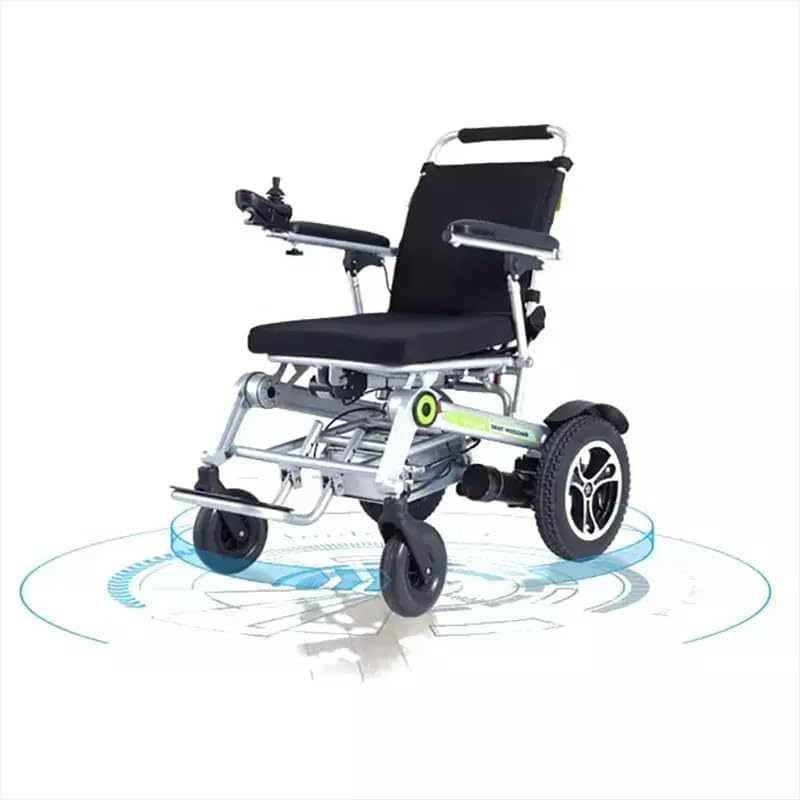
Front view of the CYBERBOT H3TS electric wheelchair, showcasing its design and joystick control.
2. Important Safety Information
Your safety is paramount. Always adhere to the following safety guidelines:
- Read and understand all instructions in this manual before operating the wheelchair.
- Consult with a healthcare professional to ensure this device is appropriate for your specific needs.
- Do not exceed the maximum weight capacity of 264 lbs (120 kg).
- Always wear appropriate safety gear if recommended by your healthcare provider.
- Exercise caution when operating on uneven terrain, inclines, or near obstacles.
- Ensure the battery is fully charged before extended use and follow all charging instructions carefully.
- Keep hands and clothing clear of moving parts.
- Do not operate the wheelchair under the influence of alcohol or medication that impairs judgment.
3. Product Components Overview
Familiarize yourself with the main components of your CYBERBOT H3TS electric wheelchair:
- Frame: Lightweight alloy steel construction.
- Seat and Backrest: Padded for comfort.
- Joystick Controller: For directional and speed control.
- Armrests: Adjustable for user comfort.
- Footrest: Provides support for the user's feet.
- Drive Wheels: Rear wheels (12.5 inch) powered by motors.
- Front Wheels: Caster wheels (8 inch) for steering and maneuverability.
- Motors: Two 200W motors for propulsion.
- Battery: Rechargeable power source.
- Remote Control: Wireless remote for advanced functions.

Side profile of the CYBERBOT H3TS electric wheelchair.
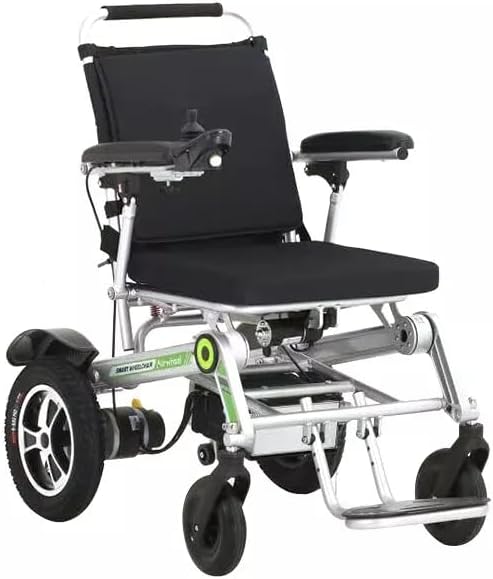
Close-up of the joystick controller.

Adjustable armrest detail.

Internal view of the powerful motor.
4. Setup and First Use
4.1 Unfolding the Wheelchair
The CYBERBOT H3TS is designed for easy folding and unfolding. Follow these steps to prepare your wheelchair for use:
- Place the folded wheelchair on a flat, stable surface.
- Gently pull the backrest upwards until it locks into place.
- Push down on the seat frame until the seat is fully extended and locked.
- Ensure all locking mechanisms are securely engaged before sitting in the wheelchair.
- Adjust the footrest to a comfortable position.

Folded upright position.

Folded flat for transport.

Wheelchair stored in a car trunk.
4.2 Battery Installation and Initial Charge
Before first use, ensure the battery is properly installed and fully charged.
- Locate the battery compartment, typically under the seat.
- Insert the battery pack, ensuring it clicks securely into place.
- Connect the charger to the charging port on the wheelchair and then to a standard electrical outlet.
- Allow approximately 5 hours for a full charge. The indicator light on the charger will change when charging is complete.
- Always use the original charger provided with your wheelchair.
5. Operating Instructions
5.1 Using the Joystick Controller
The joystick controller provides intuitive control over the wheelchair's movement:
- Power On/Off: Press the power button to turn the wheelchair on or off.
- Forward/Backward: Gently push the joystick forward to move forward, and pull it backward to move in reverse.
- Turning: Push the joystick left or right to steer the wheelchair in the desired direction.
- Stopping: Release the joystick to its neutral position to engage the electromagnetic brakes and stop the wheelchair.
5.2 Speed Control
Adjust the speed settings using the controls on the joystick panel. Start at the lowest speed setting until you are comfortable with the wheelchair's operation. The maximum speed is 3.7 mph.
5.3 Remote Control Operation
Your H3TS wheelchair is equipped with a wireless remote control for added convenience. This remote allows you to:
- Advance and retreat the wheelchair.
- Turn left and right.
- Control headlights and horn alarms.
- Utilize a one-button quick folding function.

Wheelchair operated with wireless remote control.
5.4 All-Terrain and Weatherproof Features
The CYBERBOT H3TS is designed to handle various terrains and weather conditions:
- Its robust design allows for navigation over uneven surfaces.
- The weatherproof construction protects internal components from light rain and snow. Avoid submerging the wheelchair in water.

Operating in snowy conditions.

Front wheel 360-degree rotation.
6. Maintenance and Care
6.1 Cleaning
Regular cleaning helps maintain the wheelchair's appearance and functionality:
- Wipe down the frame and seat with a damp cloth and mild detergent.
- Avoid using abrasive cleaners or solvents.
- Ensure all electrical components remain dry.
6.2 Battery Care
- Charge the battery regularly, even if the wheelchair is not in frequent use, to prolong its lifespan.
- Store the battery in a cool, dry place.
- Do not expose the battery to extreme temperatures.
6.3 Wheel and Tire Inspection
- Periodically check tires for wear and tear.
- Ensure wheels are free of debris and rotate smoothly.
7. Troubleshooting Guide
If you encounter issues with your CYBERBOT H3TS, refer to the following common problems and solutions:
- Wheelchair does not power on: Check battery connection and ensure the battery is charged. Verify the power button is fully pressed.
- Wheelchair moves erratically: Ensure the joystick is functioning correctly and not stuck. Check for any obstructions around the wheels.
- Reduced speed or range: Battery may be low or nearing the end of its lifespan. Ensure proper charging.
- Unusual noises: Inspect wheels and motors for any foreign objects or loose parts. Contact customer support if the noise persists.
For issues not covered here, please contact customer support.
8. Technical Specifications
| Feature | Specification |
|---|---|
| Model Name | H3TS |
| Brand | CYBERBOT |
| Motor Power | 200W*2 |
| Standard Max Speed | 3.7 mph |
| Charging Time | Around 5 hours |
| Max Capacity | 264 lbs |
| Rear Wheel Size | 12.5 inch |
| Front Wheel Size | 8 inch |
| Folding Size | 33*24*16.5 inch |
| Unfolded Size | 42*24.5*16.5 inch |
| Item Weight | 64 Pounds |
| Material | Alloy Steel |
9. Warranty and Customer Support
Your CYBERBOT H3TS Electric Wheelchair comes with a manufacturer's warranty. Please refer to the warranty card included with your purchase for specific terms and conditions. For technical assistance, parts, or warranty claims, please contact CYBERBOT customer support through the retailer where you purchased the product or visit the official CYBERBOT website.
Ask a question about this manual
Ask about setup, troubleshooting, compatibility, parts, safety, or missing instructions. Manuals+ will review the question and use this page’s manual context to help answer it.