
1. Product Overview
This Yondista LCD Touch Screen Replacement Kit is specifically designed for the iPhone 15 Pro Max models A2849, A3105, A3106, and A3108 (6.7 inch). It provides a high-quality solution for common screen issues such as cracks, dead pixels, touch malfunctions, or unresponsive displays.
Prior to shipment, each screen undergoes a thorough 100% inspection by our dedicated Quality Control team to ensure pristine condition and readiness for installation.
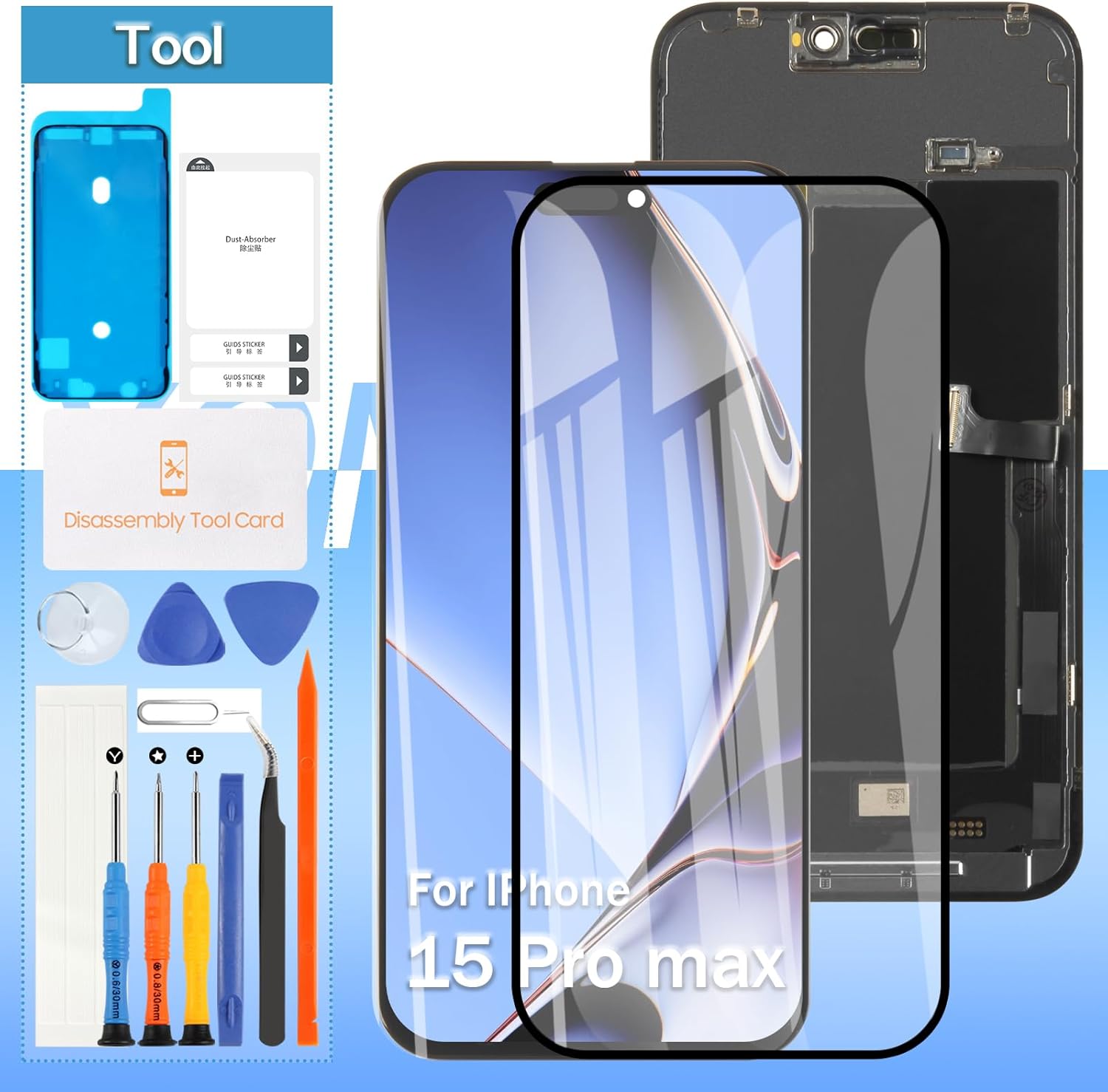
Image 1.1: Yondista iPhone 15 Pro Max Screen Replacement Kit, including the LCD screen, tempered glass, and a comprehensive set of repair tools.

Image 1.2: Detailed specifications of the replacement screen, highlighting its IPS LCD material, compatible models, pixel resolution (1290*2796), and 6.7-inch size.
2. Package Contents
Your Yondista screen replacement package includes all necessary components for a successful repair:
- 1 x LCD Replacement Screen
- 1 set of Replacement Tools

Image 2.1: The complete set of replacement tools provided with the LCD screen, designed to assist in the installation process.
3. Setup and Installation Guidance
Replacing an iPhone screen requires careful attention to detail. We strongly advise utilizing instructional videos available on platforms such as YouTube to guide you through the installation process. Search for 'iPhone 15 Pro Max screen replacement' for detailed visual instructions.
Important Caution: Improper installation can potentially damage the device's motherboard or power supply, which may necessitate replacing the entire unit. Please proceed with extreme care and ensure you understand each step before attempting the installation.
Ensure your device is powered off and disconnected from any power source before beginning the replacement process.

Image 3.1: Front and rear views of the replacement LCD screen, showing the display surface and the internal components and flex cables.

Image 3.2: A close-up view of the bottom section of the replacement screen, detailing the flex cable and connection points.

Image 3.3: A detailed view of the top section of the replacement screen, showing the cutouts and components for the camera and sensors.
4. Operating the New Screen
Once installed, the new LCD screen will restore full display and touch functionality to your iPhone 15 Pro Max. The screen is designed to provide ultra-high definition visuals and superior sensitive touch response.
Verify all functions, including touch responsiveness across the entire screen, display clarity, and Face ID functionality (if applicable and transferred correctly from the original screen), after installation.

Image 4.1: Representation of the Ultra High Definition display quality offered by the replacement screen.

Image 4.2: Illustrates the compatibility and proper functioning of Face ID with the installed replacement screen.
5. Maintenance
To ensure the longevity and optimal performance of your new screen, follow these general maintenance guidelines:
- Screen Protection: Always use a high-quality screen protector (like the included tempered glass) and a protective case to prevent scratches and impacts.
- Cleaning: Clean the screen with a soft, lint-free cloth. For stubborn smudges, lightly dampen the cloth with water or a screen-specific cleaning solution. Avoid harsh chemicals.
- Avoid Extreme Conditions: Protect your device from extreme temperatures and direct exposure to water or excessive humidity.

Image 5.1: Highlights key features such as resistance to water/oil damage, superior sensitive touch, and the rigorous multi-stage testing each LCD screen undergoes.
6. Troubleshooting
If you encounter any issues after installing the screen, consider the following common troubleshooting steps:
- No Display/Black Screen: Ensure all flex cables are securely connected. Disconnect and reconnect them carefully. Check for any visible damage to the cables or connectors.
- Touch Malfunctions/Unresponsive Touch: Verify the touch digitizer flex cable is properly seated. A hard reset of the device may also resolve minor software glitches.
- Dead Pixels/Display Issues: While screens are 100% inspected, minor defects can sometimes occur. If persistent, refer to the After-Sales Support section.
- Screen Not Fitting Properly: Double-check that you have the correct model screen for your iPhone 15 Pro Max (A2849, A3105, A3106, A3108).

Image 6.1: Visual guide confirming compatibility with iPhone 15 Pro Max (6.7 inch) and indicating incompatibility with standard iPhone 15 or iPhone 15 Pro (6.1 inch) models.
7. Specifications
| Feature | Detail |
|---|---|
| Product Type | LCD Touch Screen Display Digitizer Full Assembly |
| Compatibility | iPhone 15 Pro Max (Models: A2849, A3105, A3106, A3108) |
| Screen Size | 6.7 inches |
| Display Technology | IPS LCD |
| Color | Black |
| Package Dimensions | 7.64 x 4.06 x 1.18 inches |
| Item Weight | 5.8 ounces |
| Manufacturer | Yondista |
8. Warranty and Support
Your satisfaction is our priority. Yondista provides dedicated after-sales support to assist you with any inquiries or issues related to your screen replacement.
For assistance, please reach out to us immediately via Amazon messaging. Our professional after-sales service team is ready to provide prompt and reliable support 24/7.
Please retain your purchase receipt for any warranty claims or support requests.