1. Introduction
This manual provides detailed instructions for the safe and effective use of your PaiPaitek PD 519-TIO Bark and Training Collar. This device combines remote training capabilities with an automatic bark correction feature, designed to assist in modifying canine behavior. Please read this manual thoroughly before operating the device.

Image 1.1: Overview of the PaiPaitek PD 519-TIO Bark and Training Collar system, showing the remote transmitter, receiver collar, and lanyard.
2. Package Contents
- Remote Transmitter (x1)
- Receiver (x1)
- Adjustable Collar (x1)
- Contact Points (x4)
- Conductive Silicone Caps (x4)
- Test Lamp (x1)
- USB Charging Cable (x1)
- Lanyard (x1)
- User Manual (x1)
3. Product Overview
Familiarize yourself with the components of your training system.

Image 3.1: Labeled diagram of the remote transmitter and receiver collar, indicating features such as indicator light, bark sensor, charging port, power button, LCD display, keylock, signal channel, tone button, vibration button, and safe shock button.
Receiver Collar Features:
- Bark Sensor: Detects dog barking for automatic correction.
- Indicator Light: Displays operational status and battery level.
- Charging Port: For recharging the receiver battery.
- Power Button: Turns the receiver on/off.
- Auto Mode Button: Activates or deactivates the automatic bark correction function.
Remote Transmitter Features:
- LCD Display: Shows battery level, signal channel, and intensity levels.
- Keylock: Prevents accidental activation.
- Signal Channel Button: Selects which receiver to control (up to 3 dogs).
- Tone Button: Activates an audible beep correction.
- Vibration Button: Activates vibration correction (Levels 1-9).
- Safe Shock Button: Activates static correction (Levels 1-16).
- +/- Buttons: Adjusts intensity levels for vibration and static correction.
- Charging Port: For recharging the remote battery.
4. Safety Information
To ensure the safety and well-being of your dog, please adhere to the following guidelines:
- Collar Wear Duration: Limit collar wear to a maximum of 12 hours per day. Prolonged wear can lead to skin irritation.
- Regular Inspection: Check your dog’s neck area every 1-2 hours for any signs of redness, sores, or irritation. If irritation occurs, discontinue use and consult a veterinarian.
- Proper Fit: The collar should fit snugly but not too tightly. You should be able to insert one finger between the collar strap and your dog's neck. A loose fit may result in inconsistent correction or skin irritation due to movement.
- Water Protection: Ensure the rubber charging cap on the receiver is securely closed to maintain its waterproof integrity, especially before exposing it to water. The remote is not waterproof.
- Supervision: Do not leave your dog unsupervised while wearing the collar, especially during initial training phases.
- Age and Health: This collar is suitable for dogs weighing 40 to 150 pounds. Do not use on puppies under 6 months old, or on dogs that are ill, injured, or pregnant.
- Accidental Activation: Utilize the safety lock feature on the remote to prevent unintended corrections.

Image 4.1: The remote control features a safety lock mechanism to prevent accidental activation. A lanyard is included for secure handling.
5. Setup Guide
5.1 Charging the Devices
Before first use, fully charge both the remote transmitter and the receiver collar. Use the provided dual USB charging cable.
- Connect the dual charging cable to both the remote and the receiver.
- Plug the USB end into a standard USB power adapter (not included).
- The indicator lights on both devices will show charging status (e.g., solid red while charging, green when fully charged).
- A full charge typically takes approximately 2 hours.

Image 5.1: Both the remote transmitter and receiver collar can be charged simultaneously using the included dual USB charging cable.
5.2 Fitting the Collar
Proper fit is essential for the collar's effectiveness and your dog's comfort.
- Ensure the receiver is turned off.
- Place the receiver on your dog's neck so that the contact points are positioned underneath, making direct contact with the skin.
- Adjust the strap to be snug, allowing one finger to fit between the strap and your dog's neck. The collar should not be too tight to restrict breathing or too loose to move around excessively.
- For dogs with thick coats, you may need to trim some fur around the contact points to ensure proper skin contact.

Image 5.2: The adjustable collar fits dogs with neck sizes from 8 to 27 inches, suitable for dogs weighing 40 to 150 lbs. Ensure a finger-width gap for proper fit.
5.3 Pairing Remote and Receiver
The devices are typically pre-paired. If re-pairing is needed or for adding additional receivers:
- Turn on the remote transmitter.
- Select a channel (1, 2, or 3) on the remote using the channel button.
- With the receiver turned off, press and hold the power button on the receiver until the indicator light flashes rapidly.
- Within 10 seconds, press any correction button (Tone, Vibration, or Shock) on the remote.
- If pairing is successful, the receiver will beep, and the indicator light will stop flashing.
6. Operating Instructions
The PaiPaitek PD 519-TIO offers both remote training and automatic bark correction modes.

Image 6.1: The collar offers four training modes: automatic bark correction, beep, vibration, and static correction, providing versatile training options.
6.1 Remote Training Modes
The remote transmitter allows you to deliver three types of corrections:
- Tone (Beep): Press the Tone button to emit an audible beep. There are 9 distinct beep types. This is often used as a warning or positive reinforcement signal.
- Vibration: Press the Vibration button to deliver a vibration. Intensity levels 1-9 are adjustable using the +/- buttons. This mode is a gentle reminder for your dog.
- Static Correction (Safe Shock): Press the Safe Shock button to deliver a static pulse. Intensity levels 1-16 are adjustable using the +/- buttons. This mode should be used cautiously and only after your dog understands the tone and vibration commands.
6.2 Automatic Bark Mode
The receiver collar can automatically detect and correct excessive barking.
- To activate Automatic Bark Mode, press the 'A' button on the receiver collar. The indicator light will confirm activation.
- In this mode, the collar will automatically deliver a correction (typically progressive, starting with tone/vibration and escalating to static correction if barking persists) when it detects your dog barking.
- To deactivate, press the 'A' button again.
6.3 Multi-Dog Training
The remote can control up to three receiver collars simultaneously.
- Pair each receiver to a different channel (1, 2, or 3) on the remote as described in Section 5.3.
- Use the channel button on the remote to switch between controlling different dogs.
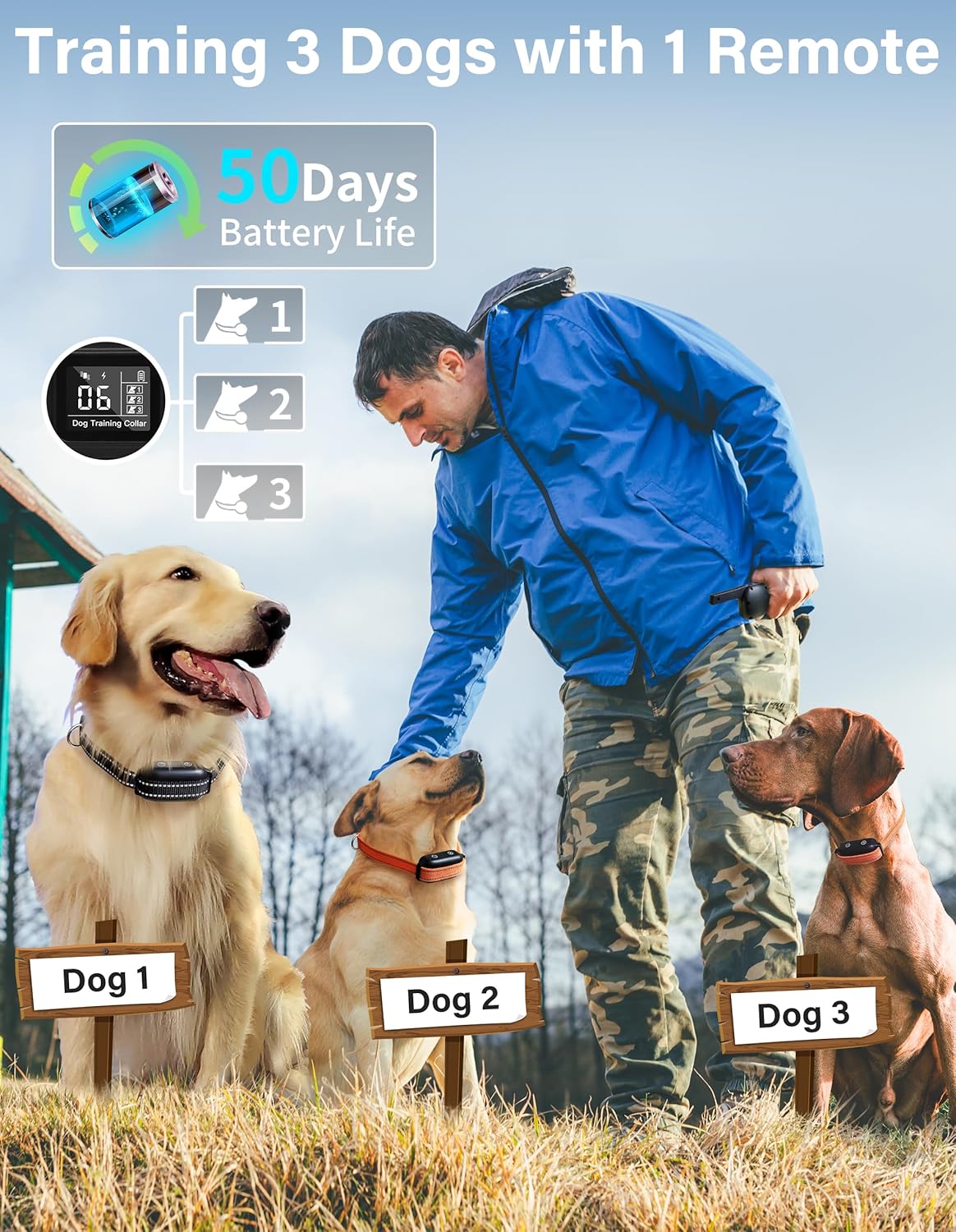
Image 6.2: The remote transmitter can be used to train up to three dogs by switching between designated channels.
7. Maintenance
- Cleaning: Regularly clean the receiver collar and contact points with a damp cloth. Ensure the contact points are free of dirt or debris to maintain proper function.
- Storage: Store the device in a cool, dry place when not in use.
- Battery Care: To prolong battery life, avoid fully discharging the batteries frequently. Recharge when the battery indicator shows low power.
8. Troubleshooting
| Problem | Possible Cause | Solution |
|---|---|---|
| Collar not working/no correction | Low battery; Not paired; Incorrect channel; Loose fit; Contact points not touching skin. | Charge devices; Re-pair remote and receiver; Select correct channel; Adjust collar fit; Ensure contact points are making skin contact. |
| Dog not responding to correction | Intensity level too low; Dog not understanding; Thick fur preventing contact. | Increase intensity gradually; Re-evaluate training method; Trim fur around contact points. |
| Automatic bark mode not activating | Mode not activated; Bark sensor obstructed; Collar too loose. | Activate bark mode (press 'A' button); Ensure bark sensor is clear; Adjust collar for snug fit. |
| Remote not controlling receiver | Out of range; Low battery; Not paired; Incorrect channel. | Move closer to dog; Charge remote; Re-pair devices; Select correct channel. |
| Skin irritation on dog's neck | Collar worn too long; Collar too tight; Allergic reaction; Poor hygiene. | Remove collar immediately; Consult veterinarian; Ensure proper fit and wear duration; Clean collar and neck area regularly. |
9. Specifications
| Feature | Detail |
|---|---|
| Model Number | PD 519-TIO |
| Remote Range | Up to 3300 feet (1000 meters) |
| Waterproof Rating (Receiver) | IPX7 (Submersible up to 1 meter for 30 minutes) |
| Battery Type | Lithium Polymer (Rechargeable) |
| Battery Life (Standby) | Up to 50 days (Receiver), Up to 90 days (Remote) |
| Charging Time | Approx. 2 hours |
| Adjustable Collar Size | 8 to 27 inches neck circumference |
| Recommended Dog Weight | 40 to 150 lbs |
| Training Modes | Beep (9 types), Vibration (1-9 levels), Static Correction (1-16 levels), Automatic Bark Mode (1-5 levels) |
| Multi-Dog Support | Controls up to 3 dogs with one remote |
| Material | Acrylonitrile Butadiene Styrene (ABS) |
| Item Weight | 3.53 ounces (100 grams) |
10. Warranty and Support
The PaiPaitek PD 519-TIO Bark and Training Collar comes with a 1-year warranty from the date of purchase. This warranty covers manufacturing defects and malfunctions under normal use.
For warranty claims, technical support, or any questions regarding the product, please contact PaiPaitek customer service. Refer to the product packaging or the official PaiPaitek website for current contact information.


