
1. Introduction
The ULANZI SK-10 is a multi-functional accessory designed to enhance your mobile experience. It integrates a magnetic cell phone stand, a semiconductor cooling fan, and a wireless charger into a single unit. This manual provides comprehensive instructions for the proper setup, operation, and maintenance of your ULANZI SK-10 to ensure optimal performance and longevity.
2. Product Features
- Rapid Cooling Performance: Utilizes an advanced semiconductor chip for efficient cooling without causing damage to your device.
- High-Speed Heat Dissipation: Equipped with a powerful 7-blade fan operating at 5000 RPM for rapid heat removal.
- Ultra-Low Noise Operation: Designed to operate at ≤27dB, ensuring a quiet environment during use.
- 3-in-1 Functionality: Offers charging mode, cooling mode, and a combined charging + cooling mode.
- 360° Universal Ball Head: Provides flexible positioning and angle adjustments with a 360° rotation and 180° pitch adjustment.
- Efficient Wireless Charging: Supports 15W wireless charging (Apple 7.5W) while simultaneously cooling the device.
- Secure Magnetic Attachment: Features a strong 12N magnetic attraction to firmly secure your phone to the stand.

Image: Overview of the ULANZI SK-10's core components, including the wireless charging coil, semiconductor cooling chip, and internal cooling fan.

Image: Detailed diagram illustrating the semiconductor chip for instant cooling and the 7-blade fan for high-speed heat dissipation.
3. Package Contents
Please verify that all items are present in the package:
- Base (1x)
- Charging Stand (1x)
- Cooling Fan (1x)
4. Setup Instructions
- Assemble the Stand: Connect the charging stand component to the base. Ensure it is securely fastened.
- Connect Power: Use the provided Type-C charging cable to connect the stand to a suitable power adapter (not included).
- Attach Your Phone: Place your compatible magnetic-enabled phone onto the magnetic cooling fan module. The strong magnetic attraction will secure the phone in place.

Image: The ULANZI SK-10 stand fully assembled with a smartphone magnetically attached, illustrating the cooling function in action.
5. Operating Instructions
5.1 Power On/Off
The ULANZI SK-10 is designed to activate automatically when a compatible phone is magnetically attached. To power off, simply remove the phone from the magnetic module.
5.2 Mode Selection
The device features a mode switch to select between different operational states:
- Charging + Cooling Mode: Provides both wireless charging and active cooling simultaneously.
- Charging Mode: Delivers wireless charging without activating the cooling fan.
- Cooling Mode: Activates the cooling fan without wireless charging.
Use the physical switch located on the cooling module to cycle through these modes. The device is designed to prevent condensation or freezing when in an idle state (no phone attached).
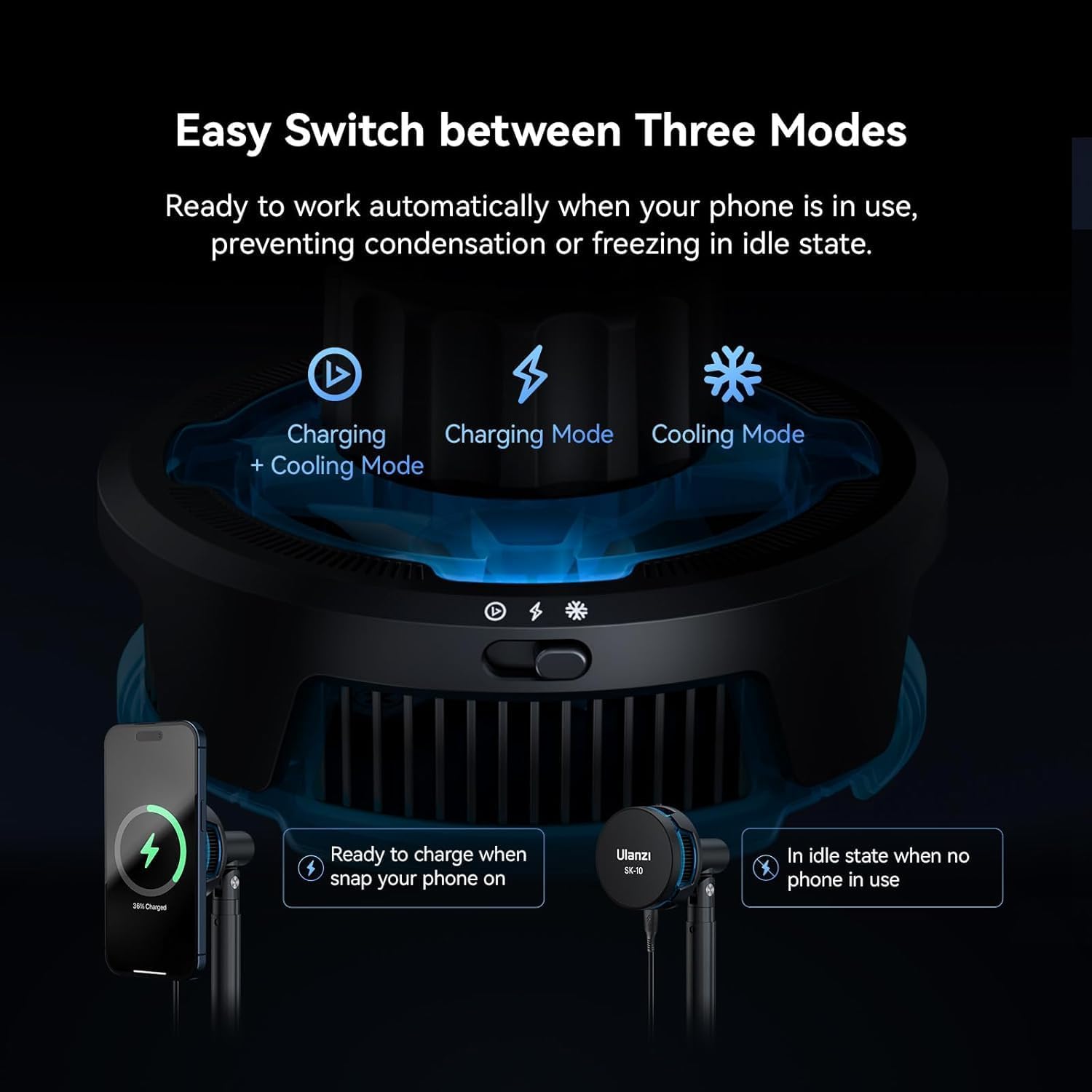
Image: Close-up of the ULANZI SK-10's mode switch, indicating options for Charging + Cooling, Charging Only, and Cooling Only.
6. Adjustments
The ULANZI SK-10 offers versatile adjustment options for optimal viewing and usage:
- Height Adjustment: The telescopic stand allows for height adjustments between 240mm and 360mm (9.45 inches to 14 inches).
- Angle Adjustment: The magnetic cooling module is attached via a 360° universal ball head, enabling full rotation. Additionally, it supports 180° pitch adjustment for precise viewing angles.

Image: Illustration of the ULANZI SK-10's adjustable height range and the 360-degree rotational capability of the phone mount.
7. Maintenance
- Cleaning: Use a soft, dry cloth to wipe the surface of the stand and cooling module. Avoid using abrasive cleaners or solvents.
- Fan Cleaning: Periodically inspect the cooling fan for dust accumulation. If necessary, gently clean with a soft brush or compressed air to maintain optimal airflow.
- Storage: When not in use, store the ULANZI SK-10 in a cool, dry place away from direct sunlight and extreme temperatures.
8. Troubleshooting
- Device Not Cooling:
- Ensure the Type-C cable is securely connected to a power source.
- Verify that the cooling mode or charging + cooling mode is selected via the switch.
- Check for any obstructions to the fan or cooling vents.
- Device Not Charging:
- Confirm that your phone is magnetically aligned correctly with the charging coil.
- Ensure your phone is compatible with wireless charging.
- Check if the charging mode or charging + cooling mode is selected.
- Try a different power adapter or Type-C cable to rule out power supply issues.
- Stand Instability:
- Ensure all connections between the base and the stand are tightened.
- Place the stand on a flat, stable surface.
9. Specifications
| Product Dimensions | 2.68 x 1.1 x 1.1 inches |
| Item Weight | 3.53 ounces |
| Item Model Number | SK-10 |
| Brand | ULANZI |
| Color | Black |
| Mounting Type | Tabletop |
| Compatible Devices | Compatible with iPhone 17/17 Pro/17 Pro Max, iPhone 16 Pro Max/16 Pro/16/16 Plus, iPhone 15/15 Plus/15 Pro/15 Pro Max, iPhone 14/14 Plus/14 Pro/14 Pro Max, iPhone 13/13 Mini/13 Pro/13 Pro Max, iPhone 12/12 Pro/12 Pro Max/12 Mini. |
10. Warranty and Support
For warranty information and customer support, please refer to the official ULANZI website or contact your retailer. Keep your purchase receipt for any warranty claims.