
1. Introduction
This user manual provides essential information for the safe and efficient operation of your DC HOUSE 12V 20A Lithium Battery Charger. Please read this manual thoroughly before using the product and retain it for future reference.
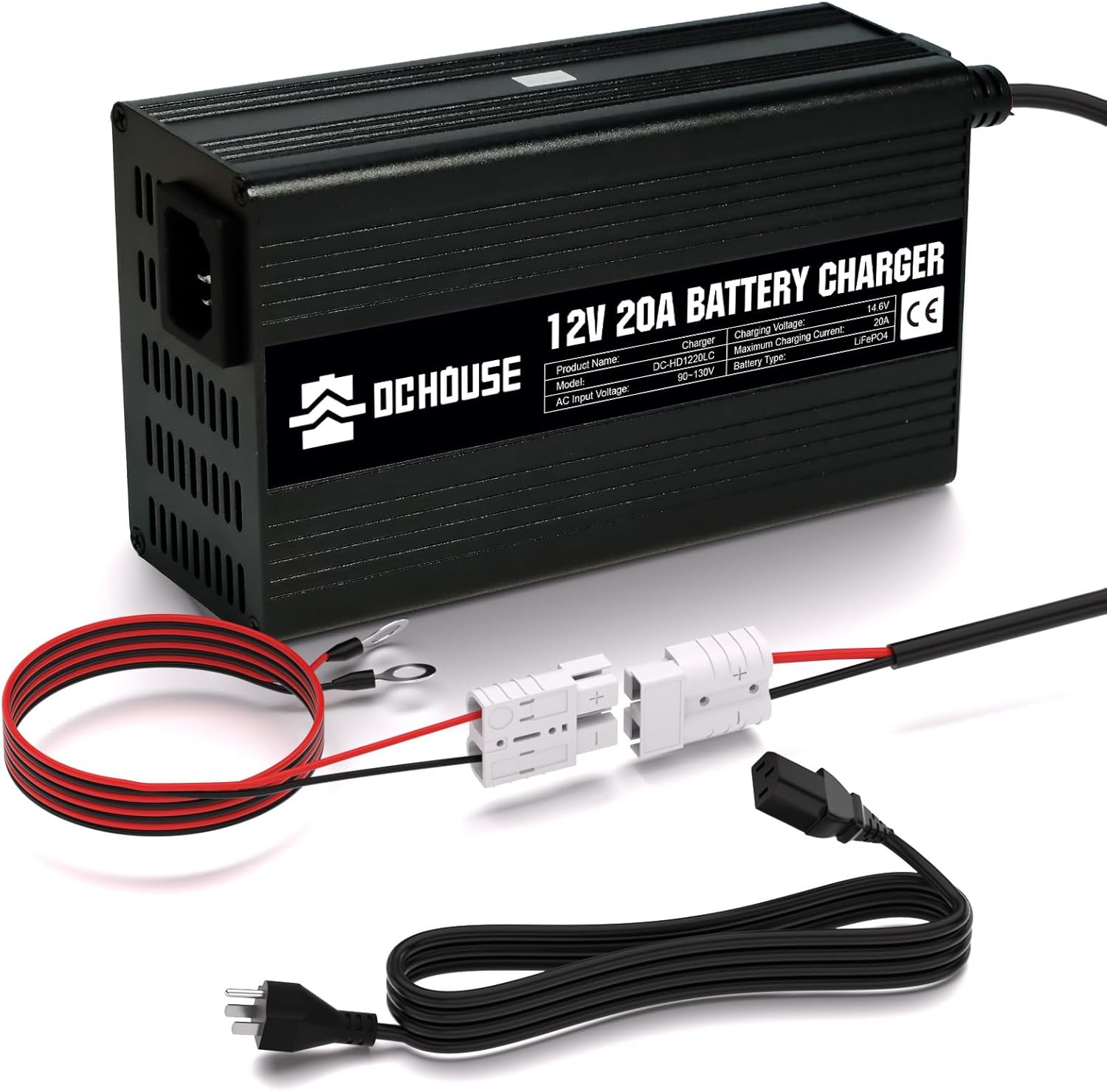
Figure 1: DC HOUSE 12V 20A Lithium Battery Charger with included cables and connectors.
2. Safety Information
Always observe the following safety precautions to prevent injury or damage to the charger and battery:
- Read Instructions: Read all instructions before using the charger.
- Ventilation: Ensure adequate ventilation during charging. Do not cover the charger.
- Compatibility: This charger is designed specifically for 12V LiFePO4 batteries. Do not use it with other battery types.
- Water Exposure: Do not expose the charger to rain, moisture, or excessive humidity.
- Damage Check: Inspect the charger, cables, and connectors for any damage before each use. Do not use if damaged.
- Proper Connection: Connect the battery terminals correctly (positive to positive, negative to negative) before plugging the charger into the AC power outlet.
- Unplugging: Always unplug the charger from the AC outlet before disconnecting the battery.
- Children and Pets: Keep the charger and battery out of reach of children and pets.
- Indoor Use: This charger is intended for indoor use only.
- Overheating: The charger has a built-in cooling fan. If the charger feels excessively hot, disconnect it immediately and allow it to cool down.
3. What's in the Box
Verify that all items are present upon unboxing:
- 1 x DC HOUSE 12V 20A Lithium Battery Charger
- 1 x AC Power Cord
- 1 x Battery Connection Cable (with M8 terminals and quick connector)
- 1 x User Manual (this document)

Figure 2: Visual representation of the package contents, including the charger, AC power cord, DC connection wire, and user manual.
4. Product Features
The DC HOUSE 12V 20A Lithium Battery Charger is designed with advanced features for optimal performance and safety:
- Dedicated LiFePO4 Charging: Specifically designed for 12V LiFePO4 batteries, supporting a 0V charging function to reactivate batteries protected by BMS.
- Simple Plug-and-Play Connection: Features M8 terminals and a battery quick connector for easy and fast connection to your battery.

Figure 3: Illustration of the M8 Terminal Connection and Battery Cable Connection options for the charger.
- Multi-Protection Features: Equipped with comprehensive protection functions including over-voltage, over-current, short-circuit, and overheating protection. It also features an automatic stop function upon full charge.

Figure 4: Visual representation of the charger's comprehensive protection features.
- Fast Charging: Delivers 300W of power with a constant voltage of 14.6V and a maximum current of 20A, allowing a 12V 100Ah LiFePO4 battery to reach 50% charge in approximately 2.5 hours.

Figure 5: Charging efficiency and estimated times for various 12V lithium battery capacities.
- Built-in Cooling Fan: An integrated cooling fan ensures stable charging output and prevents overheating during operation.

Figure 6: The charger features a built-in cooling fan for optimal performance and heat dissipation.
- Dual-Color LED Indicator: Provides clear charging status at a glance.

Figure 7: LED indicator guide for monitoring charger status.
- Battery Health Management: Supports 0V activation, prevents overcharge (safe to leave plugged in 24/7), and utilizes 2 charging stages to maintain battery life.

Figure 8: Features designed to keep your battery healthy and extend its lifespan.
5. Setup and Connection
Follow these steps to set up and connect your charger:
- Connect to Battery: Connect the battery connection cable to your 12V LiFePO4 battery. Ensure the positive (+) terminal of the cable connects to the positive (+) terminal of the battery, and the negative (-) terminal of the cable connects to the negative (-) terminal of the battery. Then, connect the quick connector from the charger to the battery cable.
- Connect to AC Power: Plug the AC power cord into the charger's AC input port, then plug the other end of the AC power cord into a standard 90V-130V AC wall outlet.
- Verify Status: The LED indicator on the charger will illuminate to show the charging status.
Video 1: This video demonstrates the connection process, highlighting the durable aluminum alloy shell, compact size, battery connector, and the plug-and-play functionality. It also shows the LED indicator status (red for charging, green for fully charged/no connection) and the built-in cooling fan. The video concludes by emphasizing the multiple protection functions and battery health features, along with the 300W fast charging capability for 12V lithium batteries.
6. Operating Instructions
Once connected, the charger will automatically begin the charging process. Monitor the LED indicator for status updates:
| Indicator Color | Status |
|---|---|
| Red | Charging |
| Green | Fully Charged or No Connection |
The charger is designed to prevent overcharging and can be left connected to the battery even after it's fully charged, thanks to its intelligent charging stages.
7. Maintenance
To ensure the longevity and optimal performance of your charger:
- Cleaning: Regularly wipe the exterior of the charger with a soft, dry cloth. Do not use liquid cleaners or solvents.
- Storage: Store the charger in a cool, dry place when not in use, away from direct sunlight and extreme temperatures.
- Cable Inspection: Periodically check the power cords and connectors for any signs of wear, cuts, or damage. Replace if necessary.
- Ventilation: Ensure the cooling fan vents are clear of dust and debris to maintain proper airflow.
8. Troubleshooting
If you encounter issues with your charger, refer to the following common problems and solutions:
| Problem | Possible Cause | Solution |
|---|---|---|
| Charger LED does not light up. | No power from AC outlet; Loose connection; Faulty charger. | Check AC outlet with another device. Ensure all connections are secure. If problem persists, contact support. |
| LED is green but battery is not fully charged. | Battery not connected properly; Battery is already full; Battery fault. | Ensure battery connections are firm. Verify battery voltage. If battery is deeply discharged, the 0V activation feature should work, but a severely damaged battery may not charge. |
| Charger gets hot during operation. | Normal operation; Poor ventilation; Overload. | Some heat is normal. Ensure charger is in a well-ventilated area. Check if the cooling fan is obstructed. If excessively hot, disconnect and allow to cool. |
| Charging is slow. | Battery capacity is very high; Battery condition. | Charging time depends on battery capacity. Refer to specifications for expected charging times. Ensure battery is healthy. |
If the problem persists after trying these solutions, please contact customer support.
9. Specifications
| Feature | Value |
|---|---|
| Product Name | 12V 20A Lithium Battery Charger |
| Model | DC-HD1220LC |
| Input Voltage | 90V-130V AC |
| Max. Charging Power | 300W |
| Battery Type | LiFePO4 |
| Constant Charge Voltage | 14.6V |
| Constant Charge Current | 20A |
| Float Charging Current | 1.6A |
| Product Dimensions | 3.5 x 7.9 x 2.5 inches |
| Item Weight | 1.98 pounds |
| AC Power Cord Length | 4.9 ft / 58.8 inches |
| DC Power Cord Length | 2.3 ft / 27.5 inches |
| Battery Connection Cable Length | 3.9 ft (M8 terminals) |

Figure 9: Physical dimensions and weight of the charger, along with details on the flame retardant wire and 50A connector.
10. Warranty and Support
DC HOUSE products are manufactured to the highest quality standards. This product comes with a standard manufacturer's warranty. For detailed warranty information, technical support, or service inquiries, please contact DC HOUSE customer service through the retailer's platform or the official DC HOUSE website.
Please have your product model number (DC-HD1220LC) and purchase date ready when contacting support.


