
APHUWJ OW02
APHUWJ OW02 Open-Ear Wireless Earbuds User Manual
Model: OW02 | Brand: APHUWJ
1. Introduction
Thank you for choosing the APHUWJ OW02 Open-Ear Wireless Earbuds. These earbuds are designed to provide a comfortable and high-quality audio experience while maintaining awareness of your surroundings. Featuring Bluetooth 5.4 connectivity, touch controls, and a durable IPX7 waterproof rating, they are ideal for various activities, including sports and daily use.
2. Product Features
- Open-Ear Comfort: Non-in-ear design reduces pressure and allows awareness of surroundings, preventing ear pain during prolonged wear.
- Extended Battery Life: Up to 8 hours of playback on a single charge, with a total of up to 80 hours using the portable charging case.
- LED Power Display: The charging case features an LED screen to monitor remaining battery life and charging status.
- Smart Touch Controls: Easily adjust volume, switch songs, and manage calls with intuitive touch gestures.
- Advanced Bluetooth 5.4: Ensures faster pairing, stable connections, and lower power consumption.
- Environmental Noise Cancellation (ENC): Reduces background noise during calls for clear communication.
- IPX7 Waterproof Rating: Resilient against sweat and rain, suitable for various weather conditions and intense workouts.
- 16mm Air-Conducting Drivers: Delivers robust, high-fidelity audio.
3. Package Contents
Please check the package for the following items:
- APHUWJ OW02 Open-Ear Wireless Earbuds (Left and Right)
- Charging Case
- USB-C Charging Cable
- User Manual
4. Setup
4.1 Charging the Earbuds and Case
Before first use, fully charge the earbuds and the charging case.
- Place the earbuds into the charging case. Ensure they are correctly seated; the LED indicators on the earbuds will light up to confirm charging.
- Connect the USB-C charging cable to the charging port on the case and the other end to a USB power adapter (not included) or a computer's USB port.
- The LED display on the charging case will show the battery percentage. A full charge for the case typically takes about 1.5 hours.
- Once fully charged, the LED display will indicate 100%.

Figure 4.1: Earbuds in their charging case, showing the LED power display.

Figure 4.2: Illustration of the extended battery life and charging times.
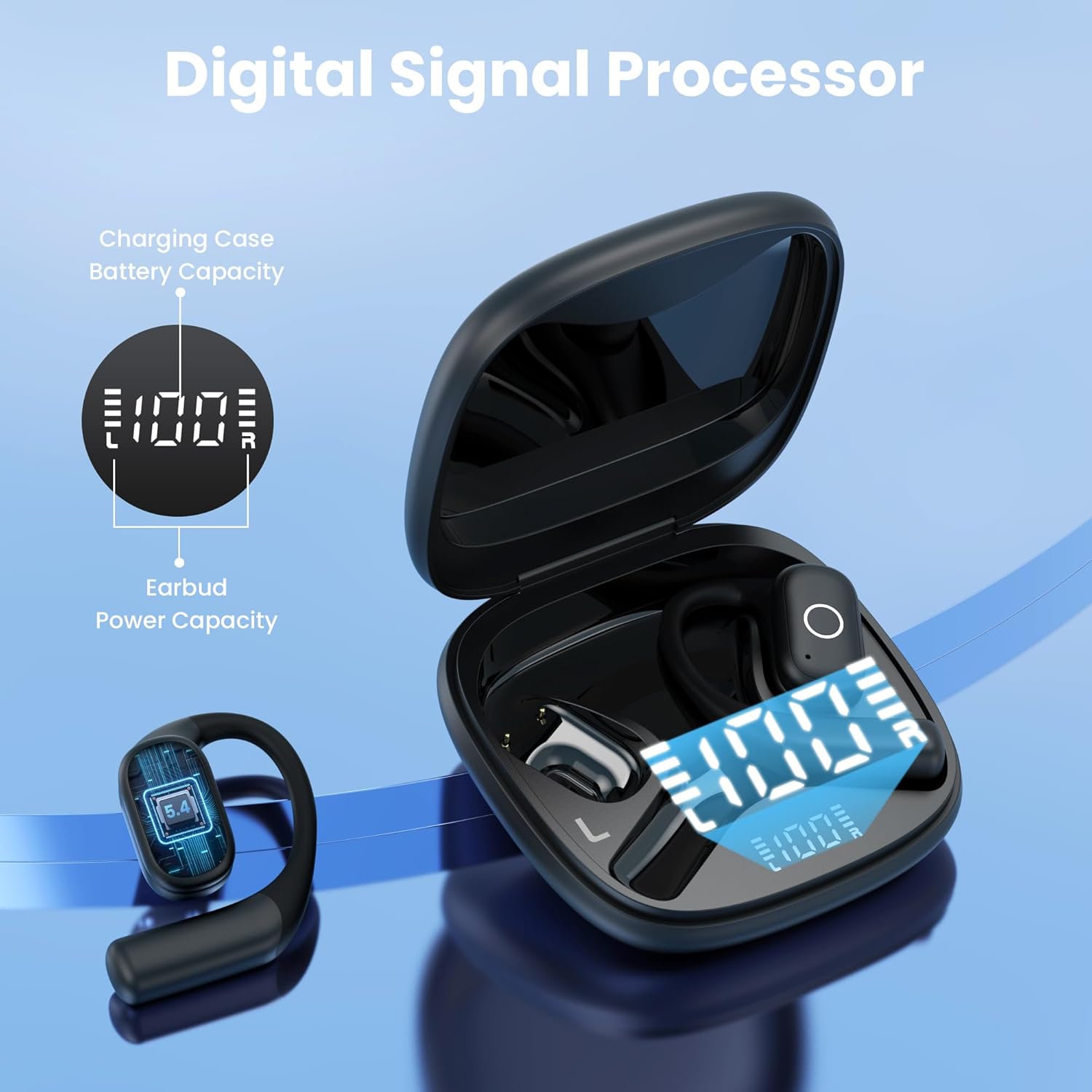
Figure 4.3: Close-up of the charging case's digital LED display indicating battery levels.
4.2 Pairing with Your Device
The earbuds support one-step auto-pairing after the initial setup.
- First-time Pairing:
- Open the charging case. The earbuds will automatically power on and enter pairing mode.
- On your device (smartphone, tablet, etc.), enable Bluetooth.
- Search for "OW02" in the list of available Bluetooth devices and select it to connect.
- Once connected, you will hear a confirmation prompt, and the earbuds' indicator lights will change.
- Subsequent Pairing: After the first successful pairing, simply open the charging case, and the earbuds will automatically connect to the last paired device.

Figure 4.4: Visual guide for the one-step auto-pairing feature.
5. Operating Instructions
5.1 Wearing the Earbuds
The OW02 earbuds feature an open-ear design with earhooks for a secure and comfortable fit.
- Identify the Left (L) and Right (R) earbuds.
- Gently place the earbud over your ear, positioning the earhook behind your ear.
- Adjust the earbud until it rests comfortably and securely on your ear, ensuring the audio driver is positioned correctly for optimal sound.

Figure 5.1: Proper wearing of the open-ear earbuds for comfort.

Figure 5.2: Examples of comfortable fit for various activities.
5.2 Touch Controls
The OW02 earbuds feature intuitive touch controls on the outer surface of each earbud. The specific functions may vary slightly depending on the earbud (left/right) and the number of taps.
| Action | Function |
|---|---|
| Single Tap | Play/Pause music, Answer/End call |
| Double Tap (Left Earbud) | Previous Song |
| Double Tap (Right Earbud) | Next Song |
| Triple Tap (Left Earbud) | Volume Down |
| Triple Tap (Right Earbud) | Volume Up |
| Long Press (2 seconds) | Reject Call / Activate Voice Assistant |
6. Maintenance and Care
- Cleaning: Use a soft, dry, lint-free cloth to clean the earbuds and charging case. Do not use abrasive cleaners or solvents.
- Water Resistance: The earbuds are IPX7 waterproof, meaning they can withstand splashes, rain, and sweat. Do not submerge them in water or expose them to saltwater or other liquids. Ensure the charging port is dry before charging.
- Storage: Store the earbuds in their charging case when not in use to protect them and keep them charged. Store in a cool, dry place away from extreme temperatures.
- Battery Care: To prolong battery life, avoid fully discharging the earbuds and case frequently. Charge them regularly, even if not used for extended periods.
7. Troubleshooting
| Problem | Possible Solution |
|---|---|
| Earbuds not pairing/connecting. |
|
| No sound from one or both earbuds. |
|
| Charging case not charging. |
|
| Poor call quality. |
|
8. Specifications
| Feature | Detail |
|---|---|
| Model Name | OW02 |
| Connectivity Technology | Wireless (Bluetooth 5.4) |
| Ear Placement | Open Ear (with ear hooks) |
| Water Resistance Level | IPX7 Waterproof |
| Battery Life (Earbuds) | Up to 8 hours (single charge) |
| Total Playtime (with Case) | Up to 80 hours |
| Charging Time (Case) | Approx. 1.5 hours |
| Control Method | Touch Control |
| Noise Control | Environmental Noise Cancellation (ENC) |
| Audio Driver Type | Dynamic Driver (16mm) |
| Compatible Devices | Smartphones, Tablets, Laptops, TVs, Computers |
| Item Weight | 5 ounces |
Note: Specifications are subject to change without notice.
9. Warranty and Support
For warranty information and customer support, please refer to the warranty card included in your product packaging or visit the official APHUWJ website. If you encounter any issues not covered in this manual, please contact APHUWJ customer service for assistance.
Contact Information: Please refer to the product packaging or the official APHUWJ website for the most up-to-date contact details.
Ask a question about this manual
Ask about setup, troubleshooting, compatibility, parts, safety, or missing instructions. Manuals+ will review the question and use this page’s manual context to help answer it.