
1. Introduction
This manual provides essential information for the safe and effective use of your MGNBDY 11-in-1 Air Quality Monitor. This device is designed to provide real-time measurements of various indoor and outdoor air quality parameters, helping you understand and manage your environment.

Figure 1: MGNBDY 11-in-1 Air Quality Monitor
The monitor is portable and battery-powered, making it suitable for use in homes, offices, and outdoor settings. It features a user-friendly interface for easy data interpretation.
2. Product Overview
Key Features:
- Comprehensive Monitoring: Tracks CO2, VOC, AQI, PM2.5, PM10, HCHO, Temperature, and Humidity.
- Portable Design: Easy to carry for various locations.
- Battery Powered: Convenient and wireless operation with a built-in 2000mAh battery.
- Smart Features: Provides instant readings and alerts for air quality changes.
- User-Friendly Interface: Simple setup and easy data interpretation on a clear LCD screen.
What's in the Box:
- Air Quality Monitor
- USB-C Charging Cable
- User Manual

Figure 2: Contents of the product packaging
3. Setup
- Initial Charge: Before first use, fully charge the device using the provided USB-C cable and a compatible power adapter. The battery indicator on the display will show charging status.
- Power On: Press and hold the power button (usually located on the top or side) for a few seconds until the display illuminates.
- Placement: Place the monitor in the area where you wish to measure air quality. For accurate readings, ensure it is not directly exposed to drafts, heat sources, or excessive humidity.
Video 1: Official product video demonstrating the air quality monitor's features and ease of use.
4. Operating Instructions
Display Overview:
The monitor features a clear LCD screen displaying multiple parameters simultaneously. The display typically includes:
- Date and Time
- Battery Level
- CO2 (Carbon Dioxide) levels in ppm
- HCHO (Formaldehyde) levels in mg/m³
- TVOC (Total Volatile Organic Compounds) levels in mg/m³
- AQI (Air Quality Index) with a color-coded indicator
- PM2.5 (Particulate Matter 2.5) in µg/m³
- PM10 (Particulate Matter 10) in µg/m³
- Temperature (Temp) in °C or °F
- Humidity (Humi) in %

Figure 3: Annotated display of the air quality monitor
Button Functions:
Specific button functions may vary slightly, but common controls include:
- Power Button: Press and hold to turn on/off. A short press may cycle through display modes or confirm selections.
- Alarm/Mute Button: Toggles audible alerts for unhealthy air quality levels.
- Brightness/Mode Button: Adjusts screen brightness or cycles through different display layouts/modes.
- Settings Button: Accesses settings for time, date, temperature units (°C/°F), and alarm thresholds.
5. Understanding Air Quality Readings
The monitor provides readings for various pollutants and environmental factors. Understanding these values is crucial for maintaining a healthy environment.
- CO2 (Carbon Dioxide): A common indoor pollutant, high levels can indicate poor ventilation, leading to drowsiness, headaches, and reduced concentration.
- HCHO (Formaldehyde): A volatile organic compound (VOC) often found in building materials, furniture, and cleaning products. High levels can cause eye, nose, and throat irritation.
- TVOC (Total Volatile Organic Compounds): A broad group of chemicals that can be emitted from various sources like paints, air fresheners, and cleaning supplies. High TVOC levels can cause respiratory irritation and other health issues.
- PM2.5 & PM10 (Particulate Matter): Microscopic solid or liquid particles suspended in the air. PM2.5 (fine particles) are particularly concerning as they can penetrate deep into the lungs and bloodstream, linked to respiratory and cardiovascular problems. PM10 (coarse particles) can irritate the eyes, nose, and throat.
- AQI (Air Quality Index): A numerical scale used to report daily air quality. It indicates how clean or polluted the air is, and what associated health effects might be a concern. The monitor uses a color-coded bar (e.g., green for good, yellow for moderate, red for unhealthy).
- Temperature & Humidity: These environmental factors can influence comfort and the concentration of certain pollutants. Maintaining optimal levels is important for overall indoor air quality.

Figure 4: Monitor displaying real-time air quality data in a home environment
6. Maintenance
- Cleaning: Use a soft, dry cloth to clean the device. Do not use abrasive cleaners or solvents, as these can damage the screen or casing.
- Storage: When not in use for extended periods, store the monitor in a cool, dry place away from direct sunlight and extreme temperatures.
- Sensor Care: Avoid blocking the sensor vents on the device, as this can affect accuracy. Do not attempt to clean the internal sensors.
7. Troubleshooting
| Problem | Possible Cause | Solution |
|---|---|---|
| Inaccurate or erratic readings (e.g., values jumping to 999) | Sensor calibration needed or temporary environmental interference. | Move the device to a well-ventilated area for 5-10 minutes to allow sensors to stabilize. If issues persist, consult customer support. |
| Device not holding charge or charging slowly | Faulty charging cable/adapter, degraded battery, or incorrect charging method. | Ensure the USB-C cable and adapter are functioning correctly. Try a different compatible charger. If the battery life remains significantly short, contact customer support. |
| Buttons not responding or getting stuck | Physical damage or debris. | Gently clean around the buttons. Avoid excessive force when pressing. If buttons are physically damaged, contact customer support. |
| Display frozen or showing incorrect time/date | Software glitch or incorrect settings. | Perform a soft reset by turning the device off and on. Check settings to ensure time and date are correctly configured. |
8. Specifications
- Model Number: AIR-11-1
- Manufacturer Part Number: MG-01
- Item Weight: 14.8 ounces
- Package Dimensions: 7.52 x 4.61 x 2.13 inches
- Batteries: 1 x 9V battery required (included)
- Date First Available: October 10, 2024
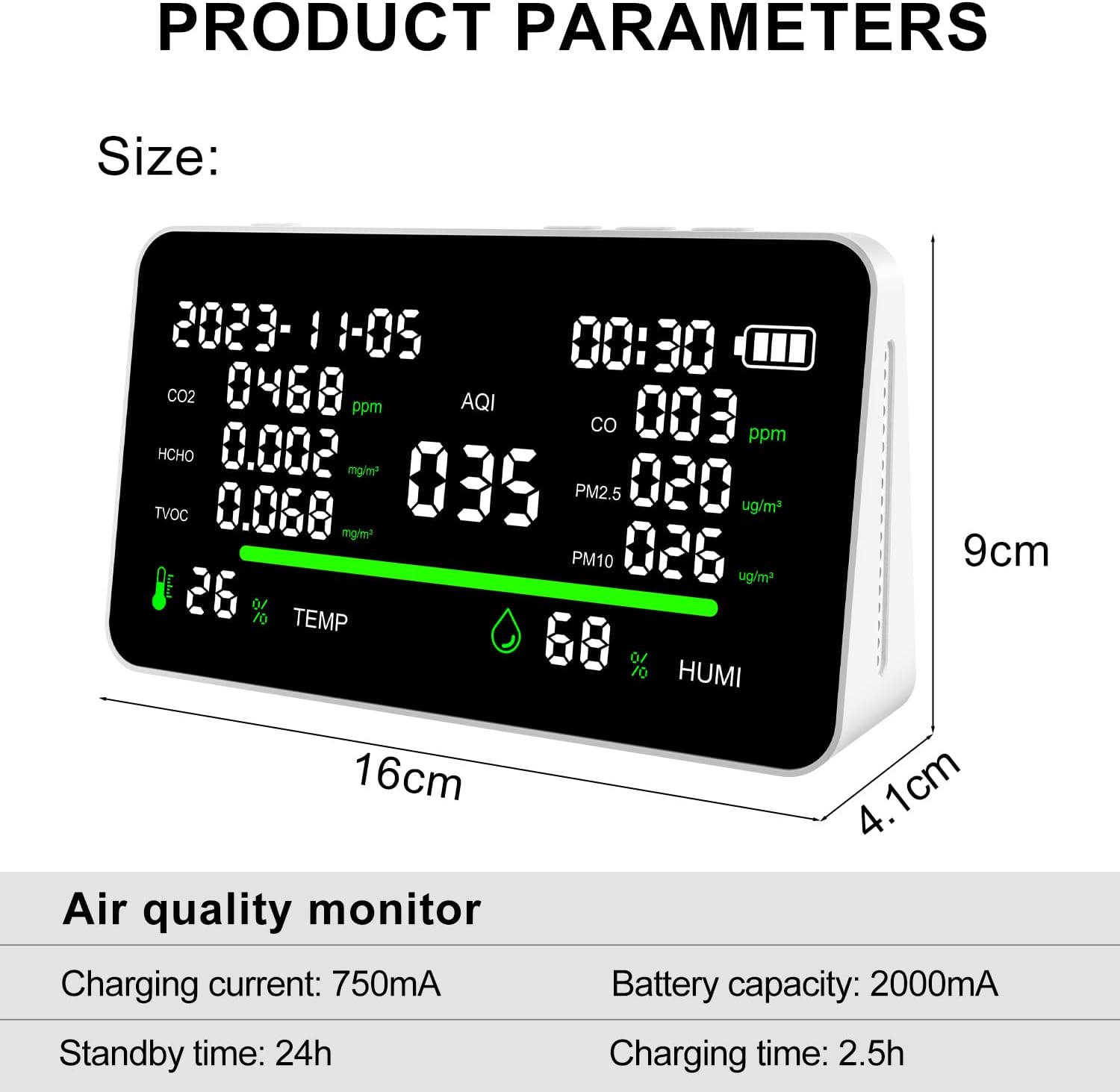
Figure 5: Product parameters including size and battery information
9. Warranty and Support
Your MGNBDY 11-in-1 Air Quality Monitor may be eligible for extended protection plans. Please refer to your purchase documentation for details on available 3-Year or 4-Year Protection Plans, or the Complete Protect monthly plan.
For technical support, warranty claims, or further assistance, please contact MGNBDY customer service through your retailer or the official brand website.