
1. Product Overview
The LIANLI O11 Vision Compact is a mid-tower PC case designed in collaboration with PC Master Race (PCMR). It offers a compact form factor while retaining the aesthetic and customization options of the larger O11 Vision. This case features a unique pillar-less design with three tempered glass panels (front, left side, and top) for an unobstructed view of your internal components, referred to as 'Vision Mode'. For enhanced cooling performance, the top tempered glass panel can be replaced with an included mesh panel, enabling 'Mesh Panel Mode'.
The O11 Vision Compact is engineered for ease of assembly with modular panels and fan brackets. It also incorporates various cable management solutions to ensure a clean and organized build. The case supports a wide range of motherboard form factors, from Mini-ITX to E-ATX, including back-connect ATX motherboards.

Image 1.1: The O11 Vision Compact features a compact dual-chamber design for optimized airflow and clean cable management, resulting in a tidy setup.

Image 1.2: Three tempered glass panels allow for a stylish display of your PC build with seamless hard glass on three sides.
2. Setup and Installation
2.1 Component Compatibility
- Motherboard: Supports E-ATX (up to 280mm width for back-connect), ATX, Micro-ATX, and Mini-ITX form factors.
- GPU: Maximum length of 408mm, accommodating high-performance graphics cards.
- Radiators: Supports up to three 360mm radiators (two in Vision Mode).
- Fans: Accommodates up to eleven 120mm fans (eight in Vision Mode).
- PSU: Bottom-mounted power supply unit.

Image 2.1: The case is compatible with all common motherboard sizes for maximum flexibility.

Image 2.2: Maximum GPU length of 408mm provides space for high-performance GPUs, perfect for powerful gaming setups.
2.2 Cable Management
The O11 Vision Compact features a dual-chamber design that separates the main components from the power supply and cables, facilitating clean cable routing. It includes a double-layered cable clip system that slides out from SSD mounting points, along with various other cable management gimmicks.

Image 2.3: The case offers comprehensive cable management solutions for a tidy build.
2.3 AIO Hose Routing
The case provides concealed AIO hose routing, with rubberized pump grommets and AIO hose guides in the second chamber, ensuring a clean look for liquid cooling setups.
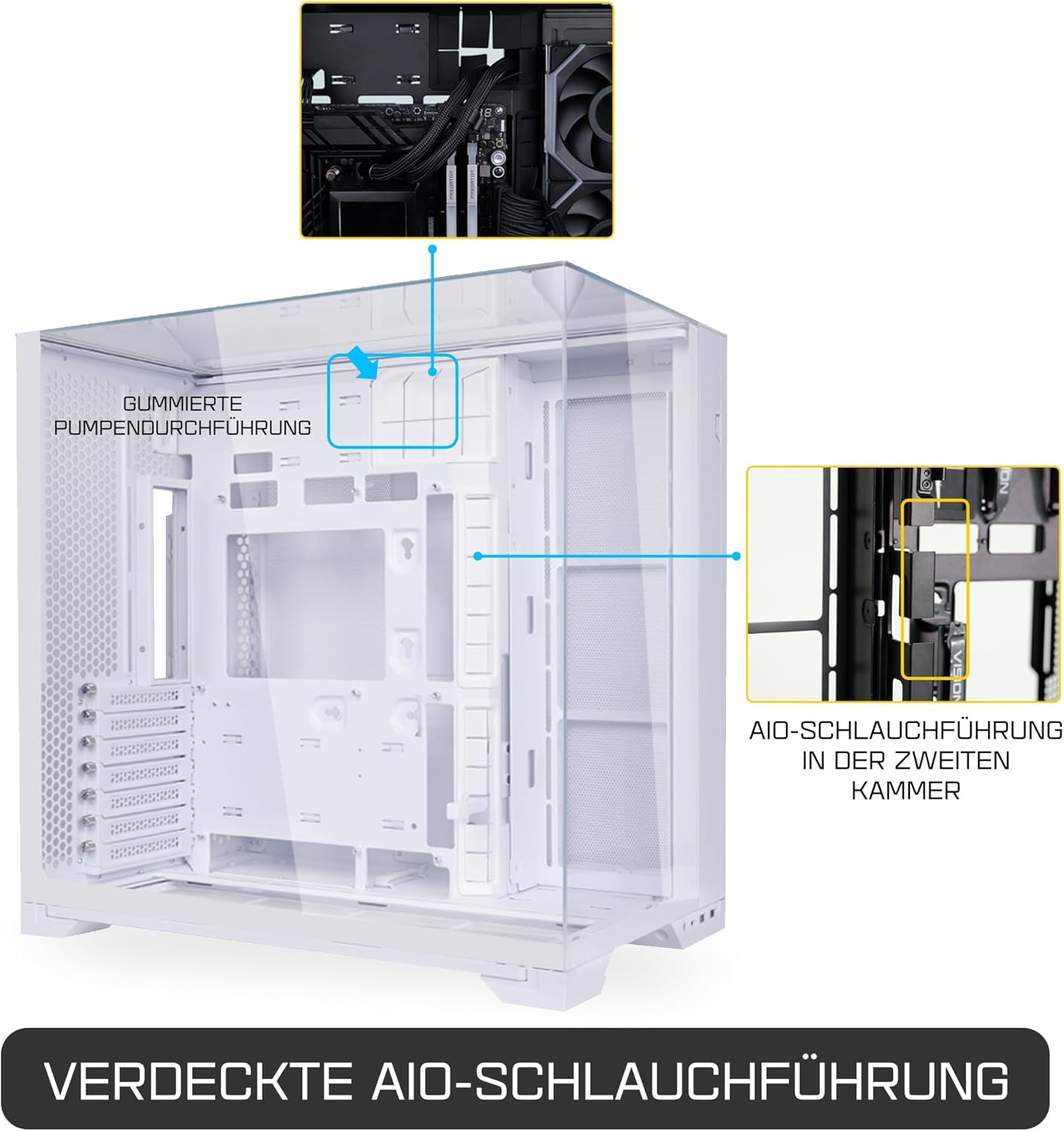
Image 2.4: Concealed AIO hose routing contributes to a clean internal aesthetic.
3. Operating Modes and Cooling
3.1 Vision Mode vs. Mesh Panel Mode
The O11 Vision Compact offers two distinct operating modes:
- Vision Mode: Utilizes the tempered glass top panel for a premium, unobstructed view of your components. In this mode, the case supports up to 8 x 120mm fans and 2 x 360mm radiators.
- Mesh Panel Mode: The top tempered glass panel can be swapped with the included mesh panel. This mode enhances airflow and cooling performance, allowing for up to 11 x 120mm fans and 3 x 360mm radiators.

Image 3.1: The customizable top cover allows switching between tempered glass or a mesh top for extra cooling.

Image 3.2: Choose between Vision Mode for aesthetics or Mesh Panel Mode for optimized cooling.
3.2 Airflow Optimization
The dual-chamber design, combined with extensive fan and radiator support, allows for highly optimized airflow configurations. In Mesh Panel Mode, the top exhaust significantly improves thermal performance, especially for AIO liquid coolers mounted at the top.

Image 3.3: The compact dual-chamber design facilitates optimized airflow for efficient cooling.
4. Maintenance
4.1 Dust Filter Cleaning
The case is equipped with a full-length, pull-out dust filter at the bottom. Regularly clean this filter to maintain optimal airflow and prevent dust buildup inside the system.
- To clean, gently pull the dust filter out from the left side of the bottom panel.
- Use a soft brush or compressed air to remove accumulated dust.
- Reinsert the filter securely after cleaning.

Image 4.1: The bottom-mounted, full-length dust filter is easily removable for cleaning.
4.2 Tempered Glass Cleaning
For cleaning the tempered glass panels, use a microfiber cloth and a non-abrasive glass cleaner. Avoid harsh chemicals that may damage the glass or coatings.
5. Troubleshooting
5.1 General Installation Issues
- Component Fit: Ensure all components (motherboard, GPU, PSU) adhere to the maximum dimensions specified in the specifications section.
- Cable Connections: Double-check all power and data cable connections to ensure they are seated correctly. Refer to your motherboard and component manuals for specific connection points.
- Standoffs: Verify that motherboard standoffs are correctly installed and aligned with your motherboard's mounting holes.
5.2 Overheating Concerns
- Fan Configuration: Ensure fans are installed in the correct orientation (intake/exhaust) to create positive or negative pressure as desired for optimal airflow.
- Dust Buildup: Regularly clean dust filters and internal components to prevent airflow restriction.
- Mesh Panel Mode: If experiencing high temperatures, consider switching to Mesh Panel Mode by replacing the top glass panel with the mesh panel for improved heat dissipation.
6. Product Specifications
| Feature | Detail |
|---|---|
| Brand | LIANLI |
| Model Name | O11 VISION |
| Case Type | Mid Tower |
| Color | White |
| Material | Metal, Tempered Glass |
| Product Dimensions (D x W x H) | 44.8 x 44.7 x 28.8 cm |
| Product Weight | 12 kg |
| Motherboard Compatibility | Extended ATX (E-ATX), ATX, Micro ATX, Mini-ITX (E-ATX up to 280mm width) |
| Max GPU Length | 408mm |
| Power Supply Mounting Type | Bottom Mount |
| Expansion Slots | 4 |
| USB 3.0 Ports | 2 |
| Internal Drive Bays | 3 |
| Fan Support (Max) | 11 x 120mm (8 x 120mm in Vision Mode) |
| Radiator Support (Max) | 3 x 360mm (2 x 360mm in Vision Mode) |
| Additional Features | Dust filter, Modular panels, Cable management clips |
| GTIN (Global Trade Identification Number) | 04718466015891 |

Image 6.1: The O11 Vision Compact offers a reduced volume of 57.4L compared to the standard O11 Vision's 67.8L.
7. Warranty and Support
7.1 Warranty Information
This product comes with a 1-year warranty from the date of delivery. A proof of purchase (delivery slip or receipt) is required for all warranty claims. The warranty is valid only within Japan.
7.2 Customer Support
For technical assistance, troubleshooting, or warranty inquiries, please contact your retailer or the official LIANLI customer support. Refer to the LIANLI website for the most up-to-date contact information and support resources.
Official LIANLI Website: www.lian-li.com


