
MINISFORUM UM690L Slim
MINISFORUM UM690L Slim Mini PC User Manual
Model: UM690L Slim
1. Introduction
The MINISFORUM UM690L Slim Mini PC is a compact and powerful computing solution designed for a wide range of applications, from business and education to gaming and home theater. Equipped with an AMD Ryzen 9 6900HX processor and integrated AMD Radeon 680M graphics, it offers robust performance in a small form factor. This manual provides essential information for setting up, operating, maintaining, and troubleshooting your device.

Image: Front and rear view of the MINISFORUM UM690L Slim Mini PC, showcasing its compact design and various ports.
2. Package Contents
Please verify that all items listed below are included in your package:
- MINI PC (UM690L Slim)
- Power Adapter
- Wall Mount Bracket with Screws
- HDMI Cable
- Instruction Manual
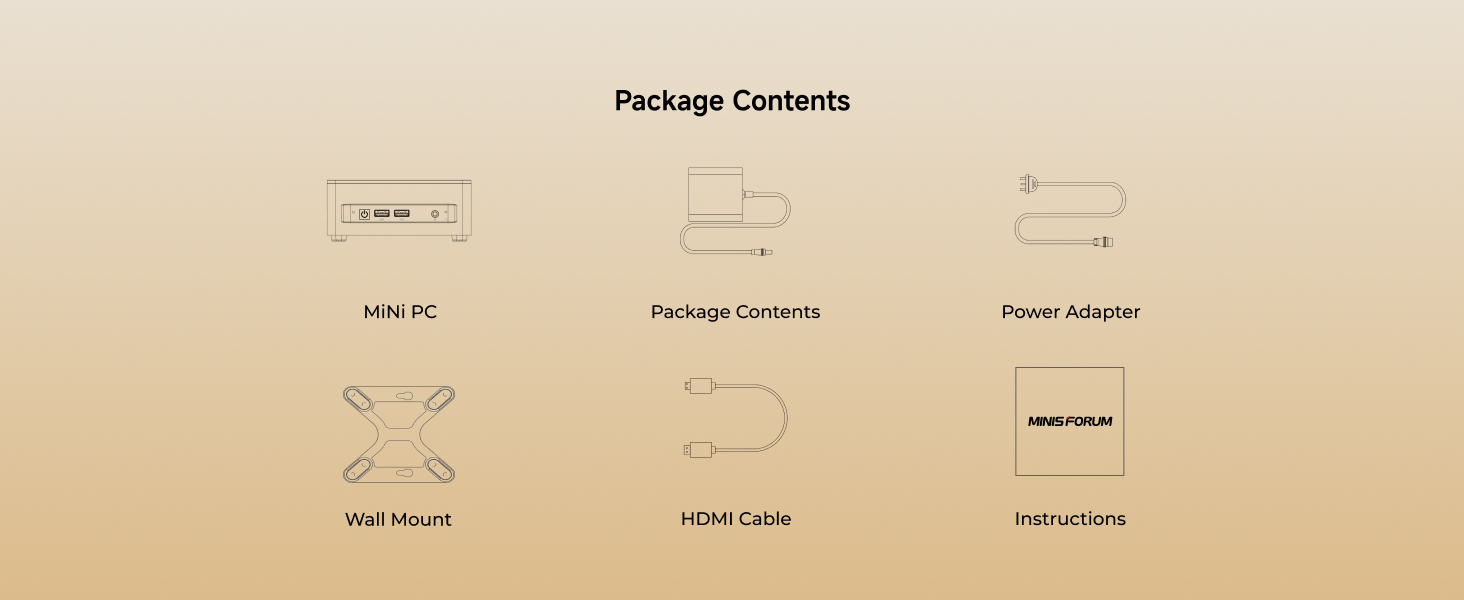
Image: A visual representation of the MINISFORUM UM690L Slim Mini PC and its included accessories: the mini PC unit, power adapter, wall mount, HDMI cable, and instruction manual.
3. Setup Guide
- Connect to Display: Connect your monitor(s) to the Mini PC using the HDMI, DisplayPort, or USB4 ports. The device supports up to three 4K monitors simultaneously.
- Connect Peripherals: Plug in your keyboard, mouse, and other USB devices into the available USB 3.2 Gen2 Type-A or USB 2.0 ports.
- Network Connection: For wired internet, connect an Ethernet cable to the 2.5G LAN port. For wireless, the device supports Wi-Fi 6E and Bluetooth 5.3.
- Power Connection: Connect the power adapter to the DC 19V input port on the Mini PC, then plug the adapter into a power outlet.
- Power On: Press the power button located on the front of the Mini PC to turn on the device.

Image: A detailed view of the front and rear input/output ports on the MINISFORUM UM690L Slim Mini PC, including USB, HDMI, DisplayPort, LAN, and audio jacks.
4. Operating Instructions
- Power On/Off: Press the power button once to turn on the Mini PC. To shut down, use the operating system's shutdown function. A short press of the power button can also put the device to sleep.
- Operating System: The Mini PC comes with a pre-installed operating system. Follow the on-screen instructions for initial setup and personalization.
- Display Configuration: To utilize multiple displays, configure display settings within your operating system. The Mini PC supports extended, duplicate, or single display modes.
- Storage Expansion: The device features two M.2 2280 PCIe 4.0 SSD slots, supporting up to 4 TB of storage capacity. Refer to the detailed specifications for compatible SSD types.
- Audio: Connect headphones or speakers to the 3.5mm combo audio jack for audio output.

Image: The MINISFORUM UM690L Slim Mini PC connected to three external monitors, illustrating its triple screen display support via HDMI 2.1, DP 1.4, and USB4 ports.
5. Maintenance
- Cleaning: Regularly clean the exterior of the Mini PC with a soft, dry cloth. Use compressed air to clear dust from ventilation grilles to ensure optimal airflow.
- Ventilation: Ensure the Mini PC is placed in a well-ventilated area. Do not block the air vents. The active heat dissipation system is designed for efficient cooling.
- Software Updates: Keep your operating system and drivers updated to ensure system stability and performance.
- Storage Management: Periodically check your storage usage and delete unnecessary files to maintain optimal performance.
6. Troubleshooting
- No Power: Ensure the power adapter is securely connected to both the Mini PC and a working power outlet. Try a different outlet if necessary.
- No Display: Verify that the display cables (HDMI, DisplayPort, USB4) are securely connected to both the Mini PC and the monitor. Ensure the monitor is powered on and set to the correct input source.
- No Network Connection: For wired connections, check the Ethernet cable and router. For Wi-Fi, ensure the Wi-Fi adapter is enabled and you are connected to the correct network with the correct password.
- Slow Performance: Close unnecessary applications, check for background processes, and ensure sufficient free storage space. Consider updating drivers or performing a system scan for malware.
- Overheating: Ensure the Mini PC's vents are not obstructed and it is in a well-ventilated area. Excessive dust can impede cooling; clean the vents if necessary.
7. Specifications
| Feature | Detail |
|---|---|
| Processor | AMD Ryzen 9 6900HX (8 Cores/16 Threads, up to 4.9 GHz) |
| Graphics | AMD Radeon 680M (Integrated) |
| RAM | 32 GB LPDDR5 (6400 MHz) |
| Storage | 1 TB PCIe 4.0 SSD (2 x M.2 2280 slots, up to 4 TB) |
| Video Output | HDMI 2.1, DisplayPort 1.4, USB4 (Supports triple 4K monitors) |
| USB Ports | 2x USB 3.2 Gen2 Type-A, 2x USB 2.0, 1x USB4 (supports Alt PD) |
| Network | 2.5G LAN, Wi-Fi 6E, Bluetooth 5.3 |
| Audio | 3.5mm combo jack |
| Dimensions | 5 x 5 x 2 inches |
| Weight | 3.23 pounds |
| Operating System | OS (Pre-installed) |
8. Warranty and Support
For after-sales service and support, please contact MINISFORUM directly:
- Company: Micro Computer (HK) Tech Limited
- Address: 19H Maxgrand Plaza, No.3 Tai Yau Street, San Po Kong, Kowloon Hong Kong
- Telephone: 00852-30697893
- Email: support@minisforum.com
- Website: http://www.minisforum.com
Please retain your proof of purchase for warranty claims. Warranty terms and conditions may vary by region and retailer.
Related Documents - UM690L Slim
 |
Minisforum Mini PC User Manual and Installation Guide User manual for Minisforum Mini PCs, detailing setup, port functions (USB4, HDMI, DisplayPort, OCulink), installation of DDR and SSD, and operational guides. Includes FCC compliance information. |
 |
Minisforum AI X1-255 Mini PC Technical Specifications Technical specifications for the Minisforum AI X1-255 Mini PC, featuring AMD Ryzen 7 255 processor, Radeon 780M graphics, and comprehensive I/O connectivity options. |
 |
Minisforum UM760 Mini PC User Manual User manual for the Minisforum UM760 Mini PC, detailing package contents, hardware overview, interface specifications, setup guide, DIY installation of RAM and SSD, and mounting instructions. |
 |
Minisforum Mini PC User Manual Comprehensive user guide for the Minisforum Mini PC, covering setup, interface details, SSD installation, and technical support information. |
 |
Minisforum MS-01-S1390 Mini-PC User Manual and Safety Guide Comprehensive user manual and safety guide for the Minisforum MS-01-S1390 Mini-PC, featuring Intel Core i9-13900H. Includes setup, installation, safety precautions, interface details, and environmental information. |
 |
MINISFORUM MKB i83 Three-Mode Mechanical Keyboard Quick Start Guide Concise guide for the MINISFORUM MKB i83 mechanical keyboard, covering setup, connectivity (Bluetooth, 2.4G, Wired), function keys, backlighting, and specifications. |
Ask a question about this manual
Ask about setup, troubleshooting, compatibility, parts, safety, or missing instructions. Manuals+ will review the question and use this page’s manual context to help answer it.