
Matast C16
Matast C16 Wireless Earbuds Bluetooth 5.4 User Manual
Model: C16
1. Introduction
Thank you for choosing the Matast C16 Wireless Earbuds. These Bluetooth 5.4 headphones are designed for an immersive audio experience with clear calls, a secure fit, and durability for active lifestyles. This manual provides detailed instructions for setup, operation, and maintenance to ensure optimal performance.

Image: Matast C16 Wireless Earbuds and their charging case.
2. Package Contents
Ensure all items are present in your package:
- Wireless Earbuds (L/R)
- Super Portable Charging Case with LED Power Display
- USB-C Fast Charging Cable
- User Manual
- Ear Tips (S, M, L sizes)
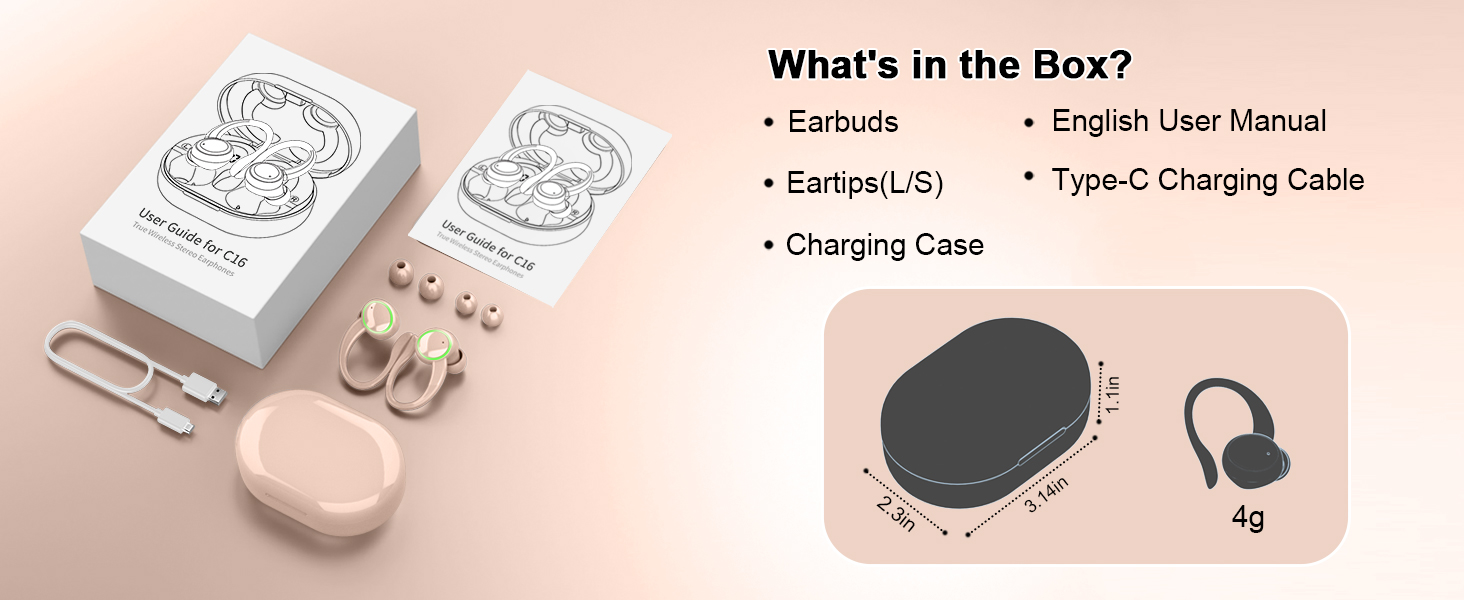
Image: The Matast C16 package contents, including earbuds, charging case, USB-C cable, and ear tips.
3. Key Features
- Stereo Sound Quality & Clear Calls: Equipped with 13mm triple-layer diaphragm drivers for transparent highs and immersive bass. Four high-definition ENC noise-cancelling microphones enhance vocal clarity and reduce external noise.
- Bluetooth 5.4 Technology: Offers faster transfer speeds, 30% lower power consumption, and 55ms lower latency compared to Bluetooth 5.3, with a stable transmission range of 50ft.
- Extended Playback & LED Display: Provides 8 hours of playback per charge, extending to 50 hours with the charging case. Features a dual LED display for real-time battery status of each earphone and the charging case.
- Ergonomic & IP7 Waterproof Design: Flexible and soft ear hooks ensure a secure fit for workouts. IP7 waterproof nano-coating protects against sweat, rain, and splashes.
- One-Step Pairing & Wide Compatibility: Automatically reconnects to the last paired device upon opening the case. Compatible with a wide range of smartphones and computers.
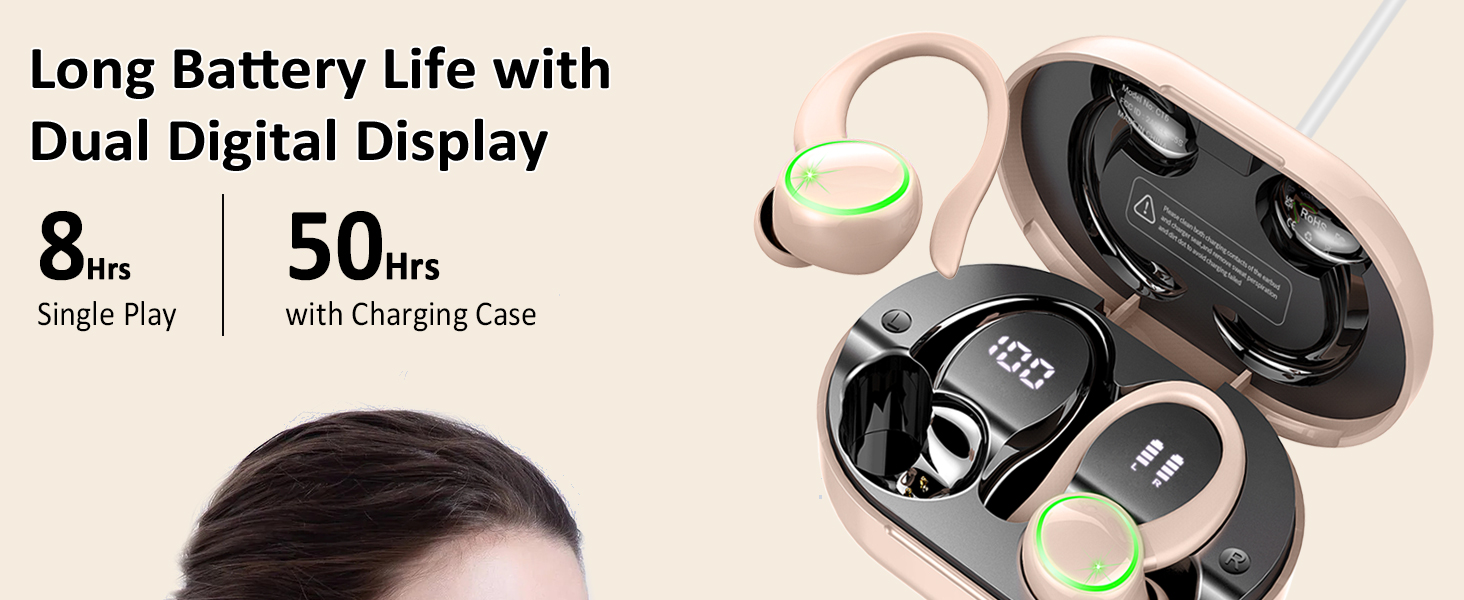
Image: Visual representation of the Matast C16 Earbuds' key features.
4. Setup
4.1 Initial Charging
- Place both earbuds into the charging case.
- Connect the USB-C charging cable to the case and a power source.
- The dual LED display on the case will show the charging percentage (1-100) and individual earbud charging status. A full charge takes approximately 1.5 hours.

Image: The charging case displaying battery life for both earbuds and the case itself.
4.2 Power On/Off
- Power On: Open the charging case, and the earbuds will automatically power on.
- Power Off: Place the earbuds back into the charging case and close the lid. They will automatically power off and begin charging.
4.3 Bluetooth Pairing
- Ensure the earbuds are charged and inside the charging case.
- Open the charging case. The earbuds will enter pairing mode, indicated by flashing lights.
- On your device (smartphone, tablet, computer), enable Bluetooth and search for available devices.
- Select "C16" from the list of devices to connect. Once connected, the earbud indicator lights will turn off.
- The earbuds will automatically reconnect to the last paired device when taken out of the case.

Image: A smartphone screen showing the Matast C16 earbuds available for Bluetooth pairing.
5. Wearing the Earbuds
For optimal sound quality and a secure fit, follow these steps:
- Select the appropriate ear tip size (S, M, L) for your ears.
- Place the ear hook over your ear.
- Gently insert the earbud into your ear canal.
- Rotate the earbud slightly to find a comfortable and secure angle.

Image: Step-by-step guide on how to wear the earbuds for a secure and comfortable fit.
6. Operating Instructions
6.1 Touch Controls
The Matast C16 earbuds feature intuitive touch controls:
| Action | Function |
|---|---|
| Tap 1x (L/R) | Play/Pause Music, Answer Call |
| Tap 2x (L/R) | Switch Song (Next/Previous) |
| Tap 3x (L/R) | Activate Voice Assistant |
| Press & Hold 2s (L/R) | Volume -/+ (Left for -, Right for +), Reject/Hang Up Call |

Image: Visual guide to the touch control functions on the earbuds.
6.2 Single & Dual Mode
- Dual Mode: Use both earbuds for stereo sound.
- Mono Mode: Use a single earbud independently for calls or music. Simply take one earbud out of the case, and it will connect automatically.

Image: Examples of using the earbuds in both single and dual modes during different activities.
7. Care & Maintenance
- Cleaning: Regularly clean the earbuds and charging contacts with a soft, dry cloth to prevent dust and debris buildup.
- Water Resistance: The earbuds are IP7 waterproof, meaning they can withstand sweat, rain, and water splashes. Do not submerge them in water for extended periods or expose them to high-pressure water.
- Storage: Store the earbuds in their charging case when not in use to protect them and ensure they remain charged.
- Temperature: Avoid exposing the earbuds to extreme temperatures (hot or cold) as this can affect battery life and performance.
8. Troubleshooting
- Earbuds not pairing: Ensure both earbuds are charged and taken out of the case. Turn off and on your device's Bluetooth, then try pairing again.
- No sound from one earbud: Place both earbuds back into the charging case, close the lid, then take them out again to reset the connection. Check your device's audio settings.
- Charging issues: Ensure the charging cable is securely connected to both the case and the power source. Clean the charging contacts on the earbuds and inside the case.
- Poor sound quality: Ensure the earbuds are properly seated in your ears and that the ear tips provide a good seal. Try different ear tip sizes.
- Earbuds falling out: Adjust the ear hooks and try different ear tip sizes to find the most secure fit.
9. Specifications
| Feature | Detail |
|---|---|
| Model Name | C16 |
| Brand | Matast |
| Connectivity Technology | Wireless (Bluetooth) |
| Bluetooth Version | 5.4 |
| Bluetooth Range | 15 Meters (50 feet) |
| Audio Driver Size | 13 Millimeters |
| Battery Life (Earbuds) | 8 Hours (per charge) |
| Total Playback (with Case) | 50 Hours |
| Charging Time | 1.5 Hours |
| Water Resistance Level | IP7 Waterproof |
| Noise Control Features | ENC Noise Cancelling (Microphone) |
| Control Method | Touch |
| Ear Placement | Over Ear (with hooks) |
| Item Weight | 0.13 Kilograms (4.6 ounces) |
10. Warranty & Support
Matast provides a standard warranty for its products. For detailed warranty information, product support, or to report any issues, please refer to the contact information provided on the product packaging or visit the official Matast website. Please retain your proof of purchase for warranty claims.
Ask a question about this manual
Ask about setup, troubleshooting, compatibility, parts, safety, or missing instructions. Manuals+ will review the question and use this page’s manual context to help answer it.