
1. Introduction
This instruction manual provides essential information for the safe and effective use of your Yinleader 40A 12V/24V Automatic Smart Car Battery Charger. Please read this manual thoroughly before operating the device and retain it for future reference. Proper understanding of these instructions will ensure optimal performance and extend the lifespan of both the charger and your batteries.
1.1 Safety Precautions
- Always operate the charger in a well-ventilated area.
- Avoid charging frozen batteries. Allow them to thaw before charging.
- Ensure proper polarity connection: positive (+) to positive, negative (-) to negative. Incorrect connection can cause damage.
- Keep the charger away from flammable materials, moisture, and direct sunlight.
- Do not attempt to open or modify the charger. Refer all servicing to qualified personnel.
- Wear appropriate personal protective equipment, such as eye protection, when working with batteries.
2. Product Overview
The Yinleader BC-400 PRO is an intelligent, fully automatic battery charger designed for various 12V and 24V lead-acid batteries, including AGM, GEL, SLA, VRLA, and wet batteries, as well as 12V/14.4V LiFePO4 batteries. It features a multi-stage charging process, an LCD display for real-time monitoring, and multiple safety protections.

Figure 2.1: The Yinleader BC-400 PRO Smart Battery Charger, showcasing its compact design, robust clamps, and power cord.
2.1 Key Features
- High Charging Current: Offers 12V/40A and 24V/20A fast charging capabilities.
- Intelligent LCD Display: Shows real-time voltage, amperage, and remaining battery capacity.
- Multi-Stage Charging: Features a 6-stage charging process (Soft Start, Bulk Charge, Absorption, Battery Test, Recondition, Float) for optimal battery health.
- Battery Repair Function: Capable of reactivating long-unused, old, or low-voltage batteries.
- Broad Battery Compatibility: Supports 12V/24V 10Ah-400Ah lead-acid batteries (AGM, GEL, SLA, VRLA, Wet, Calcium) and 12V/14.4V LiFePO4 batteries.
- Comprehensive Safety Protections: Includes short-circuit, overcurrent, reverse polarity protection, and an intelligent cooling system.
2.2 Component Identification

Figure 2.2: The charger's display indicating compatibility with various battery types and selectable current outputs.

Figure 2.3: Labeled diagram of the charger's front panel and rear, showing the LCD display, control buttons, power switch, and cooling fan.
- LCD Display: Shows charging status, voltage, current, and battery capacity.
- Start/Stop Button: Initiates or halts the charging process.
- Current Selection Button: Cycles through available charging current options (10A/20A/40A for 12V, 5A/10A/20A for 24V).
- Battery Selection Button: Selects the battery type (e.g., Life, GEL, AGM, STD).
- Repair Mode Button: Activates the battery repair function.
- Positive Clamp (Red): Connects to the positive terminal of the battery.
- Negative Clamp (Black): Connects to the negative terminal of the battery.
- Power Cord: Connects the charger to an AC power outlet.
- Power Switch: Turns the charger on or off.
- Cooling Fan: Provides intelligent temperature control to prevent overheating.
3. Setup
3.1 Initial Inspection
Before first use, inspect the charger and its cables for any signs of damage. Ensure all connections are secure and free from corrosion. Do not use the charger if any damage is detected.
3.2 Connecting to the Battery
- Ensure the charger is unplugged from the AC power outlet.
- Connect the red positive (+) clamp to the positive terminal of the battery.
- Connect the black negative (-) clamp to the negative terminal of the battery.
- Ensure connections are firm and secure.
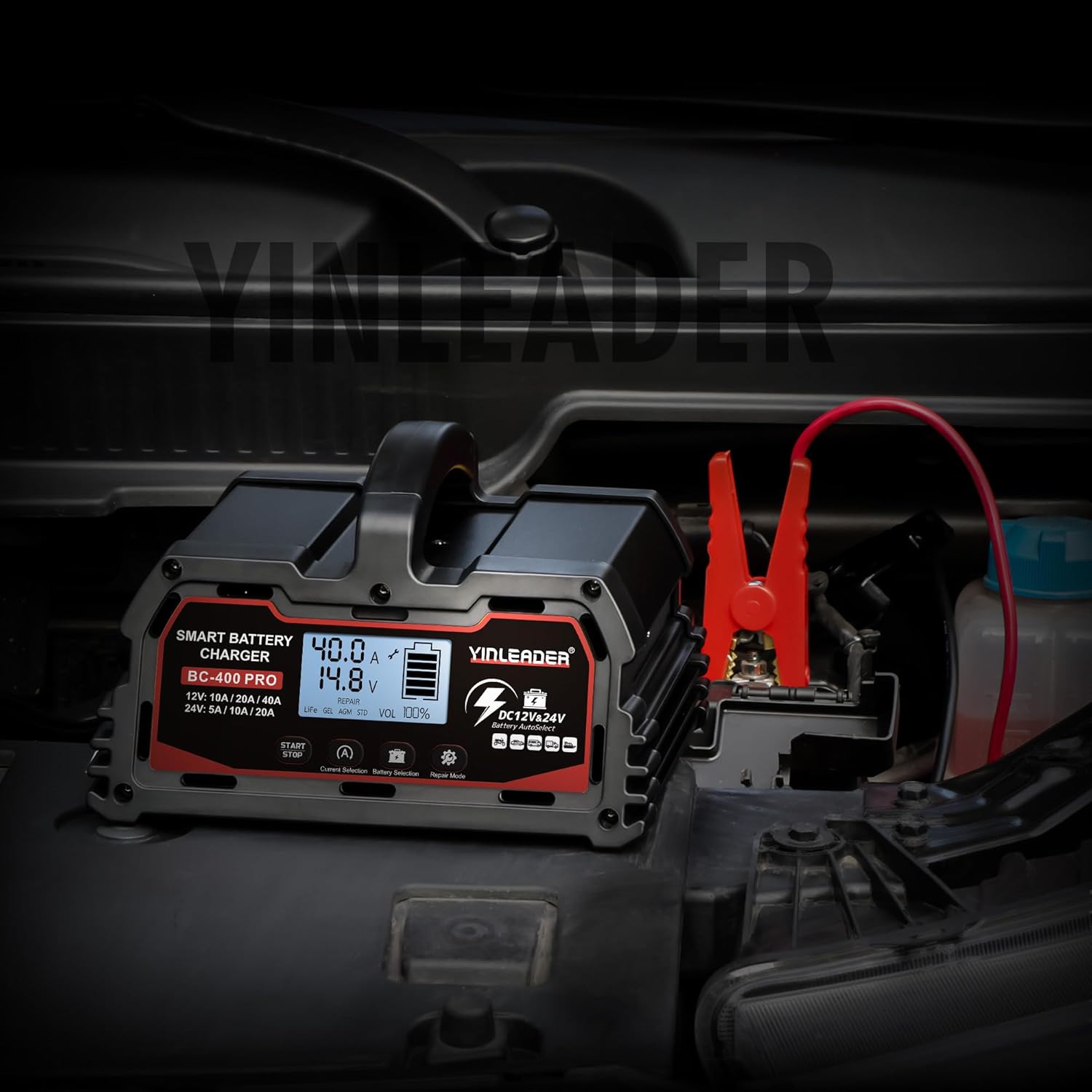
Figure 3.1: The charger properly connected to a car battery in an engine compartment.
3.3 Connecting to Power
- After connecting the clamps to the battery, plug the charger's power cord into a standard AC power outlet.
- Turn on the power switch located on the rear of the charger. The LCD display will illuminate.
4. Operating Instructions
4.1 Automatic Charging Mode
The charger automatically detects the battery voltage (12V or 24V) and begins the charging process. The LCD screen will display the current voltage, amperage, and estimated battery capacity.
4.2 Selecting Charging Current and Battery Type
- Use the Current Selection button to choose the desired charging current: 10A, 20A, or 40A for 12V batteries; 5A, 10A, or 20A for 24V batteries.
- Use the Battery Selection button to select the appropriate battery type (Life, GEL, AGM, STD) for optimized charging.
4.3 Multi-Stage Charging Process
The charger employs a sophisticated 6-stage charging algorithm to ensure efficient and safe charging, prolonging battery life:

Figure 4.1: Visual representation of the 6-stage charging cycle.
- Soft Start: A gentle initial charge to prepare the battery.
- Bulk Charge: Charges the battery at the maximum selected current until it reaches approximately 80% capacity.
- Absorption: Gradually reduces current while maintaining voltage to bring the battery to 100% charge.
- Battery Test: Monitors the battery to ensure it holds a charge.
- Recondition: A special mode to recover deeply discharged or sulfated batteries.
- Float: Maintains the battery at full charge with a low, constant voltage, preventing overcharging.
Note: The charging current may vary during the process, especially when the battery is nearly full or at the start of charging, to optimize battery health. For example, if the battery capacity exceeds 80%, the current will gradually decrease.
4.4 Battery Repair Function
The repair function is designed to restore deeply discharged, sulfated, or long-unused batteries. If a battery cannot be charged normally, activate the repair mode. This function attempts to desulfate and recondition the battery to improve its charging capability.
- To activate, connect the charger to the battery and press the Repair Mode button.
- Monitor the display for progress. The repair process may take several hours.
- After repair, attempt normal charging.
5. Maintenance
5.1 Cleaning
- Disconnect the charger from both the battery and AC power before cleaning.
- Wipe the exterior of the charger with a soft, dry cloth.
- Do not use abrasive cleaners or solvents.
- Ensure the cooling fan vents are clear of dust and debris.

Figure 5.1: The intelligent temperature control fan, crucial for maintaining optimal operating temperature.
5.2 Storage
- Store the charger in a cool, dry place, away from direct sunlight and moisture.
- Keep the clamps clean and free of corrosion.
- Ensure cables are neatly coiled to prevent damage.
6. Troubleshooting
If you encounter issues with your Yinleader BC-400 PRO charger, refer to the following common problems and solutions:
| Problem | Possible Cause | Solution |
|---|---|---|
| Charger does not power on. | No AC power; Power switch off; Damaged power cord. | Check AC outlet; Ensure power switch is ON; Inspect power cord for damage. |
| Battery not charging. | Incorrect battery connection; Battery is severely discharged/damaged; Incorrect battery type selected. | Verify positive/negative clamp connections; Try the 'Repair Mode'; Select correct battery type. |
| Error message on LCD. | Short circuit; Overcurrent; Reverse polarity. | Disconnect and re-connect correctly; Check for short circuits in cables; Ensure correct polarity. The charger has built-in protections for these conditions. |
| Charger gets hot. | Normal operation; Blocked cooling fan. | Some heat is normal during charging. Ensure cooling fan vents are clear and unobstructed. |
If the problem persists after attempting these solutions, please contact customer support.
7. Specifications
| Feature | Specification |
|---|---|
| Brand | Yinleader |
| Model | BC-400 PRO |
| Input Voltage | AC 100-240V (Standard) |
| Output Voltage | 12V / 24V DC (Auto-detect) |
| Charging Current (12V) | 10A / 20A / 40A |
| Charging Current (24V) | 5A / 10A / 20A |
| Supported Battery Types | 12V/24V Lead-Acid (AGM, GEL, SLA, VRLA, Wet, Calcium), 12V/14.4V LiFePO4 |
| Battery Capacity Range | 10Ah - 400Ah |
| Display | Digital LCD Screen |
| Protection Features | Short-circuit, Overcurrent, Reverse Polarity, Over-temperature (with cooling fan) |
| Dimensions (L x W x H) | 20 x 17 x 14 cm (approx. 195 x 174 x 120 mm) |
| Weight | 2 kg |
| Color | Red |
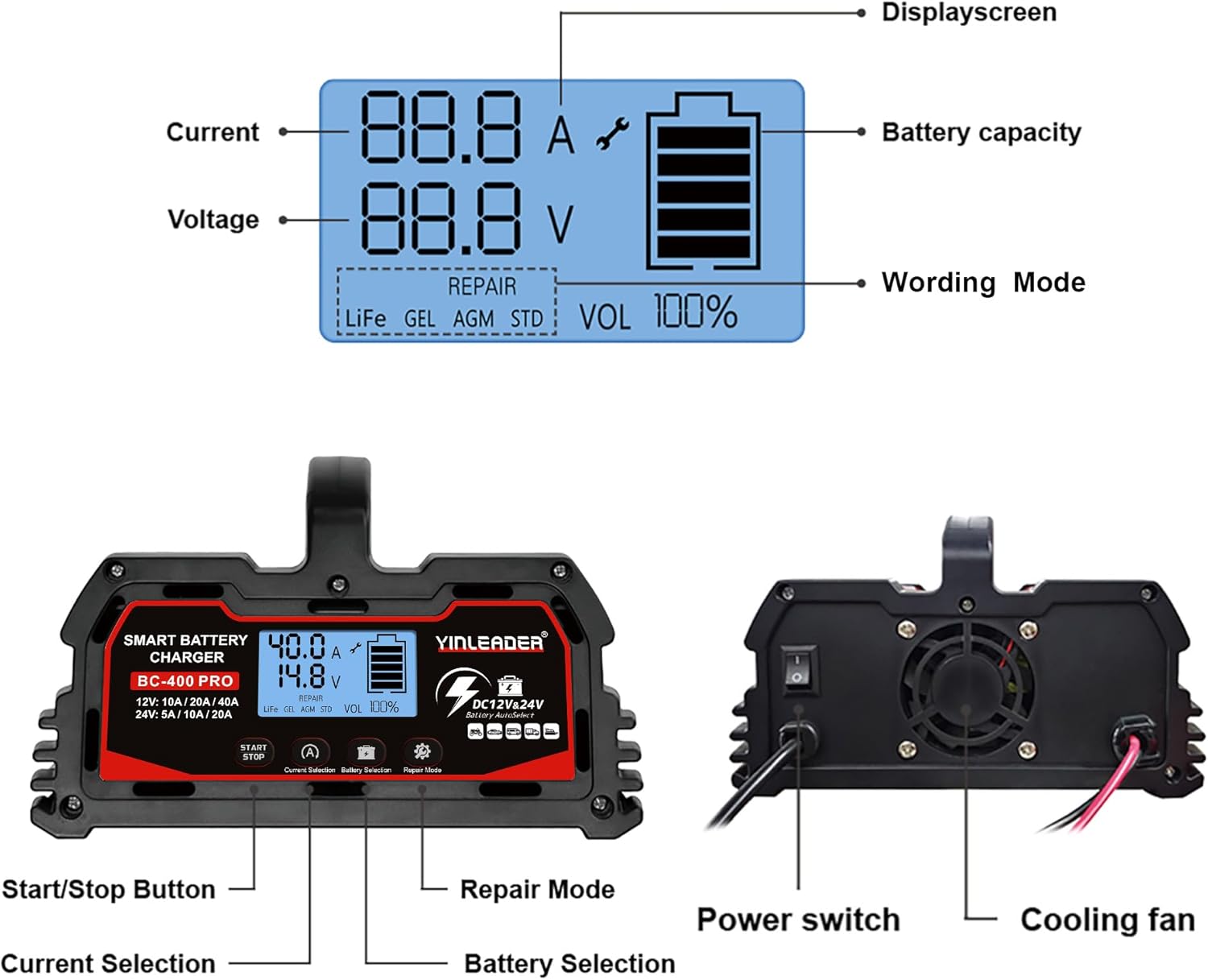
Figure 7.1: Physical dimensions of the Yinleader BC-400 PRO charger.
8. Warranty and Support
For warranty information, technical support, or service inquiries, please refer to the contact details provided with your purchase or visit the official Yinleader website. Please have your product model (BC-400 PRO) and purchase date available when contacting support.