
1. Product Overview
The MyMealivos 30W Megaphone is a portable and powerful sound amplification device designed for various indoor and outdoor activities. It features adjustable volume, a siren function, and a recording capability of up to 240 seconds. Its compact design and durable ABS material make it suitable for coaches, event organizers, cheerleaders, and emergency personnel.

Image 1.1: Front view of the MyMealivos 30W Megaphone.
Key Features:
- 30 Watts Power Output: Projects voice up to 300 feet and siren up to 650 feet.
- Record & Play Function: Allows recording and playback of up to 240 seconds of audio.
- Built-in Siren: For quickly attracting attention in various situations.
- Adjustable Volume Control: Customize sound output for different environments.
- Portable Design: Features a foldable handle and an accompanying strap for easy transport and hands-free use.
- Durable Construction: Made from robust ABS material.
- Integrated Bottle Opener: Located at the bottom of the handle for convenience.
2. Setup and Battery Installation
Before using your MyMealivos Megaphone, ensure proper battery installation and familiarize yourself with its components.
2.1 Package Contents:
- MyMealivos 30W Megaphone
- Carrying Strap
Note: 4 'D' batteries are required and are not included in the package.
2.2 Battery Installation:
- Locate the battery compartment at the rear of the megaphone, typically secured by a latch or screw.
- Open the battery compartment cover.
- Insert four (4) 'D' size batteries, ensuring the correct polarity (+/-) as indicated inside the compartment.
- Securely close the battery compartment cover.

Image 2.1: Illustration of 'D' battery installation in the megaphone.
2.3 Attaching the Carrying Strap:
Attach the provided carrying strap to the designated loops on the megaphone for convenient portability and hands-free operation.
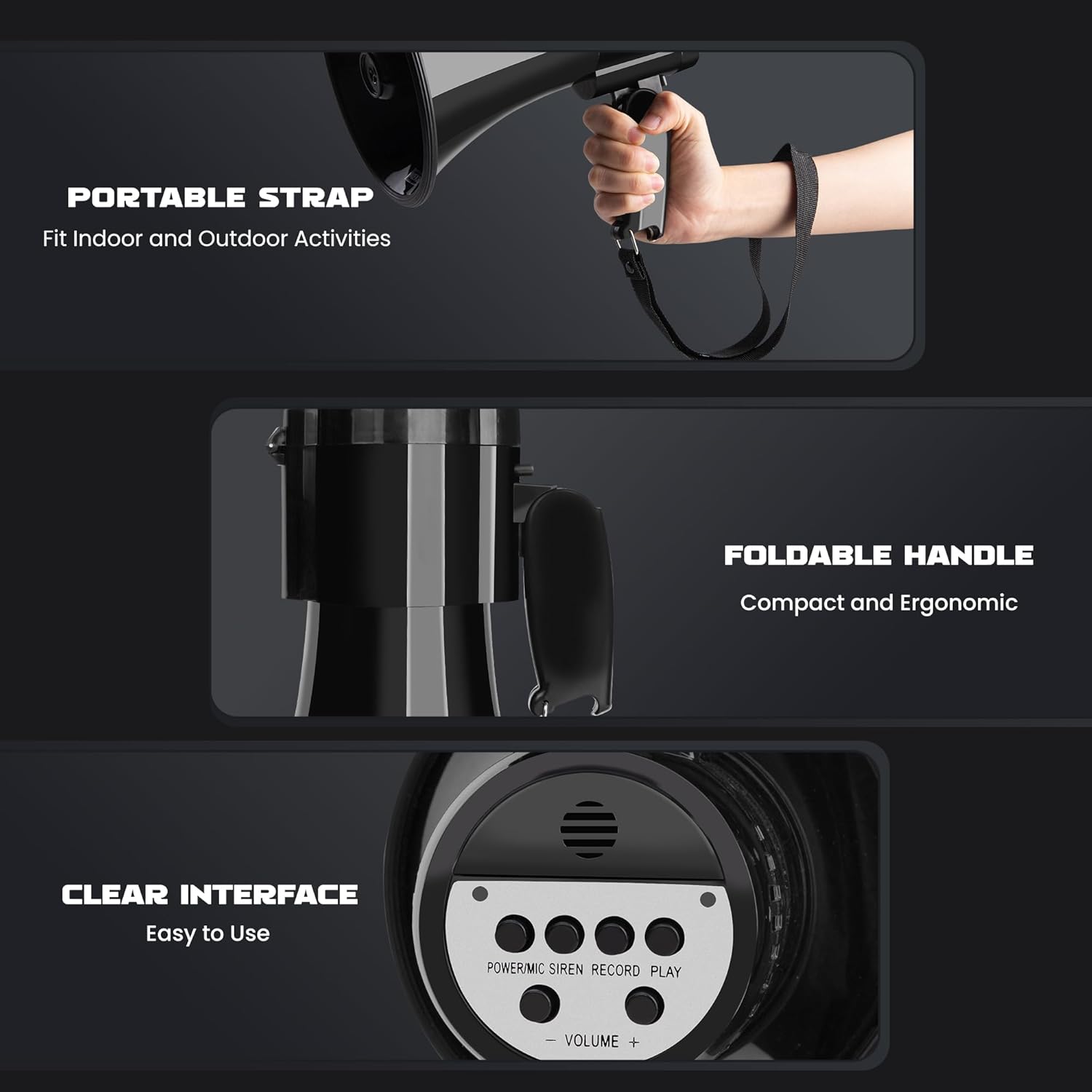
Image 2.2: The megaphone showing the portable strap, foldable handle, and control interface.
3. Operating Instructions
The MyMealivos Megaphone offers multiple functions for effective communication.
3.1 Control Panel Overview:

Image 3.1: Detailed view of the megaphone's control panel for easy operation.
- POWER/MIC Button: Press to turn the megaphone on/off. When on, it activates the microphone for voice amplification.
- SIREN Button: Activates the built-in siren sound. Press again to turn off.
- RECORD Button: Initiates audio recording.
- PLAY Button: Plays back the last recorded audio.
- VOLUME - / + Buttons: Adjusts the sound output level.
3.2 Voice Amplification:
- Press the POWER/MIC button to turn on the megaphone. The power indicator light will illuminate.
- Speak clearly into the microphone, keeping it approximately 5 cm (2 inches) from your mouth for optimal sound capture.
- Adjust the volume using the VOLUME - / + buttons to achieve the desired sound level.

Image 3.2: Proper speaking distance for effective voice amplification.
3.3 Siren Function:
- Press the SIREN button to activate the siren sound.
- Press the SIREN button again to deactivate the siren.
3.4 Recording and Playback:
- To record, press and hold the RECORD button. Speak into the microphone. The record indicator light will illuminate.
- Release the RECORD button to stop recording. The megaphone can record up to 240 seconds.
- To play back the last recording, press the PLAY button.
3.5 Bottle Opener:
The integrated bottle opener is located at the bottom of the megaphone's handle. Use it as you would a standard bottle opener.

Image 3.3: Multifunctional features including the bottle opener, siren, and record/play.
4. Maintenance
Proper maintenance ensures the longevity and optimal performance of your megaphone.
- Cleaning: Wipe the exterior of the megaphone with a soft, damp cloth. Do not use abrasive cleaners or immerse the unit in water.
- Battery Care: Remove batteries if the megaphone will not be used for an extended period to prevent leakage and damage.
- Storage: Store the megaphone in a cool, dry place away from direct sunlight and extreme temperatures.
5. Troubleshooting
If you encounter issues with your megaphone, refer to the following common problems and solutions.
| Problem | Possible Cause | Solution |
|---|---|---|
| No sound or very low volume |
|
|
| Siren not working |
|
|
| Recording/Playback issues |
|
|
6. Specifications
Detailed technical specifications for the MyMealivos 30W Megaphone.
- Model: M-30W
- Power Output: 30 Watts
- Voice Range: Up to 300 feet (approx. 91 meters)
- Siren Range: Up to 650 feet (approx. 198 meters)
- Recording Time: Up to 240 seconds
- Battery Type: 4 x 'D' batteries (not included)
- Material: ABS
- Dimensions (Approximate):
- Length: 24 cm (9.45 inches)
- Height (Megaphone body): 15.2 cm (5.98 inches)
- Handle Height: 10 cm (3.94 inches)
- Weight: 0.48 Kilograms (approx. 1.06 lbs)

Image 6.1: Product dimensions for the MyMealivos Megaphone.
7. Warranty and Support
For warranty information and customer support, please refer to the retailer's return policy or contact MyMealivos directly through their official channels. Keep your purchase receipt as proof of purchase.
For further assistance, please visit the MyMealivos store page or contact customer service.