
Introduction
This manual provides essential instructions for the safe and efficient operation of your DUKVI 24V 30A Smart Battery Charger. This charger is designed for rapid and intelligent charging of 24V lead-acid, AGM, and Gel batteries, suitable for various applications including forklifts, pallet jacks, floor scrubbers, and golf carts. Please read this manual thoroughly before use and retain it for future reference.
Important Safety Information
WARNING: Failure to follow these safety instructions may result in electric shock, fire, or serious injury.
- Always connect the charger to the battery terminals correctly (positive to positive, negative to negative) before plugging into an AC outlet.
- Ensure the charger is used in a well-ventilated area.
- Do not charge frozen or damaged batteries.
- Avoid sparks or flames near the battery during charging, as batteries can produce explosive gases.
- Keep the charger away from water and moisture, despite its IP67 rating, to prevent electrical hazards.
- Disconnect the AC power before connecting or disconnecting the battery.
- Do not attempt to open or modify the charger. Refer all servicing to qualified personnel.
- This charger is designed for 24V lead-acid, AGM, and Gel batteries only. Do not use with other battery types.

Image: The DUKVI 24V 30A Smart Charger highlighting its robust safety features including over-voltage, over-current, no-load, reverse polarity, short-circuit, and thermal overload protection.
Product Features
- High-Speed 30A Charging: Delivers 24V/30A/1250W output for rapid charging.
- Universal Compatibility: Suitable for 24V lead-acid, AGM, and Gel batteries, whether composed of two 12V or four 6V batteries.
- Intelligent Charging: Features an ambient temperature sensor that adjusts charging voltage for optimal performance in varying conditions.
- 5-Stage Charging Process: Ensures efficient charging and transitions to a safe trickle charge to prevent overcharging and extend battery life.
- Visual Status Indicators: A 3-color LED provides clear charging status (standby, charging progress, trickle mode, fully charged).
- Robust Safety Protections: Includes over-voltage, over-current, no-load output lock, reverse polarity, short-circuit cutoff, and thermal overload shutdown.
- Durable IP67 Design: Heavy-duty aluminum casing provides protection against dust and water immersion, and resistance to impact and corrosion.
- Integrated Cooling Fan: Maintains optimal operating temperatures, automatically activating when needed.
- Portable Design: Weighs 6.4 lbs and includes a convenient carry handle.
- Certified Reliability: FCC and ETL certified, incorporating PFC and LLC technology for high efficiency.

Image: The DUKVI 24V 30A Smart Charger showcasing its key features such as 7-stage smart charging, temperature sensor, 3-color indicator light, six charge protections, trickle charging mode, all-aluminum body, cooling fan, IP67 waterproof rating, high/low temperature resistance, and FCC/ETL certification.
Setup
- Unpack the Charger: Carefully remove the charger and all accessories from the packaging. Inspect for any signs of damage.
- Choose a Location: Place the charger on a stable, flat surface in a well-ventilated area, away from direct sunlight, heat sources, and flammable materials.
- Prepare the Battery: Ensure the battery terminals are clean and free of corrosion. If necessary, clean them with a wire brush and baking soda solution, then rinse with water and dry thoroughly.
- Connect to Battery: Connect the charger's positive (+) cable (red) to the positive (+) terminal of the battery. Connect the charger's negative (-) cable (black) to the negative (-) terminal of the battery. Ensure a secure connection.
- Power Connection: Plug the charger's AC power cord into a standard 110V AC outlet.

Image: A visual representation of the DUKVI 24V 30A charger connected to a battery, illustrating the two-way charging capability and proper connection points.
Operating Instructions
The DUKVI 24V 30A Smart Battery Charger operates automatically once connected. Follow these steps for charging:
- Initiate Charging: After connecting the battery and plugging into the AC outlet, the charger will perform a 3-second self-test. It will then automatically begin the charging process.
- Monitor LED Indicator: Observe the 3-color LED indicator for charging status:
- Red/Green Flashing: Standby mode or no-load detected.
- Solid Red: Charging (battery capacity below 80%).
- Solid Yellow: Charging (battery capacity above 80%).
- Green Flashing: Trickle mode (battery is nearly full, maintaining charge).
- Solid Green: Fully Charged (100%).
- Automatic Shut-off: The charger will automatically stop output when the battery is fully charged and transition to trickle mode to prevent overcharging.
- Disconnecting: Once charging is complete (solid green LED), first unplug the AC power cord from the outlet, then disconnect the negative (-) battery cable, followed by the positive (+) battery cable.
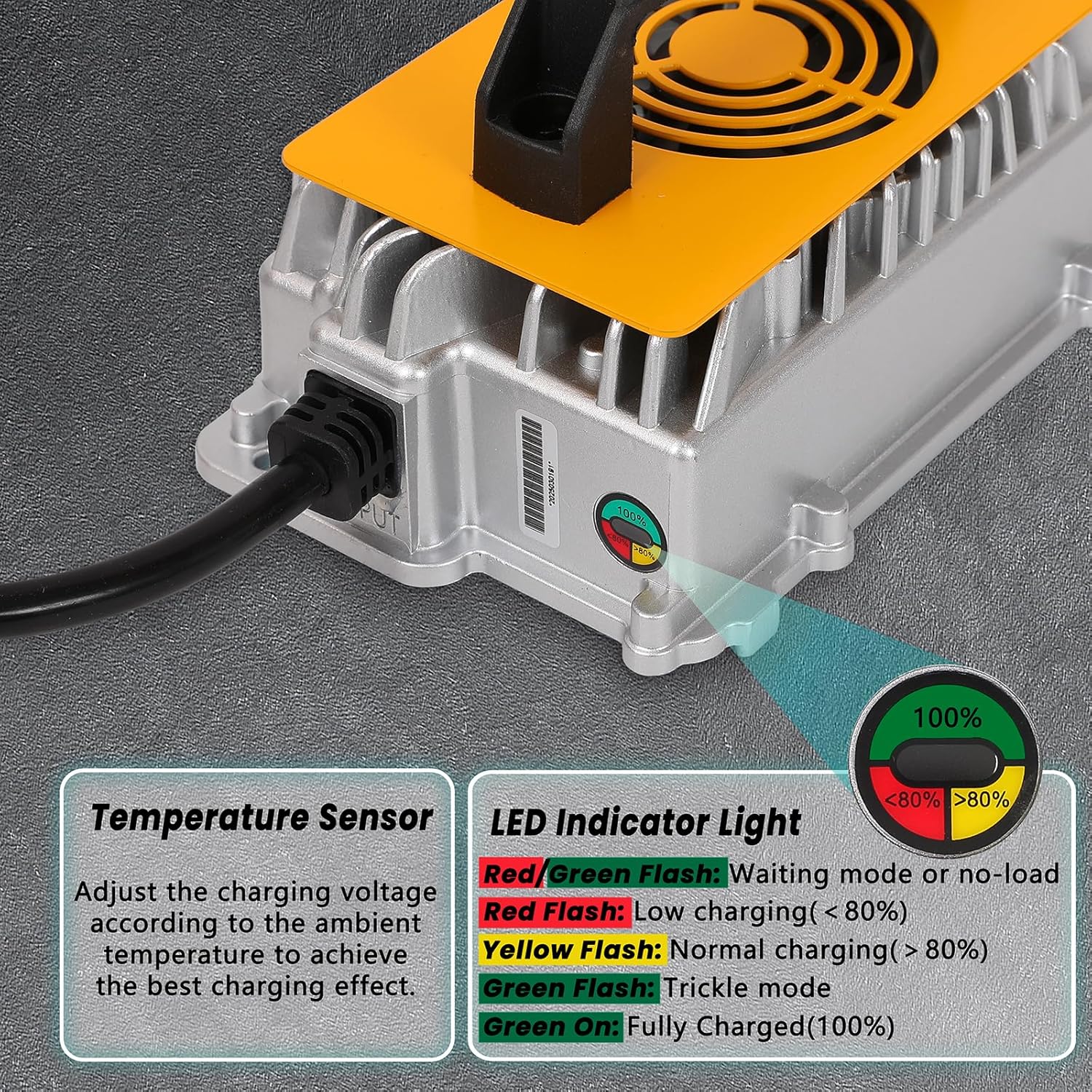
Image: Close-up of the DUKVI 24V 30A Smart Charger's LED indicator light, detailing the meaning of each color and flash pattern for charging status and temperature sensor function.

Image: Diagram illustrating the DUKVI 24V 30A Charger's 5-stage charge technology with corresponding LED indicator states: Red/Green Flash (Waiting/No-load), Red Flash (Low charging <80%), Yellow Flash (Normal charging >80%), Green Flash (Trickle mode), and Green On (Fully Charged 100%).
Maintenance
- Cleaning: Regularly wipe the charger's exterior with a dry, soft cloth. Do not use harsh chemicals or abrasive cleaners.
- Cable Inspection: Periodically inspect the AC power cord and charging cables for any signs of damage, fraying, or loose connections. Replace damaged cables immediately.
- Storage: When not in use, store the charger in a cool, dry place, away from direct sunlight and extreme temperatures.
- Cooling Fan: Ensure the cooling fan vents are clear of dust and debris to maintain proper airflow.

Image: A close-up view of the DUKVI 24V 30A Smart Charger's integrated cooling fan, emphasizing its role in maintaining optimal operating temperature and preventing overheating.
Troubleshooting
| Problem | Possible Cause | Solution |
|---|---|---|
| Charger not turning on / No LED activity |
|
|
| Red/Green LED flashing (Standby/No-load) |
|
|
| Charger shuts off unexpectedly |
|
|
| Battery not charging or charging slowly |
|
|
Specifications
| Specification | Value |
|---|---|
| Brand | DUKVI |
| Model Number | DUKVI-24V-30A |
| Output Voltage | 24 Volts (DC) |
| Current Rating | 30 Amps |
| Input Voltage | 240 Volts (Compatible with 110V AC outlets as per operating instructions) |
| Power Output | 1250W |
| Product Dimensions (D x W x H) | 9.8"D x 8.3"W x 5.1"H |
| Item Weight | 6.4 lbs |
| Connector Type | Anderson plug |
| IP Rating | IP67 (Dustproof and Water Immersion Protected) |
| Operating Temperature Range | -20°C to +45°C |
| Certifications | FCC, ETL |
Warranty and Support
Warranty: This DUKVI 24V 30A Smart Battery Charger comes with a 1-year warranty from the date of purchase, covering manufacturing defects. Please retain your proof of purchase for warranty claims.
Customer Support: For technical assistance, troubleshooting, or warranty inquiries, please contact DUKVI customer support through the retailer's platform or the official DUKVI website. Provide your model number (DUKVI-24V-30A) and purchase details for faster service.