
Introduction
The Imagitarium IN-CIRC 550 Water Pump is a versatile pump designed for moving water in various aquatic and decorative applications. It is suitable for use in aquariums, filtration systems, ponds, and fountains. This pump supports both wet (submersible) and dry (external) installations and includes a range of adaptors for connecting to different tubing sizes.
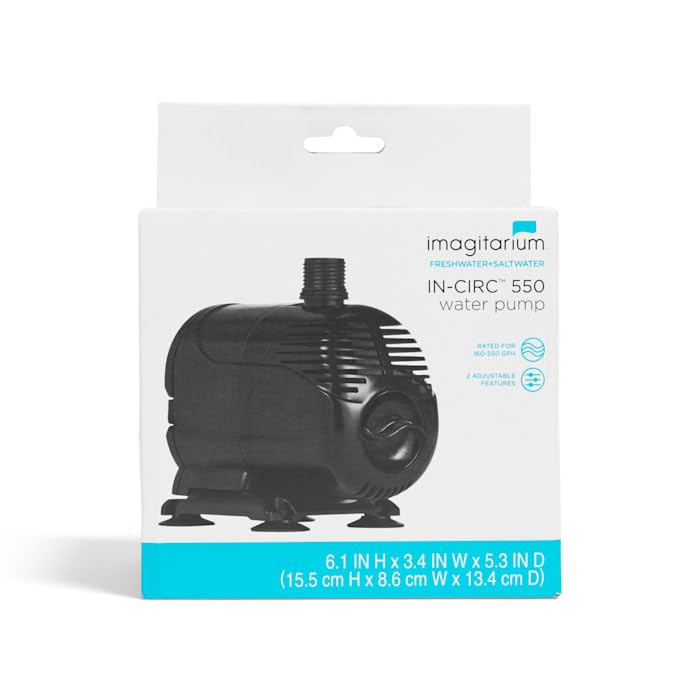
Image: Front view of the Imagitarium IN-CIRC 550 Water Pump. This image shows the compact black pump unit with its intake and output ports.
Safety Instructions
- Always disconnect the power supply before performing any maintenance, installation, or cleaning.
- Ensure the pump is fully submerged when used in wet applications to prevent overheating, unless specifically designed for dry use.
- Do not operate the pump if the power cord or plug is damaged.
- This pump is designed for water circulation only. Do not use with flammable or corrosive liquids.
- Keep out of reach of children.
- Ensure a drip loop is formed with the power cord to prevent water from traveling along the cord and reaching the electrical outlet.
Package Contents
Verify that all components are present in the package:
- Imagitarium IN-CIRC 550 Water Pump unit
- Hose connectors: 1/2-inch, 5/8-inch, and 3/4-inch sizes
- 4 suction cups for secure placement
- Cord management suction cups

Image: Packaging of the Imagitarium IN-CIRC 550 Water Pump, showing a diagram of the pump and its included accessories, such as hose connectors and suction cups.

Image: Close-up view of the various hose connectors (1/2-inch, 5/8-inch, 3/4-inch) and suction cups included with the Imagitarium IN-CIRC 550 Water Pump.
Setup
- Choose Application: Determine if the pump will be used in a wet (submersible) or dry (external) application.
- Attach Hose Connector: Select the appropriate hose connector (1/2-inch, 5/8-inch, or 3/4-inch) for your tubing and securely attach it to the pump's output port.
- Positioning (Wet Application): If using submersibly, place the pump in the desired location within the aquarium or pond. Ensure it is fully submerged and stable. Use the included suction cups to secure the pump to a clean, smooth surface.
- Positioning (Dry Application): If using externally, ensure the pump is placed on a stable, level surface below the water level of the source to allow for gravity-fed intake. Connect appropriate tubing to both the intake and output ports.
- Cord Management: Use the provided cord management suction cups to route the power cord safely, preventing kinks or damage. Create a drip loop with the power cord to prevent water from reaching the electrical outlet.

Image: Bottom view of the Imagitarium IN-CIRC 550 Water Pump, illustrating the placement of the four suction cups for secure mounting.
Operating Instructions
- Connect Power: Once the pump is correctly positioned and all tubing is connected, plug the power cord into a grounded electrical outlet.
- Adjust Flow Rate: The pump features an adjustable water flow valve. Rotate the valve to increase or decrease the water flow to your desired rate. The pump is rated for 160-550 Gallons Per Hour (GPH).
- Monitor Operation: Observe the pump's operation to ensure proper water circulation and no leaks. The maximum lift height (head lift) for this pump is 6.9 feet.
Maintenance
Regular maintenance is crucial for the longevity and efficient operation of your water pump.
- Disconnect Power: Always unplug the pump from the electrical outlet before any maintenance.
- Remove from Water/System: Carefully remove the pump from its operating environment.
- Disassemble: Gently detach the intake screen and impeller cover. Remove the impeller assembly.
- Clean Components: Rinse all parts (pump housing, impeller, impeller cover, intake screen, and tubing) with clean water. Use a small brush or cotton swab to remove any debris, algae, or mineral buildup from the impeller and its chamber.
- Inspect: Check the impeller for any signs of wear or damage. Ensure the ceramic shaft is clean and intact.
- Reassemble: Carefully reassemble the pump, ensuring all parts fit securely.
- Test: Place the pump back into its operating environment and reconnect power to test its function.
Troubleshooting
| Problem | Possible Cause | Solution |
|---|---|---|
| Pump does not start or operate. | No power; Impeller jammed; Damaged motor. | Check power connection and outlet. Disconnect power, clean impeller and chamber. If still not working, contact support. |
| Low water flow. | Clogged intake/impeller; Kinked tubing; Adjustable valve closed. | Disconnect power, clean intake screen and impeller. Check tubing for obstructions. Adjust flow valve to open position. |
| Excessive noise or vibration. | Impeller obstructed or damaged; Pump not stable; Air in pump (dry application). | Disconnect power, clean impeller. Ensure pump is securely placed with suction cups. For dry applications, ensure proper priming and no air pockets. |
Specifications
- Model: IN-CIRC 550 (Manufacturer Part Number: RP-MD)
- Brand: Imagitarium
- Flow Rate: 160-550 GPH (Gallons Per Hour)
- Maximum Head Lift: 6.9 feet
- Hose Connectors Included: 1/2-inch, 5/8-inch, 3/4-inch
- Application: Wet (submersible) or Dry (external)
- Item Weight: 1.8 Pounds
- UPC: 800443714089
Warranty Information
This Imagitarium product is covered by a manufacturer's warranty against defects in materials and workmanship. Please refer to the product packaging or contact Imagitarium customer support for specific warranty terms and conditions, including duration and claim procedures. Keep your proof of purchase for warranty validation.
Customer Support
For technical assistance, troubleshooting, or warranty inquiries, please contact Imagitarium customer support. Contact information can typically be found on the product packaging or the official Imagitarium website.