
1. Introduction
The JNHCD HD11 is an advanced 5-in-1 safety device designed to provide comprehensive environmental monitoring for your home, RV, or apartment. It integrates detection for combustible gas, smoke, and carbon monoxide, alongside real-time display of temperature and humidity. This manual provides essential information for the proper installation, operation, and maintenance of your detector.
2. Product Features
- 5-in-1 Detection: Monitors combustible gas, smoke, carbon monoxide, temperature, and humidity simultaneously.
- Dual Power Source: Operates via standard AC 100-240V plug-in and features a built-in 2000 mAh rechargeable lithium backup battery for continuous protection during power outages and portable use.
- Audio & Visual Alarm: Activates a loud 100 dB audible alarm and a continuously flashing red light to provide immediate alerts in case of potential danger.
- High-Definition Display: Equipped with a large color HD screen for clear and easy readability of all monitored parameters, even in low light conditions.
- Compact & Portable Design: Small and lightweight, allowing for easy placement in various locations. The power plug can be removed, and a magnet cap installed for convenient outdoor or travel use.
- High-Precision Sensors: Utilizes advanced sensors for accurate and reliable detection of hazardous gases and smoke.

Image: The JNHCD HD11 detector showcasing its five detection capabilities: combustible gas, smoke, carbon monoxide, temperature, and humidity.
3. Package Contents
Please verify that all items are present and in good condition upon opening the package:
- 1 x JNHCD HD11 5-in-1 Detector
- 1 x Power Plug
- 1 x Magnet Cap
- 1 x User Manual
4. Setup
4.1 Powering On and Initial Placement
- Plug the JNHCD HD11 detector into a standard AC 110V to 220V electrical outlet. The device will automatically power on.
- Upon initial power-up, the detector will perform a self-test. The green indicator light will flash three times, accompanied by an audible beep.
- Allow approximately 60 seconds for the device to initialize and begin normal operation.
- For optimal detection, place the detector in areas where gas, smoke, or carbon monoxide leaks are most likely to occur, such as near gas appliances, sleeping areas, or living spaces. Avoid placing it directly above heat sources, in direct sunlight, or in areas with high humidity.
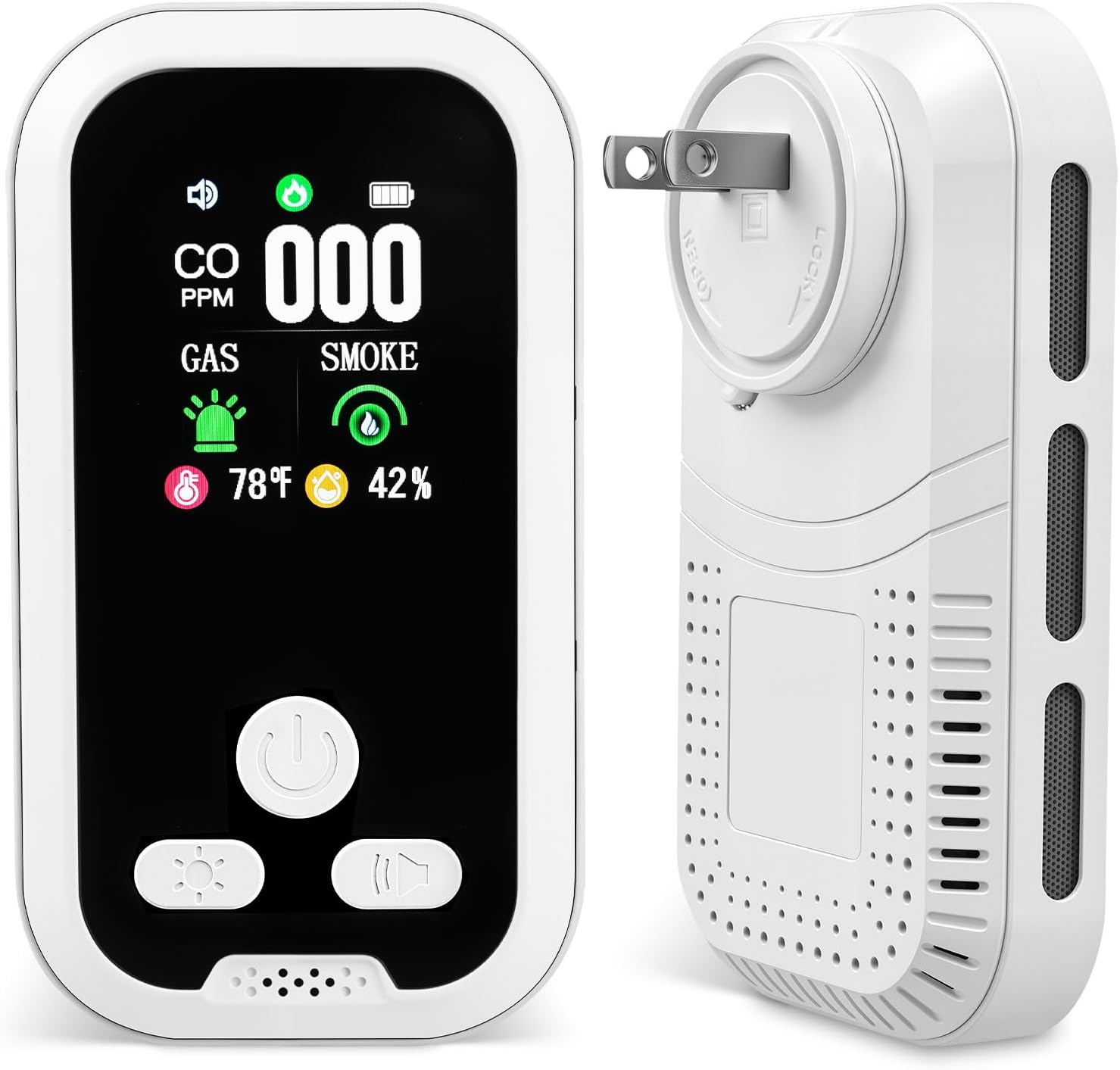
Image: The JNHCD HD11 detector, illustrating its compact design and plug-in functionality.
4.2 Backup Battery and Portable Use
The detector includes a built-in 2000 mAh rechargeable lithium battery, providing continuous operation during power outages. This also enables portable use.
- To use the detector in portable mode (e.g., for RVs or travel), carefully remove the power plug.
- Attach the provided magnet cap to cover the plug opening, allowing for easy placement on metallic surfaces or carrying.
- The battery recharges automatically when the device is plugged into an AC outlet.

Image: Visual representation of the detector's dual power options: AC plug-in and internal 2000 mAh backup battery.
5. Operating Instructions
The JNHCD HD11 detector features a user-friendly interface with three main buttons and a clear HD display.

Image: An overview of the detector's buttons and their primary functions.
5.1 Button Functions
- Power Button (①):
- Short press: Initiates a self-test. The green light will flash three times with a beep.
- Long press: Turns the device on or off. After turning on, allow 60 seconds for the device to run normally.
- Buzzer Button (③):
- Short press: Toggles the buzzer sound on or off. The current volume setting can be viewed on the display. The buzzer will automatically activate when an alarm threshold is reached, regardless of the manual setting.
- Screen Brightness Button (②):
- Short press: Adjusts the screen brightness through multiple levels (high → low → off).
- Long press: Switches the displayed temperature unit between Fahrenheit (°F) and Celsius (°C).
5.2 Display Information
The HD screen provides real-time readings for:
- CO: Carbon Monoxide concentration in Parts Per Million (PPM).
- GAS: Combustible gas concentration in Lower Explosive Limit (LEL) percentage.
- SMOKE: Smoke detection status (indicated by an icon).
- Temperature: Ambient temperature in °F or °C.
- Humidity: Relative humidity percentage.
5.3 Alarm Conditions and Responses
The detector is designed to alert you to hazardous conditions with both audible and visual signals.
- Combustible Gas Alarm: Activates when combustible gas levels reach or exceed 5% LEL. The safe level is typically below 1% LEL.
- Carbon Monoxide Alarm: Activates when carbon monoxide levels reach or exceed 150 PPM. The safe level is typically between 0-50 PPM.
- Smoke Alarm: Activates upon detection of smoke.
When an alarm is triggered, the device will emit a loud 100 dB sound and the red indicator light will flash continuously. Take immediate action to ensure safety, such as evacuating the area and contacting emergency services if necessary.

Image: The detector in an alarm state, showing visual warnings for critical danger.

Image: Explanation of critical danger thresholds for combustible gas and carbon monoxide.
6. Maintenance
6.1 Regular Testing
It is recommended to test your detector weekly to ensure it is functioning correctly. To perform a self-test, short-press the Power Button (①). The device should emit a beep and flash the green light.
6.2 Cleaning
Keep the detector clean to ensure proper operation. Gently wipe the exterior with a soft, dry cloth. Do not use water, cleaning sprays, or solvents, as these can damage the sensors or electronic components.
6.3 Battery Care
The built-in lithium battery is designed for long-term use and is not user-replaceable. Ensure the device is regularly plugged into an AC outlet to keep the battery charged, especially if you intend to use it in portable mode.
7. Troubleshooting
If you encounter any issues with your JNHCD HD11 detector, please refer to the following common troubleshooting steps:
- No Power/Display: Ensure the detector is securely plugged into a functional AC outlet. If using the backup battery, confirm it is charged.
- False Alarms: Check for potential sources of gas, smoke, or CO in the vicinity. Avoid placing the detector near cooking fumes, areas with high humidity (e.g., bathrooms), or strong air currents from vents, which can interfere with sensor readings.
- Alarm Not Sounding During Test: If the self-test (short press of Power Button) does not trigger an audible alarm and light flash, the unit may be faulty. Do not attempt to repair it; contact customer support.
- Inaccurate Temperature/Humidity Readings: Ensure the detector is not exposed to direct sunlight, drafts, or extreme temperatures, which can affect sensor accuracy.
8. Specifications
| Specification | Detail |
|---|---|
| Brand | JNHCD |
| Model | HD11 |
| Power Source | AC 100-240V/ 50-60Hz or built-in lithium battery |
| Battery Capacity | 2000 mAh (Lithium Ion) |
| Color | White |
| Product Dimensions | 4.6"D x 1.1"W x 2.7"H |
| Item Weight | 6.6 ounces |
| Alarm Sound Level | 100 dB |
9. Warranty and Support
Your purchase includes the JNHCD HD11 5-in-1 detector and its accessories. For any questions, concerns, or technical assistance, please contact our customer support team. We are committed to providing prompt support and are ready to assist you within 24 hours.