
1. Introduction
This manual provides essential information for the safe and efficient use of your VAYALT DC 12V 50A 600W Switching Power Supply. This unit converts 110V/220V AC input to a stable 12V DC output, suitable for various electronic devices. Please read these instructions carefully before installation and operation.
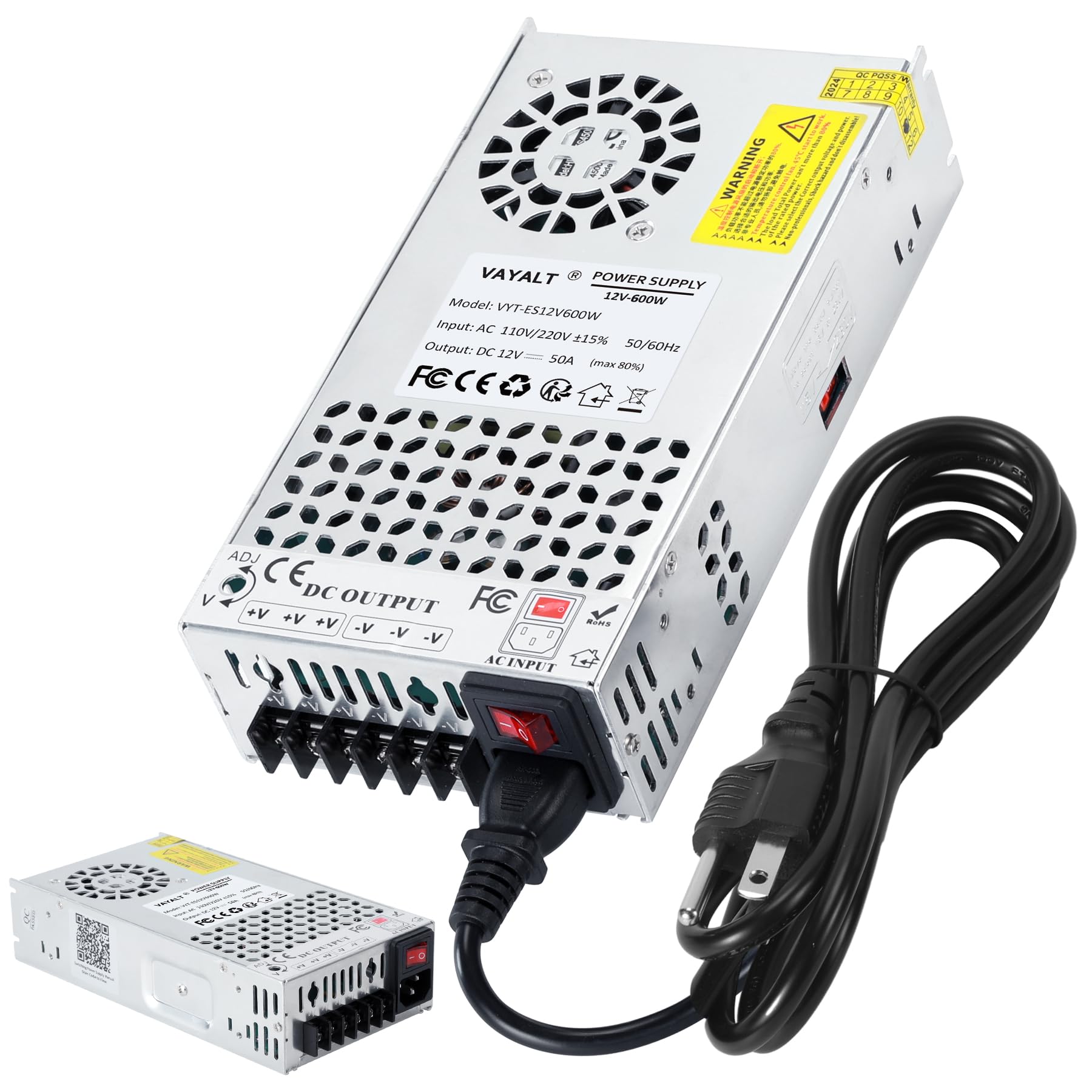
Figure 1: VAYALT DC 12V 50A 600W Switching Power Supply
2. Safety Information
WARNING: This device operates with high voltage. Improper installation or use can result in electric shock, fire, or serious injury. Always ensure power is disconnected before making any connections or adjustments.
- Indoor Use Only: This power supply is designed for indoor use in a dry environment. Do not expose to water, moisture, or high humidity.
- Proper Grounding: Ensure the unit is properly grounded to prevent electrical hazards.
- Voltage Selection: Verify the input voltage switch (110V/220V) is set correctly for your region before connecting to power. Incorrect voltage selection can damage the unit.
- Load Capacity: Do not exceed the maximum rated output of 600W (50A at 12V). Overloading can cause damage and pose a fire risk. For resistive loads, the power supply's peak power should be at least 1.25 times the device power. For motor equipment, the peak power needs to exceed twice the motor power. Variable speed motors are not compatible.
- Ventilation: Ensure adequate ventilation around the unit. Do not block cooling vents.
- Professional Installation: Installation should be performed by qualified personnel familiar with electrical wiring and safety standards.
- Protection Features: The power supply includes overloading protection, overcurrent protection, short-circuit protection, and other functions to safeguard connected equipment.
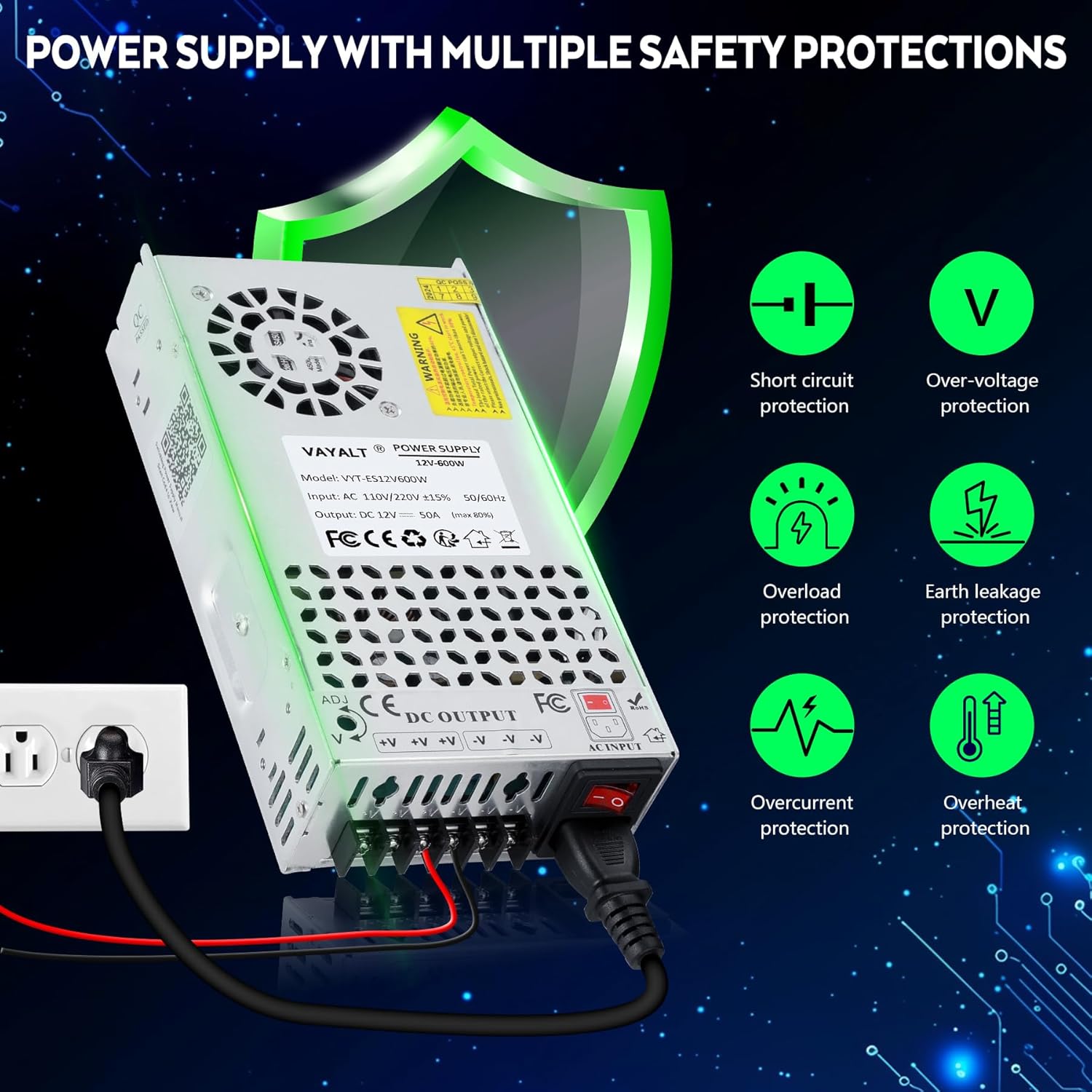
Figure 2: Overview of safety protection features including short circuit, over-voltage, overload, earth leakage, overcurrent, and overheat protection.
3. Product Overview and Features
The VAYALT 12V-600W Switching Power Supply is designed for stable and efficient DC power conversion. Key features include:
- Universal AC Input: Supports 110V/220V AC input (selectable).
- Adjustable DC Output: 12V output with a fine-tuning adjustment range of ±10% (V-ADJ).
- Effective Cooling System: Features an internal cooling fan and heat sink design with multiple ventilation holes for efficient heat dissipation. The fan operates intelligently, activating only when the temperature reaches a certain level.
- Robust Construction: High-strength aluminum alloy casing with integrated wiring for convenient connections.
- High-Quality Components: Utilizes full copper nickel-plated terminals for good conductivity and corrosion resistance, high-density copper coil, and high-quality PCB circuit board.
- Multiple Protections: Built-in overloading, overcurrent, short-circuit, over-voltage, earth leakage, and overheat protection.

Figure 3: The VAYALT Switching Power Supply highlighting its upgraded design, safety switch, new connection design, and high-density copper coil.

Figure 4: Internal view of the power supply showing key components such as the fan cooling device, aluminum housing, high temperature resistant capacitor, built-in EMI filter, copper transformer, LED status indicator light, high-density copper coil, and high-quality PCB circuit board.
4. Setup Instructions
Follow these steps for proper installation and setup:
4.1. Input Voltage Selection
- Before connecting the power supply to an AC source, locate the red switch on the side of the unit.
- Set the switch to the appropriate voltage for your region: 115V for North America (USA/Canada) or 230V for Europe and other 220V-240V regions.
- CAUTION: Ensure this switch is set correctly. Operating the unit with the wrong voltage setting can cause severe damage.
4.2. Wiring Connections
The power supply features clearly labeled terminals for AC input and DC output.
- AC Input: Connect your AC power cord to the terminals labeled L (Live), N (Neutral), and ⊙ (Ground). Ensure a secure and proper ground connection.
- DC Output: Connect your 12V DC devices to the output terminals. The terminals are labeled +V for positive output and -V for negative output. Multiple output terminals are provided for connecting several devices, ensuring the total load does not exceed 600W.
4.3. Output Voltage Adjustment (V-ADJ)
A 'V-ADJ' potentiometer is located on the unit, allowing for fine adjustment of the 12V DC output voltage within a ±10% range.
- Using a small screwdriver, carefully turn the 'V-ADJ' screw to increase or decrease the output voltage as needed.
- Monitor the output voltage with a multimeter to ensure it is within the desired range for your connected devices.

Figure 5: The power supply showing the input voltage selection switch (115V/230V) and the V-ADJ potentiometer for output voltage fine-tuning.

Figure 6: Close-up view of the DC output terminals (+V and -V) for connecting multiple devices.
5. Operating Instructions
- After completing all wiring and voltage selection, connect the AC power cord to a suitable wall outlet.
- Turn on the main power switch on the unit. The LED indicator light should illuminate, indicating the unit is powered on.
- The intelligent cooling fan will activate automatically when the internal temperature reaches a specific threshold to maintain optimal operating conditions. It is normal for the fan not to run continuously, especially under light loads.
- Ensure the total power consumption of all connected devices does not exceed 600W to prevent overloading.

Figure 7: Diagram illustrating the intelligent cooling system with a built-in fan, metal aluminum casing, and multiple ventilation holes. The fan activates based on temperature to improve efficiency.
6. Maintenance
To ensure the longevity and optimal performance of your power supply, follow these maintenance guidelines:
- Keep Clean: Regularly clean the exterior of the unit with a dry, soft cloth. Avoid using liquid cleaners or solvents.
- Ensure Ventilation: Periodically check that all ventilation holes are clear of dust and debris to allow for proper airflow. Blocked vents can lead to overheating.
- Environmental Conditions: Operate the power supply within its specified working temperature range (14°F-140°F / -10°C-60°C) and avoid environments with excessive dust or moisture.
- Power Off When Not in Use: If the power supply will not be used for an extended period, disconnect it from the AC power source.
7. Troubleshooting
If you encounter issues with your power supply, refer to the following common troubleshooting steps:
- No Power/No Output:
- Check if the AC power cord is securely connected to both the power supply and the wall outlet.
- Ensure the main power switch on the unit is in the 'ON' position.
- Verify the input voltage selection switch (115V/230V) is set correctly for your region.
- Check for tripped circuit breakers or blown fuses in your electrical system.
- Unstable Output Voltage:
- Ensure the load connected does not exceed the maximum rated power of 600W.
- Check all wiring connections for looseness or corrosion.
- Verify the V-ADJ potentiometer is not accidentally moved.
- Overheating:
- Ensure adequate ventilation around the unit and that no vents are blocked.
- Reduce the connected load if it is close to or exceeding the maximum capacity.
- The intelligent fan will activate when needed; if it never activates under load, contact support.
- Protection Circuit Activated: If the unit shuts down unexpectedly, one of the built-in protection circuits (overload, overcurrent, short-circuit, over-voltage, overheat) may have activated. Disconnect the load, power cycle the unit, and re-evaluate your setup to identify the cause before reconnecting.
If problems persist after following these steps, please contact customer support.
8. Specifications

Figure 8: Technical specifications of the VAYALT 12V-600W Switching Power Supply.
| Specification | Value |
|---|---|
| Model Name | 12V-600W |
| Brand | VAYALT |
| Input Voltage | 110V-120V / 220V-240V AC (selectable), 50-60 Hz |
| Output Voltage | DC 12V (±5% adjustable) |
| Output Wattage | 600 Watts (Max 80% recommended for continuous use) |
| Current Rating | 50 Amps (Max) |
| Working Temperature Range | 14°F-140°F (-10°C-60°C) |
| Working Efficiency | 80% |
| Cooling Method | Smart Cooling Fan (Air) |
| Item Dimensions (L x W x H) | 8.46 x 1.97 x 4.52 inches (21.5 x 5 x 11.5 cm) |
| Item Weight | 1.8 Pounds |
| Connector Type | Barrel Jack (Output terminals) |
| Certifications | RoHS/CE/LVD/EMC |
9. Applications
This AC to DC converter is suitable for a wide range of 12V equipment, including but not limited to:
- CCTV Camera Systems
- 3D Printers
- LED Strip Lighting and LED Displays
- Computer Projects
- 12V Household Appliances and Electronic Devices
- Radios and Car Audio Equipment
- Brushless Motors
- Automation Equipment
- Advertising Light Boxes
- Car Refrigerators

Figure 9: Examples of common applications for the VAYALT Switching Power Supply, including 3D printers, radios, LED drivers, LED light strips, car stereo systems, and surveillance equipment.
10. Warranty and Support
The VAYALT DC 12V 50A 600W Switching Power Supply comes with a 24-month warranty from the date of purchase. This warranty covers defects in materials and workmanship under normal use.
For technical assistance, warranty claims, or any questions regarding your product, please refer to the contact information provided with your purchase or visit the official VAYALT support channels. You may also find additional resources and FAQs at https://qr61.cn/oDdon8/qtrX58v.