
1. Introduction
This manual provides essential instructions for the safe and efficient operation, assembly, and maintenance of your M MCombo Electric Lift Recliner Chair, Model 7102. Please read this manual thoroughly before use and retain it for future reference.

Image 1.1: Front view of the M MCombo Electric Lift Recliner Chair in grey fabric.
2. Safety Instructions
- Ensure all components are securely assembled before connecting to power.
- Keep hands and feet clear of moving parts during operation.
- Do not allow children or pets to play on or around the chair unsupervised.
- Only use the chair on a flat, stable surface.
- Unplug the chair from the power outlet before cleaning or maintenance.
- Do not expose the chair to excessive moisture or direct sunlight.
- The USB ports are designed for low-power devices (e.g., smartphones, tablets). Do not connect high-power devices.
3. Package Contents
The M MCombo Electric Lift Recliner Chair is typically shipped in 3 packages. Please verify all parts are present before assembly.
- Backrest
- Seat Base with Armrests
- Footrest Assembly
- Power Adapter
- Remote Controls (Lift/Recline, Massage/Heat)
- Instruction Manual
4. Assembly Instructions
Assembly of the M MCombo Electric Lift Recliner Chair is designed to be straightforward and typically takes about 15 minutes for beginners, requiring no special tools.
- Unpack Components: Carefully remove all parts from the packaging.
- Attach Backrest: Slide the backrest onto the metal brackets located on the seat base until it clicks securely into place.
- Connect Wiring: Connect the electrical cables from the backrest to the corresponding cables on the seat base. Ensure connections are firm.
- Connect Power: Plug the power adapter into the chair's power input, then plug the adapter into a wall outlet.
- Test Functions: Use the remote controls to test the lift, recline, massage, and heat functions.
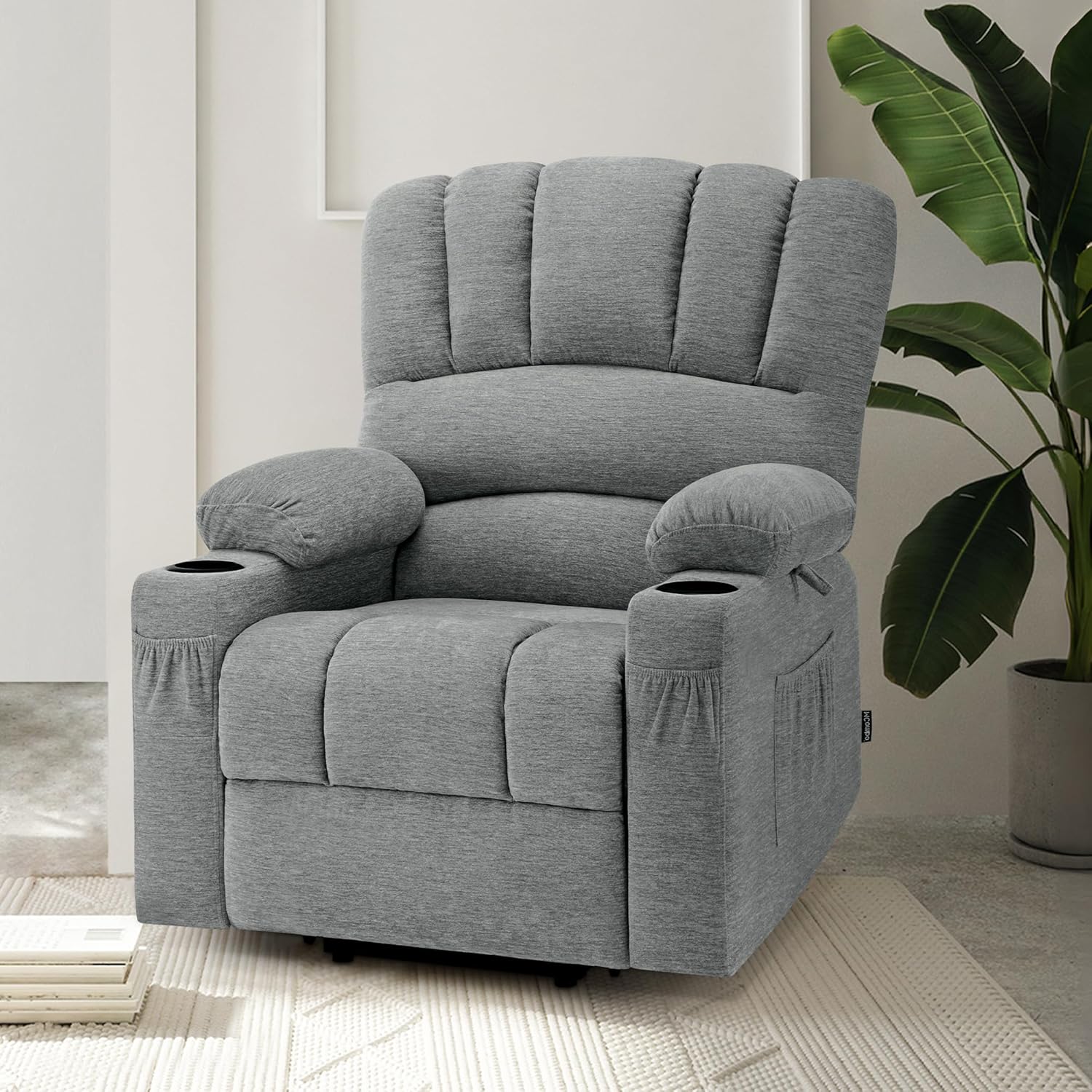
Image 4.1: The recliner chair assembled in a living room environment.
5. Operating Instructions
5.1 Electric Lift Assist
The electric lift assist function is designed to help users stand up easily from the chair. Use the dedicated remote control for this function.
- To activate the lift assist, press and hold the "Up" arrow button on the remote. The chair will gently tilt forward and lift.
- Release the button once you reach a comfortable standing position.
- To return to a seated position, press and hold the "Down" arrow button.

Image 5.1: Remote control for lift and recline functions, illustrating the chair's lifting motion.
5.2 Adjustable Reclining Function
The chair offers continuous reclining up to 145 degrees, providing an ergonomic position for relaxation. The footrest extends automatically as you recline.
- To recline, press and hold the "Down" arrow button on the lift/recline remote. The backrest will move backward, and the footrest will extend.
- Release the button at your desired recline angle.
- To return to an upright position, press and hold the "Up" arrow button.

Image 5.2: Visual representation of the chair's recline stages, from upright to fully reclined.
5.3 Massage and Heating Functions
The chair features 8 vibration points across 4 zones (back, hip, leg, calf) and a heating element in the backrest. These functions can be used independently.
- Power: Press the power button on the massage remote to turn on/off.
- Heat: Press the "HEAT" button to activate the backrest heating function. Press again to turn off.
- Massage Zones: Use the "BACK", "LUMBAR", "THIGH", and "LEG" buttons to select specific massage zones.
- Massage Mode: Press the "MODE" button to cycle through different massage patterns.
- Intensity: Use the "INTENSITY +" and "-" buttons to adjust the massage intensity (L/M/H).
- Timer: Set the massage duration using the "TIMER" button (10, 20, or 30 minutes).

Image 5.3: Massage and heat remote control, highlighting the 8 vibration points and heating area on the chair.
5.4 USB Charging Ports
The chair includes USB Type-C and standard USB ports for charging low-power electronic devices.
- Locate the USB ports on the side of the chair.
- Connect your device using a compatible USB cable.
- Note: These ports are suitable for devices like iPhones or iPads. Avoid connecting high-power devices to prevent damage.

Image 5.4: Detail of the integrated USB charging ports.
5.5 Additional Features
- Cup Holders: Two integrated cup holders are located in the armrests.
- Storage Pockets: Four side pockets provide convenient storage for remote controls, magazines, or other small items.
- Holding Straps: Two holding straps are included for added convenience.

Cup Holder

Side Pocket

Holding Strap
6. Maintenance and Care
Proper care will extend the life and appearance of your recliner chair.
- Cleaning: The soft fabric surface is wear-resistant and skin-friendly. It is recommended to clean the surface with a vacuum cleaner once a week to remove dust and debris. For spills, gently blot with a clean, damp cloth. Avoid harsh chemicals.
- Frame: The chair features a solid multi-layer wood frame for durability and stability. No special maintenance is required for the frame under normal use.
- Foam: High-density foam ensures long-lasting shape retention.

Image 6.1: Internal construction details, highlighting the solid wood frame, high-density foam, and OEKO-TEX certified fabric.
7. Troubleshooting
| Problem | Possible Cause | Solution |
|---|---|---|
| Chair does not move/operate. | Power cord not properly connected. Remote control batteries are low or dead. | Ensure the power cord is securely plugged into both the chair and a working wall outlet. Replace remote control batteries if applicable (check remote type). |
| Massage/Heat function not working. | Massage/Heat remote not powered on. Loose connection. | Press the power button on the massage remote. Check all electrical connections under the chair. |
| USB ports not charging devices. | Device requires too much power. Cable is faulty. | Ensure the device is low-power (e.g., smartphone). Try a different device. Try a different USB cable. |
| Unusual noises during operation. | Loose components or obstruction. | Inspect the chair for any loose screws or obstructions under the mechanism. Tighten any loose parts. If the issue persists, contact customer support. |
8. Specifications
- Brand: M MCombo
- Model Number: 6160-7102DE/EY/BG (Primary Model: 7102)
- Color: Grey
- Material: Fabric
- Product Dimensions (L x W x H): 85 x 85 x 111 cm (33.5 x 33.5 x 43.7 inches)
- Item Weight: 51 Kilograms (112.4 lbs)
- Special Features: Ergonomic, Electrically Adjustable, Lift Assist, Recline Function (up to 145°), Massage (8 points, 4 zones), Heat Function, USB-A & USB-C Charging Ports, 2 Cup Holders, 4 Storage Pockets.
- Frame Material: Metal and Solid Multi-layer Wood
- Country of Origin: China
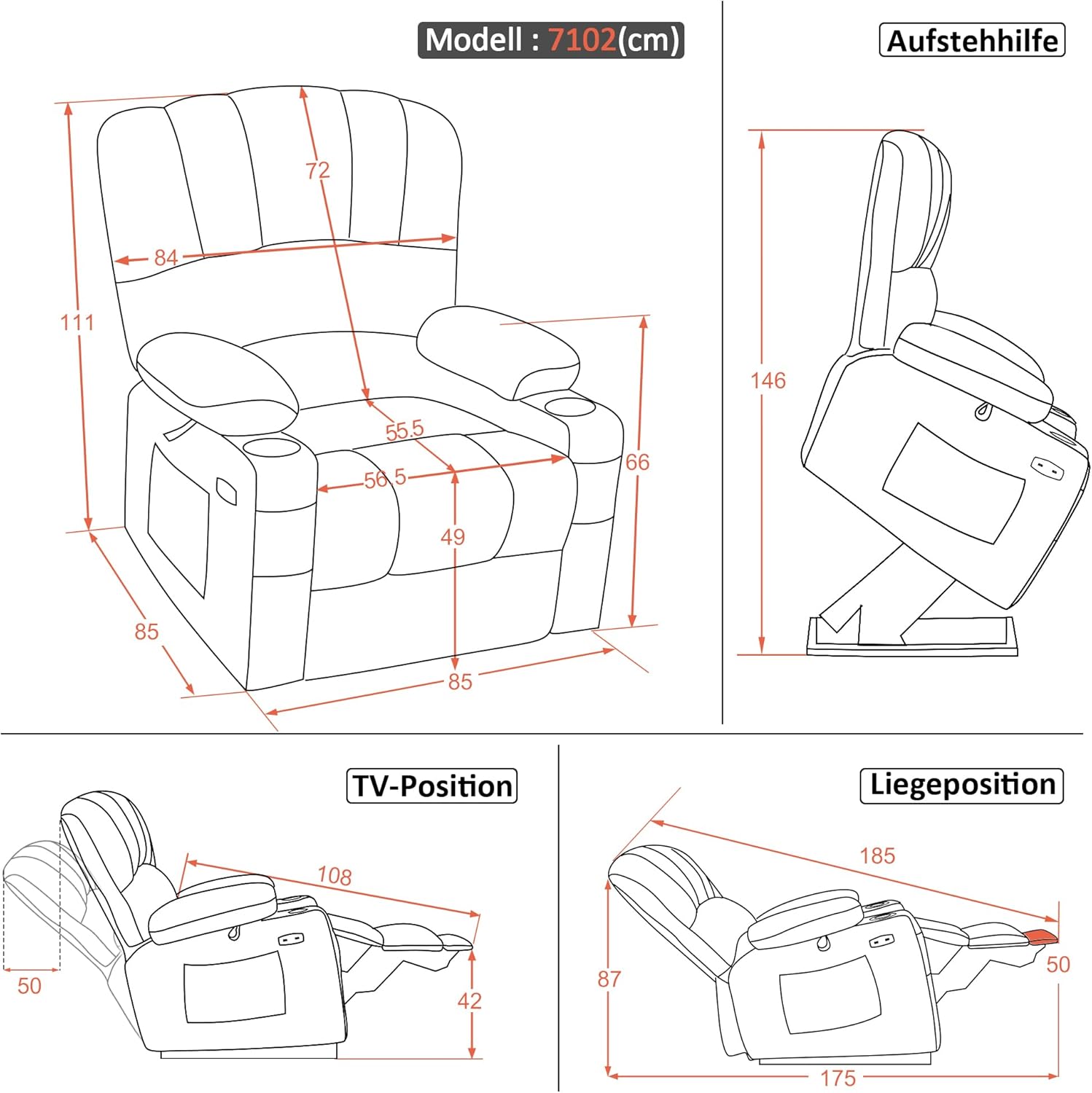
Image 8.1: Dimensional diagram of the recliner chair, including lift and recline positions.
9. Warranty and Support
Information regarding specific warranty details is not available in the provided product data. For warranty claims, technical support, or replacement parts, please contact the seller or manufacturer directly.
Seller: Pfillo
Manufacturer: M MCombo
Please refer to your purchase documentation for specific warranty terms and contact information.