
1. Introduction
This manual provides detailed instructions for the safe and effective operation of your Huepar W03CG-3D Bluetooth Laser Level. Please read this manual thoroughly before using the device to ensure proper functionality and to prevent potential hazards. Keep this manual for future reference.
The Huepar W03CG-3D is a 3x360 self-leveling green laser level featuring 12 lines, Bluetooth connectivity, an electric rotating base, and a large LCD screen. It is designed for various construction and home improvement tasks requiring precise leveling and alignment.
2. Safety Information
WARNING: This product contains a Class 2 laser. Avoid direct eye exposure to the laser beam. Staring directly into the laser beam can cause eye injury.
- Do not disassemble the laser level. Repairs should only be performed by authorized service personnel.
- Do not operate the laser level in explosive atmospheres, such as in the presence of flammable liquids, gases, or dust.
- Keep the laser level out of reach of children.
- Use only the specified battery type and charger.
- Ensure the work area is clear of obstructions and potential hazards.
3. Package Contents
Verify that all items listed below are included in your package:
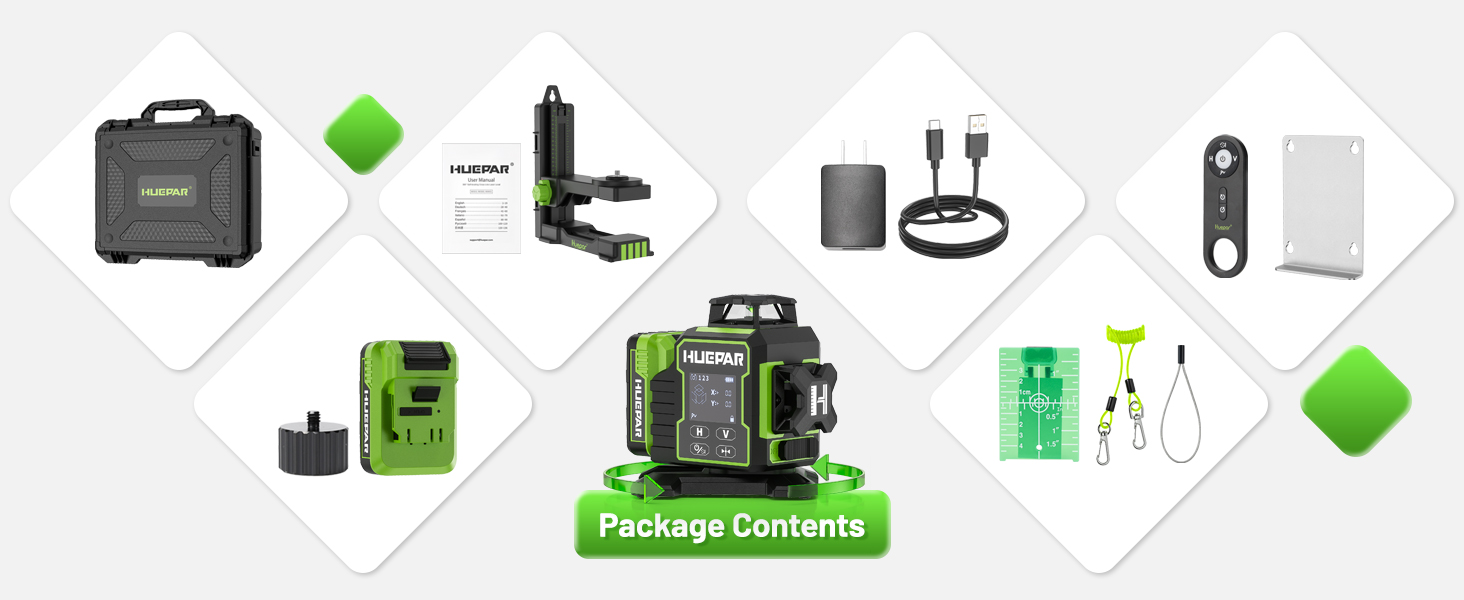
- 1 x Huepar W03CG Laser Level
- 1 x Thickened Drop-proof Hard Case
- 1 x Upgraded Triaxial Magnetic Stand
- 1 x Li-ion Battery (12.6V/2600mAh)
- 1 x Type-C Charger Kit (Power Adapter + Type-C cord)
- 1 x Remote Control
- 1 x Steel Sheet
- 1 x Laser Target Plate
- 1 x Drop-proof Rope
- 1 x User Manual
- 1 x 1/4" to 5/8" Nut

4. Product Features
The Huepar W03CG-3D laser level incorporates several advanced features for enhanced precision and ease of use:
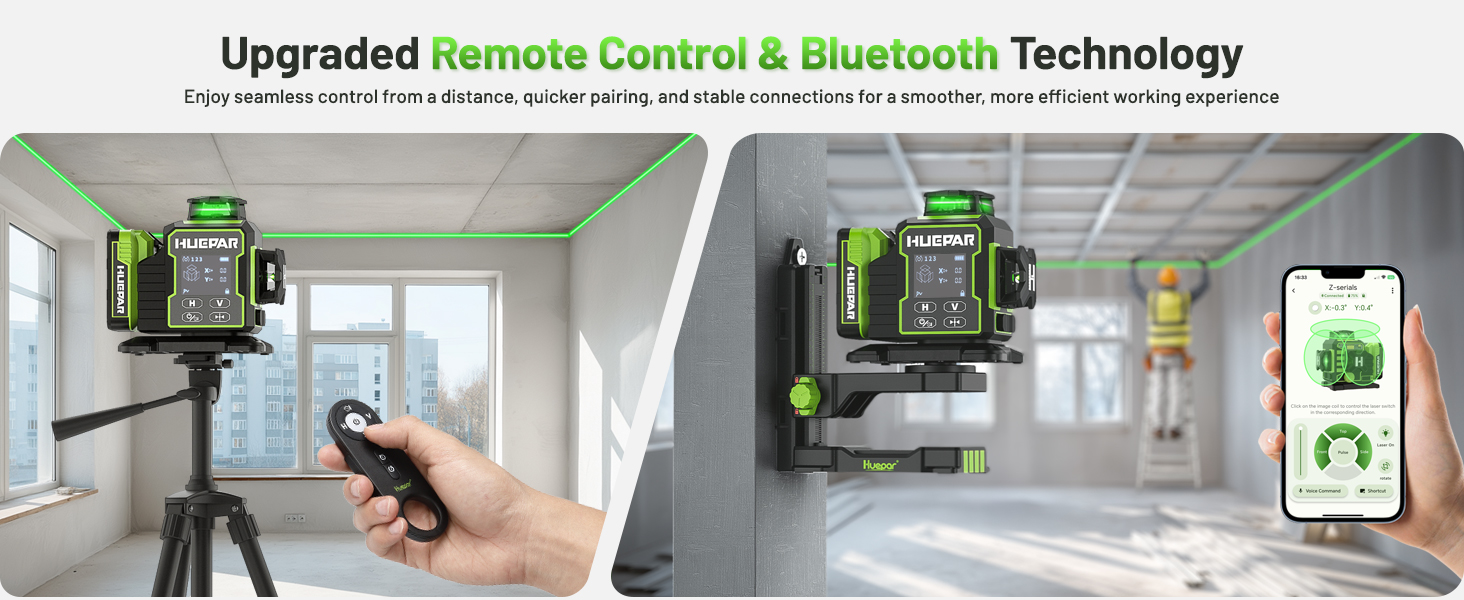
- Bluetooth APP/Remote Control: Control various modes and the electric rotating base from up to 65 feet away using a mobile app or the included remote control.
- 360° Electric Rotating Base: Features three adjustable rotation speeds (9.1mm/s, 48mm/s, 240mm/s) for precise line positioning, controllable via Bluetooth or remote.
- Advanced LCD Touch Panel and Backlit Display: A large, backlit LCD displays active laser lines, tilt angle, battery status, pulse mode, self-leveling mode, manual mode, and rotation speed. The touch panel is responsive even with gloves.
- 3x360° Laser Lines: Provides one 360° horizontal line for ceiling installation and two 360° vertical lines that cross at 90° for square layouts. Laser brightness is adjustable.
- Self-leveling & Manual & Pulse Mode: Offers automatic self-leveling within ±3°, a manual mode for angled applications, and a pulse mode for outdoor use with a laser receiver (up to 200ft working distance, receiver sold separately).
- 360° Magnetic Bracket & Durable Design: Includes a strong magnetic bracket for metal surfaces and 1/4"-20 and 5/8"-11 mounting threads for tripods. The device features an IP54 water/dust proof rating and over-molded metal laser windows for durability.

5. Setup
5.1 Battery Installation
- Locate the battery compartment on the laser level.
- Insert the provided 12.6V/2600mAh Li-ion battery, ensuring correct polarity.
- Close the battery compartment securely.
- To charge the battery, connect the Type-C cord to the laser level and the power adapter, then plug into a power outlet.
5.2 Mounting the Laser Level
The W03CG-3D offers versatile mounting options:
- Magnetic Bracket: Attach the magnetic bracket to metal surfaces for wall applications.
- Tripod/Pole Mount: Use the 1/4"-20 or 5/8"-11 mounting threads to secure the laser level to a standard tripod or pole mount.
6. Operating Instructions
6.1 Power On/Off
To power on the device, slide the main switch to the 'ON' position. To power off, slide the switch to the 'OFF' position.
6.2 Operating Modes

- Self-Leveling Mode: When the main switch is in the 'ON' position, the laser level automatically enters self-leveling mode. The device will self-level within ±3°. If the tilt exceeds this range, the laser lines will flash rapidly to indicate an out-of-level condition.
- Manual Mode: To activate manual mode, slide the main switch to the 'OFF' position. This allows the laser level to be placed at any angle for sloped applications without self-leveling.
- Pulse Mode: Activate pulse mode for use with a laser receiver in bright outdoor conditions or for extending the working range up to 200 feet. The laser receiver is sold separately.
6.3 Line Switching and Brightness Adjustment

Use the touch panel buttons or the remote control/app to switch between the 360° horizontal and vertical laser lines. The laser brightness can also be adjusted to suit ambient light conditions.
6.4 Electric Rotating Base Operation

The electric rotating base can be controlled via the remote control or the Bluetooth app. It offers three speeds for precise adjustment:
- Low Speed: 9.1mm/s for fine adjustments.
- Medium Speed: 48mm/s for moderate adjustments.
- High Speed: 240mm/s for quick positioning.
6.5 Bluetooth App and Remote Control
Download the Huepar app to your smartphone. Pair the device via Bluetooth to access advanced controls, including mode selection, line switching, brightness adjustment, and electric rotating base speed control. The included remote control provides similar functionality.
7. LCD Display Indicators

The backlit LCD screen provides real-time information:
- Laser Lines in Use: Indicates which horizontal and vertical lines are active.
- Tilt Angle: Displays the current tilt angle of the device.
- Battery Power Condition: Shows the remaining battery charge.
- Pulse Mode Indicator: Confirms if pulse mode is active.
- Self-Leveling Mode Indicator: Shows if the device is in self-leveling mode.
- Manual Mode Indicator: Shows if the device is in manual mode.
- Rotation Speed: Displays the current speed setting of the electric rotating base.
8. Maintenance
8.1 Cleaning
- Regularly clean the laser level with a soft, damp cloth. Do not use abrasive cleaners or solvents.
- Keep the laser apertures clean and free of dust or debris to ensure optimal performance.
8.2 Storage
- Store the laser level in its hard case when not in use to protect it from dust, moisture, and impact.
- Store in a dry place at room temperature.
- Remove the battery if the device will not be used for an extended period.
9. Troubleshooting
If you encounter issues with your Huepar W03CG-3D laser level, refer to the following common problems and solutions:
| Problem | Possible Cause | Solution |
|---|---|---|
| Laser lines are flashing rapidly. | Device is out of self-leveling range (±3°). | Place the laser level on a more level surface or adjust its position until the lines stabilize. |
| No laser lines appear. | Battery is low or not installed correctly. Device is off. | Check battery charge and installation. Ensure the main switch is in the 'ON' position. |
| Remote control or Bluetooth app not working. | Out of range. Battery in remote is low. Bluetooth not paired. | Ensure you are within 65 feet. Replace remote battery. Re-pair Bluetooth connection. |
| Laser lines are dim. | Brightness setting is low. Bright ambient light. | Adjust laser brightness via touch panel or app. Activate pulse mode and use a laser receiver for outdoor/bright conditions. |
If the problem persists, please contact Huepar customer support.
10. Specifications
| Feature | Specification |
|---|---|
| Model Number | W03CG |
| Laser Class | Class 2 (IEC/EN60825-1/2014) |
| Laser Wavelength | 505-520nm (Green Laser) |
| Leveling Accuracy | ±1/9 inch at 33 feet |
| Self-Leveling Range | ±3° |
| Self-Leveling Time | ≤4 seconds |
| Working Distance (Line) | Up to 66 feet (20 meters) |
| Working Distance (with Receiver) | Up to 197 feet (60 meters) |
| Power Source | 12.6V/2600mAh Li-ion Battery |
| Operating Time | ≥6.5 hours |
| IP Rating | IP54 (Water/Dust Proof) |
| Mounting Thread | 1/4"-20 and 5/8"-11 |
| Item Weight | 7.52 pounds |
| Material | Acrylonitrile Butadiene Styrene, Thermoplastic Elastomers |
11. Warranty and Support
The Huepar W03CG-3D laser level comes with a 5-year quality assurance. Any quality problems within this period are eligible for free repair or replacement. Huepar is committed to providing best-in-class service, including a 24/7 service team (response within 24 hours, solution within 48 hours) and lifetime technical support through worldwide maintenance centers.
For technical assistance, warranty claims, or any inquiries, please refer to the contact information provided in your product packaging or visit the official Huepar website.