
Introduction
This manual provides essential instructions for the setup, operation, maintenance, and troubleshooting of your Haino Teko RW-32 Pro Smartwatch. Please read this manual thoroughly before using your device to ensure proper function and to maximize your user experience.
The RW-32 Pro Smartwatch is designed to enhance your daily life with features such as Bluetooth calling, fitness tracking, and customizable displays. Its sleek design and robust functionality make it a versatile accessory.
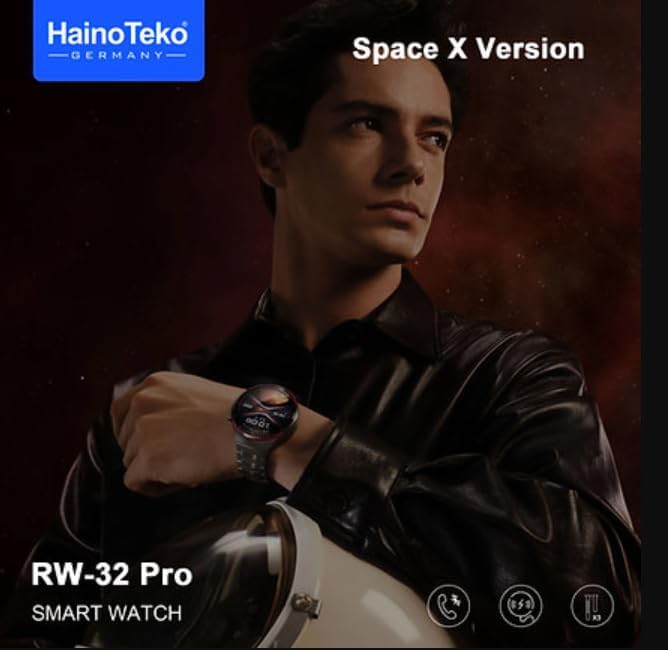
Image: The Haino Teko RW-32 Pro Smartwatch, Space X Version, worn on a wrist.
Setup
1. Unboxing and Package Contents
Carefully open the package and ensure all items are present. The standard package includes:
- Haino Teko RW-32 Pro Smartwatch
- Charging Cable
- User Manual (this document)
- Additional straps (if included in your specific model)

Image: The retail packaging for the Haino Teko RW-32 Pro Smartwatch, showing the watch and included straps.
2. Charging the Smartwatch
Before first use, fully charge your smartwatch. Connect the charging cable to the charging port on the back of the watch and plug the USB end into a standard USB power adapter (5V/1A recommended) or a computer's USB port. The watch display will indicate charging status. A full charge typically takes approximately 2 hours.
3. Powering On/Off
- Power On: Press and hold the side button for a few seconds until the screen lights up.
- Power Off: Press and hold the side button, then select the "Power Off" option on the screen.
4. App Installation and Pairing
To unlock the full functionality of your smartwatch, download the companion application on your smartphone. Search for "Haino Fit" (or similar, check product packaging) in your phone's app store (Google Play Store for Android, Apple App Store for iOS).
- Download and install the app.
- Enable Bluetooth on your smartphone.
- Open the app and follow the on-screen instructions to create an account or log in.
- In the app, select "Add Device" or "Pair Device" and choose "RW-32 Pro" from the list of available devices.
- Confirm the pairing request on both your phone and smartwatch.
Note: The exact app name may vary. Refer to the packaging or quick start guide for the correct app name.
Operating Instructions
1. Basic Navigation
- Touchscreen: Swipe left/right to navigate between main screens (e.g., activity, heart rate, weather). Swipe up/down to access quick settings or notifications.
- Side Button: Press once to return to the home screen or wake the display. Press and hold for power options or to access the main menu.

Image: The Haino Teko RW-32 Pro Smartwatch showcasing its curved glass display and multiple customizable watch faces.
2. Call Management
Once paired via Bluetooth, you can manage calls directly from your smartwatch:
- Answering Calls: When a call comes in, tap the green phone icon on the watch screen.
- Rejecting Calls: Tap the red phone icon to reject an incoming call.
- Making Calls: Access the dialer or contacts list on your watch (if supported) to initiate a call.
3. Notification Management
Receive and view notifications from your smartphone apps directly on your smartwatch. Swipe down from the top of the watch face to access your notification center. You can dismiss notifications from here.
4. Fitness Tracking
The RW-32 Pro Smartwatch monitors various fitness metrics:
- Steps & Calories: View your daily step count and estimated calories burned on the main activity screen.
- Heart Rate: Access the heart rate monitor feature to measure your current heart rate. For continuous monitoring, enable it in the companion app settings.
- Sleep Tracking: Wear the watch during sleep to track sleep patterns. Data is available in the companion app.
5. Sports Modes
Select from multiple sports modes (e.g., running, walking, cycling) to track specific workouts. Each mode provides relevant data such as duration, distance, and calories burned. Access sports modes from the main menu.
6. Customizing Watch Faces
Personalize your smartwatch by changing the watch face. Press and hold the current watch face, then swipe left or right to browse available options. More watch faces can be downloaded and applied via the companion app.
Maintenance
1. Cleaning Your Smartwatch
Regularly clean your smartwatch to maintain its appearance and functionality:
- Wipe the screen and body with a soft, lint-free cloth.
- For stubborn marks, slightly dampen the cloth with water. Avoid harsh chemicals or abrasive materials.
- Clean the charging contacts periodically to ensure proper charging.
2. Water Resistance (IP68)
The RW-32 Pro Smartwatch has an IP68 water resistance rating, meaning it is protected against dust ingress and can withstand immersion in water up to 1.5 meters for up to 30 minutes. However, it is not suitable for hot water, saunas, or diving. Avoid prolonged exposure to water and ensure the watch is dry before charging.
3. Battery Care
To prolong battery life:
- Avoid extreme temperatures.
- Charge the watch before the battery is completely depleted.
- If not using the watch for an extended period, charge it to about 50% before storing.
Troubleshooting
If you encounter issues with your smartwatch, refer to the following common problems and solutions:
- Watch not turning on: Ensure the watch is fully charged. If it still doesn't turn on, try a hard reset by holding the side button for 10-15 seconds.
- Cannot pair with phone:
- Ensure Bluetooth is enabled on your phone and the watch.
- Make sure the watch is within range of your phone.
- Restart both the watch and your phone.
- Clear Bluetooth cache on your phone (Android) or forget the device and re-pair.
- Inaccurate fitness data: Ensure the watch is worn snugly on your wrist, about one finger's width above your wrist bone. Clean the sensors on the back of the watch.
- Notifications not appearing: Check app permissions on your phone to ensure the companion app has access to notifications. Verify notification settings within the companion app.
- Short battery life: Reduce screen brightness, disable unnecessary features (e.g., continuous heart rate monitoring), and ensure no background apps are draining power.
Specifications
Key technical specifications for the Haino Teko RW-32 Pro Smartwatch:
| Feature | Detail |
|---|---|
| Model Number | RW-32 Pro Smart Watch |
| Display | AMOLED Curved Glass Screen, 1.78 Inches |
| Operating System | Android (compatible) |
| Connectivity | Bluetooth |
| Battery Capacity | 200 mAh (Note: Product specifications listed '200 Amp Hours', interpreted as mAh for smartwatches) |
| Memory Storage Capacity | 128 MB |
| Water Resistance | IP68 |
| Item Weight | 70 g |
| Special Features | AMOLED Curved Glass Screen, Bluetooth Connectivity, Fitness Tracking, Interchangeable Straps, Multiple Sports Modes |
Warranty and Support
Warranty Information
The Haino Teko RW-32 Pro Smartwatch comes with a standard manufacturer's warranty. Please refer to the warranty card included in your product packaging for specific terms, conditions, and duration. Keep your proof of purchase for warranty claims.
Customer Support
For technical assistance, troubleshooting beyond this manual, or warranty inquiries, please contact your retailer or the manufacturer's customer support. Contact details are typically available on the product packaging or the official Haino Teko website.
When contacting support, please have your product model number (RW-32 Pro) and proof of purchase ready.


