
1. Introduction
This manual provides detailed instructions for the safe and effective operation of your DazzlingStage 90W Square LED Stage Light. Please read this manual thoroughly before use and retain it for future reference. This device is designed for stage lighting applications, offering various control modes and lighting effects.
2. Product Overview
The DazzlingStage 90W Square LED Stage Light is a versatile lighting fixture featuring 9 x 10W RGBW 4-in-1 LED beads. It supports multiple control modes and lighting effects, suitable for various event settings.
2.1 Key Features
- Light Source: 9 x 10W RGBW 4-in-1 LEDs
- Control Modes: DMX512, Sound Activated, Automatic, Master-Slave, Remote Control
- Lighting Effects: Static Color, Color Mixing, Jump Mode, Strobe Mode, Fade Mode
- Construction: Cast aluminum shell with built-in air cooling system
- Lifespan: Over 100,000 hours
2.2 Package Contents
Verify that all items are present in the package:
- 1 x DazzlingStage 90W Square LED Stage Light
- 1 x Remote Control
- 1 x Power Cord
- 2 x Brackets
- 2 x Screws
- 1 x Instruction Manual

3. Setup
3.1 Mounting the Light
The stage light can be mounted in various positions using the included brackets. Ensure the mounting surface is stable and can support the weight of the fixture.
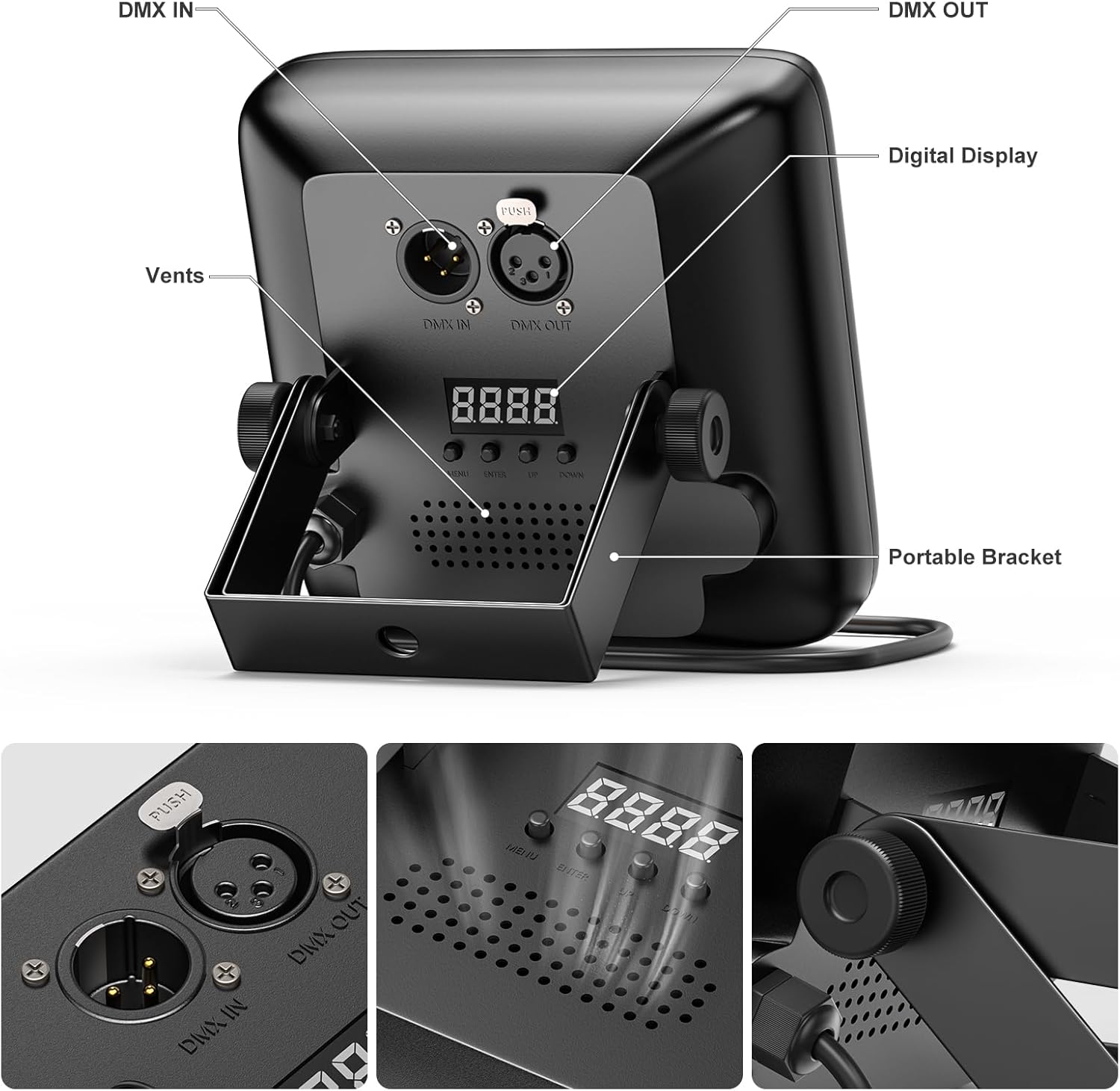
- Attach the brackets to the sides of the light using the provided screws.
- Secure the light to a truss, wall, or place it on a flat surface.
- Adjust the angle of the light as needed using the adjustable stand.

3.2 Power Connection
Connect the included power cord to the light's power input and then to a standard 120V AC outlet. The light is corded electric and does not require batteries.
3.3 DMX Connection (Optional)
For DMX control, connect a DMX cable from your DMX controller to the DMX IN port on the stage light. If linking multiple lights, connect from the DMX OUT of the first light to the DMX IN of the next.
4. Operating Modes
The DazzlingStage LED Stage Light offers five primary control modes:

4.1 Remote Control Operation
The included remote control allows for easy adjustment of modes, colors, and effects.
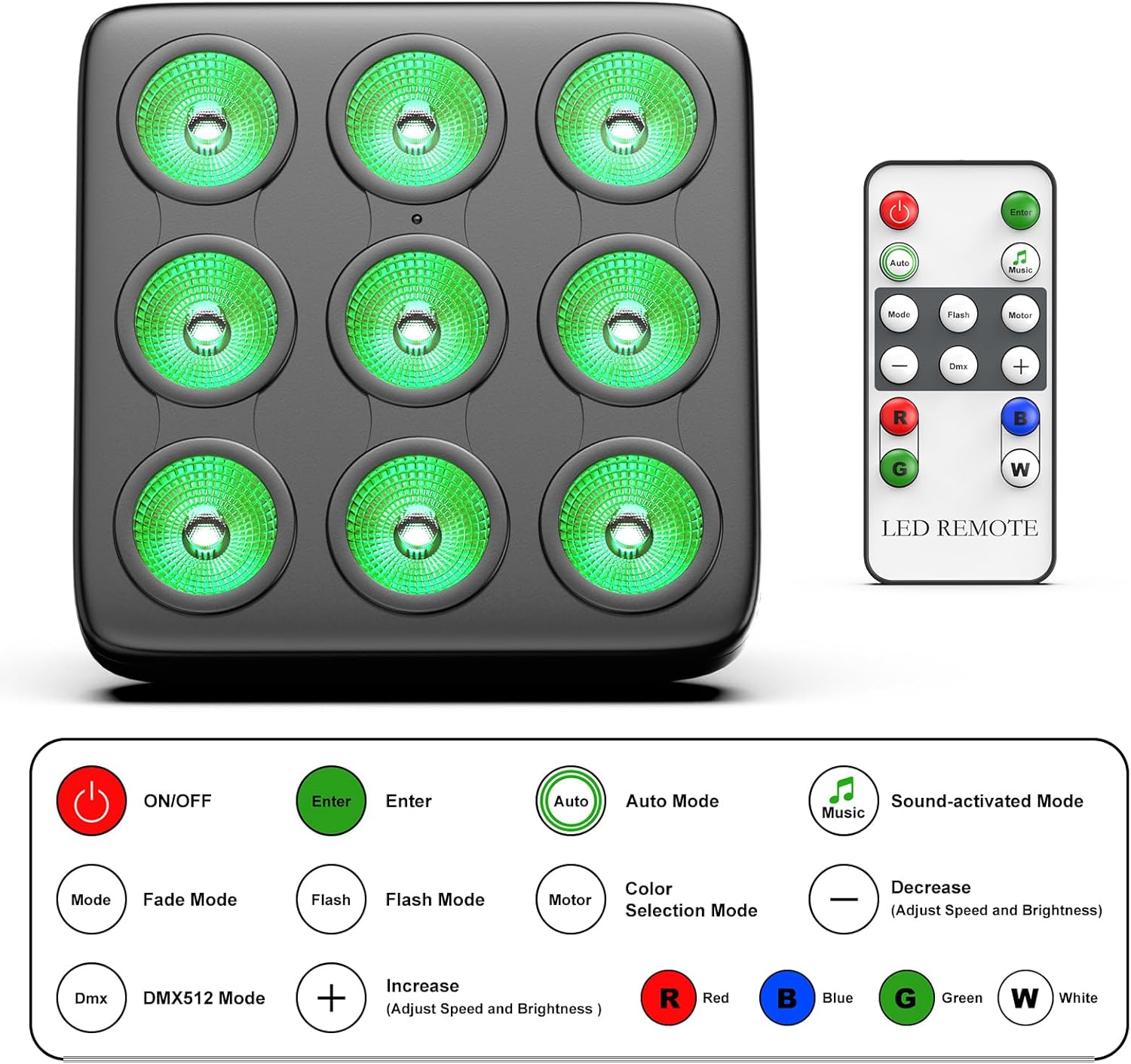
- ON/OFF: Powers the unit on or off.
- Mode: Cycles through different lighting modes (e.g., Fade, Flash, Color Selection).
- Auto: Activates automatic program mode.
- Music: Activates sound-activated mode.
- DMX: Switches to DMX control mode.
- R/G/B/W: Selects individual red, green, blue, or white colors.
- +/-: Adjusts speed or brightness depending on the active mode.
4.2 DMX512 Control
For advanced control, connect the light to a DMX controller. Refer to your DMX controller's manual for specific programming instructions. The light uses standard DMX channels for color mixing, effects, and mode selection.
4.3 Sound Activated Mode
In this mode, the light reacts to ambient sound or music, changing colors and patterns in sync with the audio. Activate this mode using the remote control or the unit's digital display.
4.4 Automatic Mode
The light cycles through pre-programmed lighting effects and color combinations automatically. This mode is suitable for continuous, dynamic lighting without manual intervention.
4.5 Master-Slave Mode
Link multiple DazzlingStage LED Stage Lights together. Set one unit as the 'Master' and others as 'Slave' units. The slave units will then mirror the master unit's operations, ensuring synchronized lighting effects across all connected fixtures.
5. Maintenance
5.1 Cleaning
Regularly clean the light fixture to ensure optimal performance and light output.
- Disconnect the power before cleaning.
- Use a soft, lint-free cloth to wipe the exterior.
- For stubborn dirt, a slightly damp cloth can be used, followed by a dry cloth.
- Do not use abrasive cleaners or solvents.
5.2 Storage
When not in use for extended periods, store the light in a dry, dust-free environment. It is recommended to keep the original packaging for protection during storage and transport.
6. Troubleshooting
If you encounter issues with your DazzlingStage LED Stage Light, refer to the following common problems and solutions:
| Problem | Possible Cause | Solution |
|---|---|---|
| Light does not turn on | No power supply | Check power cord connection and wall outlet. Ensure the power switch is on. |
| Remote control not working | Remote battery low or line of sight blocked | Replace remote battery. Ensure no obstructions between remote and light's IR receiver. |
| Light not responding to DMX | Incorrect DMX address or cable connection | Verify DMX address setting on the light. Check DMX cable connections. Ensure DMX controller is functioning correctly. |
| Sound activated mode not working | No sound input or sensitivity too low | Ensure music or sound is playing near the light. Adjust sound sensitivity if available. |
| Light overheats | Poor ventilation | Ensure adequate airflow around the fixture. Do not block vents. |
7. Specifications
| Feature | Detail |
|---|---|
| Model Number | ZQ01028 |
| Light Source Type | Light Emitting Diode (LED) |
| Number of Light Sources | 9 |
| Light Source Wattage | 10 Watts per LED (Total 90W) |
| Color Output | RGBW (Red, Green, Blue, White) 4-in-1 |
| Control Modes | DMX512, Sound Activated, Automatic, Master-Slave, Remote Control |
| Material | Aluminum |
| Finish Type | Brushed |
| Power Source | Corded Electric |
| Product Dimensions | 5.9"L x 5.9"W x 1.9"H (15cm x 15cm x 4.8cm) |
| Item Weight | 1.76 pounds (0.8 kg) |
| Mounting Type | Table Mount (Adjustable Bracket) |
8. Warranty and Support
DazzlingStage is committed to providing high-quality products and customer satisfaction.
8.1 Warranty Information
This product comes with a 180-day warranty service from the date of purchase, covering manufacturing defects. Additionally, a 30-day free return and exchange policy is offered.
8.2 Customer Support
For any questions, concerns, or technical assistance, please contact our professional after-sales service team. We aim to reply to all inquiries within 24 hours.
Contact information can typically be found on the product packaging or the official DazzlingStage website.