
1. Introduction
The DazzlingStage 90W Square LED Stage Lights are versatile RGBW 4-in-1 par lights designed for various events such as DJ shows, parties, KTV, and weddings. These lights feature powerful 9x10W LED beads, offering a wide range of colors and lighting effects. Constructed with a durable cast aluminum shell and an efficient air cooling system, they ensure long-lasting performance and stability. This manual will guide you through the setup, operation, and maintenance of your new stage lights.
2. Safety Information
- Always connect the light to a grounded power outlet.
- Do not open the housing; there are no user-serviceable parts inside. Refer all servicing to qualified personnel.
- Avoid direct eye exposure to the light source, as it can cause eye damage.
- Ensure proper ventilation around the unit to prevent overheating.
- Keep the unit away from moisture, water, and flammable materials.
- Disconnect from power before cleaning or performing any maintenance.
3. Package Contents
Upon unpacking, please verify that all items listed below are included and in good condition:
- LED Stage Light Unit(s)
- Remote Control
- Power Cord
- Mounting Bracket(s)
- Mounting Screws
- User Manual

Figure 3.1: Contents of the DazzlingStage LED Stage Lights package.
4. Product Overview
The DazzlingStage LED Stage Light features a compact square design with 9 powerful RGBW 4-in-1 LED beads. The rear panel includes essential connections and controls for versatile operation.
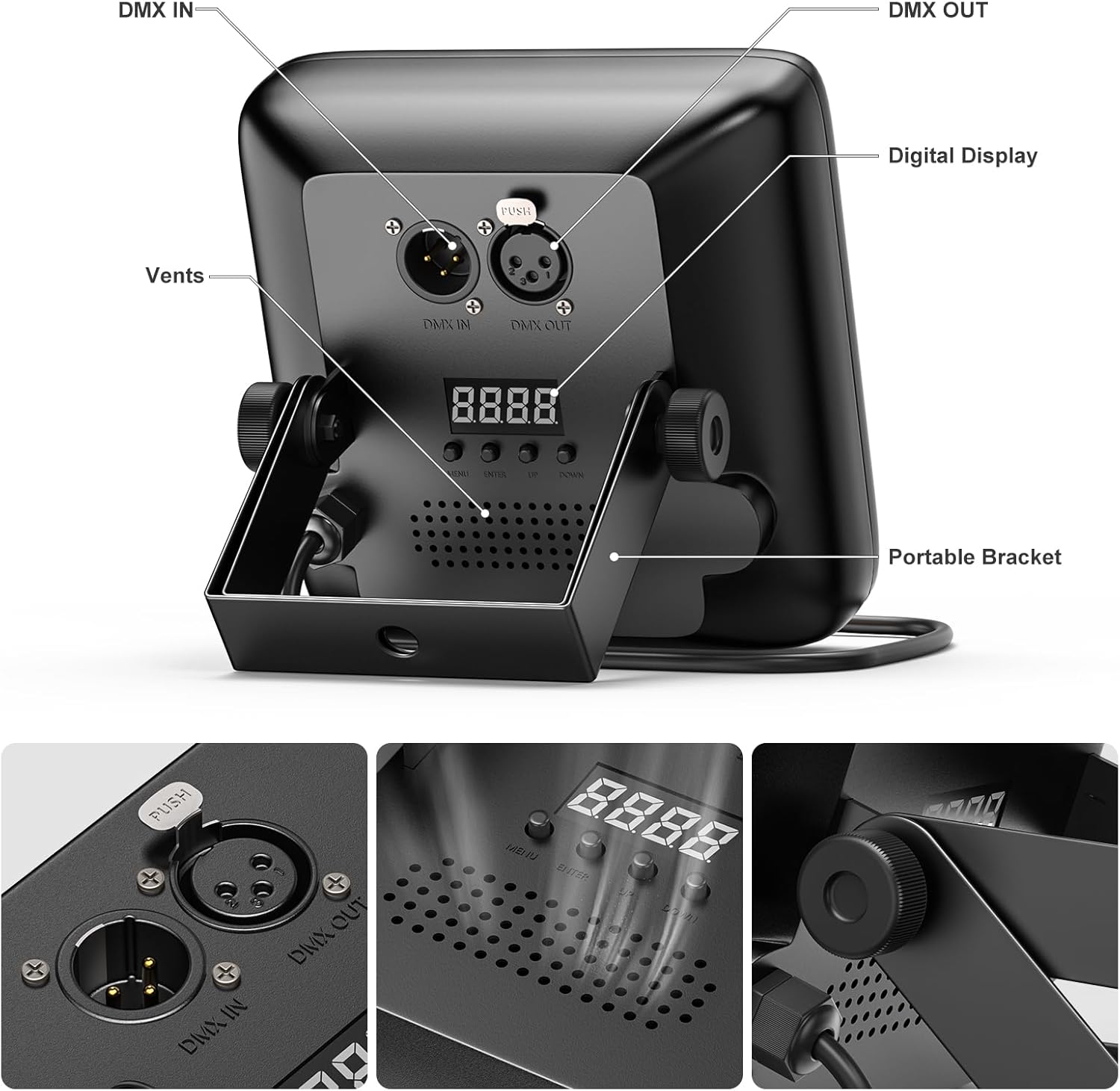
Figure 4.1: Rear panel connections and controls.
- DMX IN/OUT: 3-pin XLR connectors for DMX control signal input and output.
- Digital Display: Shows current mode, DMX address, and other settings.
- Control Buttons: Menu, Enter, Up, Down buttons for navigating settings.
- Vents: Integrated air cooling system for heat dissipation.
- Portable Bracket: Adjustable bracket for various mounting and positioning options.

Figure 4.2: Product dimensions and power cord length.
5. Setup
Follow these steps to set up your DazzlingStage LED Stage Lights:
- Unpack: Carefully remove the light unit and all accessories from the packaging.
- Mounting: Attach the portable bracket using the provided screws. The bracket allows for various positioning, including standing on a flat surface, wall mounting, or truss hanging. Ensure the mounting surface or structure can support the weight of the fixture.
- Power Connection: Connect the power cord to the light unit and then to a standard grounded power outlet.
- DMX Connection (Optional): If using DMX control, connect a DMX cable from your DMX controller to the DMX IN port of the first light. For multiple lights, daisy-chain them by connecting the DMX OUT of the first light to the DMX IN of the next, and so on.

Figure 5.1: Flexible mounting and placement options.
6. Operating Modes
The DazzlingStage LED Stage Lights offer multiple control modes to suit different event requirements:

Figure 6.1: Overview of available control modes.
- DMX512 Mode: Allows professional control over various parameters (color, intensity, effects) using a DMX controller.
- Sound-Activated Mode: The lights react to music or sound, changing patterns and colors in sync with the beat.
- Automatic Mode: Pre-programmed light shows run automatically without external input.
- Master-Slave Mode: Connect multiple units where one acts as the master, controlling all other slave units to synchronize effects.
- Remote Control: Convenient wireless control for basic functions and mode selection.

DMX Control

Automatic Mode

Sound Activated Mode

Remote Control
7. Remote Control Operation
The included remote control provides easy access to various functions:
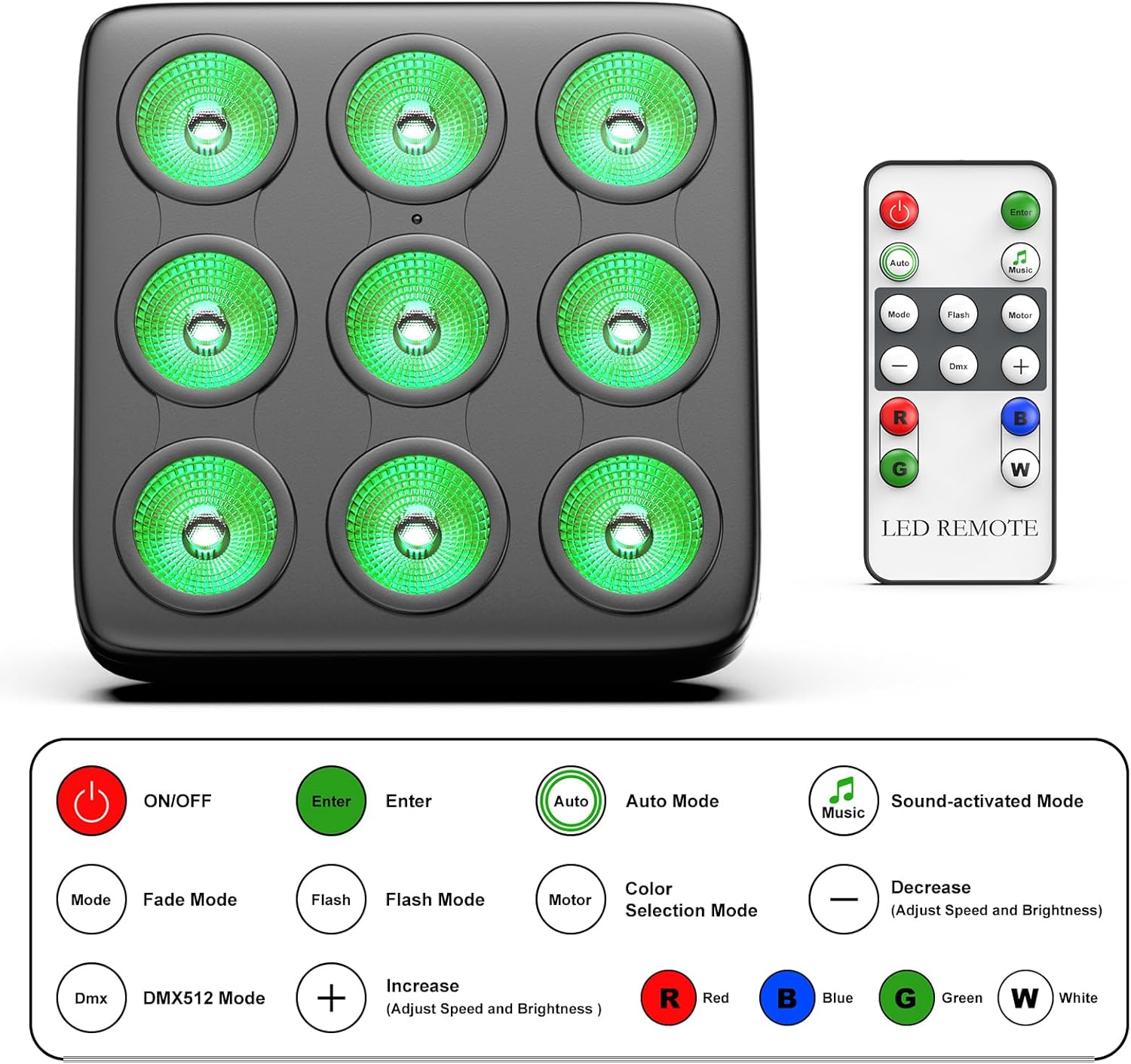
Figure 7.1: LED Remote Control functions.
- ON/OFF: Power on or off the light.
- Mode: Cycle through different operating modes (e.g., Auto, Sound-activated, Fade, Flash).
- Enter: Confirm selections on the digital display.
- Auto Mode: Activates automatic pre-programmed light shows.
- Music: Activates sound-activated mode.
- Fade Mode: Smooth transitions between colors.
- Flash Mode: Strobe effect.
- Color Selection: Direct buttons for Red (R), Green (G), Blue (B), White (W) and color mixing.
- +/- Buttons: Adjust speed for dynamic modes or brightness for static colors.
- DMX: Activates DMX512 control mode.
8. DMX Control
For advanced control, the DazzlingStage LED Stage Lights can be operated via DMX512 protocol. Connect your DMX controller to the DMX IN port. The digital display on the back of the unit allows you to set the DMX address and channel mode. Please refer to your DMX controller's manual and the specific DMX channel chart for this model (typically found in the full product manual or manufacturer's website) for detailed programming instructions. A common DMX setup involves setting a unique starting address for each fixture.
9. Maintenance
- Cleaning: Regularly clean the lens and housing with a soft, lint-free cloth. Do not use abrasive cleaners or solvents. Ensure the unit is unplugged before cleaning.
- Storage: When not in use, store the lights in a dry, dust-free environment, preferably in their original packaging or a protective case.
- Inspection: Periodically check power cords and DMX cables for any signs of damage. Replace damaged cables immediately.
10. Troubleshooting
| Problem | Possible Cause | Solution |
|---|---|---|
| Light does not turn on | No power supply; Faulty power cord; Unit is off. | Check power connection; Try a different outlet; Ensure unit is powered on via remote or button. |
| No DMX control | Incorrect DMX address; Faulty DMX cable; Incorrect DMX mode selected; DMX controller issue. | Verify DMX address and channel mode; Check DMX cable connections; Ensure DMX mode is active; Test with a different DMX controller if possible. |
| Remote control not working | Battery depleted; Obstruction between remote and sensor; Remote sensor blocked. | Replace remote battery; Ensure clear line of sight to the light's sensor; Check if the sensor on the light is clean. |
| Lights not synchronized in Master-Slave mode | Incorrect mode setting; Improper cable connection. | Ensure one unit is set to Master and others to Slave mode; Verify DMX cable connections between units. |
If you encounter issues not covered here, please contact DazzlingStage customer service for assistance.
11. Specifications
| Feature | Detail |
|---|---|
| Brand | DazzlingStage |
| Model Number | ZQ01028 |
| Product Dimensions | 5.9 x 5.9 x 1.9 inches (15 x 15 x 4.8 cm) |
| Material | Aluminum |
| Light Source | 9 * 10W RGBW 4-in-1 LED Beads |
| Control Modes | DMX512, Sound Activated, Automatic, Master-Slave, Remote Control |
| Lighting Effects | Static color, Color mixing, Jump mode, Strobe mode, Fade mode |
| Lifetime | More than 100,000 hours |
| Cooling System | Built-in air cooling |
12. Warranty and Support
DazzlingStage is committed to providing high-quality products and excellent customer service.
- Warranty: This product comes with a 180-day warranty service.
- Returns & Exchanges: Enjoy 30 days of free return and exchange.
- Customer Service: Our professional after-sales service team is available to assist you. Please feel free to contact us if you have any problems, and we will reply within 24 hours.
For support, please refer to the contact information provided with your purchase or visit the official DazzlingStage website.