
ciciglow ciciglowpzixso4k8g-11
ciciglow WL Bluetooth Speaker User Manual
Model: ciciglowpzixso4k8g-11
Introduction
Thank you for choosing the ciciglow WL Bluetooth Speaker. This manual provides detailed instructions for the safe and efficient use of your speaker. Please read it thoroughly before operation and retain it for future reference.
Product Overview
Package Contents
- ciciglow WL Bluetooth Speaker
- USB Charging Cable
- AUX Audio Cable
- User Manual
Speaker Components and Controls
Familiarize yourself with the speaker's buttons and ports:
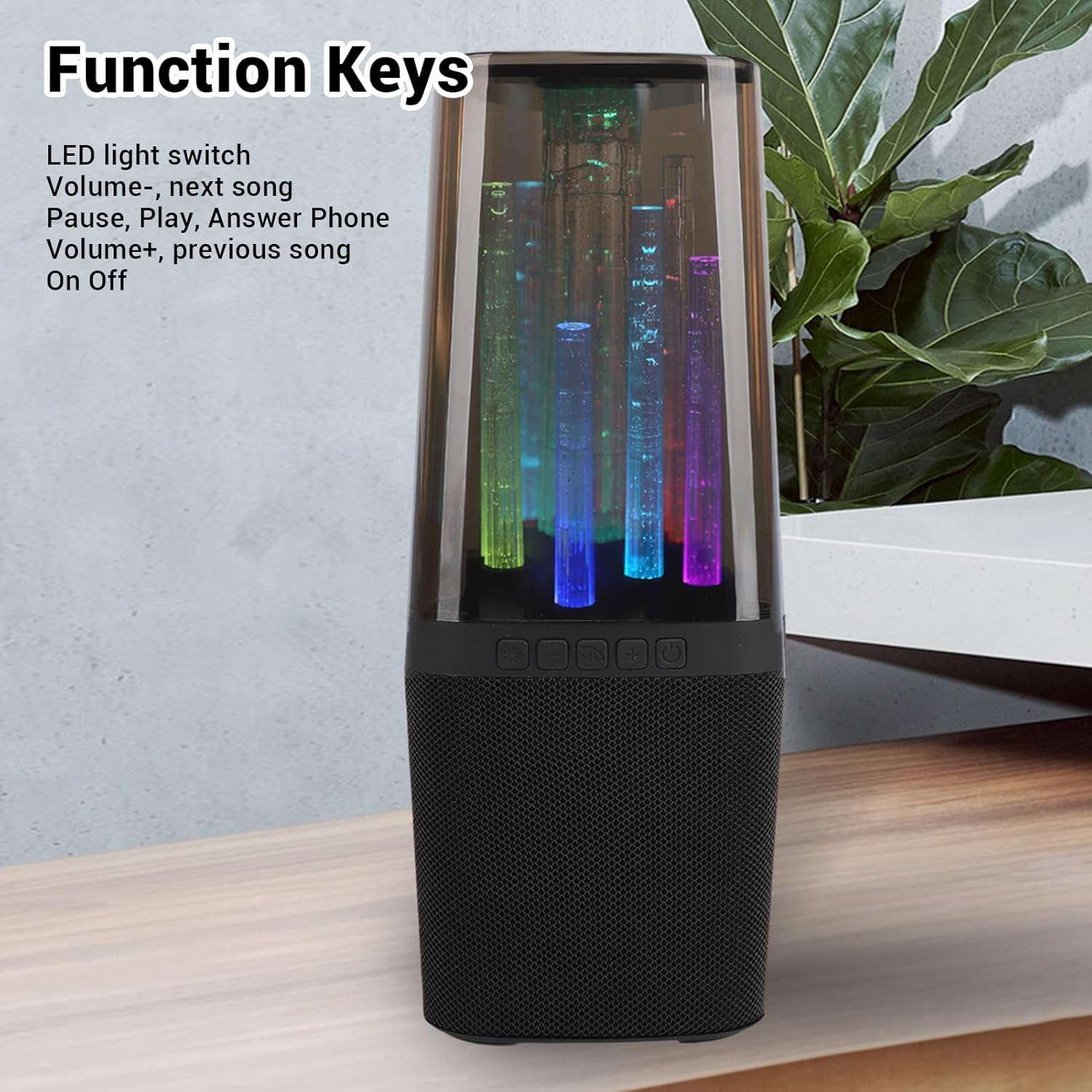
Image: Front view of the ciciglow WL Bluetooth Speaker, highlighting the control buttons. From left to right, these are typically the LED light switch, Volume Down/Previous Track, Play/Pause/Answer Call, Volume Up/Next Track, and Power On/Off button.
- LED Light Switch: Toggles the RGB lighting effects.
- Volume - / Previous Song: Decreases volume or skips to the previous track.
- Play / Pause / Answer Phone: Plays or pauses music, answers or ends phone calls.
- Volume + / Next Song: Increases volume or skips to the next track.
- Power On / Off: Turns the speaker on or off.

Image: Side view of the ciciglow WL Bluetooth Speaker, illustrating the AUX and USB ports for wired connections and charging.
- AUX Port: For connecting external audio devices via the included 3.5mm audio cable.
- USB Port: For connecting USB storage devices for music playback or charging.
- Charging Port: For charging the speaker's internal battery.
Setup
Charging the Speaker
Before first use, fully charge the speaker. Connect the provided USB charging cable to the speaker's charging port and to a USB power adapter (not included) or a computer's USB port. The charging indicator light will typically show charging status and turn off or change color when fully charged. A full charge takes approximately 1.5 hours.

Image: The ciciglow WL Bluetooth Speaker shown with its accompanying USB charging cable and AUX audio cable, ready for connection.
Powering On/Off
Press and hold the Power On/Off button for a few seconds to turn the speaker on or off. An audible prompt or indicator light will confirm the status.
Operating Instructions
Bluetooth Connection
- Ensure the speaker is powered on and in Bluetooth pairing mode (usually indicated by a flashing LED light).
- On your device (smartphone, tablet, etc.), enable Bluetooth and search for available devices.
- Select "WL Speaker" (or similar name) from the list of devices.
- Once connected, the speaker will provide an audible confirmation, and the LED indicator will typically stop flashing.
The speaker supports Bluetooth 5.2 for a fast and stable connection.
AUX Input Playback
Connect one end of the 3.5mm AUX audio cable to the speaker's AUX port and the other end to the audio output jack of your external device. The speaker will automatically switch to AUX input mode or may require a mode selection (if available).
USB Playback
Insert a USB storage device containing audio files into the speaker's USB port. The speaker should automatically detect and begin playing music from the USB device.
Music and Call Control
- Play/Pause: Press the Play/Pause button once.
- Next Song: Press the Volume + / Next Song button once.
- Previous Song: Press the Volume - / Previous Song button once.
- Volume Up: Press and hold the Volume + / Next Song button.
- Volume Down: Press and hold the Volume - / Previous Song button.
- Answer/End Call: Press the Play/Pause / Answer Phone button once during an incoming call.
- Reject Call: Press and hold the Play/Pause / Answer Phone button during an incoming call.
RGB Lighting Effects
Press the LED Light Switch button to cycle through different RGB lighting modes or to turn the lights off. The lights change colors with the rhythm of the music.

Image: The ciciglow WL Bluetooth Speaker showcasing its dynamic RGB lighting effects, which can be adjusted to enhance the listening experience.
Maintenance
- Cleaning: Use a soft, dry cloth to clean the speaker's exterior. Do not use abrasive cleaners or solvents.
- Storage: Store the speaker in a cool, dry place away from direct sunlight and extreme temperatures.
- Battery Care: To prolong battery life, avoid fully discharging the speaker frequently. Charge it regularly, even if not in use for extended periods.
- Water Resistance: This speaker is not waterproof. Avoid exposure to water or high humidity.
Troubleshooting
| Problem | Possible Cause | Solution |
|---|---|---|
| Speaker does not turn on. | Low battery; Power button not pressed correctly. | Charge the speaker; Press and hold the Power button for 3-5 seconds. |
| Cannot connect via Bluetooth. | Speaker not in pairing mode; Bluetooth disabled on device; Device too far. | Ensure speaker is in pairing mode; Enable Bluetooth on your device; Move device closer to speaker (within 10 meters). |
| No sound during playback. | Volume too low; Incorrect input mode; Audio cable not fully connected. | Increase speaker and device volume; Ensure correct input mode (Bluetooth, AUX, USB); Reconnect audio cable securely. |
| Sound distortion. | Volume too high; Weak Bluetooth signal; Low battery. | Reduce volume; Move device closer to speaker; Charge the speaker. |
| RGB lights not working. | LED light switch off; Malfunction. | Press the LED light switch button to activate; If issue persists, contact support. |
Specifications
| Model Name | ciciglowpzixso4k8g-11 |
| Brand | ciciglow |
| Connectivity Technology | Bluetooth 5.2, AUX, USB |
| Speaker Type | Built-In |
| Special Feature | RGB Color Changing Lights, Portable, Rechargeable |
| Recommended Uses | Indoor/Outdoor |
| Battery Capacity | 1200 mAh Li-ion |
| Charging Time | Approx. 1.5 hours |
| Playback Time | 2 to 3 hours (continuous) |
| Product Dimensions | 11.02"D x 4.72"W x 4.72"H |
| Item Weight | 1.34 pounds |
| Material | ABS |
Warranty and Support
For warranty information and technical support, please refer to the documentation included with your purchase or visit the official ciciglow website. Contact details for customer service are typically available on the product packaging or the brand's online store.
Manufacturer: ciciglow
ASIN: B0DJPD3S4W