
1. Introduction
This manual provides essential information for the safe and efficient operation, maintenance, and troubleshooting of your Aceup Energy 2000W Gasoline Inverter Generator, Model LH2300i. Please read this manual thoroughly before operating the generator to ensure proper use and to prevent injury or damage.
The Aceup Energy LH2300i is a portable inverter generator designed to provide clean and stable power for various applications, including sensitive electronics. It features a 79.8 cm³ OHV 4-stroke engine, delivering 2000W peak power and 1800W rated power, with multiple output options including AC, DC, and USB ports.
2. Safety Information
WARNING: Failure to follow these safety instructions can result in serious injury or death.
- Carbon Monoxide Hazard: Generators produce carbon monoxide, a colorless, odorless, poisonous gas. Operate the generator ONLY outdoors and far away from windows, doors, and vents. NEVER operate indoors, in a garage, or in any enclosed space.
- Fire Hazard: Gasoline is highly flammable. Refuel in a well-ventilated area with the engine off and cool. Do not smoke or allow open flames near the generator or fuel. Store gasoline in an approved container.
- Electrical Shock Hazard: Do not operate the generator in wet conditions. Ensure all electrical connections are dry and secure. Never connect the generator directly to a building's electrical system without a transfer switch installed by a qualified electrician.
- Hot Surfaces: The generator's engine and muffler become very hot during operation and remain hot for some time after shutdown. Avoid contact to prevent burns.
- Children and Pets: Keep children and pets away from the generator at all times.
- Ventilation: Ensure adequate clearance around the generator for proper ventilation.
- Read Manual: Always read and understand the entire user manual before operating the generator.
3. Product Overview
The Aceup Energy LH2300i inverter generator is designed for portability and efficient power delivery. Below are key components and controls.
3.1. Generator Components and Dimensions

Figure 1: Aceup Energy LH2300i Inverter Generator with key dimensions (Length: 50.5 cm, Width: 30 cm, Height: 45 cm) and weight (18 kg).
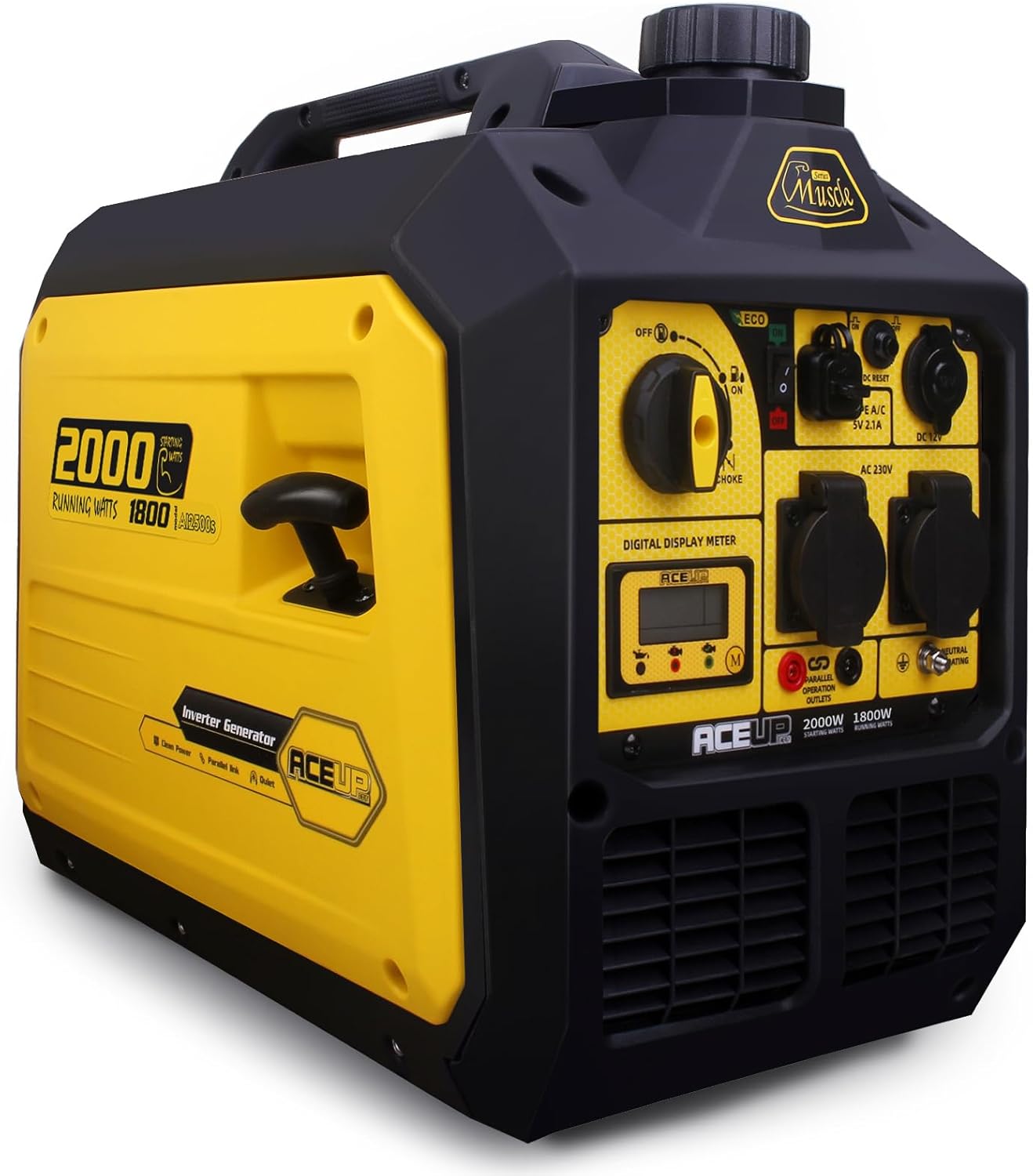
Figure 2: Front-side view of the Aceup Energy LH2300i Inverter Generator, highlighting its compact design and control panel layout.
3.2. Control Panel

Figure 3: Detailed view of the generator's control panel.
- 3-in-1 Switch: Controls engine operation (OFF, ON, CHOKE).
- ECO Mode Switch: Activates or deactivates the economy mode for fuel efficiency.
- Digital Display Meter: Shows voltage, run time, frequency (Hz), and power output.
- AC 230V Outlets: Two standard 230V AC power outlets.
- DC 12V Outlet: One 12V DC 8.3A outlet (cigarette lighter type).
- USB Ports: Two 5V USB 2.1A ports for charging small electronic devices.
- DC Reset Button: Resets the DC circuit breaker.
- Parallel Operation Outlets: Connections for linking two generators for increased power (parallel kit sold separately).
- Oil Level Indicator: Warning light for low engine oil.
- Overload Indicator: Warning light for excessive load.
4. Setup and First Use
Before starting the generator for the first time, perform the following steps:
- Unpack and Inspect: Remove the generator from its packaging and inspect for any shipping damage. Ensure all included accessories (spark plug wrench, oil funnel, user manual) are present.
- Add Engine Oil: The generator is shipped without engine oil. Place the generator on a level surface. Remove the oil fill cap/dipstick. Using the provided oil funnel, carefully add the recommended engine oil (refer to specifications for type and capacity). Do not overfill.
- Check Oil Level: Reinsert the dipstick without screwing it in, then remove it to check the oil level. Ensure the oil level is between the minimum and maximum marks.
- Add Gasoline: Ensure the generator is off and cool. Open the fuel tank cap. Carefully pour fresh, unleaded gasoline into the fuel tank using a clean funnel. Do not overfill; leave space for fuel expansion. Securely close the fuel cap.

Figure 4: Visual guide for initial setup, showing steps for adding oil and fuel.
5. Operating Instructions
5.1. Starting the Generator
Follow these steps to start your Aceup Energy LH2300i generator:
- Placement: Ensure the generator is on a level surface, outdoors, and away from any combustible materials or enclosed spaces.
- Fuel Tank Vent: Turn the fuel tank vent knob to the "ON" position.
- 3-in-1 Switch: Move the 3-in-1 switch to the "CHOKE" position.
- ECO Mode: Ensure the ECO mode switch is in the "OFF" position for starting.
- Recoil Starter: Grasp the recoil starter handle firmly and pull it slowly until resistance is felt, then pull quickly and smoothly to start the engine. Repeat if necessary.
- Warm-up: Once the engine starts, slowly move the 3-in-1 switch from "CHOKE" to "ON". Allow the generator to run for 3-5 minutes to warm up before connecting any electrical devices.
5.2. Connecting Electrical Devices
After the generator has warmed up:
- Plug your electrical devices into the appropriate AC, DC, or USB outlets.
- Ensure the total wattage of connected devices does not exceed the generator's rated power (1800W). Overloading will trigger the overload indicator and may shut down the generator.
- For sensitive electronics, the inverter technology provides clean power, but always ensure devices are compatible with the generator's output specifications.
5.3. ECO Mode Operation
The ECO mode reduces engine speed when the electrical load is low, improving fuel efficiency and reducing noise. To activate:
- With the generator running, switch the ECO mode to "ON".
- The engine speed will adjust automatically based on the load.
- For maximum power or when starting high-load devices, switch ECO mode to "OFF".
5.4. Parallel Operation
The Aceup Energy LH2300i generator is capable of parallel operation, allowing two identical generators to be linked together to double the power output. A separate parallel connection kit (not included) is required. Refer to the parallel kit's instructions for detailed setup and operation.
5.5. Stopping the Generator
To stop the generator:
- Disconnect all electrical devices from the generator.
- Move the 3-in-1 switch to the "OFF" position.
- Turn the fuel tank vent knob to the "OFF" position to prevent fuel leakage during transport or storage.
6. Maintenance
Regular maintenance ensures optimal performance and extends the lifespan of your generator. Always ensure the generator is off and cool before performing any maintenance.
6.1. Maintenance Schedule
| Item | Interval | Action |
|---|---|---|
| Engine Oil | First 20 hours, then every 50 hours or annually | Check level, change oil |
| Air Filter | Every 50 hours or annually (more often in dusty conditions) | Clean or replace |
| Spark Plug | Every 100 hours or annually | Inspect, clean, or replace |
| Fuel Filter | Annually | Inspect, clean, or replace |
6.2. Storage
For long-term storage (more than 30 days):
- Drain the fuel tank and carburetor. Run the engine until it stops from lack of fuel.
- Change the engine oil.
- Remove the spark plug and pour a small amount of engine oil into the cylinder. Pull the recoil starter a few times to distribute the oil, then reinstall the spark plug.
- Clean the exterior of the generator.
- Store in a clean, dry, well-ventilated area, away from direct sunlight and extreme temperatures.
7. Troubleshooting
This section provides solutions to common operational issues. For problems not listed here, contact customer support.
7.1. Engine Will Not Start
- No Fuel: Check fuel level and add fresh gasoline if needed.
- Old Fuel: Drain old fuel and refill with fresh gasoline.
- Low Oil: Check engine oil level. The generator has a low oil shut-off feature. Add oil if necessary.
- Choke Position: Ensure the 3-in-1 switch is in the "CHOKE" position for cold starts, then moved to "ON" after starting.
- Spark Plug: Inspect the spark plug. Clean or replace if fouled or damaged.
- Fuel Tank Vent: Ensure the fuel tank vent knob is in the "ON" position.
7.2. No Power Output
- Overload: If the overload indicator is lit, disconnect all devices, turn off the generator, and restart. Reduce the load before reconnecting.
- Circuit Breaker: Check if any AC or DC circuit breakers have tripped. Reset if necessary.
- ECO Mode: Ensure ECO mode is off if you require full power output immediately.
7.3. Engine Runs Poorly
- Stale Fuel: Use fresh gasoline.
- Air Filter: Clean or replace the air filter if it is dirty.
- Spark Plug: Inspect and clean or replace the spark plug.
8. Specifications
| Feature | Specification |
|---|---|
| Model | LH2300i |
| Brand | Aceup Energy |
| Engine Type | 79.8 cm³ OHV 4-stroke, Air-cooled |
| Peak Power | 2000 W |
| Rated Power | 1800 W |
| Voltage | 230 V AC |
| Frequency | 50 Hz |
| DC Output | 12 V, 8.3 A |
| USB Output | 5 V, 2.1 A (x2) |
| Fuel Tank Capacity | 5 L |
| Run Time (Half Load) | Up to 8 hours |
| Noise Level (at 7m) | 60 dB |
| Starting System | Manual (Recoil) |
| Dimensions (L x W x H) | 50.5 x 30 x 45 cm |
| Weight | 18 kg |
| Special Features | Digital display, Low oil shut-off, Overload protection, ECO mode, Parallel capability |
| Included Components | Spark plug wrench, Oil funnel, User manual |
9. Warranty and Support
Your Aceup Energy LH2300i Inverter Generator comes with a 1-year limited warranty from the date of purchase. This warranty covers defects in materials and workmanship under normal use.
Additionally, Aceup Energy provides free lifetime technical support by experts. For warranty claims, technical assistance, or any questions regarding your generator, please contact Aceup Energy customer service through the retailer where the product was purchased or visit the official Aceup Energy website for contact information.
Please retain your proof of purchase for warranty purposes.


