
1. Product Overview
The ZGSZJHF 5.8mm Micro Latching Push Button Switch is a compact, single-pole double-throw (SPDT) switch designed for various electronic applications. This latching type switch maintains its state (ON or OFF) after being pressed, requiring a second press to change its state. It features a side plug-in design for circuit board installation and includes switch caps for user interface.
Common applications include 3D printers, computer mice, automobile electronics, communication equipment, test instruments, water heaters, gas stoves, small home appliances, microwave ovens, electric cookers, float ball equipment, medical instruments, automation DIY projects, electric tools, timers, and wireless equipment.
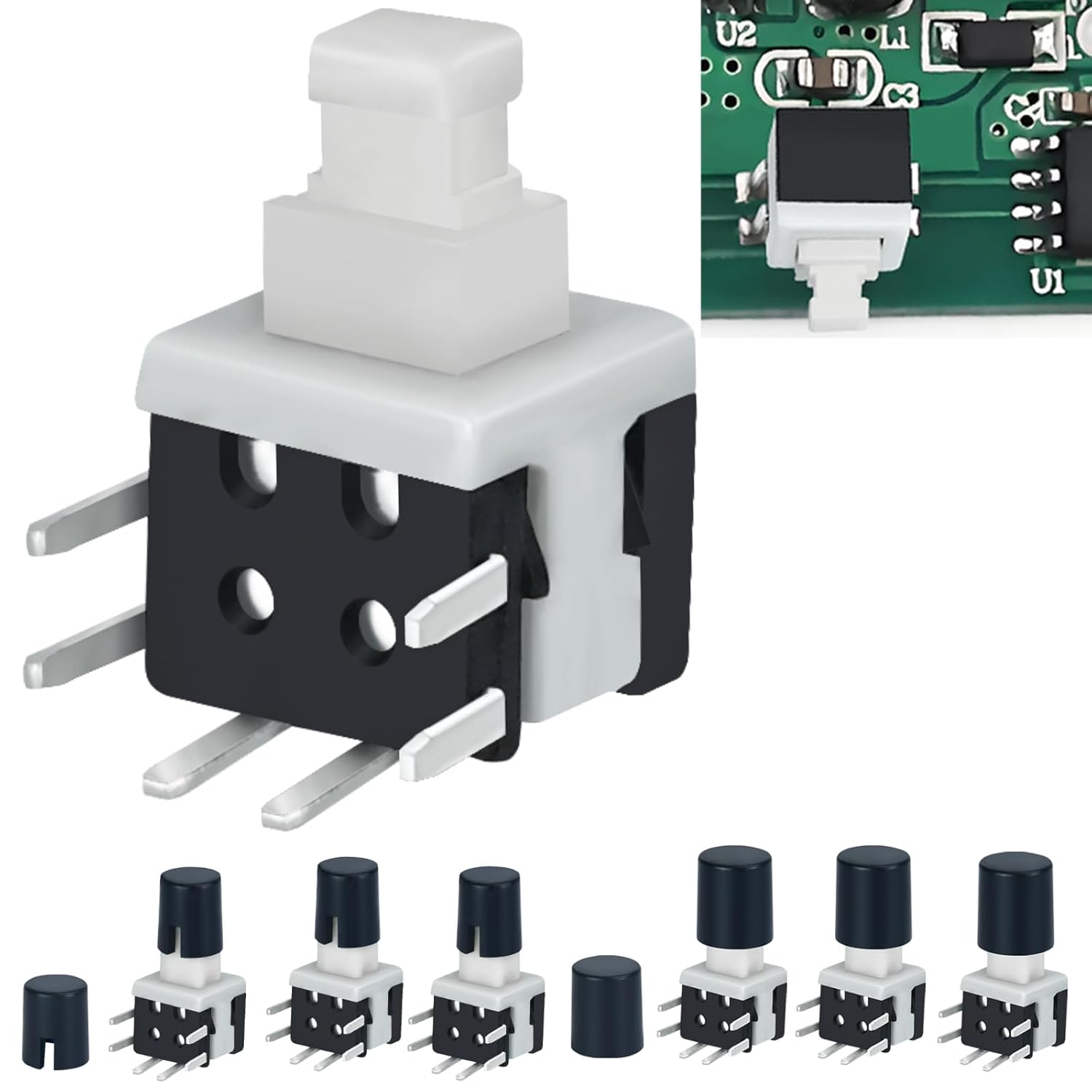
An image displaying the ZGSZJHF 5.8mm Micro Latching Push Button Switch, highlighting its compact size and the various switch caps provided for customization.
2. Package Contents
The package includes the following items:
- 30 x Micro Latching Push Button Switches
- 30 x 7mm Switch Caps
- 30 x 5.5mm Switch Caps
3. Specifications
| Feature | Specification |
|---|---|
| Model Number | JHF5.8-386-ZC |
| Size (L x W x H) | 5.8mm x 5.8mm x 10mm (0.23 x 0.23 x 0.39 inches) |
| Installation Method | Side Insertion Type (Plug-in) |
| Contact Type | SPDT (Single-Pole Double-Throw), 1 Normally Open (NO), 1 Normally Closed (NC) |
| Pins | 6-pin |
| Operation Mode | Latching (ON-OFF) |
| Current Rating | 0.5 Amps |
| Voltage Rating | 1.5V-30V DC |
| Contact Resistance | ≤ 100m Ohm |
| Mechanical Life | 50,000 Cycles |
| Soldering Temperature | 250°C for 3 seconds (max) |
| Withstand Voltage | AC250V(50Hz)/min |
| Operating Temperature | -25°C to +70°C |

This diagram shows the physical dimensions of the switch (5.8mm x 5.8mm) and visually explains the latching operation: 'Power off' (not locked, normal state) and 'Power on' (locked after press).
4. Installation and Setup
The ZGSZJHF micro latching push button switch is designed for side insertion into a circuit board. The pins are intended for soldering to establish electrical connections.
4.1 Pin Configuration
The switch features a 6-pin SPDT configuration. Refer to the diagram below for pin identification:
- Pins 1 & 4: Normally Open (NO)
- Pins 2 & 5: Normally Closed (NC)
- Pins 3 & 6: Common Pins
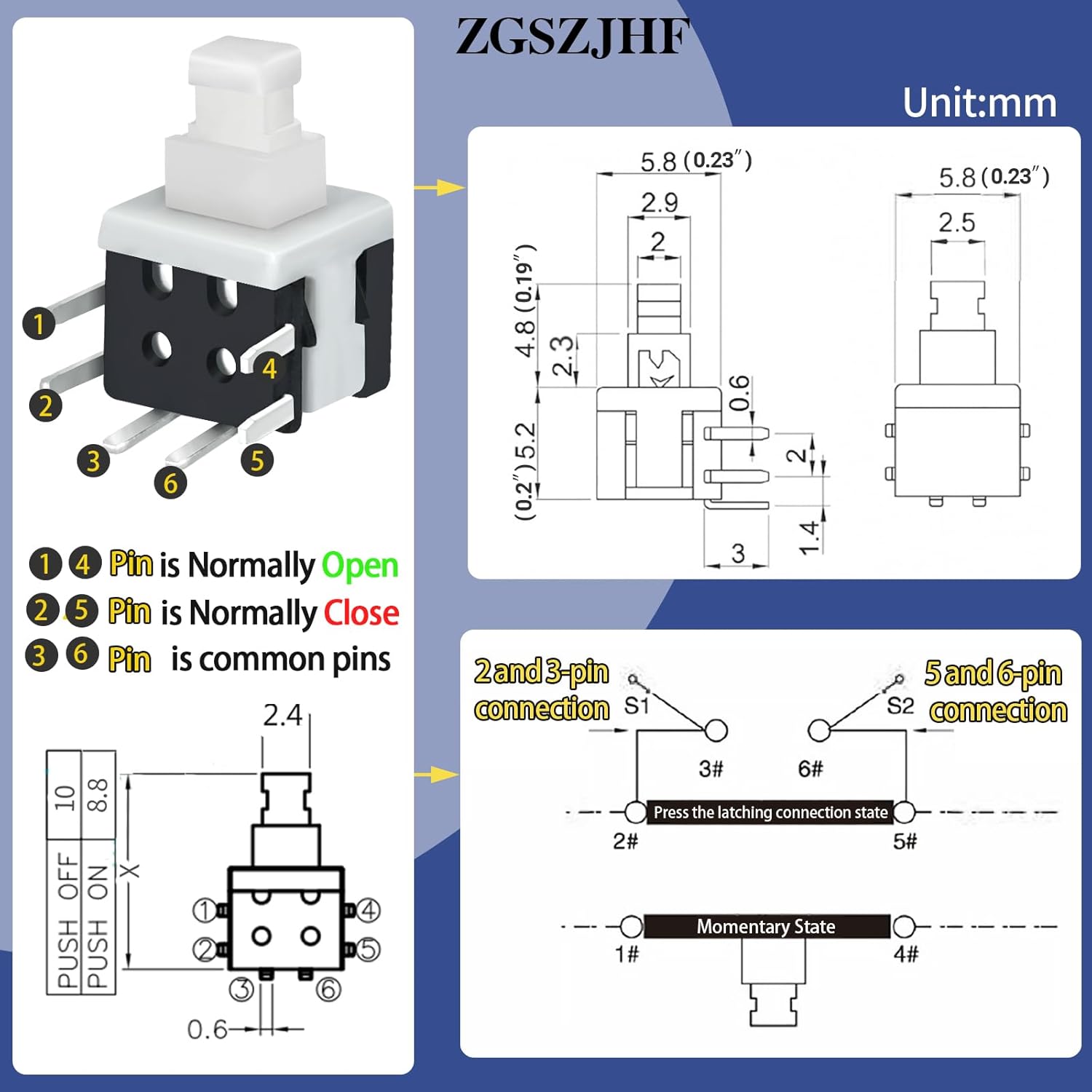
A technical diagram detailing the 6-pin configuration of the switch, identifying Normally Open (NO), Normally Closed (NC), and common pins. It also includes a circuit schematic for understanding connections.
4.2 Soldering Guidelines
- Exercise caution during soldering due to the small size and delicate nature of the switch.
- The recommended soldering temperature is 250°C for a maximum duration of 3 seconds per pin to prevent damage to the internal components.
- Ensure proper ventilation and use appropriate safety equipment when soldering.
4.3 Attaching Switch Caps
The included 5.5mm and 7mm switch caps can be pressed onto the switch stem after installation to provide a larger, more ergonomic button surface. Choose the cap size that best suits your application.
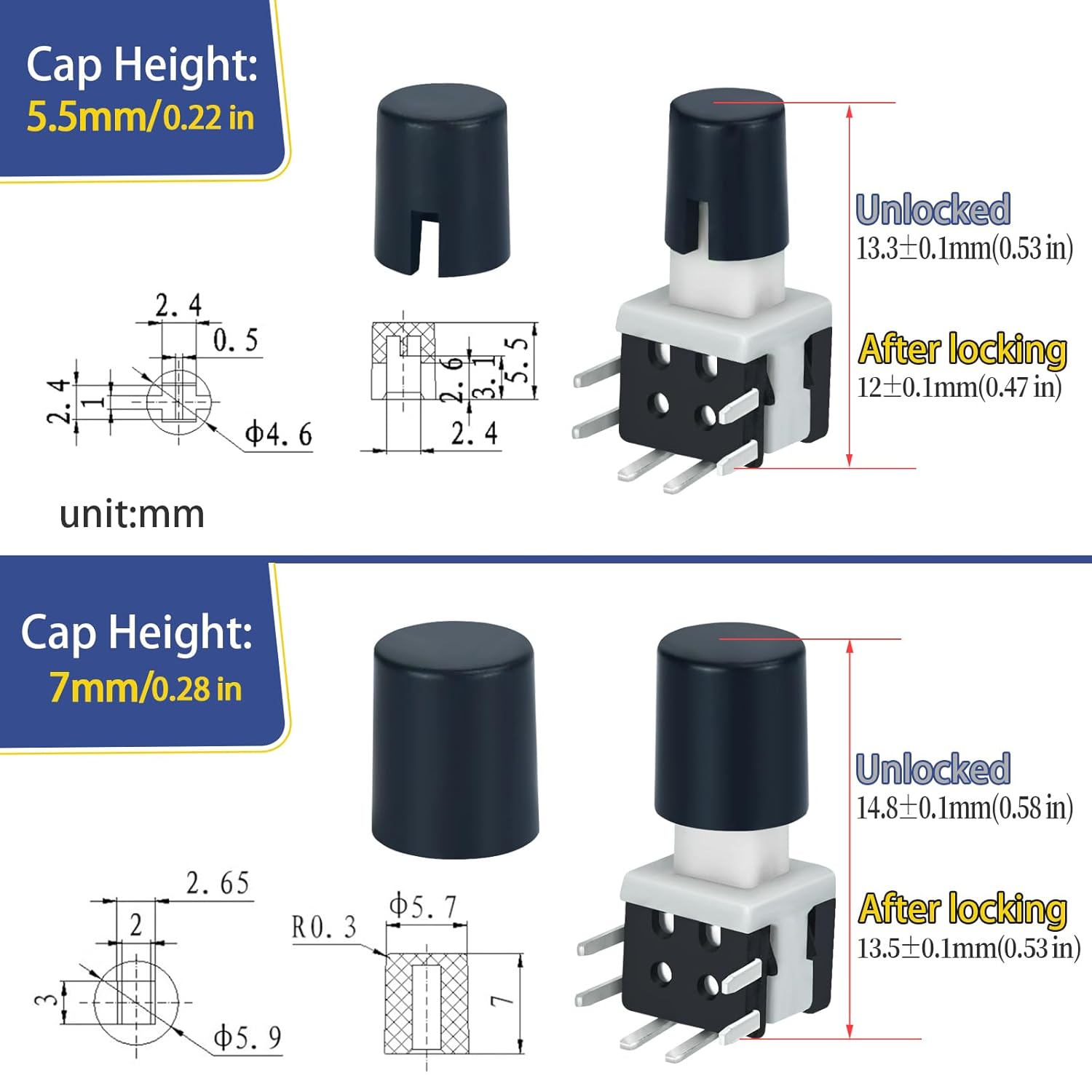
This image provides detailed measurements for both the 5.5mm and 7mm switch caps, showing their height in both unlocked and locked positions when attached to the switch.
5. Operation
This is a latching type switch. Its operation is as follows:
- First Press: Pressing the button once will change its electrical state (e.g., from OFF to ON). The switch will then 'latch' and remain in this new state.
- Second Press: Pressing the button a second time will revert it to its original electrical state (e.g., from ON to OFF). The switch will again 'latch' and remain in this state until pressed again.
The tactile feedback indicates a successful state change.
6. Maintenance
To ensure the longevity and reliable performance of your ZGSZJHF micro switches, follow these general maintenance guidelines:
- Cleanliness: Keep the switches clean and free from dust, dirt, or debris, which can interfere with their mechanical operation.
- Handling: Avoid applying excessive force during operation or installation. These switches are small and can be delicate.
- Soldering Integrity: Periodically inspect solder joints for any signs of cracking or corrosion, especially in environments with high vibration or humidity.
7. Troubleshooting
If you encounter issues with your ZGSZJHF micro latching push button switches, consider the following:
- Intermittent Connection: If the switch exhibits intermittent connection or flickering after repeated use, it may indicate wear on the internal contacts. Consider replacing the switch if it has exceeded its mechanical life cycle or if it's used in a high-frequency application.
- Switch Damage During Soldering: High soldering temperatures or prolonged heat exposure can damage the internal components of the switch, leading to malfunction or complete failure. Always adhere to the recommended soldering temperature of 250°C for a maximum of 3 seconds.
- Physical Fragility: These switches are small and can be delicate. Physical damage to the housing or pins during installation or handling can impair functionality. Ensure careful handling.
- Incorrect Wiring: Verify that the switch is wired correctly according to the SPDT pinout diagram provided in Section 4.1. Incorrect wiring will prevent proper operation.

An image depicting the micro switch integrated into a circuit board, with text indicating its wide range of uses in power supplies, motherboards, audio systems, and various industrial and home appliances.
8. Support
For technical support, product inquiries, or further assistance, please contact ZGSZJHF customer service through their official channels. Refer to the product packaging or the ZGSZJHF brand store on Amazon for contact information.