
1. Introduction
This manual provides detailed instructions for the installation, operation, and maintenance of your KUIPERAUTO Aluminum Quad Hard Truck Bed Tonneau Cover. Please read this manual thoroughly before installation and use to ensure proper function and longevity of your product.
1.1 Package Contents
- 1 Set Tonneau Cover
- Installation Parts (Clamps, Weather Stripping, etc.)
- 2 Light Strips (6500K White, 3900LLM)
- Instruction Manual (this document)
2. Compatibility
This tonneau cover is designed for specific vehicle models. Verify your truck's make, model, and bed length before proceeding with installation.
- Compatible Vehicles: 2016-2024 Nissan Titan Fleetside
- Bed Length: 5.6 FT (67 inches)
Important Note: You must accurately measure your truck bed length to ensure correct model fitment. Removal of bed side rails or cargo racks may be necessary for proper installation.

Figure 2.1: Illustration of how to measure your truck bed length from bulkhead to tailgate to ensure compatibility.
3. Safety Information
- Always ensure the tonneau cover is securely latched before driving.
- Do not operate the vehicle with the cover partially open or unsecured.
- Exercise caution when folding or unfolding the cover to avoid pinching hands or fingers.
- Do not place heavy objects on the cover.
- Ensure the light strips are properly installed and wired to avoid electrical hazards.
4. Installation Instructions
The installation process is designed to be straightforward. No drilling or additional modifications are typically required for most installations.
4.1 Preparation
- Unpack all components and verify against the package contents list.
- Clean the truck bed rails thoroughly to ensure proper adhesion of weather stripping and secure clamping.
- If present, remove any bed side rails or cargo racks that may interfere with the tonneau cover installation.
4.2 Tonneau Cover Installation
- Position the tonneau cover onto the truck bed rails, ensuring the front section (bulkhead side) is flush and centered.
- Unfold the first section of the cover towards the tailgate.
- Attach the front clamps to the truck bed rails. These clamps feature a patented design for secure attachment. Ensure they are tightened firmly but do not overtighten.
- Unfold the remaining sections of the cover towards the tailgate.
- Secure the rear clamps to the truck bed rails. Ensure these are also tightened firmly.
- Verify that the cover is centered and aligned on the truck bed. Adjust clamps as necessary.
- Apply the supplementary weather stripping along the edges of the truck bed where the cover rests, if not pre-installed, to enhance weather resistance.

Figure 4.1: The KUIPERAUTO Quad Hard Tonneau Cover fully installed on a truck bed.
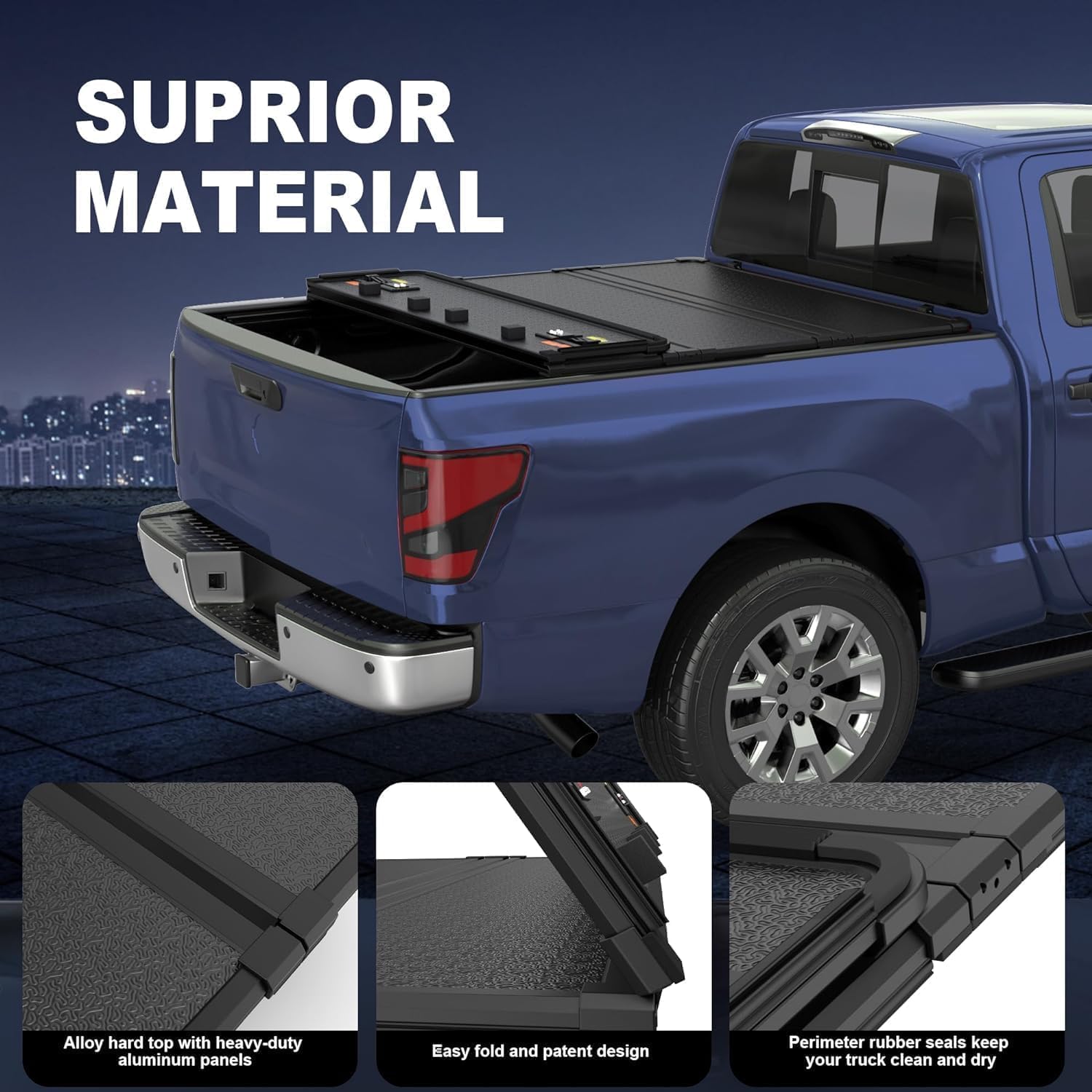
Figure 4.2: Detail of the patented clamp-on design for securing the tonneau cover to the truck bed rails.
4.3 Light Strip Installation
The included light strips provide illumination for your truck bed.
- Clean the surface where the light strips will be applied to ensure good adhesion.
- Peel the backing from the self-adhesive tape on the light strips.
- Carefully apply the light strips along the inside of the truck bed rails or other desired locations.
- Route the wiring to a suitable power source (e.g., truck's 12V system) and connect according to standard automotive wiring practices. Ensure connections are secure and insulated.
- Test the light strips to confirm proper operation.

Figure 4.3: The truck bed illuminated by the installed 6500K white light strips.
5. Operating Instructions
5.1 Opening the Tonneau Cover
- Release the rear latches located near the tailgate.
- Fold the rear section of the cover towards the cab.
- Continue folding each section until the desired open position is reached.
- If fully open, secure the folded cover using the integrated straps to prevent it from unfolding during transit.

Figure 5.1: Visual guide demonstrating the 4-fold flip-over operation of the tonneau cover.
5.2 Closing the Tonneau Cover
- Release the securing straps if the cover was fully open.
- Carefully unfold each section towards the tailgate.
- Ensure each section lays flat and aligns properly with the truck bed rails.
- Engage and secure the rear latches firmly. Verify that all sections are locked into place.
5.3 Using the Light Strips
The light strips are controlled via their integrated switch or remote, depending on the specific wiring setup. Activate them to illuminate the truck bed for improved visibility, especially in low-light conditions.
6. Maintenance
6.1 Cleaning
- Clean the tonneau cover regularly with mild soap and water.
- Use a soft cloth or sponge to wipe down the surfaces.
- Rinse thoroughly with clean water and allow to air dry.
- Avoid using abrasive cleaners or harsh chemicals, as these can damage the aluminum finish and rubber seals.
6.2 Inspection
- Periodically inspect all clamps and latches for tightness and proper function. Tighten if necessary.
- Check the weather stripping and perimeter rubber seals for any signs of wear or damage. Replace if compromised to maintain weatherproof integrity.
- Inspect the light strip wiring for any fraying or loose connections.

Figure 6.1: The tonneau cover is designed to be weatherproof and UV resistant, protecting against sun, rain, dust, and snow.
7. Troubleshooting
| Problem | Possible Cause | Solution |
|---|---|---|
| Cover does not fit properly or is difficult to close. | Incorrect bed length measurement; clamps not adjusted correctly; bed rails obstructed. | Verify truck bed length against product specifications. Loosen clamps, reposition cover, and retighten. Ensure no obstructions on bed rails. |
| Water leakage into the truck bed. | Damaged or improperly installed weather stripping; loose clamps; misaligned cover. | Inspect weather stripping and seals for damage or gaps; ensure all clamps are securely tightened; verify cover alignment. |
| Light strips not functioning. | Loose wiring connection; blown fuse; faulty light strip. | Check all electrical connections. Inspect vehicle's fuse box for a blown fuse. If connections are secure and fuse is good, the light strip may need replacement. |
| Tailgate difficult to open after cover installation. | Rear section of the cover or clamps are too close to the tailgate. | Adjust the position of the cover slightly forward or loosen the rear clamps and reposition to allow clearance for the tailgate. |
8. Specifications
- Brand: KUIPERAUTO
- Model: K102GC50102L2KJ2
- Style: Quad-Hard with Light Strip
- Exterior Finish: Aluminum
- Material: 14mm Aluminum
- Lock Type: Key
- Automotive Fit Type: Vehicle Specific Fit
- Item Weight: 63.1 pounds
- Package Dimensions: 69.49 x 22.64 x 6.3 inches
- UPC: 725414976634
- Light Strip: 2x 60 Inch, 6500K White, 3900LLM, 180 5050-SMD LEDs, IP67 Waterproof

Figure 8.1: The tonneau cover features durable 14mm thick aluminum panels.
9. Warranty and Support
For warranty information or technical support, please contact KUIPERAUTO customer service. Refer to your purchase documentation for specific warranty terms and contact details.
You can also visit the official KUIPERAUTO store for additional product information and support resources: KUIPERAUTO Store