
1. Product Overview
This product is a replacement LCD screen and digitizer assembly designed for the Motorola Moto G Power 2021. It is intended to replace faulty or damaged screens, restoring normal display and touch functionality to your device. The package includes the LCD replacement screen and a repair kit with necessary tools for installation.

Image 1: Overview of the replacement LCD screen for Motorola Moto G Power 2021.
2. Compatibility
This replacement LCD screen is compatible with the following Motorola Moto G Power 2021 models:
- Moto G Power (2021)
- XT2117
- XT2117-3
- XT2117-4
Please verify your phone's model number before proceeding with installation to ensure proper fit and function. An incorrect model will not work and may cause damage.

Image 2: Visual confirmation of compatible models: G Power (2021) and XT2117.
3. What's in the Box
Your package should contain the following items:
- 1 x LCD Replacement Screen
- 1 x Repair Kit (various tools for disassembly and reassembly)
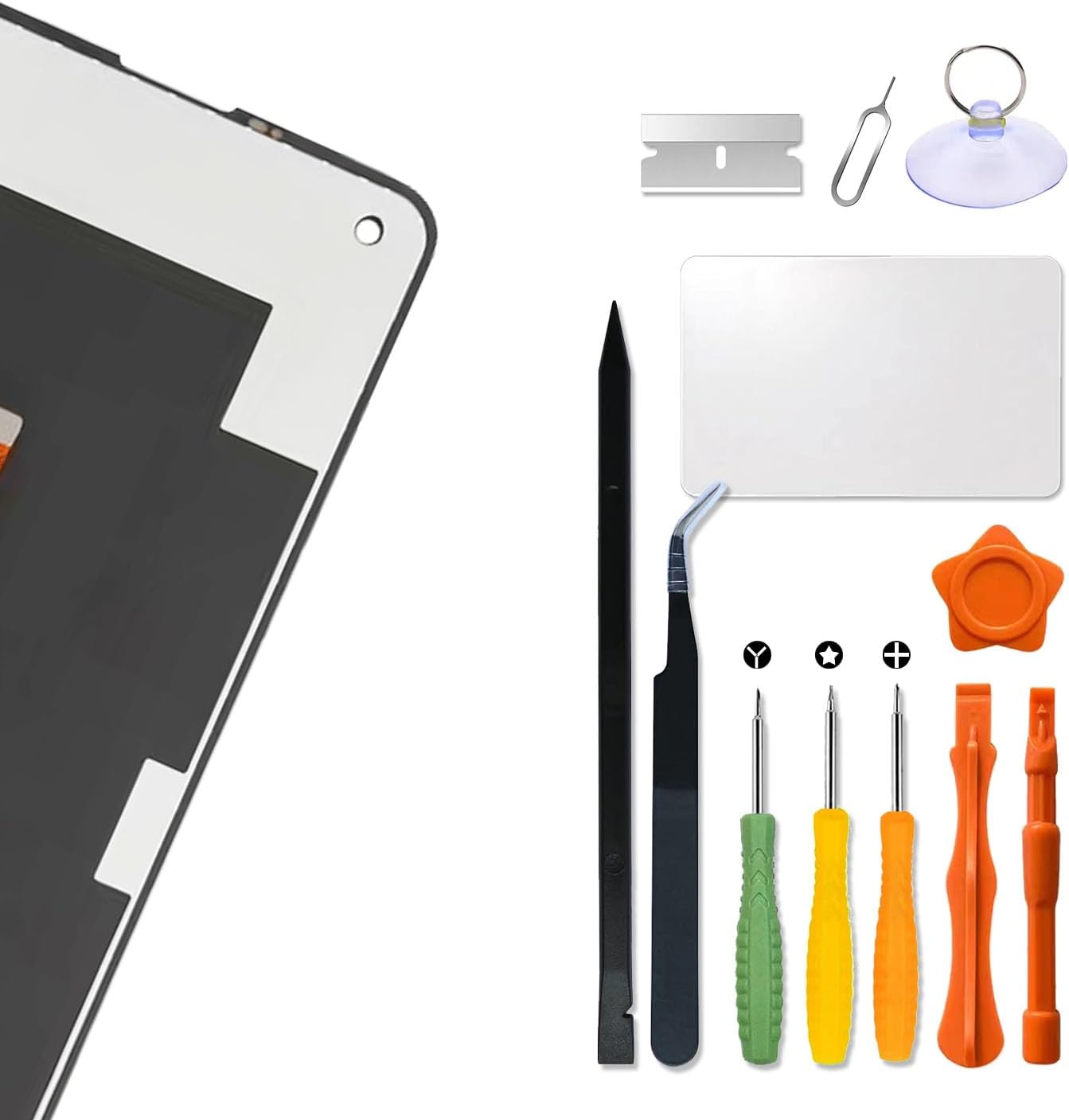
Image 3: Contents of the repair kit, including screwdrivers, prying tools, and suction cup.
4. Installation Guide
Important Safety Information:
- It is highly recommended that installation be performed by experienced individuals or professionals.
- Always shut down your device completely before starting any disassembly or installation. Removing the battery is recommended if possible.
- The LCD screen is fragile. Handle it with extreme care during installation to prevent bumping or damage.
- Ensure the LCD cable is not bent excessively. Bending over 90 degrees can result in a black display or permanent damage.
- Refer to online video tutorials (e.g., on YouTube) for detailed visual guidance specific to your phone model before beginning.
Step-by-Step Installation:
- Preparation: Power off your Motorola Moto G Power 2021. If possible, remove the SIM card tray and the back cover, then disconnect the battery connector to ensure no power is supplied to the device.
- Remove Damaged Screen: Carefully heat the edges of the old screen to loosen the adhesive. Use the provided suction cup and prying tools to gently separate the screen from the phone frame. Disconnect the flex cables connecting the old screen to the motherboard.
- Clean Frame: Remove any remaining adhesive or glass fragments from the phone frame. Ensure the frame is clean and smooth for the new screen.
- Test New Screen: Before fully installing, connect the new LCD screen's flex cables to the motherboard. Reconnect the battery (do not reassemble the phone yet) and power on the device. Test the display, touch functionality, and camera hole alignment.
- Final Installation: If the test is successful, power off the device and disconnect the battery. Apply new adhesive to the phone frame (if not pre-applied to the screen). Carefully align and press the new screen into place. Ensure all flex cables are properly connected and secured.
- Reassembly: Reconnect the battery, reattach the back cover, and insert the SIM card tray. Power on your device.

Image 4: Close-up of the flex cable connection point and the accurate camera hole on the replacement screen. The flex cable is tested for high-level quality.
5. Operating (Post-Installation Checks)
After successful installation, perform the following checks to ensure full functionality:
- Display Check: Verify that the screen displays images clearly, without dead pixels, lines, or discoloration.
- Touch Functionality: Test the entire screen for touch responsiveness. Drag an app icon across the screen to ensure all areas respond to touch.
- Brightness Adjustment: Check if screen brightness can be adjusted normally.
- Front Camera: Ensure the front camera functions correctly and is not obstructed by the new screen.
6. Maintenance
To prolong the life of your new screen:
- Avoid dropping your device or subjecting it to strong impacts.
- Use a screen protector and a protective case.
- Clean the screen with a soft, lint-free cloth, avoiding harsh chemicals.
- Keep the device away from extreme temperatures and moisture.
7. Troubleshooting
If you encounter issues after installation, consider the following:
- Black Display: Ensure all flex cables are securely connected. Check if any cable was bent excessively (over 90 degrees) during installation, which can cause permanent damage.
- Unresponsive Touch: Verify that the digitizer flex cable is properly seated. Re-test the screen before fully reassembling.
- Display Problems (lines, pixels): This may indicate a damaged screen or a loose connection. Recheck connections or contact customer service if the issue persists after re-seating cables.
- Screen Not Turning On: Ensure the battery is charged and properly connected. Try a hard reset of your device.
If troubleshooting steps do not resolve the issue, please contact customer support.
8. Specifications
- Product Type: LCD Touch Screen Display Panel Digitizer Assembly
- Compatibility: Motorola Moto G Power 2021 (XT2117, XT2117-3, XT2117-4)
- Package Dimensions: 7.48 x 3.94 x 1.18 inches
- Item Weight: 6.7 ounces
- Manufacturer: HWszyss
9. Warranty
This product comes with a 6-month after-sales service warranty. This warranty covers product quality problems that are not caused by human error. Support for replacement or refund is available under these conditions.
10. Support
If you have any questions regarding your order, installation, or product functionality, please contact our customer service team. We aim to provide assistance within 24 hours.