
taopodo T60
taopodo T60 Smart Watch User Manual
Model: T60
1. Introduction
Welcome to the taopodo T60 Smart Watch user manual. This guide provides essential information for setting up, operating, and maintaining your new smartwatch. Please read this manual thoroughly to ensure proper use and to maximize your device's features.
1.1 Package Contents
Before you begin, please verify that all items are present in your package:
- taopodo T60 Smart Watch x1
- Charging Cable x1
- Instruction Manual x1

Image: The taopodo T60 Smart Watch, showcasing its display and strap.

Image: Visual representation of the package contents including the watch, charging cable, and manual, along with watch dimensions.
2. Initial Setup
2.1 Charging the Smart Watch
Before first use, fully charge your taopodo T60 Smart Watch. Connect the magnetic charging cable to the charging points on the back of the watch and plug the USB end into a power adapter (not included) or a computer's USB port.
- Charging Time: Approximately 1.5 hours for a full charge.
- Battery Life: Up to 7 days of typical use, 30 days standby time.

Image: The smartwatch connected to its magnetic charger, illustrating the charging process and battery life details.
2.2 App Installation and Pairing
To unlock the full functionality of your T60 Smart Watch, you need to install the 'GloryFit' app on your smartphone and pair the devices.
- Turn on Bluetooth: Ensure Bluetooth is enabled on your smartphone.
- Download the App: Search for 'GloryFit' in the Google Play Store (for Android) or Apple App Store (for iOS) and install it.
- Open and Register: Launch the 'GloryFit' app and follow the on-screen instructions to create an account or log in.
- Add Device: In the app, navigate to the 'Device' section and select 'Add Device'. The app will search for available devices.
- Select T60: From the list of found devices, select 'T60' to initiate the pairing process. Confirm any pairing requests on both your phone and the watch.
Once paired, the watch will synchronize data with your phone, including time and date settings.

Image: A visual guide demonstrating the steps to connect the taopodo T60 Smart Watch to a smartphone via the GloryFit app.
3. Operating the Smart Watch
3.1 Basic Navigation
- Touchscreen: Swipe left, right, up, or down to navigate through menus and features. Tap to select.
- Side Button: Press to return to the home screen or wake the display.
- Wake Screen: Raise your wrist or press the side button to wake the screen.
3.2 Bluetooth Call Functions
The T60 Smart Watch supports making and receiving calls directly from your wrist when connected to your smartphone via Bluetooth.
- Making Calls: Access the 'Dialpad' or 'Contacts' feature on the watch to initiate a call.
- Receiving Calls: When a call comes in, the watch will display the caller ID. Tap the green icon to answer or the red icon to reject.
- Call History: View recent calls directly on the watch.

Image: The smartwatch displaying incoming call and dialpad interfaces, alongside examples of smart notifications from various social media apps.

Image: Instructions within the GloryFit app for enabling Bluetooth call functionality on the T60 Smart Watch, showing options for dialpad, calling, call history, and contacts.
3.3 Smart Notifications
Receive notifications from SMS and various social media applications directly on your watch. Ensure notification permissions are granted in the 'GloryFit' app and your phone's settings.

Image: A user smiling while wearing the smartwatch, with various social media app icons displayed, indicating smart notification capabilities.
3.4 Health Monitoring
The T60 Smart Watch provides continuous health monitoring features:
- Heart Rate: Monitors your heart rate 24/7 using a high-precision PPG optical sensor. View real-time data on the watch and detailed trends in the 'GloryFit' app.
- Blood Oxygen (SpO2): Measures your blood oxygen levels in real-time.
- Sleep Monitoring: Automatically tracks your sleep patterns (deep sleep, light sleep, wake-up times). Analyze sleep quality and duration in the app.
- Activity Tracking: Records daily steps, distance, and calories burned.
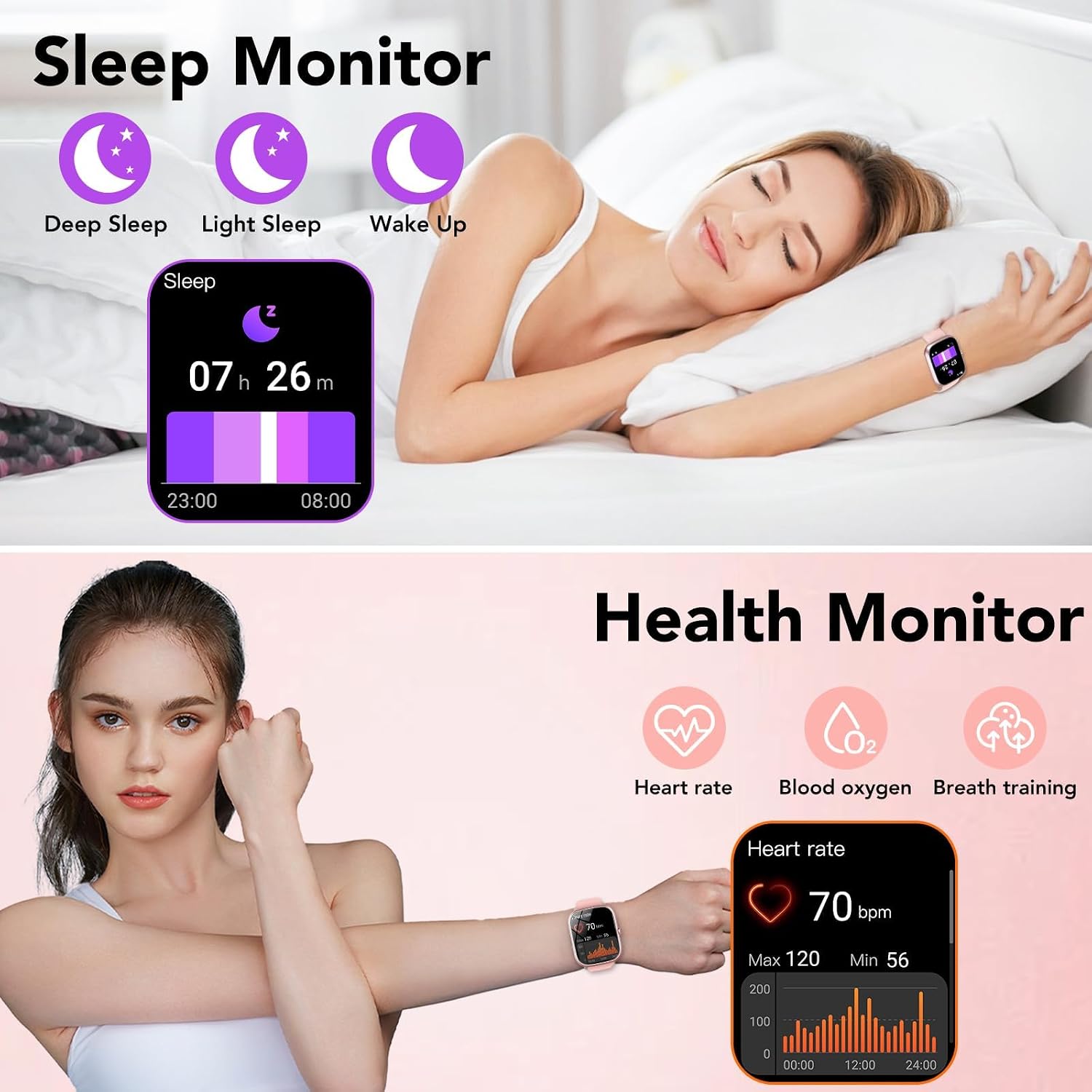
Image: The smartwatch displaying sleep duration and heart rate data, illustrating its health monitoring capabilities.

Image: A collage showing a woman exercising, a woman sleeping, and a woman drinking water, with corresponding smartwatch screens displaying heart rate, sleep record, and hydration reminders.
3.5 Sports Modes
The T60 Smart Watch supports over 115 sports modes. During exercise, the 'GloryFit' app records real-time data such as steps, calories burned, distance, and activity time to help you track your fitness progress.
- Selecting a Mode: Swipe on the watch face to find the 'Exercise' menu, then select your desired sport (e.g., hiking, cycling, football).
- Tracking: The watch will begin tracking your activity. You can view real-time metrics on the watch screen.
- Ending Activity: Swipe or press the button to pause or end the activity. Data will sync to the app.

Image: A woman jumping rope, with the smartwatch displaying a list of sports modes like basketball, football, and baseball, along with activity tracking data.

Image: A collage showing various individuals engaged in different sports activities, with the smartwatch displaying a menu of exercise options like outdoor run, indoor run, and outdoor walk.

Image: A woman looking at her phone, which displays activity tracking data (steps, distance, calories, heart rate) from the smartwatch.
3.6 Other Useful Features
The T60 Smart Watch includes a variety of additional features:
- Customizable Dials: Choose from over 250 personalized dial wallpapers or customize with your own photos via the app.
- Music Control: Control music playback on your smartphone.
- Camera Control: Use the watch as a remote shutter for your phone's camera.
- Weather Forecast: Get real-time weather updates.
- Alarm Clock: Set alarms directly from your watch.
- Stopwatch & Timer: Essential tools for timing activities.
- Find Phone: Locate your misplaced smartphone.
- Sedentary Reminder: Prompts you to move after periods of inactivity.
- Female Menstrual Cycle Tracker: For tracking menstrual cycles.
- Breathing Exercises: Guided breathing for relaxation.

Image: The smartwatch displaying various colorful watch faces and an example of the customization interface on a smartphone.

Image: A collection of different watch faces available for the 1.91-inch display, showcasing customization options.

Image: A collage illustrating various smartwatch features such as remote photo shoot, music playback, weather forecast, alarm, breath training, flashlight, find phone, and calculator.
4. Maintenance
4.1 Cleaning Your Smart Watch
To maintain the appearance and functionality of your watch, clean it regularly:
- Wipe the screen and strap with a soft, damp cloth.
- Avoid using harsh chemicals or abrasive materials.
- Ensure the charging contacts are clean and dry before charging.
4.2 Water Resistance (IP68)
The taopodo T60 Smart Watch has an IP68 waterproof rating. This means it is protected against dust ingress and can withstand immersion in water up to 1.5 meters for up to 30 minutes.
- It is suitable for daily use, such as hand washing, rain, and sweating during exercise.
- It is not suitable for hot showers, saunas, diving, or prolonged immersion in water.
- Avoid contact with hot water, steam, or corrosive liquids.
5. Troubleshooting
If you encounter issues with your taopodo T60 Smart Watch, refer to the following common solutions:
- Watch not turning on: Ensure the watch is fully charged. Connect it to the charger for at least 10 minutes.
- Cannot pair with phone:
- Ensure Bluetooth is enabled on your phone and the watch is within range.
- Restart both your phone and the watch.
- Make sure the 'GloryFit' app is updated to the latest version.
- If previously paired, try unpairing the device from your phone's Bluetooth settings and then re-pairing through the app.
- Inaccurate step count or sleep tracking:
- Ensure the watch is worn snugly on your wrist, about one finger's width from your wrist bone.
- Movement patterns like pushing a shopping cart or driving may affect step count accuracy.
- For sleep tracking, ensure you wear the watch throughout the night.
- Cannot change time: The watch time automatically synchronizes with your paired smartphone. Ensure your watch is successfully paired with the 'GloryFit' app and your phone's time settings are correct. If the time is incorrect, try re-syncing the watch with the app.
- Charging issues: Ensure the charging cable is securely connected to both the watch and the power source. Check for any debris on the charging contacts.
- Notifications not appearing: Verify that notification permissions are enabled for the 'GloryFit' app in your phone's settings, and that specific app notifications are turned on within the 'GloryFit' app.
For further assistance, please refer to the 'Help' section within the 'GloryFit' app or contact customer support.
6. Specifications
| Feature | Specification |
|---|---|
| Model Number | T60 |
| Screen Size | 1.91 Inches |
| Display Type | TFT HD Color Display (320*385 resolution) |
| Connectivity | Bluetooth 5.3 |
| Battery Capacity | 300 Milliamp Hours |
| Charging Time | Approx. 1.5 hours |
| Battery Life | 5-7 days (typical use), 30 days (standby) |
| Waterproof Rating | IP68 |
| Operating System Compatibility | Android 6.0+ / iOS 9.0+ |
| Health Monitoring | Heart Rate, SpO2, Sleep Monitor |
| Sports Modes | 115+ |
| Item Weight | 3.2 ounces (0.09 Kilograms) |
7. Warranty Information
Your taopodo T60 Smart Watch is covered by a manufacturer's warranty. Please refer to the warranty card included in your package or contact the seller for specific details regarding warranty duration and terms. Keep your proof of purchase for warranty claims.
8. Customer Support
If you have any questions, concerns, or require technical assistance that is not covered in this manual, please contact our customer support team. You can typically find contact information on the product packaging, the seller's website, or within the 'GloryFit' application.
For common inquiries, you may also find helpful resources and FAQs within the 'GloryFit' app.
Ask a question about this manual
Ask about setup, troubleshooting, compatibility, parts, safety, or missing instructions. Manuals+ will review the question and use this page’s manual context to help answer it.