
1. Safety Information
Please read all instructions carefully before installation and use. Retain this manual for future reference.
- Handle the mirror with care to avoid injury from sharp edges.
- Ensure the mirror is securely mounted to prevent falling.
- Keep the magnifying glass away from children.
- Do not use the mirror if the glass is cracked or damaged.
- All electrical connections should be performed by a qualified electrician in accordance with local codes and regulations.
- Always disconnect power at the circuit breaker before installation or maintenance.
- Do not expose the mirror to excessive moisture or direct water spray beyond normal bathroom use.
2. Product Overview
The YITAHOME LED Bathroom Mirror is designed to enhance your daily routine with advanced features and modern aesthetics. This mirror combines functionality with convenience, offering superior illumination and smart controls.
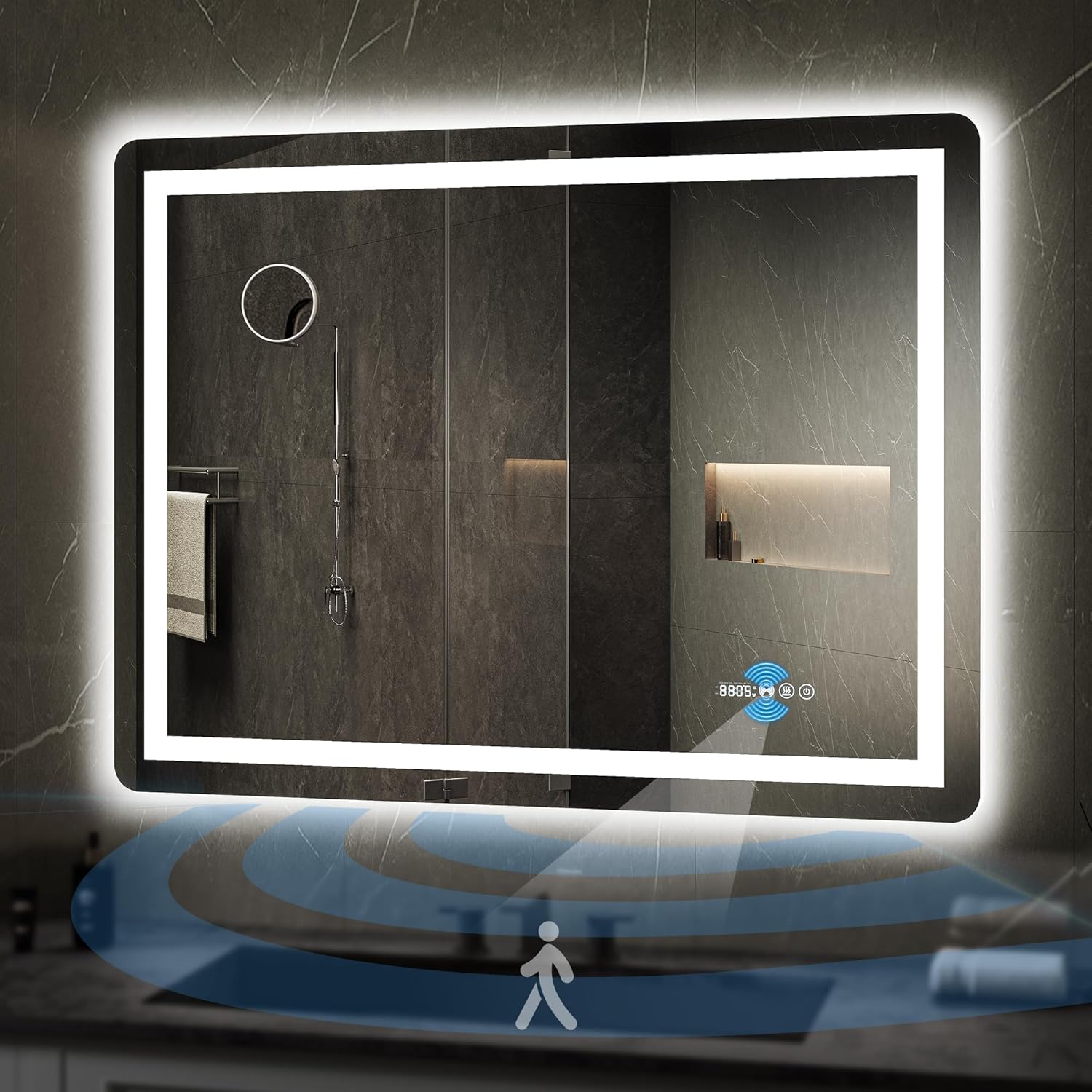
Image: YITAHOME LED Bathroom Mirror featuring front and backlit illumination, motion sensor, and integrated display.
Key Features:
- Infrared Motion Sensing: Automatic illumination within 1 meter (3.28 feet) sensing range for touchless operation.
- Simple Touch Control: Easily adjust color temperature (3000K warm white to 6000K cold white) and brightness with short and long presses. Includes memory function.
- Anti-Fog & Temperature Display: Built-in defogger ensures a clear reflection. Displays current time and temperature.
- 10x Magnifying Mirror: Integrated magnifying mirror for detailed tasks.
- Double-Lighted Design: Features both front light strip and backlight for comprehensive illumination.
- Durable Construction: Made with 5mm thick tempered glass and IP54 waterproof design for safe use in damp environments.
3. Setup and Installation
Proper installation is crucial for the safe and optimal performance of your YITAHOME LED Bathroom Mirror. It is recommended that installation be performed by a certified electrician.
Mounting the Mirror:
The mirror is designed for horizontal wall mounting. Ensure the mounting surface is sturdy and capable of supporting the mirror's weight. Use appropriate wall anchors and screws for your wall type.
Electrical Connection Options:
Your mirror offers two primary methods for electrical connection:
- Mode A: Plug-in Power: Simply plug the mirror's power cord into a standard 110V wall outlet.
- Mode B: Hardwired Connection: For a seamless look, the power plug can be cut off, and the power cord can be directly connected to a power box. This operation MUST be performed by a certified electrician with the main power switched off.

Image: Illustration of two installation methods: plugging into an outlet or hardwiring to a power box.
4. Operating Instructions
Familiarize yourself with the touch controls and smart features of your YITAHOME LED Bathroom Mirror.
Power On/Off and Lighting Control:
The mirror features touch-sensitive buttons integrated into the glass. The power button (usually on the right) controls the main illumination.
- Short Press Power Button: Turns the mirror lights on or off.
- Short Press Light Color Button (usually middle): Cycles through 3 color temperatures: warm white (3000K), neutral white, and cold white (6000K).
- Long Press Light Color Button: Adjusts the brightness of the selected light color. The mirror will remember your last brightness setting.

Image: Visual guide for using touch controls to switch between cool white, warm white, and warm yellow light colors, and to adjust brightness.
Anti-Fog Function:
Activate the anti-fog feature to maintain a clear reflection in steamy conditions.
- Short Press Anti-Fog Button (often marked with 'SSS' symbol): Activates or deactivates the defogger. The button will illuminate when active.

Image: A woman in a steamy bathroom, demonstrating the effectiveness of the anti-fog function on the mirror.
Infrared Motion Sensing:
The mirror can automatically turn on its lights when motion is detected within 1 meter (3.28 feet).
- Activation: The motion sensor is typically active by default. Refer to the 'Setting Motion Sensing' video for detailed activation/deactivation instructions.
- Operation: Lights turn on when a person is within 1 meter. Lights remain on while within 20-100 cm sensing range. Lights turn off 1 minute after moving out of range.
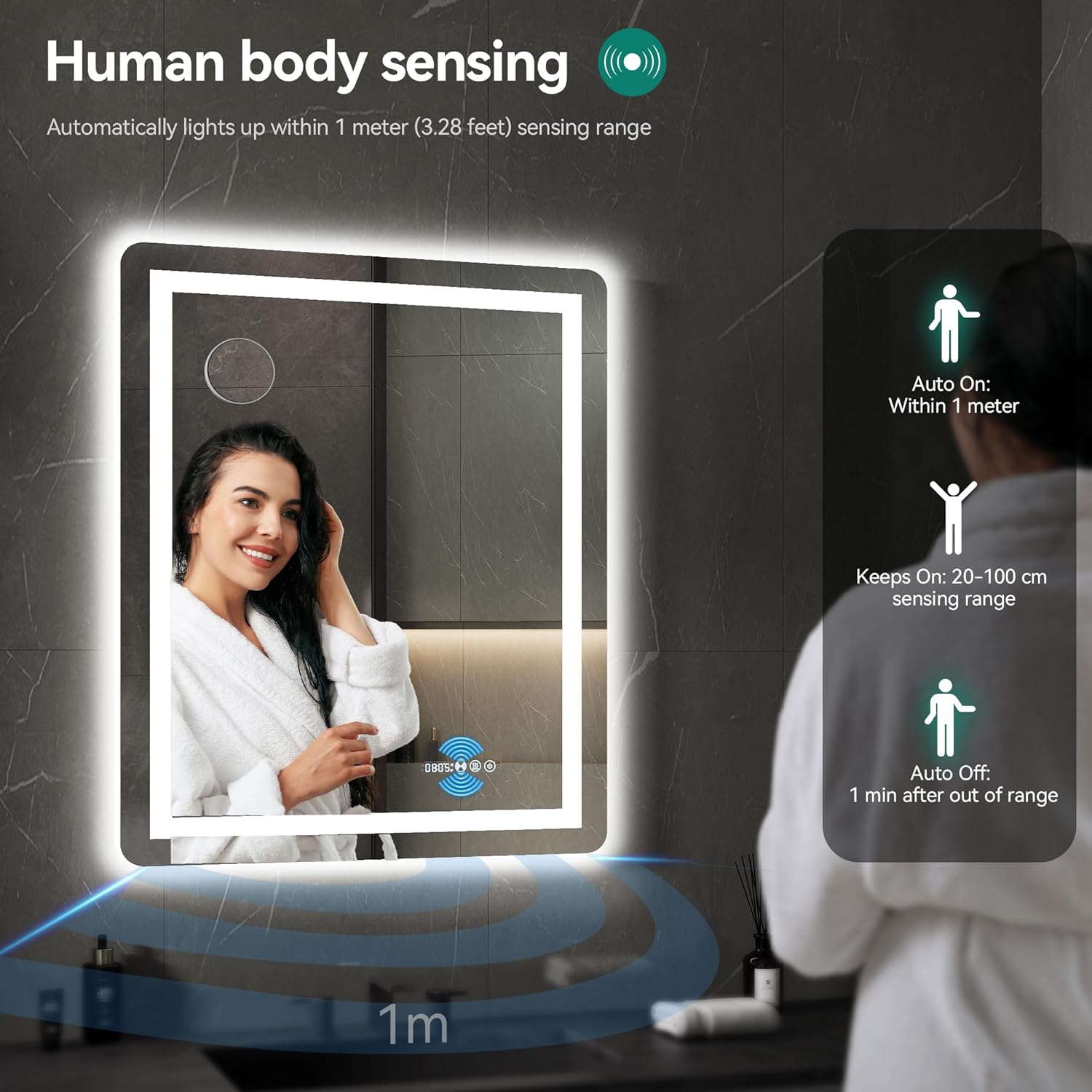
Image: Diagram showing the human body sensing range, with auto-on within 1 meter and auto-off 1 minute after leaving the range.
Time and Temperature Display:
The mirror displays the current time and temperature. These settings can be adjusted.
Video: Demonstration of how to adjust the time on the mirror's display.
Video: Instructions on setting the temperature unit (Celsius/Fahrenheit) on the mirror.
10x Magnifying Glass:
The mirror includes a built-in 10x magnifying glass for precise grooming tasks.

Image: A user applying lip gloss while utilizing the integrated 10x magnifying glass for enhanced detail.
5. Maintenance
Regular maintenance ensures the longevity and optimal performance of your mirror.
- Cleaning the Mirror Surface: Use a soft, lint-free cloth and a non-abrasive glass cleaner. Spray the cleaner onto the cloth, not directly onto the mirror, to prevent liquid from seeping into the electrical components.
- Cleaning the Frame: Wipe the frame with a soft, damp cloth. Avoid harsh chemicals or abrasive materials.
- Electrical Components: Ensure the mirror is unplugged or the power is off at the circuit breaker before cleaning any electrical parts. Do not attempt to clean internal electrical components.
- Inspection: Periodically check the mounting hardware for tightness and the power cord for any signs of damage.
6. Troubleshooting
If you encounter issues with your mirror, refer to the following common problems and solutions:
| Problem | Possible Cause | Solution |
|---|---|---|
| Mirror lights do not turn on. | No power, loose connection, faulty switch. | Check power supply and circuit breaker. Ensure the power cord is securely plugged in or hardwired correctly. Press the power button firmly. |
| Anti-fog function is not working. | Anti-fog feature not activated. | Ensure the anti-fog button (SSS symbol) is illuminated, indicating it is active. Allow a few minutes for the defogger to warm up. |
| Time or temperature display is incorrect. | Settings need adjustment. | Refer to the operating instructions and the provided videos for setting the time and temperature unit. Long press the appropriate button to enter setting mode. |
| Motion sensor is not responding or is too sensitive. | Sensor settings need adjustment, obstruction. | Ensure there are no obstructions in front of the sensor. Refer to the 'Setting Motion Sensing' video for instructions on adjusting sensor sensitivity or deactivating it if desired. |
| Lights flicker or dim unexpectedly. | Unstable power supply, internal wiring issue. | Check the power source for stability. If the problem persists, contact customer support; do not attempt internal repairs. |
If these solutions do not resolve the issue, please contact YITAHOME customer support for further assistance.
7. Specifications
| Feature | Detail |
|---|---|
| Brand | YITAHOME |
| Model Number | MAYIHeJKfq |
| Product Dimensions | 40"L x 32"W |
| Room Type | Bathroom |
| Shape | Rectangular |
| Frame Material | Glass |
| Mounting Type | Wall Mount |
| Finish Type | Brushed |
| Special Feature | Infrared Motion Sensor, 10X Magnifying Glass, 3 Colors Dimmable, Anti-Fog, Time/Temperature Display |
| Color | Glass (Frame Color: Silver) |
| Material | Glass |
| Assembly Required | No |
| Is Lighted | Yes |
| Item Weight | 15 pounds |
| UPC | 197839499362 |
8. Warranty and Support
YITAHOME stands behind the quality of its products. For specific warranty details, including coverage period and terms, please refer to the warranty card included with your purchase or visit the official YITAHOME website.
If you require technical assistance, have questions about installation, or need to report a defect, please contact YITAHOME customer support:
- Website: Visit the YITAHOME Store on Amazon (for general inquiries and product information)
- Contact Information: Please refer to your product packaging or the YITAHOME website for the most current customer service contact details (phone, email, or online support portal).
When contacting support, please have your model number (MAYIHeJKfq) and purchase date readily available.