
1. Overview
The IXTECH IX-MIC02 White Gaming USB Condenser Microphone is designed to provide clear and balanced audio for gaming, podcasting, and streaming. Featuring noise cancellation, RGB lighting, and versatile connectivity, this microphone enhances your audio experience on various platforms.
2. Package Contents
Please ensure all items are present in your package:
- IXTECH IX-MIC02 Condenser Microphone (x1)
- Microphone Base (x1)
- Shock Mount (x1)
- Pop Filter (x1)
- USB-C to USB-A Cable (6.6 feet) (x1)
- XLR Cable (x1)
- User Manual (x1)

Image: All components included in the IXTECH IX-MIC02 microphone package.
3. Product Features
- Clear and Balanced Sound: Equipped with a Cardioid pickup pattern to reduce background noise, ensuring your voice is clear for streaming, recording, and podcasting. Includes a shock mount and detachable pop filter.
- Dynamic RGB Lights: Multi-color RGB lighting effects to customize your setup. Lights turn red when muted and can be turned off by long-pressing the mute button.
- Mic Gain Control: Easily adjust volume and sensitivity with the gain knob to minimize room noise or increase sensitivity.
- Quick Mute Button: Instantly and quietly mute the microphone with a single press.
- Zero Latency Monitoring: Connect your headset via the 3.5mm jack for real-time audio monitoring without delays.

Image: IXTECH IX-MIC02 microphone highlighting its dynamic recording capabilities, cardioid polar pattern, and noise reduction features.

Image: Close-up of the IXTECH IX-MIC02 microphone's easy control features.
4. Setup Guide
- Assemble the Tripod Stand: Securely attach the microphone to the included tripod stand.
- Attach Shock Mount and Pop Filter: Install the shock mount onto the microphone, then attach the pop filter to the shock mount. This helps reduce vibrations and plosive sounds.
- Connect to Device: Use the provided USB-C to USB-A cable to connect the microphone to your PC, PS4, or PS5. For XLR connectivity, use the XLR cable (not included for USB-only models) to connect to an audio interface or mixer.
- Power On: The microphone is plug-and-play; it should be recognized by your device automatically.

Image: IXTECH IX-MIC02 microphone connected via USB-C to a PC, illustrating its plug-and-play compatibility.
5. Operating Instructions
- Mute/Unmute: Press the mute button on the microphone to instantly mute or unmute. The RGB lights will turn red when muted.
- Adjust Mic Gain: Rotate the gain knob located on the microphone to increase or decrease the microphone's sensitivity.
- Adjust Headphone Volume: If using the 3.5mm jack for monitoring, adjust the headphone volume using the dedicated control.
- RGB Lighting Control: Short press the RGB button to cycle through different color modes. Long press to turn the RGB lights on or off.
6. RGB Lighting Modes
The IXTECH IX-MIC02 features dynamic RGB lighting to enhance your setup. You can control the lighting as follows:
- Short Press: Cycles through various rainbow color modes and single-color options (red, orange, yellow, green, cyan, blue, purple).
- Long Press: Turns the RGB lights ON or OFF.
- Mute Indicator: When the microphone is muted, the RGB lights will turn red.
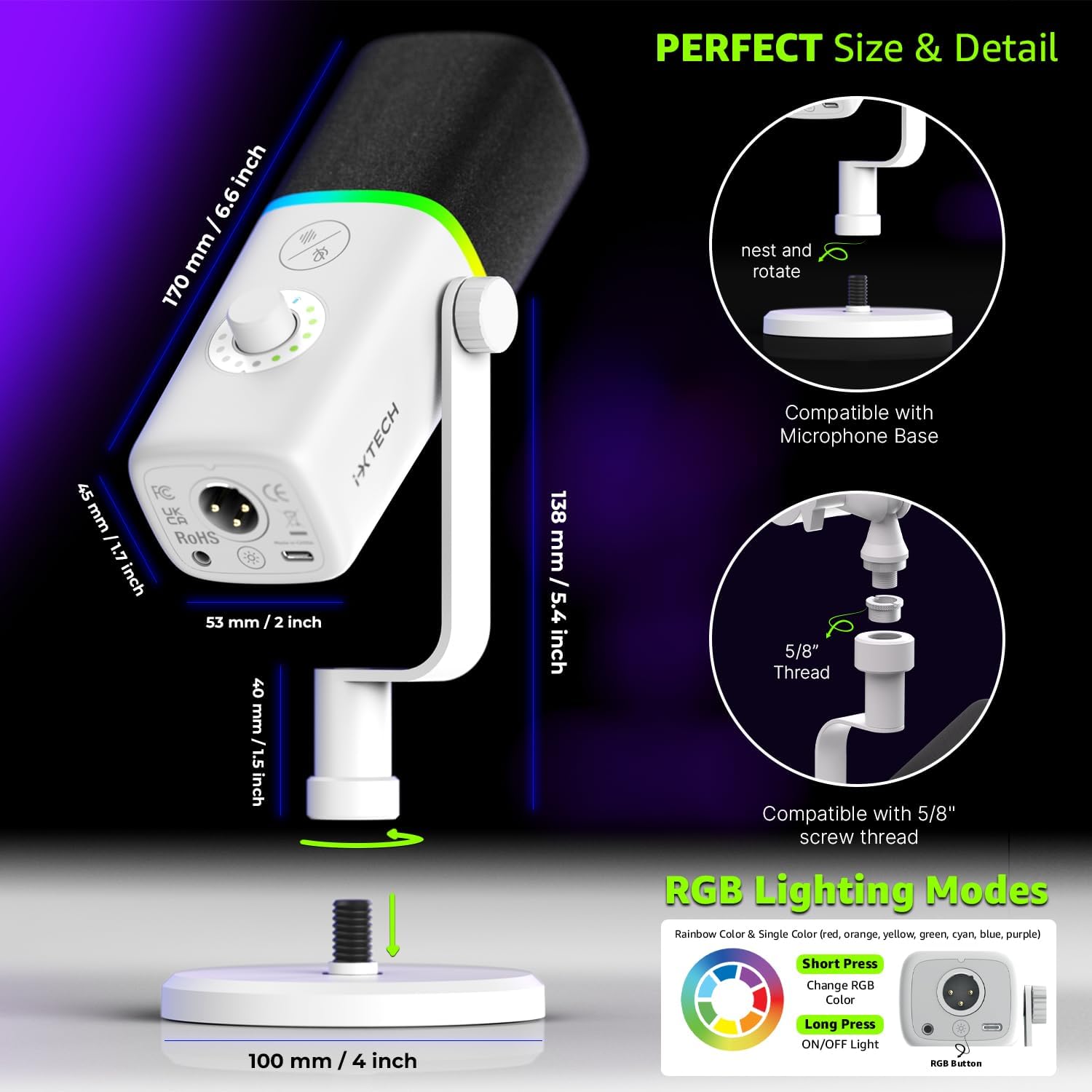
Image: Diagram illustrating the RGB lighting modes and controls.
7. Connectivity
The IXTECH IX-MIC02 offers flexible connectivity options:
- USB-C: Connects directly to PC, PS4, PS5, Macs, and Laptops using the included USB-C to USB-A cable. (Note: Not compatible with Xbox).
- XLR: For professional audio setups, the microphone features an XLR port for connection to external audio interfaces or mixers. An XLR cable is included.
- 3.5mm Headphone Jack: For zero-latency monitoring of your audio.

Image: IXTECH IX-MIC02 microphone showing its headphone jack and XLR connector.
8. Specifications
| Feature | Detail |
|---|---|
| Brand | IXTECH |
| Model Name | IX-MIC02 White |
| Connectivity Technology | Type-C |
| Connector Type | USB, XLR |
| Special Feature | 1-Touch Recording (Mute Button) |
| Compatible Devices | Digital Receiver, Laptop, MacOS, Personal Computer, Windows (Not compatible with Xbox) |
| Color | IX-MIC02 White |
| Polar Pattern | Unidirectional (Cardioid) |
| Audio Sensitivity | 1.5 Decibels |
| Impedance | 350 Ohms |
| Microphone Form Factor | Built-in |
| Power Source | Corded Electric |
| Signal-to-Noise Ratio | 105 dB |
| Hardware Platform | Laptop, PC |
| Number of Channels | 1 |
| Frequency Response | 40.16 Hz |
| Frequency Range | 40-16000 MHz |
| Maximum Frequency | 16 KHz |
| Minimum Frequency | 40 Hz |
| Audible Noise | 105 Decibels |
| Enclosure Material | Zinc |
| Item Weight | 1.23 Pounds |
| Item Dimensions | 8.2 x 3 x 2.5 inches |
9. Troubleshooting
- No Sound Output:
- Ensure the USB cable is securely connected to both the microphone and your device.
- Check your device's audio input settings to confirm the IXTECH microphone is selected as the default input device.
- Verify the microphone is not muted (RGB lights should not be red).
- Adjust the mic gain knob to an audible level.
- RGB Lights Not Working:
- Ensure the microphone is powered on and connected.
- Short press the RGB button to cycle through modes. Long press to turn them on.
- Background Noise:
- Ensure the cardioid pickup pattern is facing the sound source directly.
- Utilize the pop filter and shock mount to minimize plosives and vibrations.
- Adjust the mic gain to reduce sensitivity to ambient sounds.
10. Maintenance
- Cleaning: Use a soft, dry cloth to wipe the microphone's exterior. Do not use liquid cleaners or solvents.
- Storage: Store the microphone in a cool, dry place away from direct sunlight and extreme temperatures when not in use.
- Cable Care: Avoid bending or crimping the USB and XLR cables excessively to prevent damage.
11. Warranty and Support
The IXTECH IX-MIC02 Condenser Microphone comes with a 12-month Manufacturer's Warranty.
For any questions, concerns, or technical support, please refer to the contact information provided with your purchase or visit the official IXTECH website.