
YVDSZNMQ EAMPDW-TY-63-B
User Manual for YVDSZNMQ Smart Energy Meter and Protector
Model: EAMPDW-TY-63-B
1. Introduction
This manual provides comprehensive instructions for the installation, operation, and maintenance of the YVDSZNMQ 2P 63A 230V Smart Energy Meter, Over-Voltage, Under-Voltage, and Leakage Protector. This device is designed to monitor and protect electrical circuits from various anomalies, ensuring the safety and longevity of your electrical appliances and system.
Please read this manual thoroughly before installation and operation to ensure correct usage and to prevent potential hazards.
2. Safety Information
WARNING: Risk of Electric Shock!
- Installation and maintenance must be performed by qualified electricians only.
- Ensure the main power supply is disconnected before any installation, wiring, or maintenance work.
- Do not operate the device with wet hands or in damp environments.
- Verify all connections are secure and correct according to the wiring diagram.
- Do not attempt to repair or modify the device. Contact qualified personnel for service.
- This device is for indoor use only.
3. Product Overview
3.1 Key Features (Model EAMPDW-TY-63-B)
- Undervoltage Protection: Adjustable from 90V to 190V (default 170V).
- Overvoltage Protection: Adjustable from 100V to 300V (default 270V).
- Overcurrent Protection: Adjustable from 10A to 80A (default 50A).
- Leakage Protection: Adjustable from 10mA to 99mA.
- Reconnection Time (Delayed Online Time): Adjustable from 5s to 90s (default 30s).
- Power Display Range: 0-99999.9 kWh.
- Power Recording Range: 10-500 kWh (default 30 kWh).
- Backlight Time: Approximately 15 seconds.
- Memory function for Kwh, overvoltage, undervoltage, and overcurrent values upon power cut-off.
3.2 Components and Display

Figure 3.2.1: Front view of the EAMPDW-TY-63-B Smart Energy Meter and Protector. The display shows voltage (V), current (A), and kilowatt-hour (kWh) readings. Buttons for 'SET', 'Up/Down', and 'Power' are visible at the bottom. Input terminals (IN) are at the top, and output terminals (OUT) are at the bottom.
The device features a clear digital display showing real-time electrical parameters such as voltage (V), current (A), and accumulated energy consumption (kWh). It also indicates leakage current (mA). Control buttons ('SET', 'Up/Down arrows', 'Power') allow for parameter adjustment and device control.
4. Setup and Installation
Before installation, ensure the main power supply is turned off at the circuit breaker or fuse box. This device is designed for DIN rail mounting.
4.1 Wiring Diagram
Connect the incoming live (L) and neutral (N) wires to the "IN" terminals at the top of the device. Connect the outgoing live (L) and neutral (N) wires to the "OUT" terminals at the bottom of the device. Ensure all connections are tight and secure.
- IN (Top): Connect to the main power source.
- OUT (Bottom): Connect to the load (appliances/circuit).
Refer to local electrical codes and standards for proper wiring practices.
5. Operating Instructions
5.1 Powering On/Off
After successful installation and wiring, turn on the main power supply. The device display will illuminate, showing current readings.
To manually turn off the output, press the Power button. Press it again to turn on the output.
5.2 Viewing Parameters
The default display shows voltage, current, and kWh. The device cycles through various parameters automatically. You can also press the SET button briefly to cycle through different display modes, such as leakage current (mA).
5.3 Adjusting Protection Parameters
To enter the setting mode, press and hold the SET button for approximately 3-5 seconds until the display changes to a setting parameter.
- While in setting mode, use the Up and Down arrow buttons to adjust the value of the currently displayed parameter.
- Press the SET button briefly to move to the next parameter.
- Parameters for Model EAMPDW-TY-63-B include:
- Undervoltage Protection (90V-190V)
- Overvoltage Protection (100V-300V)
- Overcurrent Protection (10A-80A)
- Reconnection Time (5s-90s)
- Leakage Protection (10-99mA)
- Power Recording Range (10-500kWh)
- After setting all desired parameters, press and hold the SET button again for 3-5 seconds to save the settings and exit the setting mode. The device will return to normal operation.
Note: The device has a memory function, so settings will be retained even after a power cut-off.
6. Maintenance
The YVDSZNMQ Smart Energy Meter and Protector is designed for minimal maintenance. However, regular checks can ensure optimal performance and safety.
- Cleaning: Gently wipe the device with a dry, soft cloth. Do not use abrasive cleaners or solvents. Ensure the device is powered off before cleaning.
- Connection Check: Periodically inspect wiring connections to ensure they remain tight and free from corrosion. (Ensure power is off before checking connections).
- Environmental Conditions: Ensure the operating environment remains within specified temperature and humidity ranges to prevent damage.
7. Troubleshooting
| Problem | Possible Cause | Solution |
|---|---|---|
| Device does not power on. | No input power; incorrect wiring; internal fault. | Check main power supply. Verify wiring connections. If problem persists, contact support. |
| Device trips frequently. | Protection parameters set too low; actual overcurrent/overvoltage/undervoltage/leakage. | Check and adjust protection parameters. Investigate the circuit for actual faults (e.g., short circuit, overloaded appliances, ground fault). |
| Display is blank or flickering. | Unstable power supply; internal fault. | Check input voltage stability. If problem persists, contact support. |
| Cannot adjust settings. | Not in setting mode; buttons malfunctioning. | Ensure you press and hold the SET button for 3-5 seconds to enter setting mode. If buttons are unresponsive, contact support. |
8. Specifications
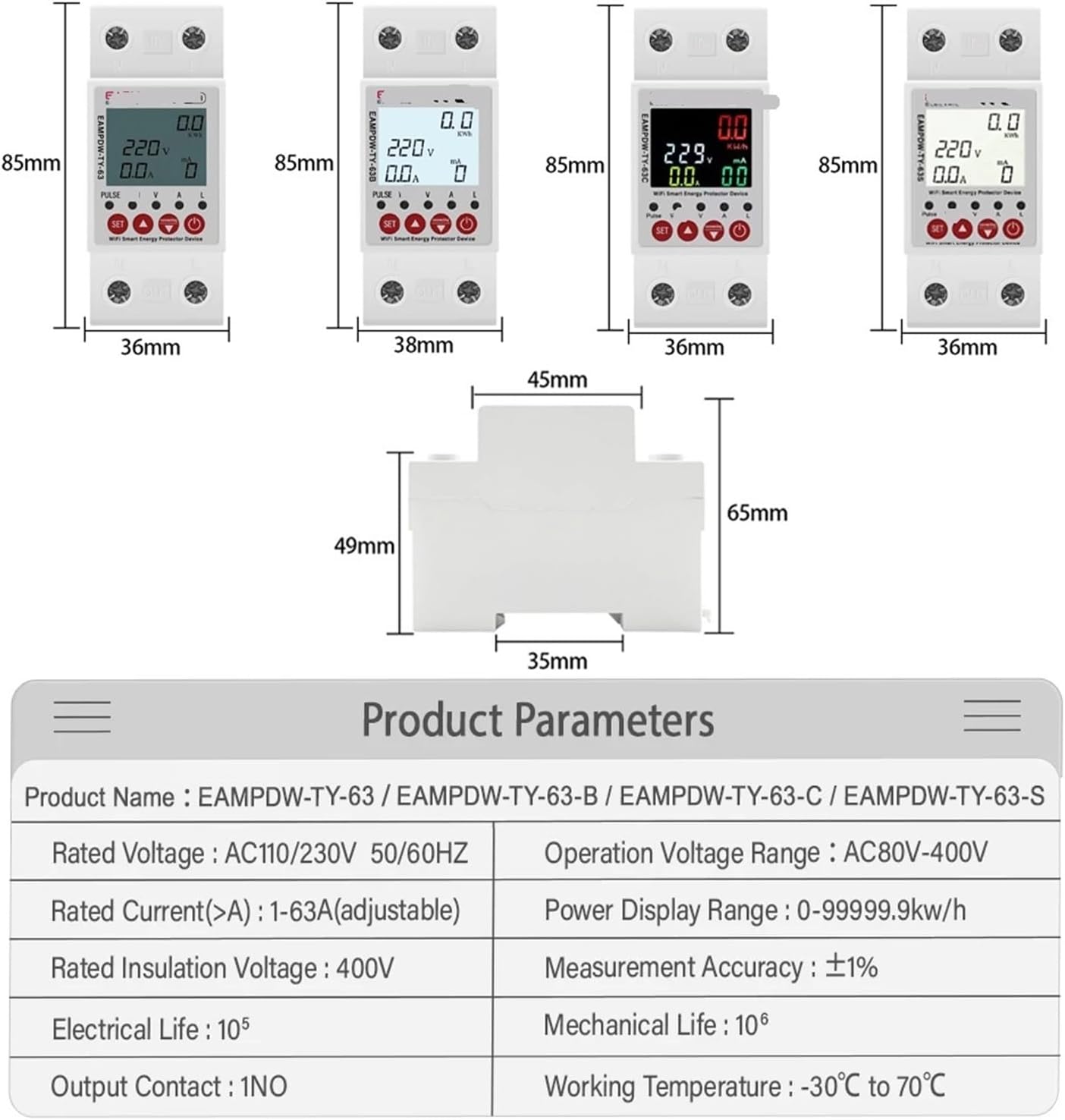
Figure 8.1.1: Product dimensions and a table detailing general product parameters applicable to EAMPDW-TY-63, EAMPDW-TY-63-B, EAMPDW-TY-63-C, and EAMPDW-TY-63-S models.
| Parameter | Value |
|---|---|
| Rated Voltage | 230V AC |
| Frequency | 50Hz/60Hz |
| Rated Current (Adjustable) | 1-63A (for EAMPDW-TY-63/C/S), 10-80A (for EAMPDW-TY-63-B) |
| Operation Voltage Range | AC80V-400V |
| Power Display Range | 0-99999.9 kWh |
| Rated Insulation Voltage | 400V |
| Measurement Accuracy | ±1% |
| Electrical Life | 105 cycles |
| Mechanical Life | 106 cycles |
| Output Contact | 1NO |
| Working Temperature | -30°C to 70°C |
| Package Dimensions | 1.18 x 0.79 x 0.39 inches |
| Item Weight | 1.76 ounces |

Figure 8.1.2: Feature comparison table for various models of the Smart Energy Meter and Protector, highlighting differences in protection types, control features, and display options.
9. Warranty and Support
Specific warranty information is not provided in the product details. Please refer to the retailer or manufacturer's official website for warranty terms and conditions.
For technical support, troubleshooting assistance, or service inquiries, please contact your point of purchase or the manufacturer, YVDSZNMQ.
Manufacturer: YVDSZNMQ
Ask a question about this manual
Ask about setup, troubleshooting, compatibility, parts, safety, or missing instructions. Manuals+ will review the question and use this page’s manual context to help answer it.