
Introduction
Thank you for purchasing the Big Ben BTTDMINIDG Bluetooth Speaker Alarm Clock. This device combines a retro turntable design with modern audio features, including Bluetooth connectivity, FM radio, AUX-IN, and Micro SD card playback, along with a dual alarm clock function. This manual provides detailed instructions to help you set up, operate, and maintain your new speaker.
Safety Information
- Read all instructions carefully before use and retain them for future reference.
- Do not expose the device to water, moisture, or extreme temperatures.
- Avoid placing the device near heat sources or in direct sunlight.
- Do not attempt to disassemble or repair the device yourself. Refer all servicing to qualified personnel.
- Use only the specified charging cable and power adapter.
- Keep the device away from children and pets.
Package Contents
Please check that all items are present in your package:
- Big Ben BTTDMINIDG Bluetooth Speaker Alarm Clock
- USB-C Charging Cable
- User Manual (this document)
Product Overview
Familiarize yourself with the components and controls of your Big Ben BTTDMINIDG speaker.
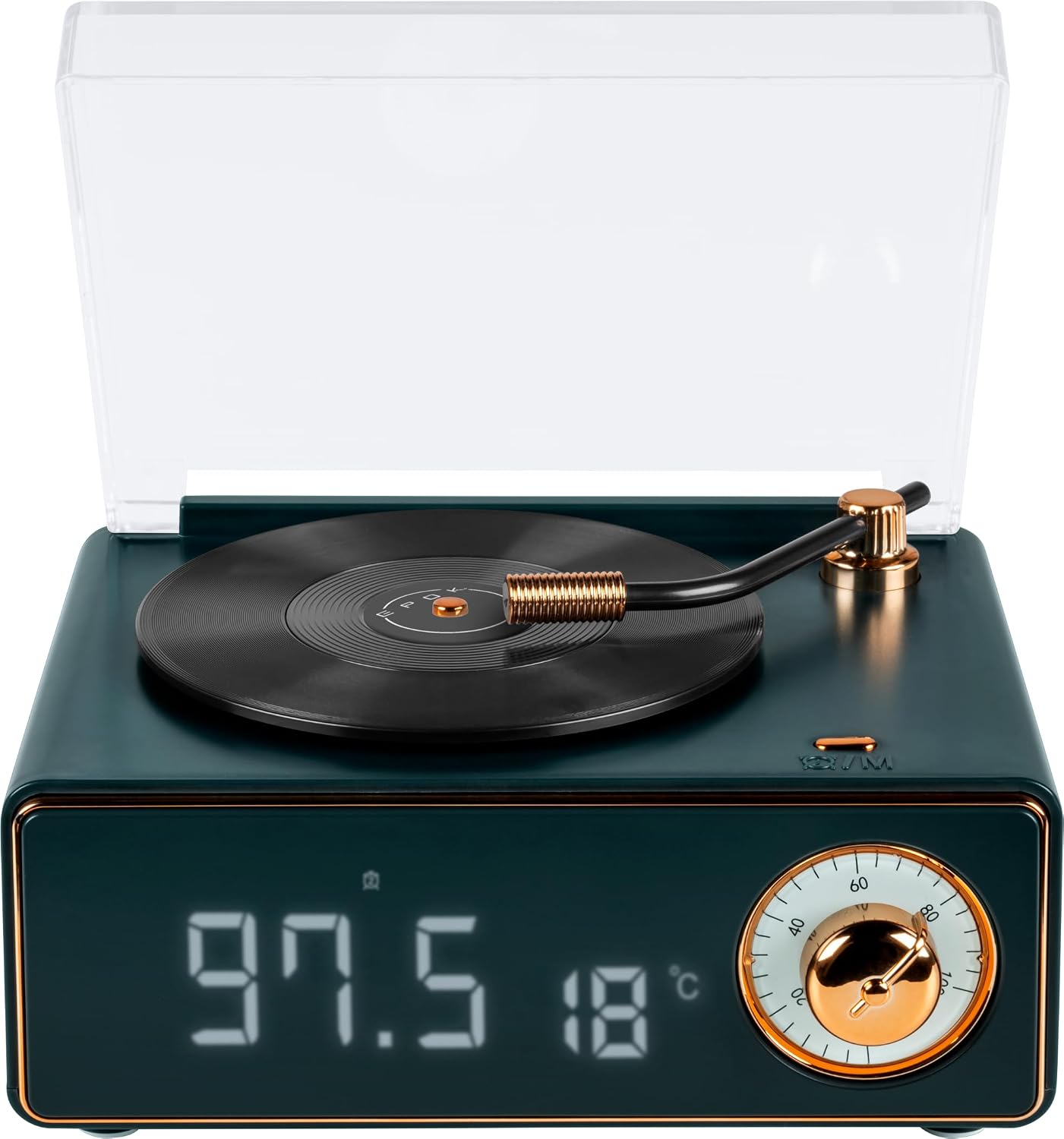
Figure 1: Front View. This image displays the front of the speaker, highlighting the digital display which shows the current time and indoor temperature. To the right, a rotary knob for volume control is visible, designed to resemble a classic turntable control.

Figure 2: Angled View. An angled perspective of the speaker, showcasing the digital display with time and temperature, and providing a glimpse of the side where various input ports (such as AUX-IN) and control buttons are located.

Figure 3: Top View. This image shows the top of the speaker, featuring a transparent dust cover that protects the decorative turntable. The tonearm and a small record are visible, emphasizing the retro design. This turntable rotates when music is playing.
Setup
1. Charging the Device
- Locate the USB-C charging port on the back or side of the speaker.
- Connect the provided USB-C cable to the speaker and the other end to a compatible USB power adapter (not included) or a computer's USB port.
- The charging indicator light will illuminate.
- Once fully charged, the indicator light will change or turn off. Disconnect the charging cable.
2. Powering On/Off
- To power on, press and hold the Power button for a few seconds. The display will light up.
- To power off, press and hold the Power button again until the display turns off.
3. Setting Time and Date
(Specific instructions for setting time and date are not detailed in the product description. General guidance provided.)
- Refer to the specific buttons on your device (e.g., "SET", "MODE", arrow buttons) to enter time setting mode.
- Use the navigation buttons to adjust hours, minutes, and date (if applicable).
- Confirm your settings to save.
Operating Instructions
1. Bluetooth Mode
- Power on the speaker. It will automatically enter Bluetooth pairing mode, indicated by a flashing Bluetooth icon on the display.
- On your mobile device, enable Bluetooth and search for available devices.
- Select "BTTDMINIDG" (or similar name) from the list.
- Once paired, the Bluetooth icon will stop flashing, and you can start playing music from your device.
2. AUX-IN Mode
- Connect one end of a 3.5mm audio cable (not included) to the AUX-IN port on the speaker.
- Connect the other end to the audio output jack of your external device (e.g., MP3 player, computer).
- The speaker should automatically switch to AUX-IN mode, or you may need to press the "MODE" button to select it.
- Control playback and volume from your external device.
3. Micro SD Card Playback
- Insert a Micro SD card (with supported audio files) into the Micro SD card slot on the speaker.
- The speaker will automatically detect the card and begin playing music, or you may need to select Micro SD mode using the "MODE" button.
- Use the speaker's control buttons (e.g., Play/Pause, Next/Previous) to manage playback.
4. FM Radio
- Switch the speaker to FM radio mode using the "MODE" button.
- Press and hold the Play/Pause button (or a dedicated scan button) to initiate automatic station scanning. The speaker will search for and save available FM stations.
- Use the Next/Previous buttons to navigate through the saved stations.
5. Alarm Clock Function
The speaker features a dual alarm clock. (Specific button names for alarm setting are not provided, general steps are given.)
- Press the "ALARM" button (or similar) to enter alarm setting mode.
- Use the navigation buttons to set the desired alarm time for Alarm 1.
- Press "ALARM" again to set Alarm 2.
- Select your desired alarm sound (e.g., buzzer, FM radio, Micro SD).
- Confirm your settings. The alarm icon will appear on the display.
- To snooze, press any button (except power) when the alarm sounds. To turn off the alarm, press the Power button.
6. Volume Control
Rotate the dedicated volume knob on the front of the speaker clockwise to increase volume and counter-clockwise to decrease volume.
7. Turntable Rotation Feature
The decorative vinyl turntable on top of the speaker will rotate automatically when music is playing, adding to the retro aesthetic.
Maintenance
- Cleaning: Use a soft, dry cloth to wipe the surface of the speaker. Do not use abrasive cleaners or solvents.
- Storage: When not in use for extended periods, store the speaker in a cool, dry place, away from direct sunlight and extreme temperatures.
- Battery Care: To prolong battery life, avoid fully discharging the battery frequently. Charge the device regularly, even if not in constant use.
Troubleshooting
| Problem | Possible Cause | Solution |
|---|---|---|
| Device does not power on. | Low battery. | Charge the device using the USB-C cable. |
| No sound. | Volume too low; incorrect mode selected; device not properly connected. | Increase volume. Ensure correct input mode (Bluetooth, AUX, SD) is selected. Reconnect Bluetooth or AUX cable. |
| Bluetooth not connecting. | Speaker not in pairing mode; device too far; Bluetooth disabled on source device. | Ensure speaker is in pairing mode. Move devices closer. Enable Bluetooth on your source device. Forget and re-pair the device. |
| FM radio reception is poor. | Weak signal; interference. | Relocate the speaker to an area with better reception. Avoid placing near other electronic devices. |
Specifications
| Feature | Detail |
|---|---|
| Model Number | BTTDMINIDG |
| Brand | Big Ben |
| Bluetooth Version | 5.3 |
| Connectivity Technology | Bluetooth, AUX-IN |
| Special Features | Dual Alarm Clock, Micro SD Card Reader, FM Radio with auto scan, Time and Indoor Temperature Display, Rotating Turntable with music sound |
| Total Music Power | 15 W |
| Built-in Rechargeable Battery | Yes (1200 mAh) |
| Power Source | Battery Powered |
| Product Dimensions (L x W x H) | 12 x 3.81 x 14 cm (4.72 x 1.5 x 5.51 inches) |
| Product Weight | 100 grams (0.22 lbs) |
| Display Type | Digital |
| Style | Retro |
| Color | Dark Green |
| Usage | Indoor |
| Frame Material | Resin |
Warranty Information
This product is covered by a manufacturer's warranty. Please refer to the warranty card included in your package or visit the official Big Ben website for detailed terms and conditions. The warranty typically covers defects in materials and workmanship under normal use.
Customer Support
If you encounter any issues or have questions regarding your Big Ben BTTDMINIDG Bluetooth Speaker Alarm Clock, please contact our customer support team. You can usually find contact information (phone, email, or support portal) on the Big Ben official website or on your purchase documentation.