
WorryFree Gadgets WA65
WorryFree Gadgets 300W Wireless Bluetooth Speaker User Manual
Model: WA65 | Brand: WorryFree Gadgets
Introduction
Thank you for choosing the WorryFree Gadgets 300W Wireless Bluetooth Speaker. This powerful and portable speaker is designed to deliver an exceptional audio experience with deep bass and clear highs. Featuring Bluetooth 5.3 connectivity, TWS support, an included microphone, and IPX6 splashproof rating, it is ideal for both indoor and outdoor use. This manual provides essential information for setting up, operating, and maintaining your speaker to ensure optimal performance and longevity.
Safety Information
- Do not expose the speaker to extreme temperatures, direct sunlight, or open flames.
- While the speaker is IPX6 splashproof, do not submerge it in water.
- Avoid dropping or subjecting the speaker to strong impacts.
- Do not attempt to disassemble, repair, or modify the speaker yourself. Contact qualified service personnel.
- Use only the provided charging cable and a compatible power adapter (5V/2A recommended, not included) for charging.
- Keep the speaker away from children and pets.
- Ensure proper ventilation when operating the speaker.
Package Contents
Please check the box for the following items:
- WorryFree Gadgets 300W Wireless Bluetooth Speaker
- Microphone
- Charging Cable (USB-C)
- AUX Cable (3.5mm)
- Quick Start Guide
Product Overview
Familiarize yourself with the various parts and controls of your speaker.
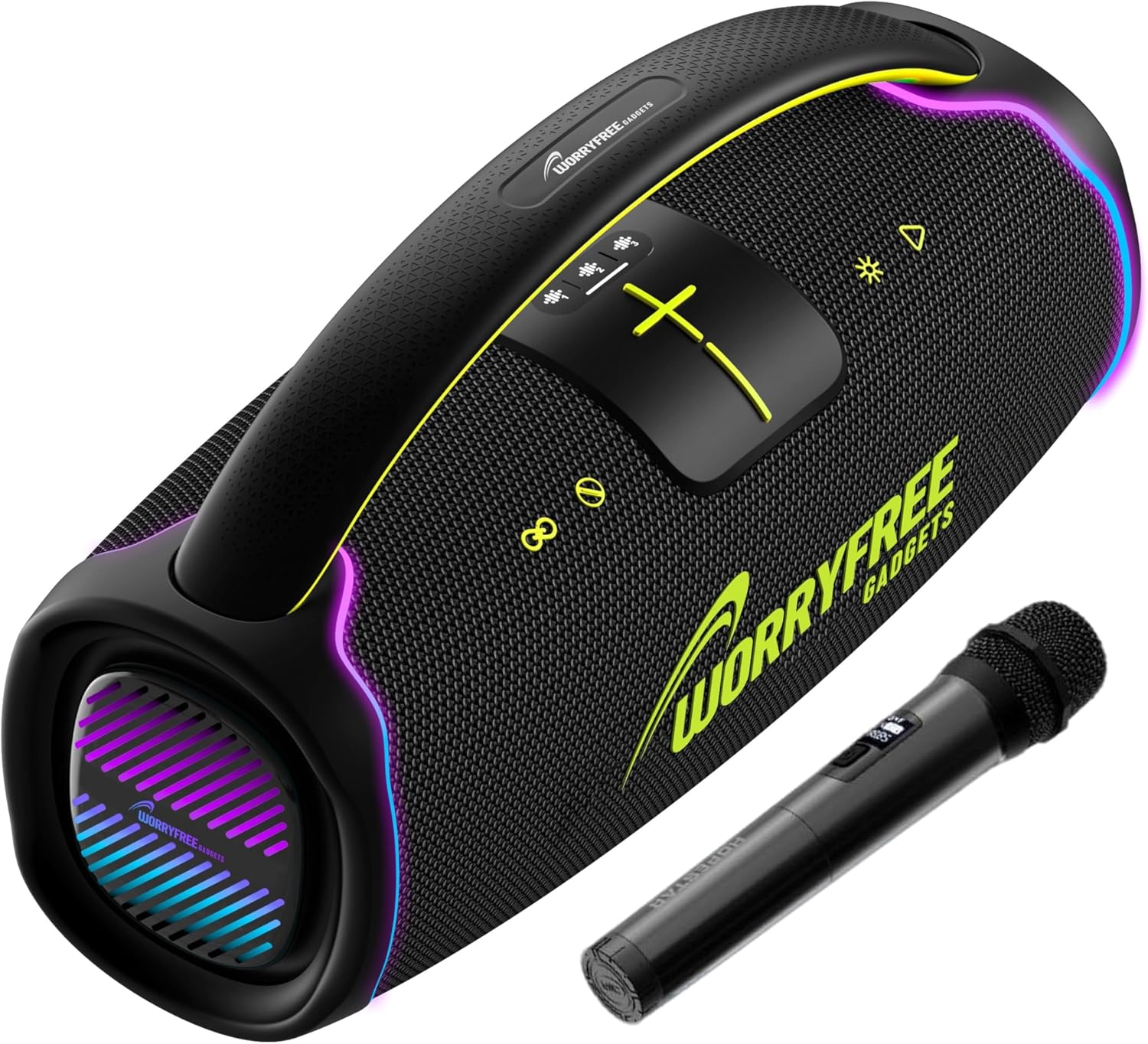
Figure 1: Front view of the WorryFree Gadgets 300W Wireless Bluetooth Speaker, showcasing the control panel with illuminated buttons, the speaker grille, and the included microphone positioned next to it. The speaker features vibrant LED lighting on its sides.

Figure 2: Side view of the speaker, highlighting the integrated carrying handle for portability and the textured speaker grille. The end panel shows the WorryFree Gadgets branding and blue LED lighting.

Figure 3: Angled view of the speaker, emphasizing the dynamic LED light display on both ends and along the top edge. The robust design and prominent branding are also visible.
Control Panel (Refer to Figure 1)
- Power Button: Press and hold to turn the speaker on or off.
- Mode Button (M): Press to switch between Bluetooth, AUX, and other available modes.
- Play/Pause Button (►▮▮): Press to play or pause audio.
- Volume Down / Previous Track (-): Press to decrease volume. Press and hold to go to the previous track.
- Volume Up / Next Track (+): Press to increase volume. Press and hold to go to the next track.
- EQ Button: Press to cycle through different equalizer modes.
- Light Button: Press to change or turn off the LED light display.
- TWS Button: Press to initiate True Wireless Stereo pairing.
Rear Panel (Not Pictured, but typically includes)
- Charging Port (USB-C): For connecting the charging cable.
- AUX Input (3.5mm): For wired audio connection.
- Microphone Input: For connecting the included microphone.
Setup
1. Charging the Speaker
- Connect the provided USB-C charging cable to the speaker's charging port.
- Connect the other end of the cable to a compatible USB power adapter (5V/2A recommended, not included).
- The charging indicator light will illuminate. A full charge takes approximately 4 hours.
- Once fully charged, the indicator light will change or turn off. Disconnect the charging cable.
2. Powering On/Off
- To Power On: Press and hold the Power Button (refer to Figure 1) for approximately 3 seconds until you hear an audible prompt and the LED lights activate.
- To Power Off: Press and hold the Power Button for approximately 3 seconds until you hear an audible prompt and the LED lights turn off.
3. Bluetooth Pairing
- Ensure the speaker is powered on and in Bluetooth mode (indicated by a flashing Bluetooth icon or audible prompt). If not, press the Mode Button (M) to switch to Bluetooth mode.
- On your mobile device (smartphone, tablet, etc.), enable Bluetooth and search for available devices.
- Select "WorryFree WA65" from the list of devices.
- Once paired, you will hear a confirmation sound, and the Bluetooth indicator light on the speaker will become solid.
- The speaker will automatically reconnect to the last paired device when powered on, if the device is within range and Bluetooth is enabled.
4. TWS (True Wireless Stereo) Pairing (Requires two WA65 speakers)
- Ensure both WA65 speakers are powered on and in Bluetooth mode, but not yet connected to any device.
- On one of the speakers (this will be the primary speaker), press the TWS Button. You will hear an audible prompt indicating it's searching for another speaker.
- The primary speaker will automatically search for and connect to the secondary speaker.
- Once successfully paired, you will hear a confirmation sound. The LED lights on both speakers will synchronize.
- Now, connect your mobile device to the primary speaker via Bluetooth as described in "3. Bluetooth Pairing". Audio will play in stereo across both speakers.
5. Microphone Connection
- Locate the microphone input port on the rear panel of the speaker.
- Insert the microphone cable into the microphone input port.
- Adjust the microphone volume using the controls on the microphone itself or potentially through the speaker's main volume control.
6. AUX Connection
- Connect one end of the provided 3.5mm AUX cable to the AUX input port on the speaker.
- Connect the other end of the AUX cable to the audio output jack of your external device (e.g., MP3 player, computer).
- Press the Mode Button (M) on the speaker until you hear an audible prompt indicating AUX mode.
- Audio will now play through the wired connection.
Operating
Basic Playback Controls
- Play/Pause: Press the Play/Pause Button (►▮▮) to toggle playback.
- Volume Adjustment: Press the '+' button to increase volume, and the '-' button to decrease volume.
- Previous Track: Press and hold the '-' button.
- Next Track: Press and hold the '+' button.
EQ Modes
- Press the EQ Button to cycle through different equalizer presets (e.g., Bass Boost, Vocal, Standard). Select the mode that best suits your audio preference.
LED Light Display Control
- Press the Light Button to change the LED light patterns or to turn the lights off.
Hands-Free Calling (when connected via Bluetooth)
- Answer Call: Press the Play/Pause Button (►▮▮) once.
- End Call: Press the Play/Pause Button (►▮▮) once during a call.
- Reject Call: Press and hold the Play/Pause Button (►▮▮) for 2 seconds.
Maintenance
- Cleaning: Use a soft, dry cloth to wipe the speaker's exterior. Do not use abrasive cleaners, alcohol, or chemical solvents.
- Storage: Store the speaker in a cool, dry place away from direct sunlight and extreme temperatures when not in use for extended periods.
- Battery Care: To prolong battery life, fully charge the speaker before first use and recharge it at least once every three months if not used regularly. Avoid completely draining the battery frequently.
Troubleshooting
| Problem | Possible Solution |
|---|---|
| Speaker does not power on. | Ensure the speaker is fully charged. Connect the charging cable and try again. |
| Cannot pair via Bluetooth. |
|
| No sound or low volume. |
|
| TWS pairing fails. |
|
| Microphone not working. |
|
Specifications
| Feature | Detail |
|---|---|
| Brand | WorryFree Gadgets |
| Model Number | WA65 |
| Output Power | 300W |
| Wireless Standard | Bluetooth 5.3 |
| Transmission Distance | Up to 10 meters (33 feet) |
| Speaker Unit Configuration | 119mm*2 + 78mm*2 + 66mm*2 |
| Battery Capacity | 12V, 9000mAh (Total 27000mAh from 6 Nonstandard Batteries) |
| Playing Time | 8-10 hours (varies with volume and content) |
| Charging Time | Approximately 4 hours |
| Water Resistance | IPX6 Splashproof |
| Features | TWS Connection, EQ Mode, Microphone Input, LED Lights, Portable Handle |
| Audio Signal Input | Standard 3.5mm headphone jack (stereo) |
| Product Dimensions | 6.5"D x 20"W x 12"H |
| Item Weight | 18 Pounds |
| Material | Plastic |
| Color | Black |
| UPC | 810147202225 |
Warranty and Support
For warranty information, technical support, or service inquiries, please contact WorryFree Gadgets directly. Refer to the contact information provided with your purchase or visit the official WorryFree Gadgets website.
While this product does not come with an explicit warranty statement in this manual, additional protection plans may be available for purchase separately. Please consult your retailer for details on available protection plans.
Ask a question about this manual
Ask about setup, troubleshooting, compatibility, parts, safety, or missing instructions. Manuals+ will review the question and use this page’s manual context to help answer it.