
Introduction
This manual provides essential instructions for the proper use and maintenance of your Casio Edifice EFS-S640ZE-1AJR 50TH Anniversary watch. Please read this manual thoroughly to ensure optimal performance and longevity of your timepiece. This watch features a solar charging system, sapphire glass, 10 ATM water resistance, and a stopwatch function.
Product Overview
The Casio Edifice EFS-S640ZE-1AJR is a sophisticated analog watch designed for durability and precision. It incorporates a solar charging system, eliminating the need for regular battery replacements. The watch features a robust stainless steel case, a synthetic leather band, and a scratch-resistant sapphire crystal with an anti-reflective coating.
Key Features:
- Solar Charging System: Powers the watch using light, ensuring reliable operation.
- Sapphire Glass: Highly scratch-resistant crystal with anti-reflective coating for enhanced durability and readability.
- 10 ATM Water Resistance: Suitable for swimming and snorkeling, but not for diving.
- Stopwatch Function: 1-second, 30-minute counters with split time capability.
- Battery Charge Warning Function: Alerts you when the battery level is low.
- Battery Indicator Display: Shows the current charge level.
- Date Display: Convenient calendar function.
- Commemorative Design: Special 50th Anniversary edition.

Image 1: Front and side view of the Casio Edifice EFS-S640ZE-1AJR watch, showcasing its black and gold dial, black synthetic leather strap, and chronograph sub-dials.
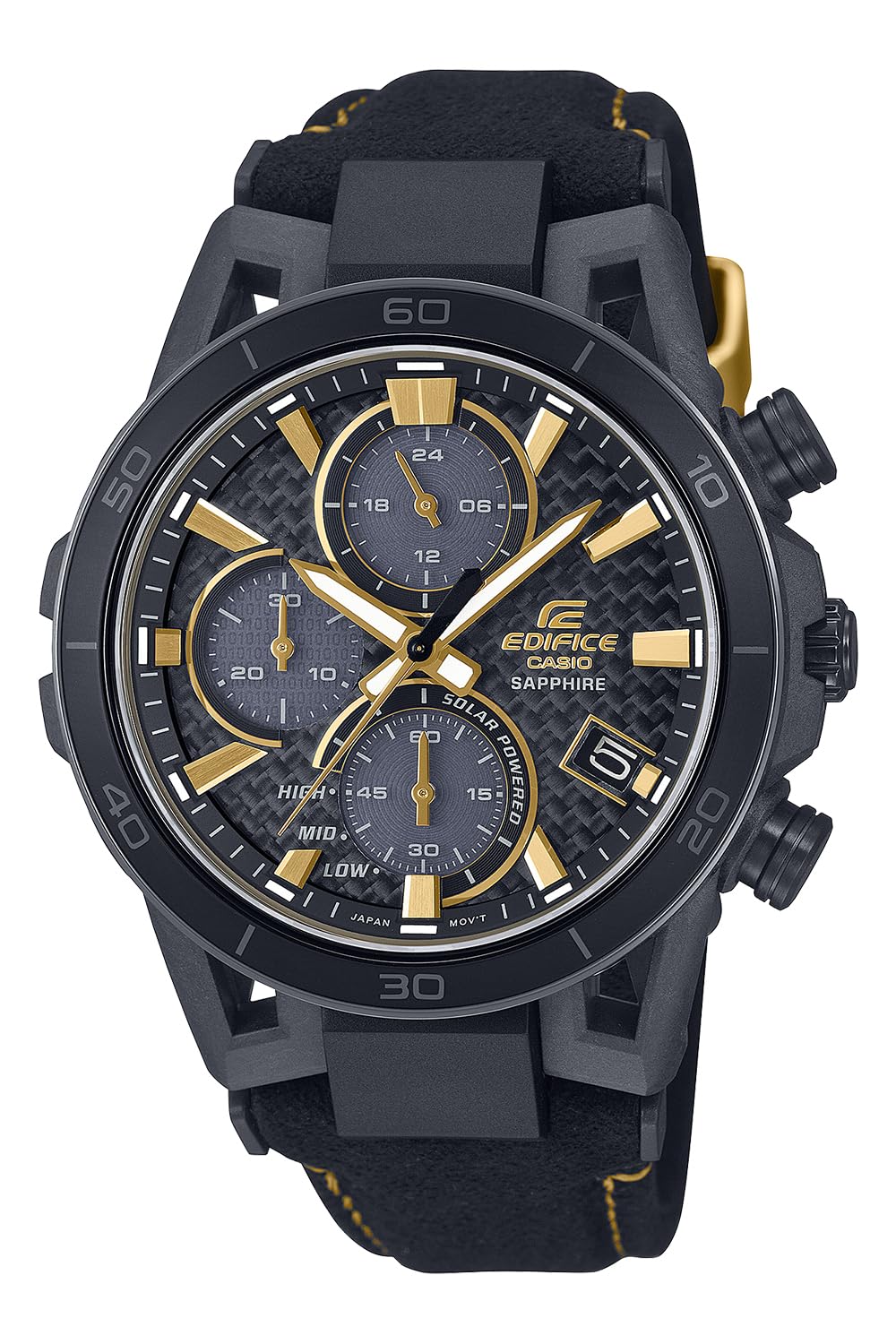
Image 2: Detailed view of the watch's back case, featuring engravings for "CASIO 50TH ANNIVERSARY", "SOLAR POWERED", "SAPPHIRE CRYSTAL", "10 BAR WATER RESIST", and model number EFS-S640.
Setup
Initial Charging
Your watch is equipped with a solar charging system. Before initial use, or if the watch has been stored in darkness for an extended period, expose the watch face to bright light (natural sunlight is ideal) for several hours. This will ensure the internal battery is sufficiently charged for optimal operation. Avoid placing the watch in direct sunlight for prolonged periods in extremely hot environments to prevent damage.
Setting the Time and Date
- Pull the crown out to the first or second click position (refer to the specific watch module manual for exact crown positions).
- Rotate the crown to set the desired time. Ensure the AM/PM setting is correct if your watch has a 24-hour indicator.
- Push the crown back in to the normal position to start timekeeping.
- To set the date, pull the crown out to the first click position and rotate it to adjust the date. Push the crown back in when finished.
Note: Avoid setting the date between 9:00 PM and 1:00 AM, as this may interfere with the automatic date change mechanism.
Operating Instructions
Timekeeping
The watch displays hours, minutes, and seconds. The solar charging system ensures continuous operation under normal light exposure. If the watch stops or the hands move erratically, expose it to bright light for recharging.
Using the Stopwatch
This model features a 1-second stopwatch with a 30-minute measuring capacity and split time functionality. The specific operation of the stopwatch buttons (usually located at 2 o'clock and 4 o'clock positions) may vary slightly. Typically:
- Press the upper button to start and stop the stopwatch.
- Press the lower button to reset the stopwatch to zero when it is stopped.
- During measurement, press the lower button to record a split time. Press it again to release the split and resume current measurement.
Date Display
The date is displayed in a window on the dial. It automatically advances at midnight. Adjust the date manually at the end of months with fewer than 31 days.
Battery Indicator and Warning
The watch includes a battery indicator display, often a sub-dial or a specific hand, showing the current charge level (e.g., HIGH, MID, LOW). A battery charge warning function will activate when the charge is critically low, typically indicated by the second hand moving in two-second intervals. When this occurs, expose the watch to bright light immediately for recharging.
Maintenance
Cleaning
- Wipe the watch case and band with a soft, dry cloth regularly to remove dirt and moisture.
- For synthetic leather bands, avoid excessive moisture and harsh chemicals. If it gets wet, dry it thoroughly.
- The sapphire glass can be cleaned with a soft, lint-free cloth.
Water Resistance (10 ATM)
Your watch is water resistant to 10 atmospheres (100 meters). This means it is suitable for everyday use, swimming, and snorkeling. However, it is not suitable for scuba diving. To maintain water resistance:
- Ensure the crown is pushed in completely before exposing the watch to water.
- Do not operate the crown or buttons while the watch is wet or submerged.
- Avoid exposing the watch to hot water, steam, or sudden temperature changes, which can compromise seals.
- After exposure to saltwater, rinse the watch with fresh water and dry it thoroughly.
Solar Charging Care
To ensure continuous operation, expose the watch to light regularly. Avoid prolonged storage in dark places. The operating time from a full charge until the hands stop moving is approximately 5 months.
Troubleshooting
| Problem | Possible Cause | Solution |
|---|---|---|
| Watch hands stop moving or move erratically. | Insufficient battery charge. | Expose the watch face to bright light (e.g., sunlight) for several hours to recharge. |
| Second hand moves in two-second intervals. | Battery charge warning activated (low battery). | Immediately expose the watch to bright light for recharging. |
| Incorrect time or date. | Time/date not set correctly or accidentally changed. | Refer to the "Setting the Time and Date" section to adjust. |
| Condensation inside the watch glass. | Exposure to sudden temperature changes or compromised water resistance. | If condensation persists, contact an authorized service center. Avoid further water exposure. |
If the problem persists after attempting these solutions, please contact an authorized Casio service center for assistance.
Specifications
| Model Number | EFS-S640ZE-1AJR |
| Manufacturer | Casio |
| Glass Material | Sapphire glass (Anti-reflective coating on the inside) |
| Water Resistance | 10 ATM (100 meters) |
| Case Material | Stainless Steel (Black IP bezel) |
| Band Material | Synthetic Leather |
| Case Size (H×W×D) | 50.1 × 44.5 × 13.8 mm |
| Weight | 61 g (2.15 ounces) |
| Power Source | Solar Powered |
| Operating Time (Full Charge) | Approximately 5 months |
| Accuracy | Average monthly difference: ±20 seconds |
| Display Type | Analog |
| Watch Movement Type | Quartz |
| Additional Features | Solar Charging, Scratch Resistant, Water Resistant, Commemorative Design, Luminous Hands |
Warranty Information
This Casio Edifice watch comes with a Limited Warranty. The terms and conditions of the warranty are typically provided with the product packaging or can be found on the official Casio website. The warranty generally covers manufacturing defects under normal use. It does not cover damage resulting from misuse, accidents, unauthorized repairs, or normal wear and tear.
Please retain your proof of purchase for any warranty claims. For detailed warranty terms specific to your region, refer to the documentation included with your watch or visit the official Casio support website.
Support
For further assistance, technical support, or service inquiries regarding your Casio Edifice EFS-S640ZE-1AJR watch, please contact Casio customer service or an authorized service center in your region. You can usually find contact information on the official Casio website or in the warranty documentation.
When contacting support, please have your watch model number (EFS-S640ZE-1AJR) and proof of purchase readily available.