
Introduction
Thank you for choosing the Quilter Labs Bass Block V803 800-Watt Bass Head. This amplifier is designed to deliver powerful and versatile bass tones for professional musicians. This manual provides essential information for the proper setup, operation, and care of your new amplifier. Please read it thoroughly before use to ensure optimal performance and longevity.
Safety Information
WARNING: To reduce the risk of electric shock, do not remove the cover. No user-serviceable parts inside. Refer servicing to qualified service personnel.
- Ensure the power cord is securely connected to a grounded outlet.
- Do not expose this appliance to rain or moisture.
- Do not block ventilation openings.
- Disconnect power before cleaning or servicing.
Package Contents
- Quilter Labs Bass Block V803 Bass Head
- Power Cable
Product Overview
The Quilter Labs Bass Block V803 is a compact yet powerful 800-watt bass amplifier head. It features a versatile control set designed for bass players seeking clarity, power, and tonal flexibility.

Figure 1: Front panel of the Bass Block V803.

Figure 2: Rear panel of the Bass Block V803.
Setup
Follow these steps to properly set up your Bass Block V803 amplifier.
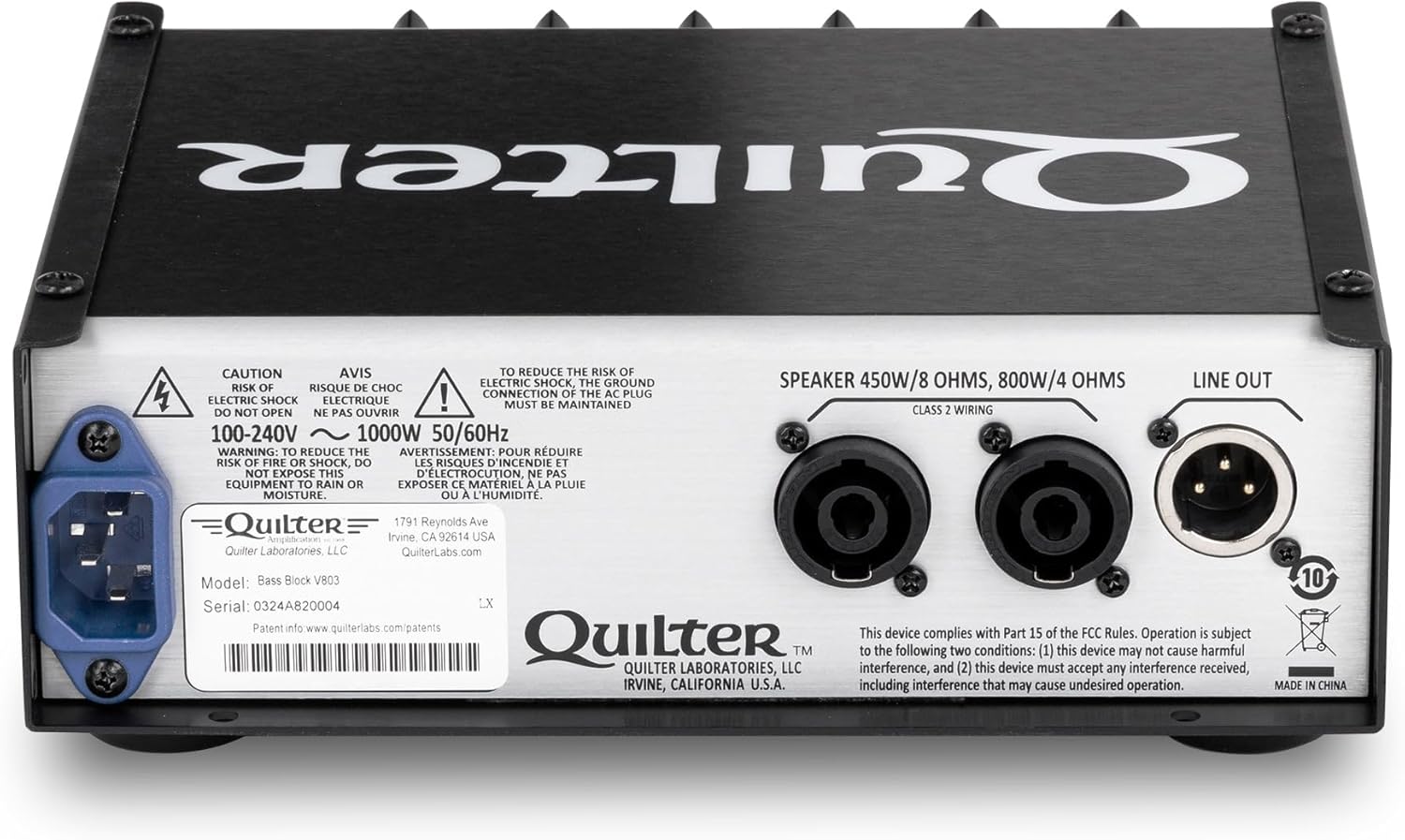
Figure 3: Rear panel connections.
1. Power Connection
- Connect the provided power cable to the AC inlet on the rear panel of the Bass Block V803.
- Plug the other end of the power cable into a grounded electrical outlet (100-240V ~ 1000W 50/60Hz).
- Ensure the power switch on the front panel is in the "OFF" position before connecting to power.
2. Speaker Connection
- Connect your bass speaker cabinet(s) to the speaker outputs on the rear panel. The Bass Block V803 supports up to 450W at 8 ohms and 800W at 4 ohms.
- Use high-quality speaker cables for optimal performance.
3. Instrument Connection
- Connect your bass guitar to one of the two input jacks on the front panel.
- The input jacks are 1meg, Flat and Scoop, 4V peak.
- Use the INPUT SWITCH (Mute, Active, Passive) to match your instrument's output level.
4. Effects Loop (Optional)
- For external effects, connect the "SEND FX LOOP" jack to the input of your effects unit.
- Connect the output of your effects unit to the "RETURN" jack.
- The effects loop is buffered, with a 1K Send and 47K Return, supporting a 1V peak signal level.
5. XLR Line Out (Optional)
- For direct connection to a mixing console or recording interface, use the XLR LINE OUT.
- This output provides a 1.4V (+4dBu), 600 ohms balanced signal.
- Use the XLR GROUND LIFT switch (Ground, Lift Auto) to eliminate hum caused by ground loops.
Operating Instructions
This section details the functions of the front panel controls and provides guidance on basic operation.
Figure 4: Front panel controls.
Front Panel Controls
- INPUT SWITCH: Selects between Mute, Active, or Passive input modes to accommodate different instrument output levels.
- GAIN: Regulates the overall input volume to the preamp. Adjust for desired signal level without clipping.
- AMP VOICE SWITCH: Choose between "Modern," "Warm," and "Q-Tube" profiles to shape the amplifier's fundamental tone.
- 4-KNOB EQ:
- BASS: Boosts or cuts bass frequencies by +/- 15dB at 100Hz.
- MIDRANGE: Boosts or cuts midrange frequencies by +/- 15dB.
- FREQUENCY: Sweeps the center frequency of the midrange control from 250Hz to 1kHz.
- TREBLE: Boosts or cuts treble frequencies by +/- 15dB at 1kHz.
- MASTER: Adjusts the speaker power volume level, from 0 to 800 watts.
- HEADPHONE: Connect headphones for silent practice.
- POWER SWITCH: Turns the amplifier ON or OFF.
Basic Operation
- Ensure all connections (power, speaker, instrument) are secure.
- Set the MASTER volume control to its minimum position.
- Select the appropriate INPUT SWITCH setting (Passive for standard basses, Active for basses with active electronics, Mute for silent connection/disconnection).
- Turn on the amplifier using the POWER switch.
- Slowly increase the GAIN control until the desired input level is achieved. Avoid clipping.
- Adjust the EQ controls (BASS, MIDRANGE, FREQUENCY, TREBLE) to sculpt your desired tone.
- Gradually increase the MASTER volume to the desired listening level.
- Experiment with the AMP VOICE SWITCH to find the tonal character that best suits your playing style and musical context.
Maintenance
To ensure the longevity and optimal performance of your Bass Block V803, follow these maintenance guidelines:
- Cleaning: Use a soft, dry cloth to clean the exterior of the amplifier. Avoid abrasive cleaners or solvents.
- Ventilation: Ensure that the ventilation grilles on the sides of the amplifier are not obstructed. Proper airflow is crucial for preventing overheating.
- Storage: Store the amplifier in a cool, dry place away from direct sunlight and extreme temperatures.
- Transportation: When transporting the amplifier, use appropriate protective cases to prevent physical damage.
- Power: Always power off the unit and disconnect it from the mains before cleaning or moving.
Troubleshooting
If you encounter issues with your Bass Block V803, refer to the following common troubleshooting steps:
- No Power:
- Check if the power cable is securely connected to both the amplifier and the wall outlet.
- Verify that the wall outlet is functioning by plugging in another device.
- Ensure the power switch on the amplifier is in the "ON" position.
- No Sound:
- Check all cable connections: instrument to amplifier, amplifier to speaker cabinet.
- Ensure the speaker cabinet is properly connected and functioning.
- Verify that the INPUT SWITCH is not set to "Mute".
- Increase the GAIN and MASTER volume controls gradually.
- Test with a different instrument cable and speaker cable.
- Distorted Sound:
- Reduce the GAIN control if the input signal is too hot.
- Check your instrument's output level.
- Ensure your speaker cabinet can handle the amplifier's output power.
- Adjust EQ settings to remove unwanted frequencies.
- Hum or Noise:
- Ensure all cables are properly shielded and in good condition.
- Use the XLR GROUND LIFT switch if using the XLR LINE OUT.
- Try plugging the amplifier into a different electrical outlet, preferably on a different circuit.
- Keep the amplifier away from sources of electromagnetic interference (e.g., fluorescent lights, power transformers).
If the issue persists after trying these steps, please contact Quilter Labs customer support for further assistance.
Specifications
| Feature | Specification |
|---|---|
| Model | Bass Block V803 |
| Output Power | Up to 450W at 8 ohms, 800W at 4 ohms |
| Frequency Response | 25Hz-15kHz |
| Input Jacks | 2 (1meg, Flat and Scoop, 4V peak) |
| Input Switch | Mute, Active, Passive |
| Amp Voice Switch | Modern, Warm, Q-Tube profiles |
| EQ Controls | 4-KNOB EQ: Bass (+/- 15dB at 100Hz), Mid (+/- 15dB with 250-1K Freq Sweep), Treble (+/- 15dB at 1kHz) |
| Effects Loop | Buffered, 1K Send, 47K Return, 1V peak signal level |
| XLR Line Out | 1.4V (+4dBu), 600 ohms balanced |
| XLR Ground Lift | Ground, Lift Auto |
| Power Requirements | 100-240V ~ 1000W 50/60Hz |
| Item Weight | 4.5 pounds |
| Product Dimensions (D x W x H) | 7.75 x 8.5 x 3.13 inches |
| What's in the Box | Bass Amp |
Warranty and Support
For information regarding warranty coverage and terms, please refer to the documentation included with your purchase or visit the official Quilter Labs website.
For technical support, service inquiries, or additional product information, please contact Quilter Labs directly.
- Quilter Labs Official Store: Visit the Quilter Store on Amazon
- Manufacturer Website: www.quilterlabs.com