Introduction
This manual provides detailed instructions for the safe and efficient operation, maintenance, and troubleshooting of your ZJchao Cordless Electric Mop. Please read this manual thoroughly before first use and keep it for future reference.

Image: The ZJchao Cordless Electric Mop, showcasing its full assembly.
What's Included
Carefully unpack all components and ensure you have received the following items:
- 1 x Mop Head
- 1 x Handle
- 2 x Extension Rods
- 4 x Mop Cloths
- 1 x Power Cable (for charging)
- 1 x User Manual (this document)
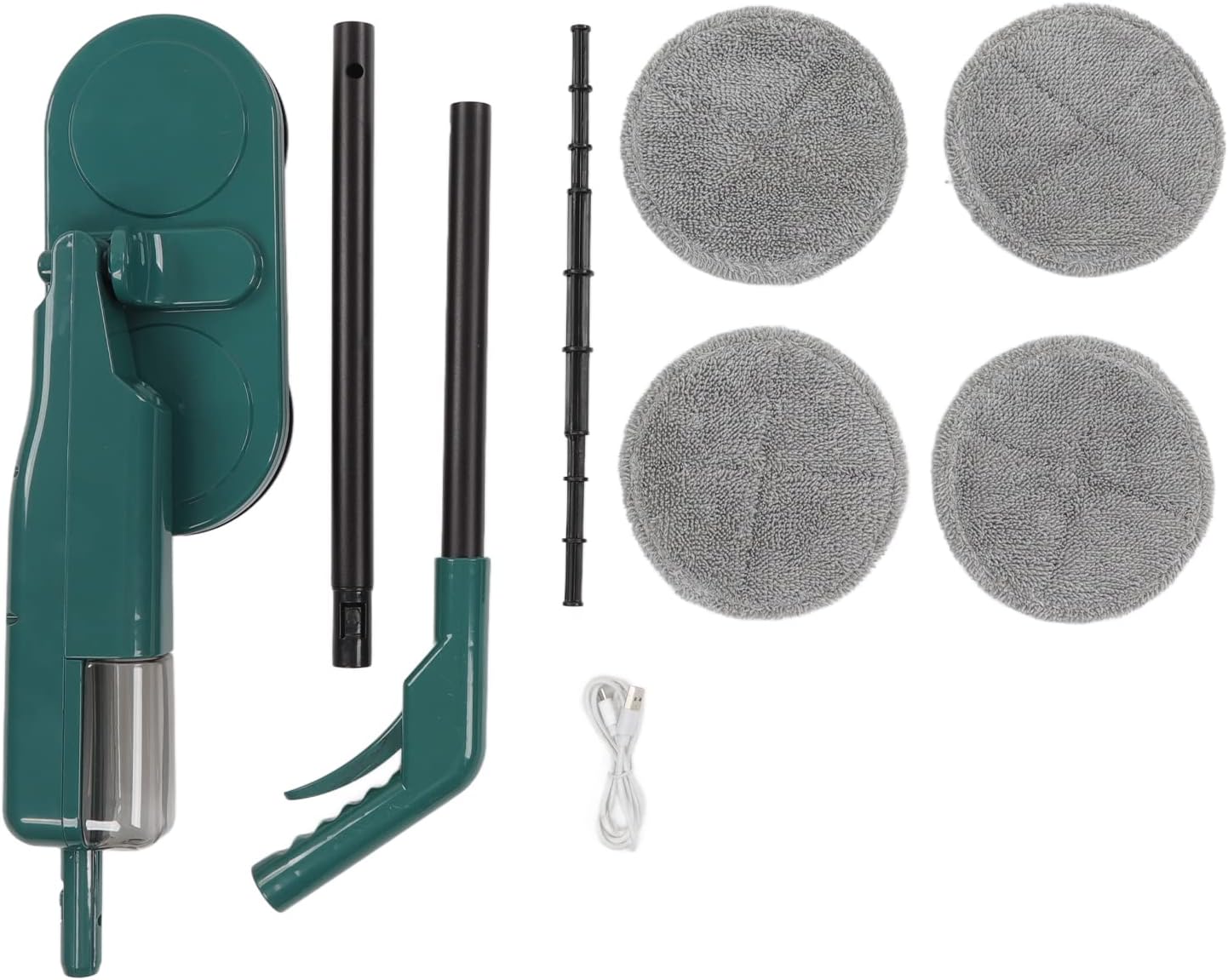
Image: All components of the electric mop laid out, including the mop head, handle, extension rods, mop cloths, and charging cable.
Important Safety Instructions
To reduce the risk of fire, electric shock, or injury, please observe the following safety precautions:
- Read all instructions before using the appliance.
- Do not immerse the appliance in water or other liquids.
- Keep hair, loose clothing, fingers, and all parts of the body away from openings and moving parts.
- Use only as described in this manual. Use only manufacturer's recommended attachments.
- Do not use with a damaged cord or plug. If the appliance is not working as it should, has been dropped, damaged, left outdoors, or dropped into water, return it to a service center.
- Do not handle the charger or appliance with wet hands.
- Do not pull or carry by cord, use cord as a handle, close a door on cord, or pull cord around sharp edges or corners. Keep cord away from heated surfaces.
- Do not use the appliance in areas where flammable or combustible liquids may be present.
- This appliance is for household use only.
Setup and Assembly
1. Assembly
- Attach the mop cloths to the rotating pads on the mop head. Ensure they are securely fastened.
- Connect the extension rods to each other and then to the mop head.
- Attach the handle to the top extension rod. Ensure all connections are firm.
2. Charging the Battery
Before first use, fully charge the mop's battery. The charging time is approximately 4 hours.
- Locate the charging port on the mop.
- Connect the power cable to the charging port and plug the other end into a suitable power outlet.
- The charging indicator light (if present) will show the charging status. Refer to the indicator light section for details.
- Once fully charged, disconnect the power cable.
Operating Instructions
1. Basic Operation
To start cleaning, simply hold the handle and press the power button. The mop will begin its high-speed rotation for effective cleaning.

Image: A person demonstrating the use of the ZJchao Cordless Electric Mop on a floor.
2. Efficient Water Spray Function
The mop features an integrated water mist function for efficient wet cleaning. This function allows the mop to effectively wet and dry the floor in a continuous motion.
- Fill the water tank located on the mop head with clean water.
- Press the spray button on the handle to activate the fan-shaped water mist.
- The fan-shaped spray ensures even distribution of water, allowing for effective wetting and subsequent drying in one pass.
3. Flexible Rotation for Thorough Cleaning
The mop head offers a 90-degree rotation capability, enabling easy access to dirt under furniture and in tight spaces for a comprehensive clean.
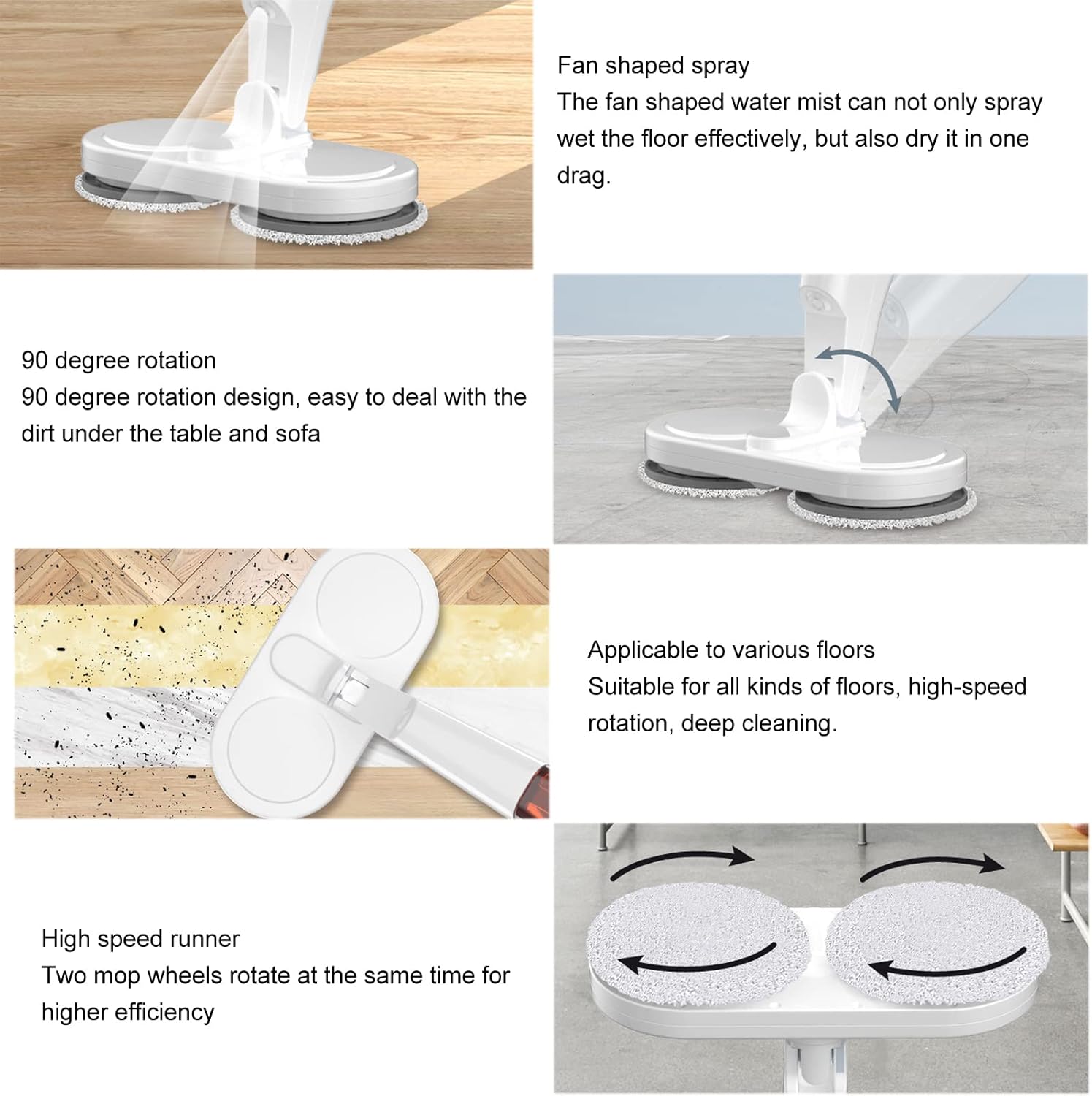
Image: Visual representation of the mop's fan-shaped spray, 90-degree rotation, and high-speed rotating pads.
4. Cleaning Steps for Optimal Results
For best results, follow these steps for floor cleaning:
- Dry Dust Absorption: Use the mop in dry mode first to absorb dust and loose debris.
- Dump the Garbage: Empty any collected debris from the mop pads or area.
- Cleaning Mop: Attach clean mop pads.
- Absorb Water and Mop the Floor: Use the water spray function to wet and mop the floor, removing stains and dirt.

Image: Diagram illustrating the four recommended steps for floor washing using the electric mop.
The high-speed rotation of the electric mop ensures deep cleaning, effectively removing dry and wet debris, stubborn stains, and dirt from all types of floors.
Maintenance and Care
1. Cleaning the Mop Pads
- After each use, remove the mop cloths from the mop head.
- Wash the mop cloths by hand or machine wash according to their care instructions.
- Ensure the mop cloths are completely dry before reattaching or storing.
2. Cleaning the Mop Head and Body
- Wipe the mop head and body with a damp cloth to remove any dirt or residue.
- Do not use harsh chemicals or abrasive cleaners.
- Ensure the mop is completely dry before storing.
3. Storage
Store the mop in a cool, dry place, away from direct sunlight and extreme temperatures. Ensure the battery is partially charged if storing for extended periods.
Troubleshooting
| Problem | Possible Cause | Solution |
|---|---|---|
| Mop does not turn on. | Battery is depleted. | Charge the battery for 4 hours. |
| Mop pads are not rotating effectively. | Mop pads are dirty or worn out. | Clean or replace the mop pads. |
| Water spray is weak or not working. | Water tank is empty or nozzle is clogged. | Refill the water tank. Clean the spray nozzle if necessary. |
| Reduced operating time. | Battery capacity may be reduced over time. | Ensure full charge. If issue persists, battery may need replacement (contact support). |
Product Specifications
| Feature | Specification |
|---|---|
| Item Type | Electric Mop |
| Brand | ZJchao |
| Model Number | ZJchaoxb4ehvms6g |
| Material | ABS |
| Color | #811 (Green/Teal) |
| Weight | Approx. 1535g / 3.4lb |
| Voltage | 7.4V |
| Noise Level | 55db |
| Charging Time | 4 hours |
| Service Time (Operating) | 60 minutes |
| Battery Type | 2000mAh Polymer Lithium Battery (included) |
| Package Dimensions | 53 x 16 x 12 cm |
Warranty and Support
For warranty information or technical support, please refer to the purchase documentation or contact ZJchao customer service directly. Keep your proof of purchase for any warranty claims.
Contact information can typically be found on the product packaging or the retailer's website where the product was purchased.