Introduction
Thank you for purchasing the RIDFY 43" Farmhouse Makeup Vanity Desk with Lighted Mirror. This manual provides important information regarding the assembly, operation, maintenance, and troubleshooting of your new vanity desk. Please read these instructions carefully before assembly and use, and retain them for future reference.
Important Safety Information
- Keep all packaging materials away from children to prevent choking hazards.
- Ensure all parts are present and undamaged before assembly. Do not use if any parts are missing or broken.
- Assemble the vanity desk on a soft, clean surface to prevent scratches.
- Do not overtighten screws during assembly, as this may damage the material.
- Always use the vanity desk on a flat, stable surface to prevent tipping.
- Do not exceed the weight capacity of the drawers or shelves.
- Keep electrical components (mirror lights, charging station) away from water.
- Unplug the vanity desk from the power outlet before cleaning or performing any maintenance.
Package Contents
Please verify that all components listed below are included in your package. If any parts are missing or damaged, please contact customer support.
- Vanity Desk Frame Components (panels, legs)
- Lighted Mirror Unit
- Drawers and Drawer Slides
- Cabinet Doors and Hinges
- Shelves (fixed and adjustable)
- Hardware Pack (screws, dowels, cam locks, etc.)
- Power Outlet Unit with USB Ports
- Hair Dryer Rack
- Assembly Instructions Manual
Setup and Assembly
Assembly is required for this vanity desk. It is recommended to have two people for assembly. Please follow the detailed instructions provided in the separate assembly manual included in your package. Below are general steps and important considerations.
General Assembly Steps:
- Unpack and Identify Parts: Carefully unpack all components and lay them out on a clean, soft surface. Identify each part using the provided assembly diagram.
- Assemble the Base Frame: Connect the main side panels and back panels to form the desk's base structure using the provided hardware.
- Install Drawers: Assemble the drawers according to the instructions and install the drawer slides onto the desk frame. Insert the assembled drawers.
- Attach the Upper Cabinetry: Secure the upper storage unit to the desk base.
- Install Doors and Shelves: Attach the cabinet doors using the hinges. Insert the fixed and adjustable shelves into their designated slots.
- Mount Lighted Mirror: Carefully install the lighted mirror unit into its recess in the upper cabinetry.
- Install Power Outlet Unit: Secure the power outlet unit, including AC outlets and USB ports, into its designated location, typically on the side of the desk. Ensure the power cord is accessible.
- Attach Hair Dryer Rack: Mount the hair dryer rack to the side of the desk as shown in the assembly manual.
- Final Checks: Ensure all screws are tightened (do not overtighten) and the vanity desk is stable.

Image: The RIDFY vanity desk featuring a built-in power outlet with AC and USB ports, and a convenient hair dryer rack on the side. This image illustrates the integrated electrical features and overall design.

Image: Detail of the adjustable door hinges on the RIDFY vanity desk, showing how to adjust door height, depth, and the width of the middle door gap for proper alignment.
Operating Instructions
Lighted Mirror Operation:
The integrated mirror features adjustable lighting with touch controls.
- Power On/Off: Lightly touch the power button icon on the mirror surface to turn the lights on or off.
- Change Color Mode: With the lights on, lightly touch the power button icon repeatedly to cycle through the three color modes:
- Cold White: Bright, clear light.
- Warm Yellow: Soft, warm light.
- Warm White: Balanced, natural light.
- Adjust Brightness: To adjust the brightness, press and hold the power button icon. The brightness will gradually increase or decrease. Release the button when the desired brightness level is reached.
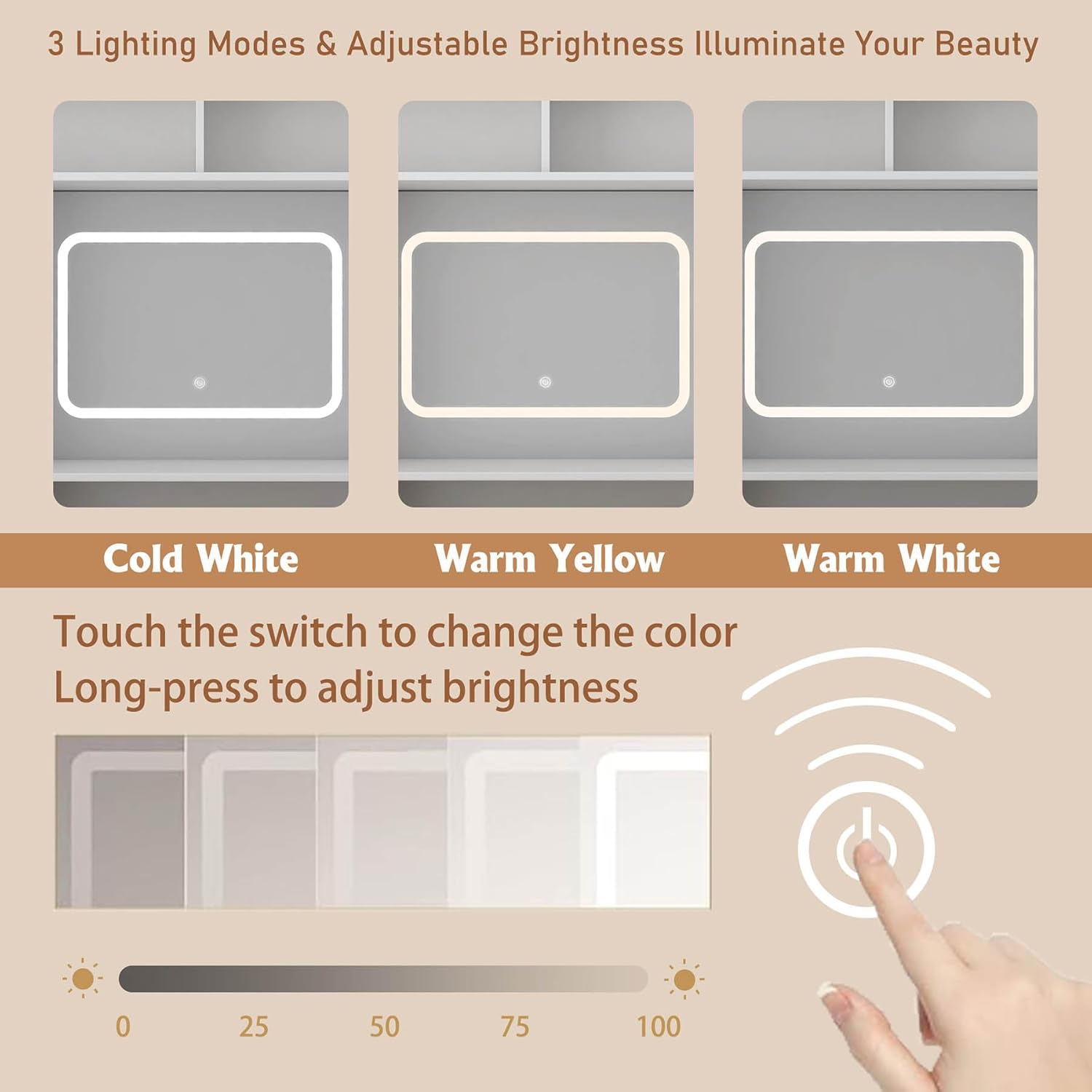
Image: Illustration showing the three lighting modes (Cold White, Warm Yellow, Warm White) of the RIDFY vanity mirror and the touch control for adjusting brightness.
Charging Station Use:
The vanity desk includes a built-in power outlet unit for convenient charging of electronic devices.
- AC Outlets: Plug in devices requiring standard 110V/12A power, such as hair dryers or curling irons.
- USB Ports: Use the 5V/2A USB ports to charge smartphones, tablets, or other USB-powered devices.
- Power Cord: Ensure the vanity desk's main power cord (approximately 4.92 feet long) is securely plugged into a wall outlet.
Storage and Organization:
Utilize the various storage options to keep your items organized.
- Drawers: Use the two visible drawers for smaller items like makeup, brushes, or accessories.
- Cabinet with Sliding Door: The side cabinet features adjustable shelves, allowing you to customize the storage space for taller bottles or larger items. The sliding door provides easy access and conceals contents.
- Open Storage Spaces: Utilize the open compartments above the desk surface for frequently used items or decorative pieces.
- Hair Dryer Rack: The dedicated rack on the side is designed to hold your hair dryer or other styling tools, keeping them within easy reach.
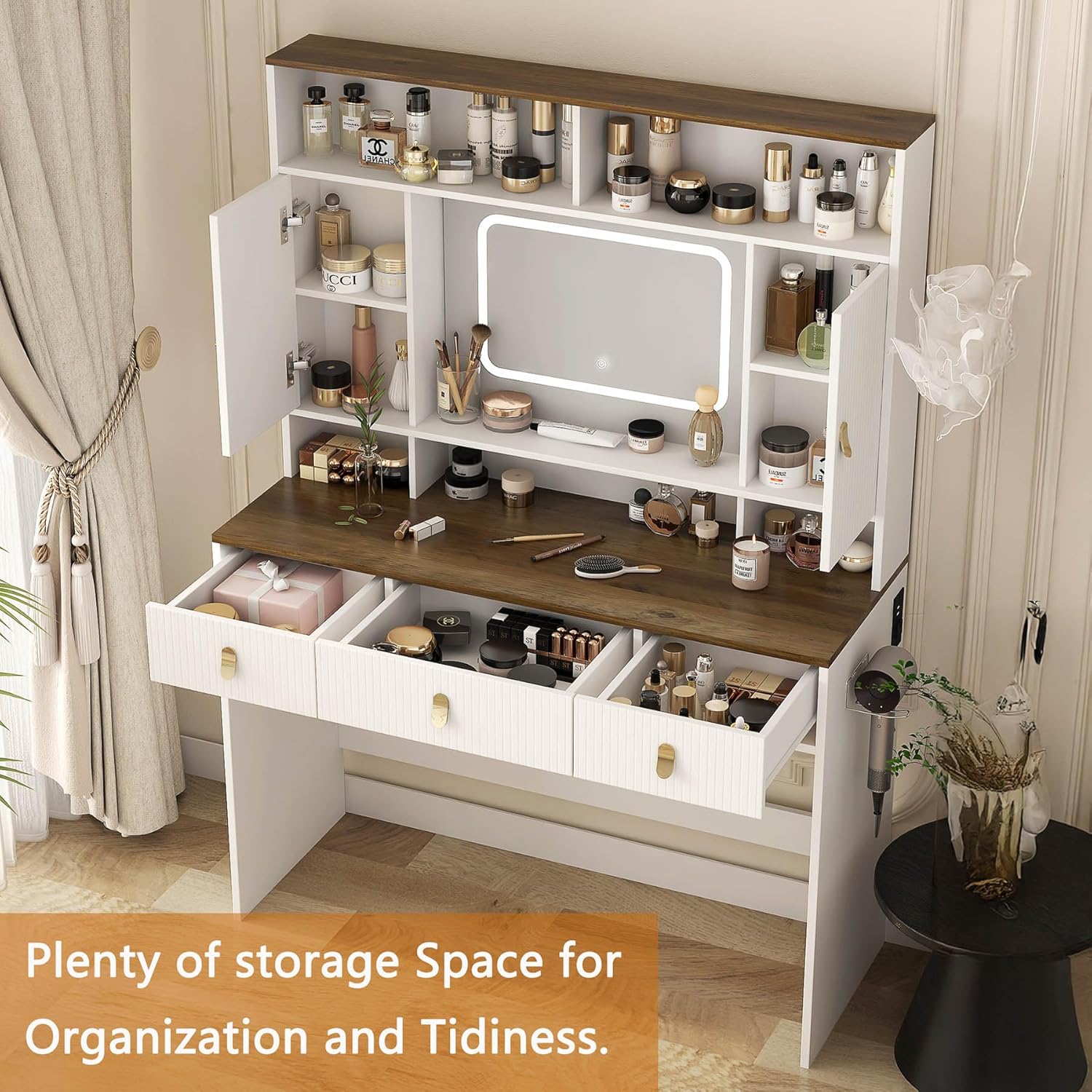
Image: An overhead view of the RIDFY vanity desk, showcasing its multiple drawers, open shelves, and cabinet storage, highlighting its capacity for organization.
Maintenance
Cleaning:
- Wood Surfaces: Wipe wood surfaces with a soft, damp cloth. Avoid abrasive cleaners or harsh chemicals that could damage the finish. Dry immediately with a clean cloth.
- Mirror: Clean the mirror with a glass cleaner and a lint-free cloth. Do not spray cleaner directly onto the mirror, especially near the edges or electrical components.
- Electrical Components: Ensure the vanity is unplugged before cleaning any electrical parts. Wipe gently with a dry cloth.
Hinge Adjustment:
If cabinet doors become misaligned, you can adjust the hinges using a screwdriver.
- Adjust Door Height: Use screw 1 on the hinge to adjust the vertical position of the door.
- Adjust Door Depth: Use screw 2 on the hinge to move the door closer to or further from the cabinet frame.
- Adjust Width of Middle Door Gap: Use screw 3 on the hinge to adjust the horizontal position of the door, affecting the gap between doors.
Refer to the assembly manual for specific hinge adjustment diagrams if needed.
Troubleshooting
| Problem | Possible Cause | Solution |
|---|---|---|
| Mirror lights do not turn on. |
|
|
| Lights are on but cannot change color or brightness. |
|
|
| Charging station (AC/USB) is not working. |
|
|
| Drawers stick or do not slide smoothly. |
|
|
| Cabinet doors are misaligned. |
|
|
If you encounter problems not listed here or if solutions do not resolve the issue, please contact customer support.
Specifications
| Feature | Detail |
|---|---|
| Product Type | Vanity Desk with Lighted Mirror |
| Brand | RIDFY |
| Model Number | vanity with mirror and lights |
| Color | White |
| Material | MDF (Engineered Wood) |
| Overall Dimensions (W x D x H) | 42.44" x 15.74" x 59.48" (107.79 cm x 40 cm x 151.08 cm) |
| Item Weight | 77.2 lbs (35 kg) |
| Mirror Lighting Modes | 3 (Cold White, Warm Yellow, Warm White) |
| Brightness Adjustment | Dimmable via touch control |
| Charging Station | 1x 110V/12A AC Outlet, 2x 5V/2A USB Ports |
| Power Cord Length | Approx. 4.92 feet (1.5 meters) |
| Assembly Required | Yes |

Image: Detailed diagram illustrating the dimensions of the RIDFY vanity desk, including overall width, depth, height, and specific measurements for shelves, mirror, and desk surface.
Warranty and Customer Support
For warranty information, missing parts, or any questions regarding your RIDFY vanity desk, please refer to the warranty card included in your package or contact RIDFY customer support directly through the retailer where the product was purchased. Please have your model number (vanity with mirror and lights) and purchase date available when contacting support.