
Introduction
This manual provides comprehensive instructions for the setup, operation, maintenance, and troubleshooting of your HUAYU RM-DS909 Replacement TV Remote Control. Designed for seamless compatibility with DSTV LCD/LED televisions, this remote offers intuitive control and reliable performance. Please read this manual carefully to ensure optimal use of your new remote control.
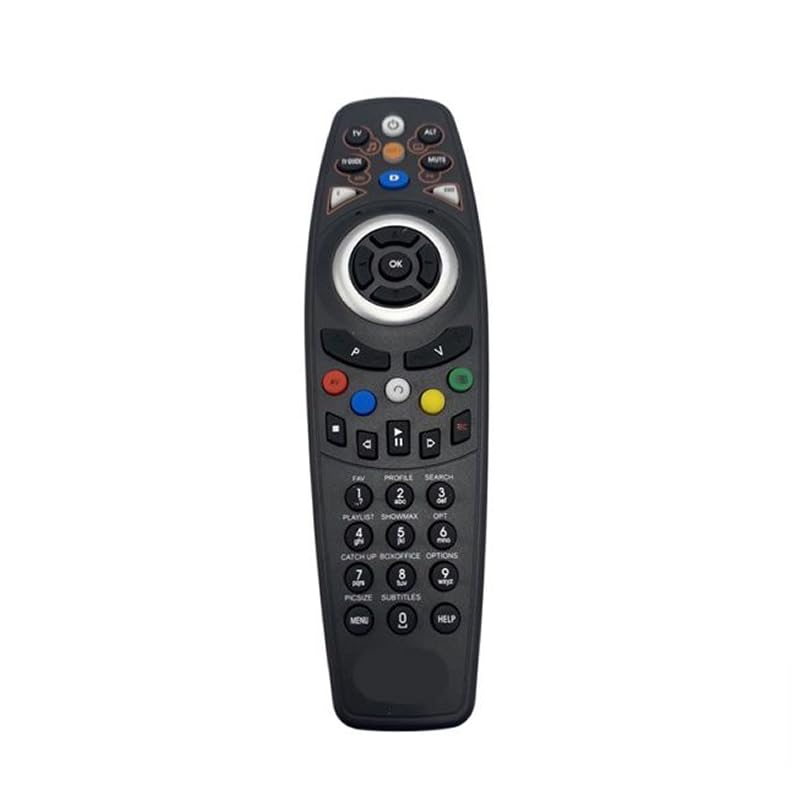
Image: Front view of the HUAYU RM-DS909 Replacement TV Remote Control.
Setup
1. Battery Installation
- Locate the battery compartment on the back of the remote control.
- Slide the battery compartment cover downwards and remove it.
- Insert two (2) AAA batteries (not included) into the compartment, ensuring the positive (+) and negative (-) terminals align correctly with the indicators inside.
- Replace the battery compartment cover by sliding it back into place until it clicks securely.

Image: Battery compartment with cover removed, showing AAA battery slots.
2. Initial Use
The HUAYU RM-DS909 remote control is designed for direct use with compatible DSTV LCD/LED televisions. No complex programming or pairing is required. Once batteries are installed, the remote is ready to operate your television.
Operating Instructions
This remote control provides access to all standard functions of your DSTV LCD/LED television. Below is a general guide to common button functions:
- Power Button: Turns the TV on or off.
- Channel Up/Down: Changes the television channel.
- Volume Up/Down: Adjusts the audio volume.
- Mute Button: Silences or restores the audio.
- Navigation (Arrow) Buttons & OK: Used to navigate menus and confirm selections.
- Menu/Home Button: Accesses the TV's main menu or smart features.
- TV Guide Button: Displays the electronic program guide.
- Colored Buttons (Red, Green, Yellow, Blue): These buttons typically correspond to specific functions within menus or interactive services, as indicated on your TV screen.
- Playback Controls (Play, Pause, Stop, Rewind, Fast Forward, Record): Used for media playback functions, often with PVR or connected devices.
- Numeric Keypad (0-9): For direct channel input.
For specific functions related to your DSTV decoder or TV model, refer to your television's or decoder's user manual.
Maintenance
- Cleaning: Wipe the remote control with a soft, dry cloth. Do not use liquid cleaners or abrasive materials, as they may damage the surface or internal components.
- Battery Replacement: Replace batteries when the remote's response becomes sluggish or stops working. Always replace both batteries simultaneously with new AAA batteries. Do not mix old and new batteries, or different types of batteries.
- Storage: If the remote will not be used for an extended period, remove the batteries to prevent leakage and potential damage. Store the remote in a cool, dry place away from direct sunlight and extreme temperatures.
Troubleshooting
- Remote not responding:
- Ensure batteries are inserted correctly with the correct polarity.
- Replace old batteries with new AAA batteries.
- Check for any obstructions between the remote and the TV's infrared sensor.
- Ensure you are within the effective operating range and pointing the remote towards the TV.
- Limited operating range:
- Weak batteries can reduce the remote's range. Replace them if necessary.
- Bright light sources (e.g., direct sunlight, fluorescent lights) can interfere with the infrared signal.
- Specific buttons not working:
- Ensure the remote is clean and there is no debris obstructing the buttons.
- If only certain buttons fail, it might indicate internal damage. Consider replacing the remote.
Specifications
| Model Number | RM-DS909 (Internal Model: 930) |
| Brand | HUAYU |
| Connectivity Technology | Infrared (IR) |
| Compatible Devices | DSTV LCD/LED Televisions |
| Battery Type | 2 x AAA (not included) |
| Material | ABS |
| Color | Black |
| Special Feature | Smart Functionality |
| Max Number of Supported Devices | 1 |
Warranty and Support
Manufacturer's Warranty
This HUAYU remote control comes with a 1-year Manufacturer's Warranty from the date of purchase. This warranty covers defects in materials and workmanship under normal use. It does not cover damage caused by misuse, accidents, unauthorized modifications, or battery leakage.
Customer Support
For further assistance, troubleshooting not covered in this manual, or warranty claims, please contact your retailer or the point of purchase. Please have your purchase receipt and product model number (RM-DS909) available when seeking support.