
1. Introduction
This instruction manual provides essential information for the safe assembly, operation, and maintenance of your HOOBRO Full Bed Frame, Model BC21UDBF01. This metal platform bed frame features an integrated LED headboard and a convenient charging station. Please read this manual thoroughly before assembly and retain it for future reference.

Image 1.1: Overview of the HOOBRO Full Bed Frame with LED headboard and charging station.
2. Safety Information
To ensure safe use and prevent injury or damage, please adhere to the following safety guidelines:
- Assembly: Assemble the bed frame on a soft, clean surface to prevent scratches. Ensure all parts are correctly aligned and securely fastened before use. Do not overtighten screws.
- Weight Capacity: Do not exceed the maximum weight capacity of 408 kg (900 lbs).
- Electrical Components: The integrated charging station and LED lights contain electrical components. Do not expose them to water or excessive moisture. Disconnect from power before cleaning or maintenance.
- Children: Keep small parts and packaging materials away from children during assembly.
- Stability: Regularly check all connections to ensure they remain tight. Do not jump on the bed frame.
3. Package Contents
Verify that all components are present before beginning assembly. If any parts are missing or damaged, please contact customer support.
- Headboard components (with integrated LED strip and charging station)
- Side rails and footboard components
- Metal support slats (13 heavy-duty slats)
- Support legs (9 sturdy legs)
- Assembly hardware (screws, bolts, Allen wrench)
- Power adapter for LED lights and charging station
- Remote control for LED lights
- Instruction Manual
4. Setup and Assembly Instructions
Assembly is designed to be straightforward. It is recommended to have two people for easier assembly. Follow the step-by-step instructions provided in the included manual. Ensure all parts are correctly oriented before tightening screws.
- Unpack and Identify: Carefully unpack all components and lay them out on a protected surface. Identify each part using the provided parts list.
- Assemble Headboard: Attach the headboard sections, ensuring the LED strip and charging station are correctly positioned. Connect any internal wiring as instructed.
- Attach Side Rails: Connect the side rails to the headboard and footboard using the provided hardware. Do not fully tighten bolts until the frame is complete.
- Install Support Legs: Securely attach the 9 support legs to the frame, ensuring even distribution for stability.
- Insert Metal Slats: Place the 13 heavy-duty metal slats into the designated slots on the side rails. Ensure they are firmly seated to provide stable mattress support and reduce noise.
- Final Tightening: Once all components are in place and aligned, fully tighten all bolts and screws.
- Connect Power: Plug the power adapter for the LED lights and charging station into a wall outlet.

Image 4.1: Illustration of metal slat installation for strong support.

Image 4.2: Exploded view of the bed frame showing components and LED cable connection.
5. Operating Instructions
5.1 LED Headboard Lights
The headboard features a multi-function RGB LED strip to enhance your room's ambiance.
- Power On/Off: Use the provided remote control to turn the LED lights on or off.
- Color Selection: Choose from 16 different colors using the color buttons on the remote.
- Modes: Select from 22 dynamic modes (e.g., flash, strobe, fade, smooth) to create various lighting effects.
- Brightness Adjustment: Adjust the light intensity with 5 brightness levels to suit your preference.
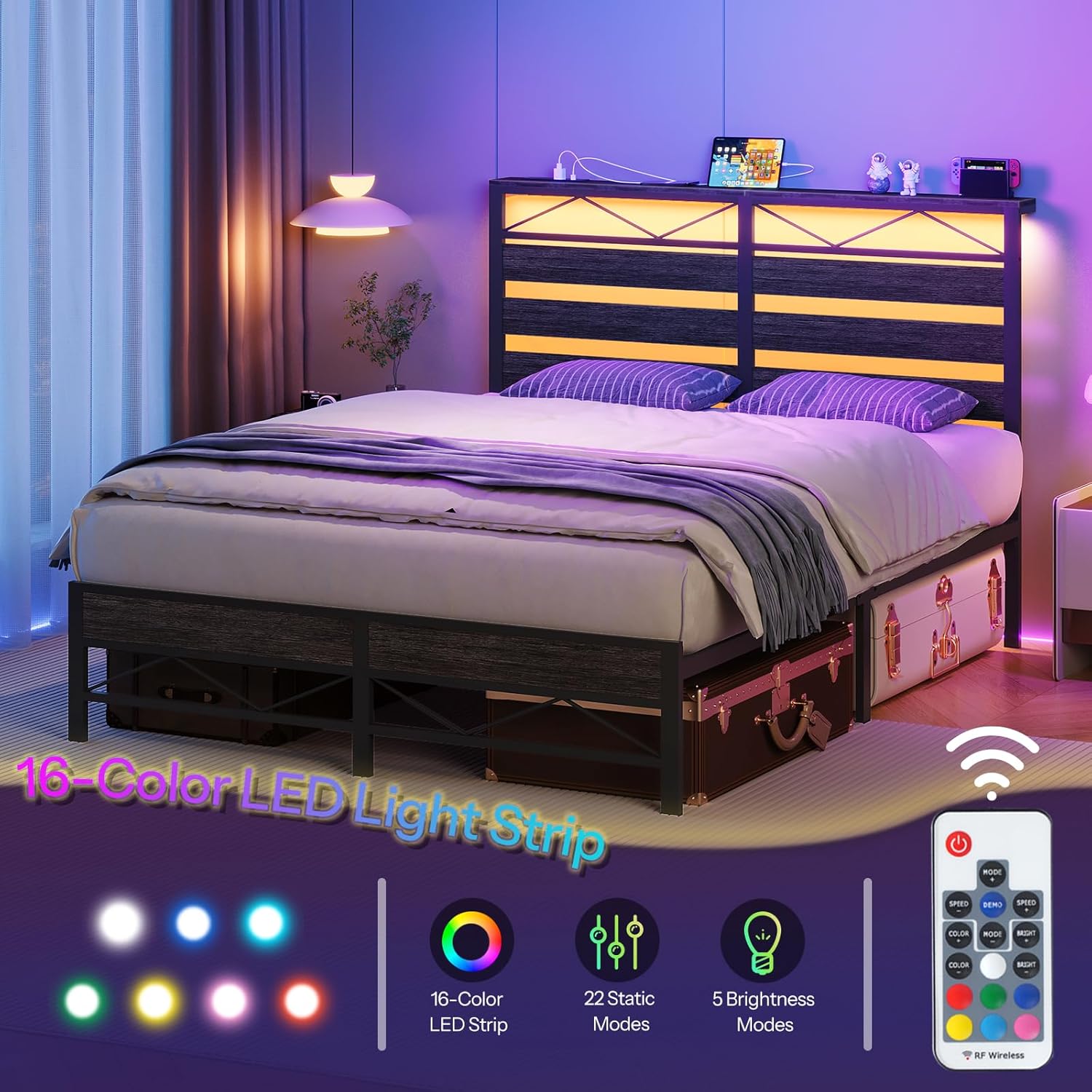
Image 5.1: Remote control and features for the 16-color LED light strip.
5.2 Integrated Charging Station
The headboard includes a convenient charging station for your electronic devices.
- AC Outlets: Two standard AC outlets are available for powering devices such as lamps or laptops.
- USB Ports: Two USB ports are provided for charging smartphones, tablets, and other USB-powered devices.
- Usage: Simply plug your devices into the appropriate outlets or ports. Ensure the bed frame's power cord is connected to a functional wall outlet.

Image 5.2: Detail of the headboard's charging station, showing 2 AC outlets and 2 USB ports.
6. Maintenance
Regular maintenance helps prolong the life of your bed frame.
- Cleaning: Wipe the metal and wooden surfaces with a soft, damp cloth. Avoid harsh chemicals or abrasive cleaners. For the LED strip and charging station, use a dry cloth only after disconnecting power.
- Fastener Check: Periodically check all bolts and screws to ensure they are tight. Retighten as necessary to maintain stability and prevent noise.
- Electrical Check: Inspect the power cord and connections for any signs of wear or damage. If damage is found, discontinue use and contact customer support.
7. Troubleshooting
Refer to this section for solutions to common issues.
| Problem | Possible Cause | Solution |
|---|---|---|
| Bed frame is wobbly or noisy. | Loose fasteners; uneven assembly. | Ensure all bolts and screws are fully tightened. Verify that all support legs are making even contact with the floor. |
| LED lights do not turn on or only partially light up. | Power cord disconnected; faulty remote battery; damaged LED strip. | Check if the power cord is securely plugged into the wall and the headboard. Replace remote control batteries. If the issue persists, contact customer support. |
| Charging station is not working. | Power cord disconnected; device not properly plugged in. | Verify the bed frame's main power cord is connected to a live outlet. Ensure devices are correctly plugged into the AC outlets or USB ports. |
| Missing parts during assembly. | Packaging error. | Carefully re-check all packaging materials. If parts are genuinely missing, contact HOOBRO customer support immediately with your purchase details. |
8. Specifications
- Model: BC21UDBF01
- Brand: HOOBRO
- Type: Full Bed Frame, Metal Platform
- Material: Metal, Engineered Wood
- Overall Dimensions (L x W x H): 205 cm x 137 cm x 112 cm (80.7 in x 53.9 in x 44.1 in)
- Under-Bed Clearance: 28.5 cm (11.2 in)
- Weight Capacity: 408 kg (900 lbs)
- Item Weight: 26.5 kg
- LED Features: 16 Colors, 22 Dynamic Modes, 5 Brightness Levels
- Charging Station: 2 AC Outlets, 2 USB Ports

Image 8.1: Detailed dimensions of the HOOBRO Full Bed Frame.

Image 8.2: Illustration of the 11.2-inch under-bed storage clearance.
9. Warranty and Support
HOOBRO products are designed for quality and durability. For any questions, missing parts, or concerns regarding your HOOBRO Full Bed Frame (Model BC21UDBF01), please contact HOOBRO customer support directly. Please have your purchase information and model number ready when contacting support.
Manufacturer: HOOBRO
Seller: HOOBRO CA
For support, please refer to the contact information provided with your purchase or visit the official HOOBRO website.


