Cecotec Conga 15090 SpinArm Home&Wash Robot Vacuum and Mop User Manual
Model: Conga 15090 SpinArm Home&Wash
1. Introduction
Product Overview
The Cecotec Conga 15090 SpinArm Home&Wash is an advanced robot vacuum and mop designed for comprehensive home cleaning. It features precise laser navigation to map your home, ensuring thorough coverage of every corner. The innovative SpinArm system allows for effective mopping along edges and under furniture, while its powerful 8000 Pa suction effortlessly removes dirt from hard floors and carpets.
This model includes a Home&Wash self-emptying and self-cleaning base, providing autonomous maintenance by emptying dust and cleaning/drying the mop pads. With its long-lasting 5200 mAh battery and intuitive app control, the Conga 15090 offers a convenient and efficient cleaning experience.

Image 1.1: Cecotec Conga 15090 SpinArm Home&Wash Robot Vacuum and Mop with its self-emptying and self-cleaning base, along with included accessories like mop pads and dust bags.
Key Features
- Intelligent Laser Navigation: Maps your home for precise and efficient cleaning paths.
- SpinArm Mopping System: Features extendable and liftable mop pads for thorough cleaning of edges and under furniture, with 10mm mop lifting for carpets.
- Ultra-Powerful Suction: Delivers 8000 Pa suction power to capture micro-dirt on all surfaces, including high-pile carpets.
- Home&Wash Self-Maintenance Base: Automatically empties dust, refills water, and cleans/dries mop pads to prevent odors and germs.
- Silicone Brush for Pet Hair: Designed to clean deeply without tangles, ideal for homes with pets.
- Carpet Care Detection: Ultrasonic detection lifts mops to protect carpets from moisture and automatically increases suction for deep cleaning.
- Extended Battery Life: 5200 mAh battery provides up to 240 minutes of vacuuming and 160 minutes of mopping, covering large areas.
- App 3.0 Control: Comprehensive mobile application for detailed cleaning plans, room-specific settings, and restricted zones.
2. Safety Instructions
Please read all safety instructions carefully before using the appliance and keep this manual for future reference. Failure to follow these instructions may result in electric shock, fire, or serious injury.
- Ensure the power voltage matches the voltage indicated on the appliance's rating label.
- Do not immerse the appliance, power cord, or plug in water or any other liquid.
- Keep the appliance away from children and pets. Supervise children to ensure they do not play with the appliance.
- Use only original accessories and spare parts provided or approved by Cecotec.
- Do not use the appliance on wet surfaces or to pick up liquids, flammable or combustible materials.
- Regularly check the power cord and plug for damage. If damaged, contact authorized technical support.
- Before cleaning or maintenance, always unplug the appliance from the power outlet.
- Avoid operating the robot in areas with open flames, excessive moisture, or extreme temperatures.
- Clear the cleaning area of loose cables, small objects, or fragile items that could obstruct the robot or cause damage.
3. Package Contents
Verify that all components are present and in good condition upon unpacking. If any items are missing or damaged, contact customer support.
- Cecotec Conga 15090 Robot Vacuum
- Home&Wash Self-Emptying and Self-Cleaning Base
- Power Adapter
- Side Brushes (x2)
- Main Silicone Brush
- Mop Pads (x2)
- Disposable Dust Bags (x1 pre-installed, x1 spare)
- Cleaning Tool
- User Manual
Image 3.1: The main product image illustrating the robot, base, and some of the included accessories.
4. Product Components
Robot Vacuum
The robot vacuum features a sleek design with integrated sensors and cleaning mechanisms.
- Top Panel: Features the laser navigation sensor (LDS), power/clean button, and Wi-Fi indicator.
- Front Bumper: Equipped with anti-collision sensors.
- Side Brushes: Two rotating brushes to sweep debris into the main brush path.
- Main Brush: A silicone brush designed for deep cleaning and preventing hair tangles, especially useful for pet owners.
- Mop Pads: Two rotating mop pads for effective wet cleaning, extendable and liftable.
- Driving Wheels: Large wheels for navigating various floor types and overcoming obstacles.
- Cliff Sensors: Located on the bottom to prevent the robot from falling down stairs.
- Charging Contacts: On the bottom for connecting to the charging base.

Image 4.1: Top view of the robot vacuum, highlighting the laser navigation system.
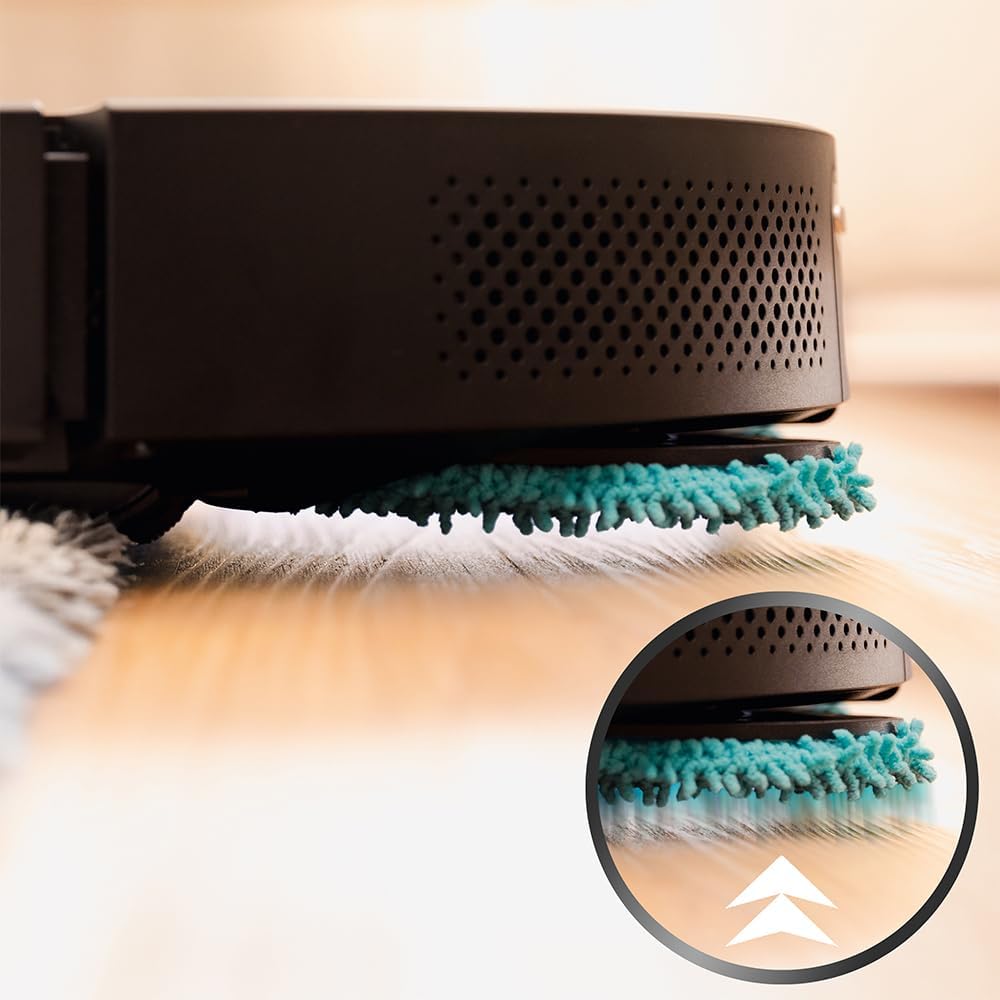
Image 4.2: Underside of the robot, displaying the cleaning components including the silicone brush and rotating mop pads.
Home&Wash Self-Emptying & Self-Cleaning Base
The multifunctional base provides automated dust collection and mop maintenance.
- Dust Collection Port: Connects to the robot for automatic dust emptying.
- Clean Water Tank: Holds fresh water for mop cleaning and refilling the robot's internal tank.
- Dirty Water Tank: Collects wastewater from the mop cleaning process.
- Dust Bag Compartment: Houses the disposable dust bag for collected debris.
- Mop Washing Area: Where the robot's mop pads are cleaned and dried.

Image 4.3: The Home&Wash base, showing the clean and dirty water tanks.

Image 4.4: Illustration of the water circulation system within the base for mop cleaning.
5. Setup Guide
Unpacking and Placement
- Carefully remove all components from the packaging.
- Remove all protective films and packing materials from the robot and the base.
- Place the Home&Wash base against a wall in an open area, ensuring at least 1.5 meters of clear space in front and 0.5 meters on either side. Avoid placing it near stairs or heat sources.
- Plug the power adapter into the base and then into a wall outlet.

Image 5.1: Proper placement of the robot vacuum and its base in a home environment.
Initial Charging
- Place the robot onto the charging contacts of the Home&Wash base. Ensure the contacts align.
- The robot will automatically begin charging. For the first use, allow the robot to charge completely (approximately 4-5 hours) before its initial cleaning cycle.
- The indicator lights on the robot and base will show charging status.

Image 5.2: The robot vacuum correctly docked and charging on its base.
App Connection
- Download the 'Cecotec Conga' App from your smartphone's app store (Google Play Store or Apple App Store).
- Register an account and log in.
- Ensure your smartphone is connected to a 2.4 GHz Wi-Fi network. The robot does not support 5 GHz networks.
- Follow the in-app instructions to add your device. This typically involves pressing and holding the robot's Wi-Fi button until it enters pairing mode, then connecting to the robot's temporary Wi-Fi hotspot.
- Once connected, you can control the robot, view maps, set cleaning schedules, and access advanced features.

Image 5.3: Using the Cecotec Conga App to control the robot vacuum.
6. Operating Instructions
Starting a Cleaning Cycle
- Manual Start: Press the power button on the robot once to start an automatic cleaning cycle. Press again to pause.
- App Start: Open the Cecotec Conga App and select the desired cleaning mode (e.g., Auto, Spot, Zone) to begin cleaning.
Cleaning Modes
- Auto Clean: The robot intelligently maps and cleans the entire area.
- Spot Clean: Directs the robot to clean a specific small area intensively.
- Zone Clean: Allows you to define specific areas on the map for the robot to clean.
- Restricted Zones: Use the app to set virtual walls or no-go zones to prevent the robot from entering certain areas.
Mopping Function
The Conga 15090 features an advanced mopping system with extendable and liftable mop pads.
- Ensure the clean water tank in the base is filled. The robot will automatically refill its internal water tank as needed.
- Attach the mop pads securely to the robot.
- Select a mopping mode via the app. The SpinArm system will extend the right mop to clean edges and corners effectively.

Image 6.1: The SpinArm system extending the mop pad to clean close to edges.
Carpet Detection
The robot is equipped with ultrasonic carpet detection to protect carpets during mopping and enhance vacuuming performance.
- When a carpet is detected during mopping, the mop pads will automatically lift by 10mm to prevent wetting the carpet.
- During vacuuming, the robot will automatically increase suction power when on carpets for deeper cleaning.

Image 6.2: The robot's mop pads lifting mechanism to avoid contact with carpets.
7. Maintenance
Regular maintenance ensures optimal performance and extends the lifespan of your robot vacuum.
Emptying the Dust Bin (Robot)
While the base automatically empties the robot's dust bin, it's good practice to manually check and clean it periodically.
- Open the robot's top cover.
- Remove the dust bin.
- Empty the contents into a trash can.
- Clean the filter and dust bin with the provided cleaning tool or a soft brush.
- Reinsert the dust bin and close the cover.
Cleaning Water Tanks (Base)
The clean and dirty water tanks in the base should be cleaned regularly to prevent mold and odors.
- Remove the clean and dirty water tanks from the base.
- Empty any remaining water from both tanks.
- Rinse both tanks with clean water. For the dirty water tank, you may use a mild detergent if necessary, then rinse thoroughly.
- Allow the tanks to air dry completely before reinserting them into the base.
Image 7.1: The clean and dirty water tanks of the Home&Wash base, which require regular cleaning.
Cleaning Brushes and Mops
- Main Brush: Remove the main brush cover and the brush itself. Use the cleaning tool to remove tangled hair and debris. Rinse if necessary and air dry.
- Side Brushes: Check for tangled hair or debris. If worn or damaged, replace them.
- Mop Pads: The base automatically cleans and dries the mop pads. However, for deeper cleaning, remove the mop pads from the robot and hand wash them with water and mild detergent. Allow them to air dry completely before reattaching.
Image 7.2: The underside of the robot, showing the main brush and side brushes that need regular cleaning.
Filter Replacement
The HEPA filter in the robot's dust bin should be cleaned regularly and replaced every 3-6 months, depending on usage.
- Remove the dust bin from the robot.
- Take out the HEPA filter.
- Tap the filter gently to remove dust. Do not wash the HEPA filter with water.
- Replace with a new filter when necessary.
Sensor Cleaning
Wipe all sensors (cliff sensors, anti-collision sensors, laser sensor window) with a soft, dry cloth to ensure proper navigation.
8. Troubleshooting
If you encounter issues with your Cecotec Conga 15090, refer to the table below for common problems and solutions. If the problem persists, contact customer support.
| Problem | Possible Cause | Solution |
|---|---|---|
| Robot does not turn on or charge. | Low battery; charging contacts dirty; power adapter not connected. | Ensure robot is properly docked; clean charging contacts; check power connection to base and outlet. |
| Robot cannot connect to Wi-Fi / App. | Incorrect Wi-Fi band (5GHz); incorrect password; router issues; robot too far from router. | Ensure 2.4 GHz Wi-Fi; re-enter password; restart router; move robot closer to router; try resetting robot's Wi-Fi. |
| Poor cleaning performance. | Dust bin full; brushes tangled; filter clogged; sensors dirty. | Empty dust bin; clean main and side brushes; clean/replace filter; wipe all sensors. |
| Mop pads not cleaning effectively or leaving streaks. | Mop pads dirty; clean water tank empty; dirty water tank full. | Clean or replace mop pads; refill clean water tank; empty dirty water tank. |
| Base leaks water during mop cleaning. | Improper tank installation; damaged tank seal; base malfunction. | Ensure tanks are correctly seated; check for cracks or damage on tanks/seals; if problem persists, contact support. |
| Robot gets stuck frequently. | Obstacles (cables, small objects); dark surfaces (cliff sensors triggered). | Clear cleaning area; use virtual walls for problematic areas. |
9. Technical Specifications
| Feature | Specification |
|---|---|
| Brand | Cecotec |
| Model Name | Conga 15090 Spin Revolution Home&Wash |
| Model Number | A01_EU01_100104 |
| Color | Black |
| Product Dimensions (Robot) | 35 x 35 x 10 cm |
| Product Weight | 13.3 kg (total with base) |
| Suction Power | 8000 Pa |
| Battery Capacity | 5200 mAh |
| Max. Cleaning Area (Vacuum) | Up to 240 m² |
| Max. Cleaning Time (Vacuum) | 240 minutes |
| Max. Cleaning Time (Mop) | 160 minutes |
| Filter Type | HEPA |
| Control Method | Application (App 3.0) |
| Special Features | Laser Navigation, SpinArm Mopping, Self-Emptying Base, Self-Cleaning Mops, Carpet Detection |
10. Warranty and Support
Cecotec products are manufactured to the highest quality standards. This product is covered by a warranty in accordance with current legislation. For detailed warranty terms and conditions, please refer to the warranty card included with your product or visit the official Cecotec website.
If you require technical assistance, have questions about product operation, or need to report a defect, please contact Cecotec customer support through their official channels. You can typically find contact information on the Cecotec website or in the product packaging.
- Online Support: Visit the official Cecotec website for FAQs, troubleshooting guides, and contact forms.
- Customer Service Hotline: Refer to your product documentation for the relevant phone number in your region.
- Service Centers: Information on authorized service centers may be available on the Cecotec website.


