
1. Introduction
Thank you for choosing the DC HOUSE 12V DC Converter and 3 Amp Battery Charger. This device is designed to convert 12V DC power from a battery into various USB outputs (USB-A and USB-C) for charging electronic devices, and can also function as a 3 Amp charger for 12V batteries up to 50AH. Please read this manual thoroughly before use to ensure safe and optimal operation.
2. Safety Information
WARNING: Failure to follow these safety instructions may result in fire, electric shock, injury, or damage to the product or other property.
- This product is recommended for use with batteries under 12V voltage and below 50AH (Max 50AH). Using with larger batteries may lead to unexpected behavior or damage.
- Do not immerse the product in water or expose it to water splashes. This can affect the product's lifespan and performance.
- Do not attempt to open or repair the product. This may cause electric shock or damage and will void the warranty.
- When the charger is not in use, store it in a dry, cool, and ventilated place. Avoid direct sunlight.
- Avoid violently pulling on the connection cable to prevent physical damage to the cable or interface.
- Ensure proper polarity when connecting to a battery. Connect the red clip to the positive (+) terminal and the black clip to the negative (-) terminal. Reverse connection protection is built-in, but caution is advised.
- Use a fuse on the battery lead for added safety, especially when connecting to large external batteries.
- Keep out of reach of children.
3. Product Overview
The DC HOUSE 12V DC Converter and 3 Amp Battery Charger is a compact and versatile device designed for both charging electronic devices from a 12V battery and charging a 12V battery itself. It features multiple output ports and integrated protection mechanisms.
3.1 Components
- Main Unit: The central converter/charger module.
- USB-A Ports (x2): For charging standard USB devices (5V/2.4A, 12W Max).
- USB-C (Type-C) Port (x1): Supports QC3.0 Fast Charging (45W Max) and Power Delivery (PD). This port is bidirectional (IN/OUT).
- DC Input/Output Cable: With alligator clips for connecting to a 12V battery.
- Type-C Port Indicator: LED light indicating charging/discharging status.
3.2 Product Diagram

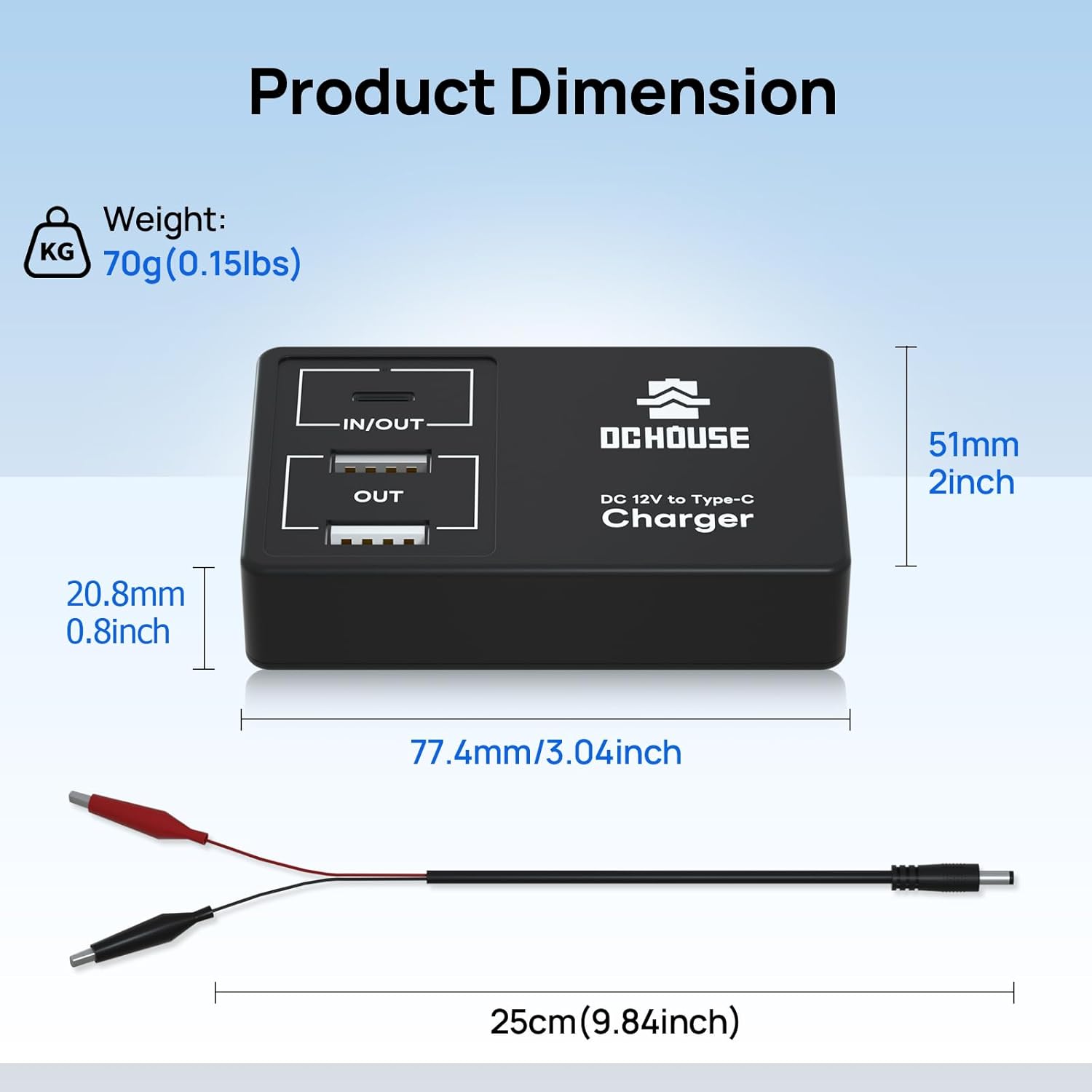
4. Specifications
| Feature | Specification |
|---|---|
| Input Voltage | DC 10-14.6V |
| USB-A Output | 5V/2.4A (12W Max) |
| USB-C (Type-C) Output | PD 45W Max (Supports QC3.0) |
| USB-C Output Voltages/Currents | 20V/3A, 15V/3A, 12V/3A, 9V/3A, 5V/3A |
| Maximum Charging Current (for 12V battery) | 3A |
| Recommended Battery Capacity | Under 12V and below 50AH (Max 50AH) |
| Operating Temperature | 0-60°C |
| Dimensions (L x W x H) | 77.4 x 51 x 20.8 mm (3.04 x 2 x 0.8 inches) |
| Weight | 70g (0.15 lbs) |
| Model Number | L131211800072-1 |
5. Setup
The DC HOUSE converter/charger is designed for straightforward use. Follow these steps for initial setup.
5.1 Connecting to a 12V Battery
- Ensure the 12V battery is in good condition and within the recommended capacity (under 50AH).
- Identify the positive (+) and negative (-) terminals on your 12V battery.
- Connect the red alligator clip from the DC HOUSE unit to the positive (+) terminal of the battery.
- Connect the black alligator clip from the DC HOUSE unit to the negative (-) terminal of the battery.
- Ensure the connections are secure.
Note: The alligator clips are suitable for M6 or smaller size battery terminals.

6. Operating Instructions
The DC HOUSE unit offers two primary functions: discharging (powering devices from a 12V battery) and charging (charging a 12V battery).
6.1 Discharging (Charging Electronic Devices)
- Connect the DC HOUSE unit to a 12V battery as described in Section 5.1.
- Connect your electronic device (smartphone, tablet, camera, etc.) to one of the available USB-A or USB-C ports using an appropriate charging cable.
- The device will begin charging. The Type-C port indicator will show a green light when discharging.
- You can charge up to three devices simultaneously (two via USB-A, one via USB-C).
6.2 Charging a 12V Battery
The USB-C (IN/OUT) port can also be used to charge the 12V battery connected to the alligator clips.
- Connect the DC HOUSE unit to the 12V battery as described in Section 5.1.
- Connect a USB-C power adapter (not included) to the USB-C (IN/OUT) port on the DC HOUSE unit.
- Plug the USB-C power adapter into a wall outlet.
- The Type-C port indicator will show a red light when the battery is charging.
- Once the battery is fully charged, the indicator light will turn green.
Note: This function is recommended for 12V batteries under 50AH. Charging time will be longer for larger batteries.

6.3 Type-C Port Indicator Status
- Red Light On: Charging status (when charging a 12V battery).
- Green Light On: Full status (when 12V battery is fully charged) or Discharging status (when powering external devices).

7. Maintenance
- Cleaning: Wipe the unit with a soft, dry cloth. Do not use liquid cleaners or solvents.
- Storage: Store the unit in a cool, dry, and well-ventilated area away from direct sunlight and moisture when not in use.
- Cable Care: Inspect cables and connectors regularly for any signs of wear or damage. Replace if necessary.
- Battery Compatibility: Always ensure the connected battery meets the recommended specifications to prevent strain on the unit.
8. Troubleshooting
| Problem | Possible Cause | Solution |
|---|---|---|
| Device not charging (discharging function) | Incorrect battery connection; Battery voltage too low; Faulty USB cable; Device not compatible. | Check alligator clip connections for correct polarity and secure contact. Ensure the 12V battery has sufficient charge. Try a different USB cable. Verify device compatibility with USB charging standards. |
| 12V Battery not charging (charging function) | Incorrect battery connection; USB-C power adapter not connected or faulty; Battery capacity too high. | Check alligator clip connections for correct polarity and secure contact. Ensure the USB-C power adapter is working and properly connected. Confirm the 12V battery is within the recommended 50AH capacity. |
| Type-C indicator light not working | No power input/output; Unit in sleep mode. | Ensure the unit is properly connected to a power source (12V battery or USB-C adapter) and a device is connected for charging/discharging. The unit enters sleep mode when connected but not in use to reduce self-consumption and can be awakened during use. |
| Unit gets excessively hot | Overload; Poor ventilation; Internal fault. | Disconnect all devices and the battery immediately. Allow the unit to cool down. Ensure the total power draw from connected devices does not exceed the unit's capacity. Ensure adequate ventilation around the unit. If the problem persists, discontinue use and contact support. |
8.1 Multiple Protection Features
The DC HOUSE unit incorporates several protection features to ensure safe operation:
- Input Reverse Connection Protection: Protects against incorrect battery polarity.
- Over Current Protection: Prevents damage from excessive current draw.
- Over Temperature Protection: Shuts down if the unit overheats.
- Short Circuit Protection: Protects against short circuits.
- Low Voltage Protection: Prevents over-discharge of the connected 12V battery.
- Over Charge Protection: Prevents overcharging of the 12V battery.
- Over Discharge Protection: Prevents excessive discharge of the 12V battery.

9. Warranty and Support
DC HOUSE products are manufactured to high-quality standards. For warranty information, technical support, or any abnormal situations during the use of the product, please contact our after-sales service personnel immediately. Refer to your purchase documentation or the official DC HOUSE website for specific warranty terms and contact details.
Contact Information: Please refer to the contact details provided with your purchase or on the official DC HOUSE website.