
1. Product Overview
The HEATGENE Smart Towel Warmer (Model HG-R0246P) is a wall-mounted, liquid-filled towel rail designed to warm towels. It features smart controls including a timer, temperature control, and compatibility with Alexa and Google Home for voice and app control. This manual provides instructions for safe installation, operation, and maintenance of your towel warmer.

Figure 1: Front view of the HEATGENE Smart Towel Warmer.
Key Features:
- 7x24 Temperature Control & Timer: Customize temperature and schedule for automatic operation.
- Voice and Remote Control: Compatible with Alexa and Google Home, controllable via the Tuya app (iOS 8.0+ and Android 4.4+).
- Energy-Efficient: Rated power 300W (2.5 amp), reaches 130°F in approximately one hour (based on 68°F room temperature).
- Dual Installation Options: Supports both hardwired and plug-in installation.
- Reliable Quality: ETL-certified with overheat protection.

Figure 2: Overview of smart features including temperature control, timer, Wi-Fi, and voice control compatibility.
2. Safety Information
Please read all safety instructions carefully before installation and use. Failure to follow these instructions may result in electric shock, fire, or other hazards.
- This appliance is intended for domestic use only.
- Do not immerse the towel warmer in water or other liquids.
- Ensure the power supply matches the voltage specified on the product label.
- Hardwiring must be performed by a qualified electrician.
- Do not operate the towel warmer with a damaged cord or plug.
- Keep children and pets away from the towel warmer during operation.
- The surface of the towel warmer can reach high temperatures (up to 130°F). Avoid prolonged direct contact.
- This product is ETL-certified, indicating compliance with North American safety standards.
3. Installation
The HEATGENE Smart Towel Warmer can be installed as either a plug-in unit or hardwired directly into your electrical system. Choose the method that best suits your needs.
3.1. Wall Mounting
The towel warmer is designed for wall-mounted installation. Ensure the mounting surface is structurally sound and can support the weight of the unit and any towels.
3.2. Wiring Options
Plug-in Installation:
- The unit comes with a coiled power cord with a 5.25-ft reach.
- Simply plug the cord into a standard 120V grounded electrical outlet.
- Ensure the outlet is easily accessible and not located where it can be splashed with water.
Hardwired Installation:
- For a seamless appearance, the towel warmer can be hardwired.
- This process involves cutting the power cable and connecting it directly to your home's electrical wiring.
- Important: Hardwiring must be performed by a qualified electrician to ensure safety and compliance with local electrical codes.
- A wall plate (e.g., HEATGENE PR4644 Wall Plate) is required for hardwired installation and is sold separately. Search for "HEATGENE PR4644 Wall Plates" on Amazon if needed.

Figure 3: Hardwired installation overview. Professional installation is required.

Figure 4: Product features and installation options.
4. Operating Instructions
The HEATGENE Smart Towel Warmer offers multiple ways to control its functions.
4.1. Manual Control (Touchscreen)
The integrated touchscreen display allows for direct control of temperature and timer settings. Refer to the on-screen prompts for specific adjustments.
4.2. App Control (Tuya App)
Control your towel warmer from anywhere using the Tuya Smart app.
- Step 1: Download and launch the Tuya Smart app (available for iOS 8.0+ and Android 4.4+).
- Step 2: Create an account and follow the in-app instructions to set up your profile.
- Step 3: Connect your towel warmer to the app. Ensure your device is connected to a 2.4G Wi-Fi network. No separate hub is required.

Figure 5: Simple Tuya App setup process.
4.3. Voice Control
The towel warmer is compatible with Amazon Alexa and Google Home. Once connected via the Tuya app, you can use simple voice commands.
- Example Commands:
- "Alexa, turn on the towel warmer."
- "Hey Google, set towel warmer temperature to 120 degrees."

Figure 6: Voice control functionality with smart assistants.

Figure 7: Remote control via the Tuya app. (Note: Do not use phone while driving.)
5. Maintenance
Regular cleaning and proper care will ensure the longevity and optimal performance of your HEATGENE Smart Towel Warmer.
- Cleaning: Disconnect the power before cleaning. Use a soft, damp cloth to wipe down the surface. Do not use abrasive cleaners, solvents, or harsh chemicals, as these can damage the finish.
- Inspection: Periodically check the power cord (for plug-in models) for any signs of damage. Ensure all mounting hardware remains secure.
- No internal maintenance is required. Do not attempt to open or repair the unit yourself.
6. Troubleshooting
If you encounter issues with your towel warmer, refer to the following common solutions:
| Problem | Possible Cause | Solution |
|---|---|---|
| Towel warmer does not heat up. | No power supply. Unit is turned off. Timer not set correctly. | Check power outlet/circuit breaker. Ensure the unit is powered on via the touchscreen or app. Verify timer settings in the app or on the device. |
| Towel warmer not connecting to Wi-Fi/App. | Incorrect Wi-Fi password. Not on 2.4GHz network. Router too far. | Re-enter Wi-Fi password in the app. Ensure your phone and the towel warmer are connected to a 2.4GHz Wi-Fi network during setup. Move the towel warmer closer to the Wi-Fi router or use a Wi-Fi extender. |
| Voice control not working. | Not linked to Alexa/Google Home. Incorrect device name. | Ensure the Tuya Smart skill/service is enabled and linked in your Alexa/Google Home app. Use the exact device name configured in the Tuya app. |
If the problem persists after attempting these solutions, please contact customer support.
7. Specifications
| Feature | Detail |
|---|---|
| Model Number | HG-R0246P |
| Dimensions (H x W) | 15.75 inches x 23.62 inches (Current Variant) |
| Package Dimensions | 27 x 22.5 x 4.75 inches |
| Item Weight | 18.91 pounds |
| Rated Power | 300W (2.5 amp) |
| Voltage | 120V |
| Optimal Working Temperature | 130°F (based on 68°F room temperature) |
| Material | Q195 Low Carbon Steel |
| Certification | ETL Listed |
| Wi-Fi Compatibility | 2.4G Wi-Fi |
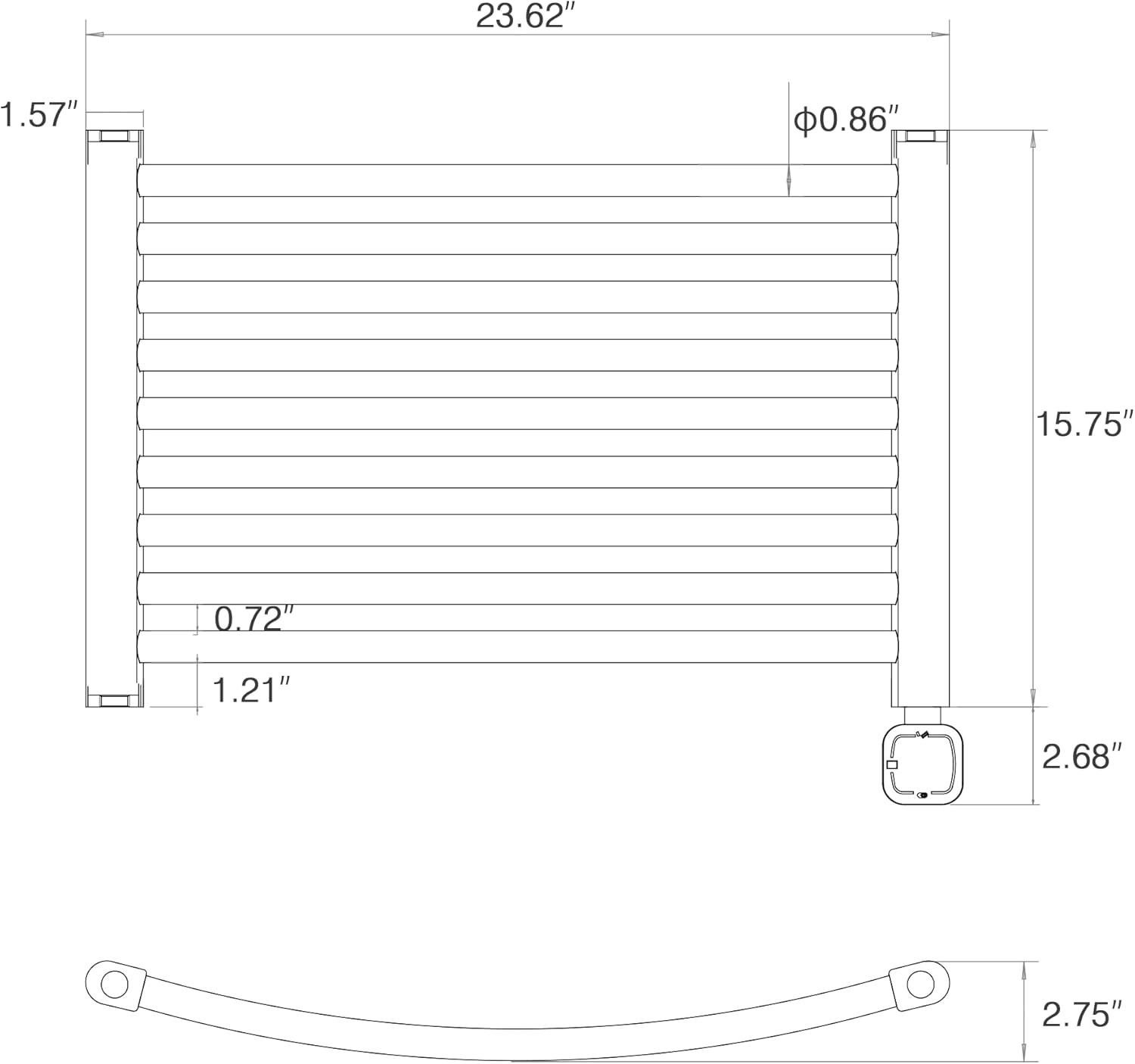
Figure 8: Dimensional drawing of the towel warmer.
8. Warranty and Support
Warranty Coverage:
This HEATGENE Smart Towel Warmer comes with a 2-YEAR MANUFACTURER'S COVERAGE from the date of purchase. This warranty covers defects in materials and workmanship under normal use. Please retain your proof of purchase for warranty claims.
Exclusions:
- Damage caused by improper installation (especially hardwiring not performed by a trained electrician).
- Damage from misuse, abuse, accidents, or unauthorized repairs.
- Normal wear and tear.
Customer Support:
For technical assistance, troubleshooting, or warranty inquiries, please contact HEATGENE customer support. Refer to the contact information provided with your product packaging or visit the official HEATGENE website for support details.