
1. Safety Instructions
Please read all safety instructions carefully before assembly and use. Failure to follow these instructions may result in injury or damage to the product.
- Always follow the assembly instructions carefully.
- Keep the desk away from heat sources.
- Do not overload the desk. The maximum recommended weight is 70 kg.
- Be aware of the anti-collision function during height adjustment. Do not place objects or body parts in the path of the moving desk frame.
- Ensure all cables are properly managed to prevent tripping hazards or damage during height adjustments.
- Assembly requires two people for safety and ease of installation.

Image: The desk frame supports up to 70 kg. Avoid exceeding this limit.
2. Product Overview
The WOLTU TS190ws Electric Height-Adjustable Desk Frame is designed to provide a versatile and ergonomic workspace, allowing seamless transitions between sitting and standing positions. It features a robust steel construction, intelligent control panel, and safety mechanisms.
Key Features:
- Adjustable Height: Electric height adjustment from 72 cm to 120 cm.
- Memory Function: Store up to 4 common height settings for quick adjustments.
- Anti-Collision Protection: Automatically stops and reverses when encountering an obstacle (20-30 kg pressure).
- Quiet Operation: Powerful motor operates at less than 50 dB.
- Integrated USB Port: Convenient charging for devices.
- Robust Construction: High-quality powder-coated steel frame with T-shaped legs, supporting up to 70 kg.
- Extendable Frame: Adapts to desktops with widths from 100-160 cm.

Image: The WOLTU desk frame in a typical office setup.

Image: The desk frame allows for comfortable sitting and standing positions.
3. Package Contents
Before starting assembly, ensure all components are present. Refer to the assembly video for a visual guide to the parts included.
- Desk Legs (2 pcs)
- Crossbar (extendable)
- Motor
- Control Panel
- Power Adapter and Cable
- Mounting Brackets and Screws (various sizes)
- Allen Key
- Cable Management Clips
Video: This video demonstrates the unboxing and identification of all components included in the WOLTU TS190ws desk frame package, followed by a step-by-step assembly guide.
4. Setup and Assembly
Follow these steps to assemble your WOLTU electric height-adjustable desk frame. It is recommended to have two people for assembly.
- Attach Motor to Leg: Secure the motor to one of the desk legs using the provided screws (A x 2pcs).
- Assemble Leg Extensions: Attach the horizontal leg extensions to the main leg columns using screws (C x 6pcs).
- Install Feet: Secure the T-shaped feet to the bottom of the leg columns using screws (B x 4pcs) and the Allen key (G x 1pc).
- Connect Crossbar: Insert the extendable crossbar between the two leg assemblies. Adjust the width to match your desktop size (customized width: 90-135 cm). Secure the crossbar with screws (B x 2pcs).
- Attach Control Box: Connect the motor and control panel cables to the control box. Use the adhesive bracket to mount the power adapter securely under your desktop.
- Mount to Desktop: Place your desktop (not included) onto the assembled frame. Secure the frame to the desktop using the provided screws (D x 8pcs). Ensure the desktop is centered and aligned.
- Cable Management: Use the included cable clips to organize and secure all cables, preventing them from interfering with the desk's movement.

Image: Dimensions and load capacity of the desk frame.

Image: The frame is suitable for various desktop sizes.
5. Operating Instructions
Your WOLTU desk frame is equipped with an intuitive control panel for easy height adjustment and memory functions.
Control Panel Functions:
- Up/Down Arrows (▲ / ▼): Press and hold to continuously adjust the desk height. Release to stop at the desired height.
- Memory Presets (1, 2, 3, 4): To save a height, adjust the desk to your desired position, then press the 'M' button (if available, or hold the number button) followed by the desired number (1-4). To recall a saved height, simply press the corresponding number button.
- LED Display: Shows the current desk height in centimeters.
- USB Charging Port: Located on the side of the control panel, use this port to charge your electronic devices.
Anti-Collision Feature:
The desk is equipped with an anti-collision system. If the desk encounters an obstacle during height adjustment (e.g., a chair, cabinet, or wall), it will automatically stop and reverse slightly to prevent damage. This feature activates with approximately 20-30 kg of pressure.
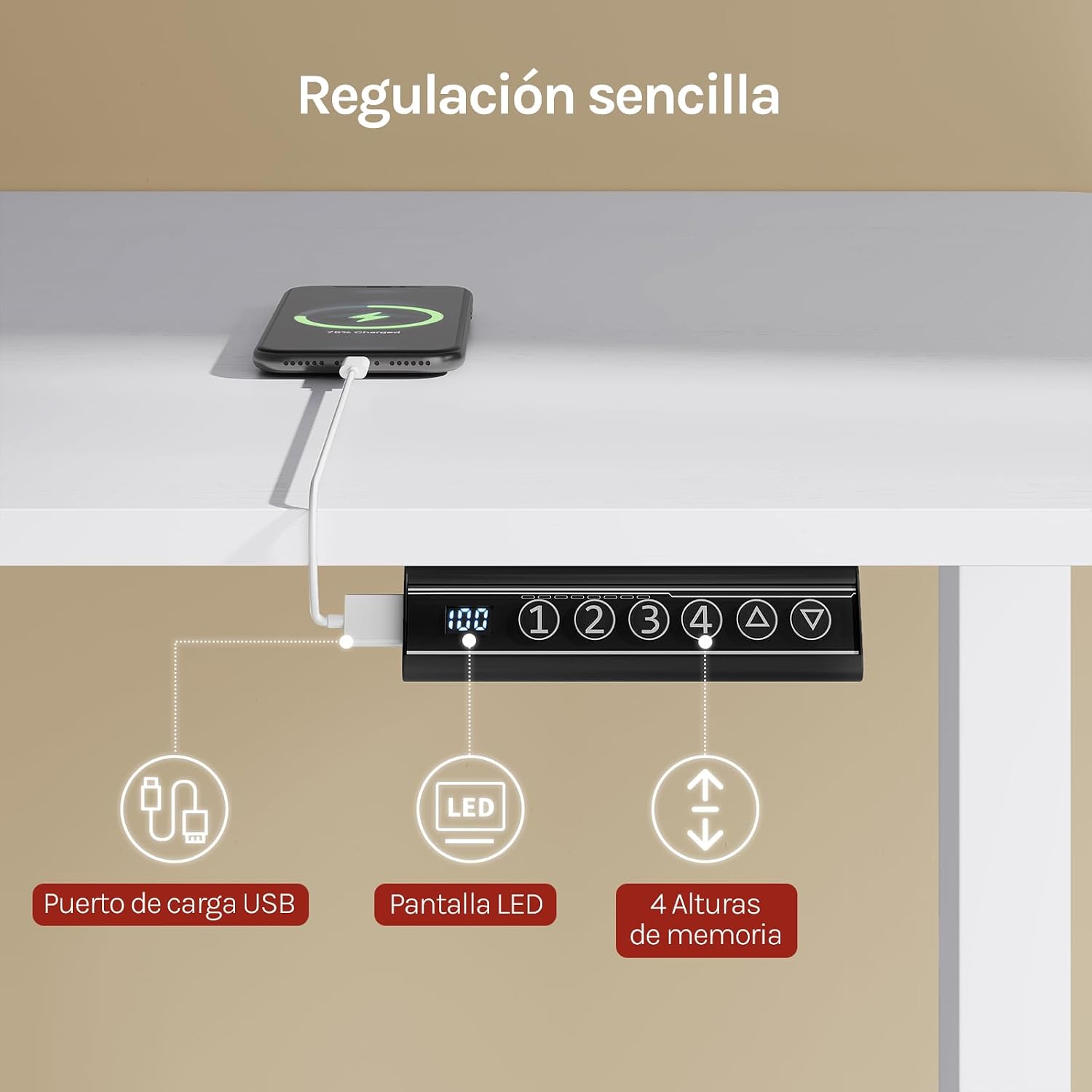
Image: Control panel with USB charging port and memory functions.

Image: Features of the control panel.

Image: The desk supports 4 customizable memory heights.

Image: Automatic rebound anti-collision feature.
Video: This video showcases the WOLTU TS190ws desk frame's automatic height adjustment, USB charging port, and its adaptability for various working positions.
6. Maintenance
To ensure the longevity and optimal performance of your WOLTU desk frame, follow these maintenance guidelines:
- Cleaning: Wipe the desk frame with a soft, damp cloth. Avoid abrasive cleaners or harsh chemicals that could damage the finish.
- Check Connections: Periodically check all screws and connections to ensure they are tight. Retighten if necessary.
- Cable Management: Regularly inspect cables for any signs of wear or damage. Ensure they are neatly organized and not pinched.
- Avoid Overloading: Do not exceed the maximum weight capacity of 70 kg to prevent strain on the motor and frame.
- Environmental Conditions: Keep the desk in a dry environment and away from extreme temperatures or direct sunlight.
7. Troubleshooting
If you encounter any issues with your desk frame, refer to the following common troubleshooting tips:
- Desk Not Moving:
- Check if the power cable is securely plugged into both the wall outlet and the control box.
- Ensure there are no obstacles preventing movement.
- Try resetting the desk (refer to the full manual for specific reset procedures, if available).
- Uneven Movement:
- Verify that the desk is not overloaded and weight is evenly distributed.
- Check that all screws and connections are tight.
- Anti-Collision Activating Frequently:
- Ensure there are no objects in the path of the desk's movement.
- Check if the desk is stable and not wobbling, which could trigger the sensor.
- USB Port Not Charging:
- Confirm the desk is powered on.
- Try a different USB cable or device to rule out external issues.
If these steps do not resolve the issue, please contact WOLTU customer support for further assistance.
8. Specifications
| Feature | Specification |
|---|---|
| Brand | WOLTU |
| Model Number | TS190ws |
| Height Range | 72 - 120 cm |
| Frame Width (Adjustable) | 90 - 135 cm |
| Recommended Desktop Width | 100 - 160 cm |
| Recommended Desktop Depth | 60 - 70 cm |
| Max Load Capacity | 70 kg |
| Material | Alloy Steel (Base), Metal (Frame) |
| Special Features | Adjustable, Electric, Ergonomic, Retractable, Built-in USB Output |
| Noise Level | < 50 dB |
| Assembly Required | Yes (2 people recommended) |
| Tools Recommended for Assembly | Screwdriver |

Image: Quiet motor operation details.

Image: Load capacity and structural features.
9. Warranty and Support
Your WOLTU TS190ws Electric Height-Adjustable Desk Frame comes with a limited warranty. For specific details regarding the warranty period and coverage, please refer to the documentation included with your purchase or contact WOLTU customer service.
- Return Policy: 30-day refund/replacement policy.
- Warranty Type: Limited.
For technical support, spare parts, or warranty claims, please contact WOLTU GmbH directly through their official channels or the retailer where the product was purchased.