
1. Introduction
Thank you for choosing the BEXEVUE L-Shaped Reversible Desk. This desk is designed to provide a modern, ergonomic, and organized workspace. Its versatile L-shaped design, integrated power outlets, and ample storage make it suitable for various home and office environments. This manual provides essential information for safe assembly, proper use, and maintenance of your new desk.
2. Product Features
- Reversible L-Shaped Design: Allows for flexible configuration to fit your space, with the side shelves installable on either the left or right side.
- Integrated Power Outlets: Equipped with 1 USB and 1 Type-C power strip to keep your devices charged and cables organized. The power cable length is 1.5 meters.
- Spacious Storage: Features two open-tier shelves for books, documents, or decorative items, and an additional side storage bag for accessories.
- Durable Construction: Made from high-quality P2 class particle board with a perfect edge technology and a robust, thicker steel frame for stability and longevity.
- Adjustable Feet Pads: Designed with adjustable foot pads to ensure stability on uneven floors and prevent scratching.
- High Static Load Capacity: Supports up to 250 lb (120 kg).
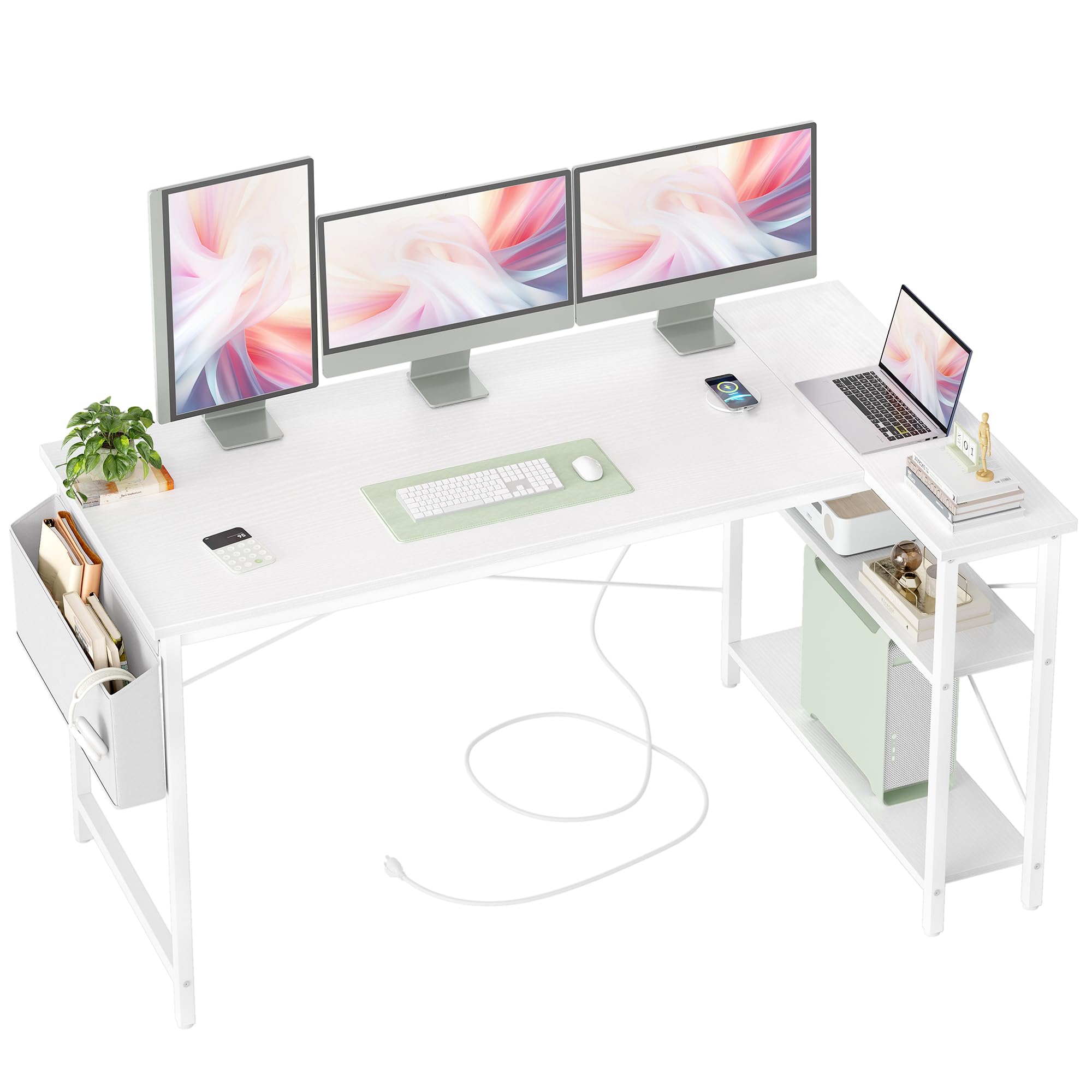
Figure 2.1: Overview of the BEXEVUE L-Shaped Reversible Desk.
3. Safety Information
Please read and understand all safety warnings before assembly and use. Failure to follow these instructions may result in injury or damage to the product.
- Weight Limit: Do not exceed the maximum static load capacity of 250 lb (120 kg). Overloading the desk can cause instability and potential collapse.
- Anchoring: If placing heavy items on the shelves or desktop, consider anchoring the desk to a wall to prevent tipping, especially in households with children or pets.
- Level Surface: Always assemble and use the desk on a flat, stable, and level surface.
- Electrical Safety: Ensure the integrated power strip is connected to a properly grounded outlet. Do not use if the power cord is damaged. Keep liquids away from electrical components.
- Assembly: Assemble the desk according to the instructions provided. Do not force parts together. Ensure all screws are securely tightened before use.
- Children: Keep small parts and packaging materials away from children during assembly to prevent choking hazards.
4. Package Contents
Please verify that all components are present and undamaged before beginning assembly. Refer to the packaging for a complete list of included parts and hardware. Typically, your package should contain:
- Desktop panels (main and L-extension)
- Steel frame components (legs, support bars)
- Two-tier shelf panels
- Integrated power strip (USB and Type-C)
- Fabric storage bag
- Hardware kit (screws, bolts, adjustable feet, tools)
- Assembly instructions
5. Setup and Assembly Instructions
Follow these steps carefully to assemble your BEXEVUE L-Shaped Reversible Desk. It is recommended to have two people for assembly.
- Prepare the Area: Clear a spacious area for assembly. Lay out all components and hardware on a soft, clean surface to prevent scratches.
- Assemble the Main Frame: Connect the main desk legs and support bars using the provided hardware. Do not fully tighten screws until all parts are aligned.
- Choose Reversible Configuration: Decide whether you want the L-extension and shelves on the left or right side of the main desk. This choice will determine how you attach the extension frame.
- Attach L-Extension Frame: Securely attach the L-extension frame to the main desk frame according to your chosen configuration.
- Install Desktop Panels: Place the main desktop and L-extension desktop panels onto the assembled frame. Secure them with the designated screws from underneath.
- Assemble and Install Shelves: Assemble the two-tier shelves and attach them to the L-extension frame. Ensure they are stable and level.
- Install Power Strip: Mount the integrated power strip to the designated location on the desktop or frame, typically using pre-drilled holes.
- Attach Storage Bag: Hook or screw the fabric storage bag to the side of the desk as shown in the instructions.
- Final Tightening and Adjustment: Once all parts are in place, fully tighten all screws. Adjust the feet pads at the bottom of the desk legs to ensure the desk is stable and level on your floor.
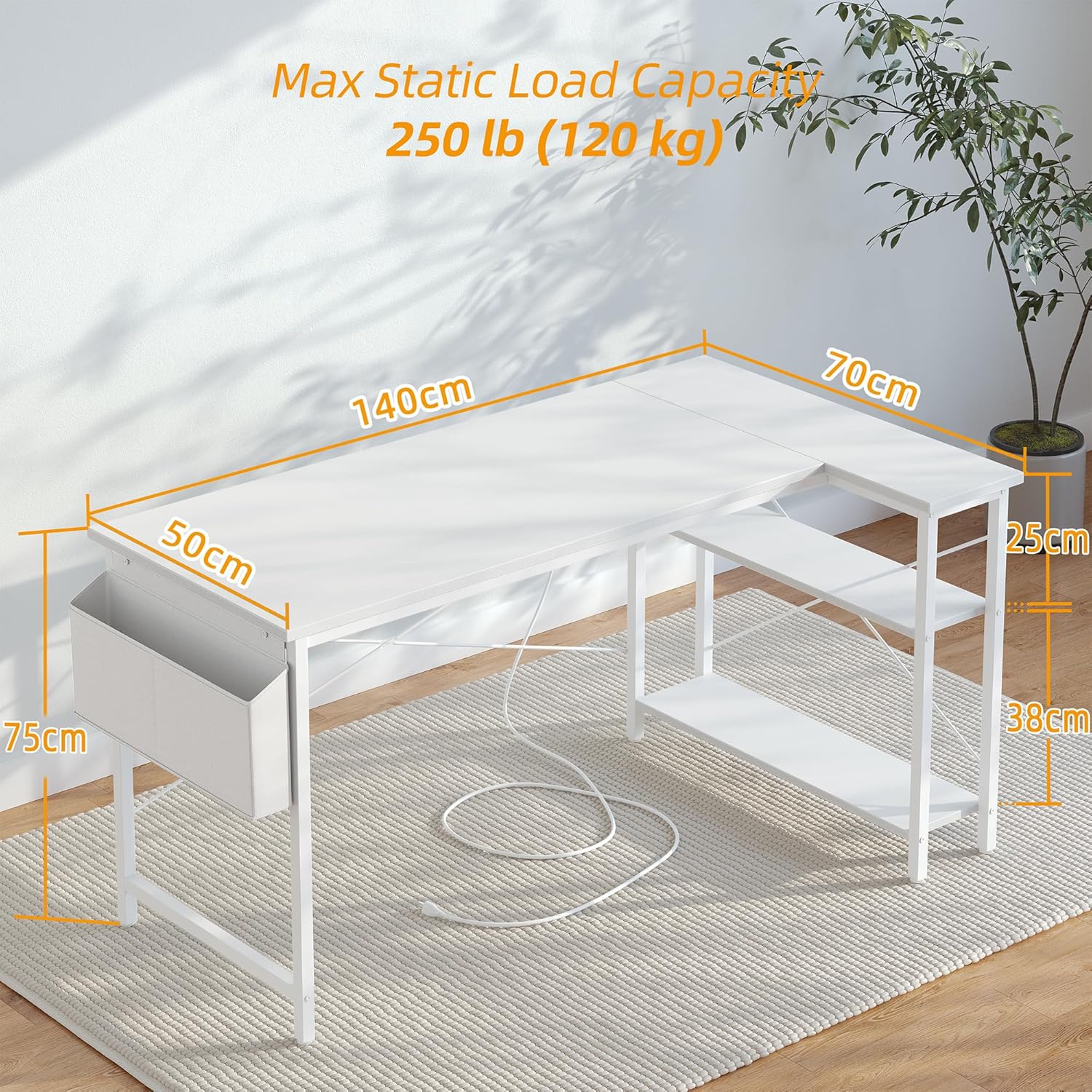
Figure 5.1: Desk Dimensions and Load Capacity.

Figure 5.2: Reversible Design for Flexible Setup.
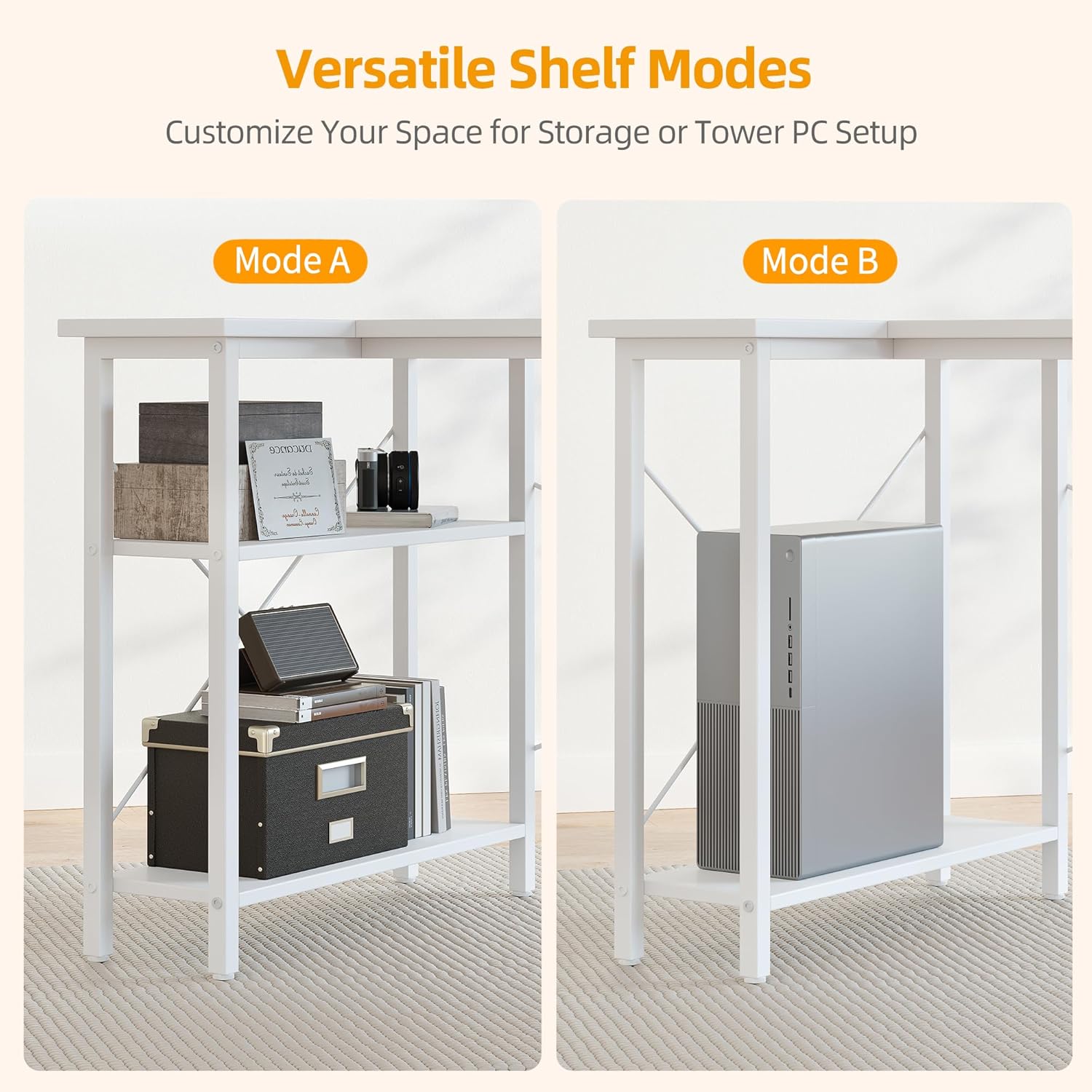
Figure 5.3: Versatile Shelf Modes for Storage or PC Setup.
6. Operating Instructions
Your BEXEVUE desk is designed for ease of use and organization.
- Using the Integrated Power Strip: Plug the desk's power cord into a wall outlet. You can then use the USB and Type-C ports on the integrated power strip to charge your electronic devices directly from your desk.
- Utilizing Storage Shelves: The two-tier open shelves are ideal for storing books, binders, small printers, or decorative items. The bottom shelf can also accommodate a tower PC (refer to Figure 5.3).
- Using the Storage Bag: The fabric storage bag provides convenient access for headphones, notebooks, pens, or other small office supplies.

Figure 6.1: Side Storage Bag for Accessories.
7. Maintenance
Proper care will extend the life and appearance of your desk.
- Cleaning: Wipe the desktop and frame with a soft, damp cloth. Avoid using harsh chemicals, abrasive cleaners, or polishes that may damage the finish.
- Spills: Immediately wipe up any spills to prevent water damage or staining, especially on the desktop surface.
- Hardware Check: Periodically check all screws and bolts to ensure they remain tight. Re-tighten if necessary to maintain stability.
- Adjustable Feet: Ensure the adjustable feet pads are correctly positioned and adjusted to keep the desk level and prevent wobbling.

Figure 7.1: High-Quality Desktop Features.

Figure 7.2: Adjustable Feet Pads for Stability and Floor Protection.
8. Troubleshooting
If you encounter any issues with your desk, refer to the following common problems and solutions:
- Desk is Wobbly:
Solution: Check that all screws and bolts are securely tightened. Ensure the desk is on a level surface. Adjust the individual feet pads until the desk is stable. - Power Strip Not Working:
Solution: Verify that the desk's power cord is fully plugged into a functional wall outlet. Check if the wall outlet itself is working by plugging in another device. Ensure the power strip's internal connections are secure (if accessible and safe to check). - Parts Missing or Damaged:
Solution: If you find any parts missing or damaged upon unpacking, do not proceed with assembly. Contact BEXEVUE customer support immediately for assistance.
9. Specifications
| Feature | Detail |
|---|---|
| Model Number | E10002055W |
| Brand | BEXEVUE |
| Dimensions (L x W x H) | 140 x 70 x 75 cm (55.1 x 27.6 x 29.5 inches) |
| Weight | 16.5 kg (36.4 lbs) |
| Color | White |
| Material | P2 Particle Board (Desktop), Metal (Frame) |
| Special Features | Reversible Design, Integrated USB & Type-C Power Strip, 2-Tier Open Shelves, Storage Bag, Adjustable Feet |
| Max Static Load Capacity | 120 kg (250 lb) |
10. Warranty and Support
BEXEVUE is committed to providing high-quality products and customer satisfaction. Your BEXEVUE desk comes with a 30-day risk-free guarantee.
If you have any questions, require assistance with assembly, or need to report a defect, please do not hesitate to contact BEXEVUE customer support. Refer to your purchase documentation or the BEXEVUE official website for contact details.