
R-CHEN-UAV K11 TURBO
K11 Aerial Drone User Manual
Model: K11 TURBO
1. Introduction
The R-CHEN-UAV K11 Aerial Drone is a high-performance Unmanned Aerial Vehicle (UAV) designed for advanced aerial photography and versatile flight operations. Featuring 8K pixel resolution, a 3-axis stabilized gimbal, and intelligent obstacle avoidance, it offers a robust and user-friendly experience for both beginners and experienced pilots. This manual provides essential information for the safe and effective operation, maintenance, and troubleshooting of your K11 drone.

Figure 1.1: The K11 Aerial Drone with its remote control and in its folded configuration.
2. Product Configuration
The K11 Aerial Drone package includes the following components:
- Flying Machine (Drone) x 1
- Remote Control x 1
- Battery x 1 (Additional batteries may be included depending on package)
- Spare Wind Blade x 4
- Screwdriver x 1
- Mapping Cable x 3
- USB Charging Cable x 1
- Manual x 1 (This document)

Figure 2.1: Side view of the K11 Aerial Drone, highlighting its compact design.
3. Key Features
The K11 Aerial Drone is equipped with advanced features for superior performance:
- High-Resolution Camera: Features an 8K pixel camera with 4K video capabilities and 50x HD zoom for lossless picture quality.
- 3-Axis Stabilized Gimbal: Mechanical stabilization combined with electronic stabilization ensures smooth and steady footage.
- Intelligent Obstacle Avoidance: 360-degree omni-directional obstacle avoidance system for enhanced flight safety.
- Long Endurance Battery: 11.1V 8000mAh (or 3500 mAh matrix battery) provides up to 45 minutes of flight time.
- GPS Functionality: Includes GPS one-key return, intelligent follow, and route multi-point planning flight modes.
- Payload Capacity: Capable of carrying a load of up to 500g, with a bottom throwing hook for various applications.
- Wind Resistance: Designed with Class 6 wind resistance for stable flight in challenging conditions.
- Digital Map Transmission: Offers 40 kilometers of digital map transmission for extended range.
- Durable Construction: Made from aviation-grade PAPC material, providing upgraded dust and moisture resistance.

Figure 3.1: The K11 drone's advanced camera system and omni-directional obstacle avoidance capabilities.

Figure 3.2: The drone equipped with a bottom throwing hook, capable of carrying up to 500 grams.
4. Setup Guide
Follow these steps to prepare your K11 drone for its first flight:
- Unfold the Drone: Carefully unfold the drone arms until they click into place. Ensure all arms are fully extended and locked.
- Install Propellers: Attach the propellers according to the markings (e.g., A and B) on the propellers and motor arms. Ensure they are securely fastened.
- Charge and Install Battery: Fully charge the drone battery using the provided USB charging cable. Once charged, insert the battery into the drone until it clicks securely.
- Prepare Remote Control: Ensure the remote control is charged. If using a smartphone, attach it to the remote control holder and connect it with the appropriate mapping cable.
- Download App: Download the official R-CHEN-UAV drone application from your device's app store.
- Power On: Power on the drone first, then the remote control. Wait for them to establish a connection. Refer to the app for connection status.
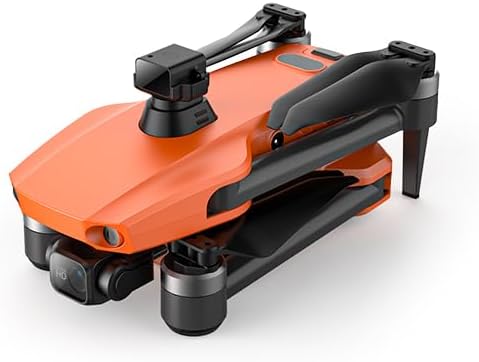
Figure 4.1: The K11 drone in its folded, transport-ready configuration.
5. Operating Instructions
This section covers basic flight operations and advanced features.
5.1 Basic Flight
- Take-off: Place the drone on a flat, open surface. Use the one-key take-off button on the remote control or within the app.
- Ascend/Descend: Use the left joystick (Mode 2) to control altitude.
- Forward/Backward/Left/Right: Use the right joystick (Mode 2) for directional movement.
- Landing: Use the one-key landing button or slowly lower the left joystick.
5.2 Advanced Flight Modes
- Intelligent Follow: Activate this mode via the app to have the drone automatically follow a designated subject.
- Route Multi-point Planning: Draw a flight path on the app's map, and the drone will automatically follow the pre-set route.
- Fixed-point Surround: Select a point of interest, and the drone will orbit around it, capturing footage.
- GPS One-Key Return: Press the RTH (Return To Home) button, and the drone will automatically return to its take-off point. This feature also activates on low battery or signal loss.
- Gesture Shooting Recognition: Perform specific hand gestures to trigger photo or video recording.

Figure 5.1: The remote control connected to a smartphone for real-time digital graphic transmission.

Figure 5.2: Illustrations of orbiting flight and intelligent following modes.
5.3 Camera Operation
- Photo/Video Capture: Use the dedicated buttons on the remote control or the app interface to take photos or start/stop video recording.
- Gimbal Control: Adjust the camera angle using the gimbal dial on the remote control.
- Dual Camera Switching: Switch between the front and bottom cameras via the app for different perspectives.

Figure 5.3: Example views from the front and bottom cameras, demonstrating dual camera functionality.
6. Maintenance
Proper maintenance ensures the longevity and optimal performance of your K11 drone.
- Battery Care:
- Store batteries in a cool, dry place.
- Do not overcharge or over-discharge batteries.
- If storing for extended periods, charge batteries to approximately 50-60%.
- Cleaning:
- Use a soft, dry cloth to clean the drone body and camera lens.
- Avoid using liquid cleaners directly on electronic components.
- Propeller Inspection:
- Regularly inspect propellers for cracks, bends, or damage.
- Replace damaged propellers immediately using the provided spare blades.
- Gimbal Protection:
- Ensure the gimbal protector is in place when transporting the drone.
- Avoid applying force to the gimbal.
7. Troubleshooting
Refer to this section for common issues and their solutions.
| Problem | Possible Cause | Solution |
|---|---|---|
| Drone does not power on. | Battery not charged or not properly installed. | Ensure battery is fully charged and securely inserted. |
| No connection between drone and remote. | Incorrect power-on sequence; interference. | Power on drone first, then remote. Move to an area with less interference. Re-pair if necessary (refer to app instructions). |
| Unstable flight or drifting. | Improper calibration; damaged propellers; strong winds. | Perform IMU and compass calibration via the app. Check and replace damaged propellers. Avoid flying in strong winds. |
| Poor image/video quality. | Dirty lens; insufficient lighting; unstable flight. | Clean camera lens. Ensure adequate lighting. Check gimbal for proper function. |
| App not displaying live feed. | Incorrect cable connection; app glitch; Wi-Fi interference. | Ensure mapping cable is securely connected. Restart app and drone. Check Wi-Fi signal. |
8. Specifications
Detailed technical specifications for the K11 Aerial Drone.
| Feature | Detail |
|---|---|
| Brand | R-CHEN-UAV |
| Model Name | K11 TURBO |
| Special Feature | Obstacle Avoidance |
| Color Options | Orange, Gray, Black (Orange model specified) |
| Video Capture Resolution | 8K |
| Connectivity Technology | Wi-Fi, Bluetooth |
| Skill Level | All |
| Item Weight | 2 Kilograms (approx. 4.4 pounds) |
| Battery Capacity | 3500 mAh (matrix battery), 11.1V 8000mAh (single battery) |
| Product Dimensions (Unfolded) | Approx. 15.37"L x 5.12"W x 9.85"H (48 x 40 x 9 cm) |
| Product Dimensions (Folded) | Approx. 22 x 12 x 9 cm |
| Flight Time | About 45 minutes |
| Flying Distance (Transmission) | About 10 kilometers (40 kilometers digital map transmission) |
| Wind Resistance | Class 6 |
| Max Load | 500g |

Figure 8.1: Manufacturer's product parameters table.

Figure 8.2: Dimensions of the K11 drone in both unfolded and folded states.
9. Warranty and Support
For warranty information, technical support, or service inquiries, please refer to the official R-CHEN-UAV website or contact their customer service directly. Keep your purchase receipt as proof of purchase for any warranty claims.
Manufacturer: R-CHEN-UAV
Website: R-CHEN-UAV Official Store on Amazon