
Introduction
This manual provides instructions for the installation, operation, and maintenance of your Zingbabu USB Aquarium Light. This 10W full spectrum LED light is designed for aquariums measuring 12-20 inches (30-60 CM) and features adjustable brightness, multiple color modes, and a built-in timer function. Please read this manual thoroughly before use to ensure proper function and safety.

Image: The Zingbabu USB Aquarium Light installed on an aquarium, showcasing its illumination.
Safety Instructions
- Ensure the power source is compatible with the light's specifications (5V USB).
- Do not immerse the light fixture or USB connector in water. This product is not waterproof.
- Always unplug the light from the power source before performing any maintenance, cleaning, or when placing hands in the aquarium water.
- Keep the power cord and USB connector away from water to prevent electrical hazards.
- Do not operate the light if it has a damaged cord or plug, or if it is malfunctioning or has been dropped.
- This product is intended for indoor use only.
- Keep out of reach of children.
Package Contents
Verify that all items are present in the package:
- 1 x Zingbabu USB Aquarium Light (Model: Q9-1LTD-O2ZZ)
- Adjustable Extendable Brackets (pre-attached or included)
Note: A USB power adapter is not included. You will need a standard 5V USB charger, power bank, or USB outlet.
Product Features
- Full Spectrum LED Lighting: Contains 30 white (6500K), 10 blue (450-455nm), 4 red (620-625nm), 2 green (520-525nm), and 2 pink (620-625nm) LED beads for comprehensive illumination.
- Three Color Light Modes:
- Full Spectrum Mode: All LEDs active, simulating natural light for plant growth.
- Growth Mode: White and blue LEDs active, suitable for general plant and fish viewing.
- Moonlight Mode: Blue LEDs only, ideal for nighttime viewing and enhancing fish colors.
- Adjustable Brightness: Six levels of brightness (10%, 20%, 40%, 60%, 80%, 100%) for customizable illumination.
- Integrated Timer: Three timer settings (3H, 6H, 12H) for automated on/off cycles.
- Adjustable Extendable Bracket: High-density ABS construction with adjustable brackets to fit aquariums from 12 to 20 inches (30-60 CM).

Image: Visual representation of the three available light modes.
Setup
- Unpack the Light: Carefully remove the aquarium light and its components from the packaging.
- Adjust the Brackets: The light comes with adjustable extendable brackets. Slide the brackets outwards or inwards to match the length of your aquarium. Ensure the light fixture is centered over the tank.

Image: Detail of the adjustable bracket for tank fitting.
- Position the Light: Place the light fixture securely on the edges of your aquarium. The brackets should rest firmly on the tank's rim.
- Connect Power: Plug the USB connector into a compatible 5V USB power source (e.g., USB wall adapter, power bank, computer USB port).

Image: Examples of compatible USB power sources.
Operating Instructions
The Zingbabu USB Aquarium Light is controlled via an inline remote with several buttons:
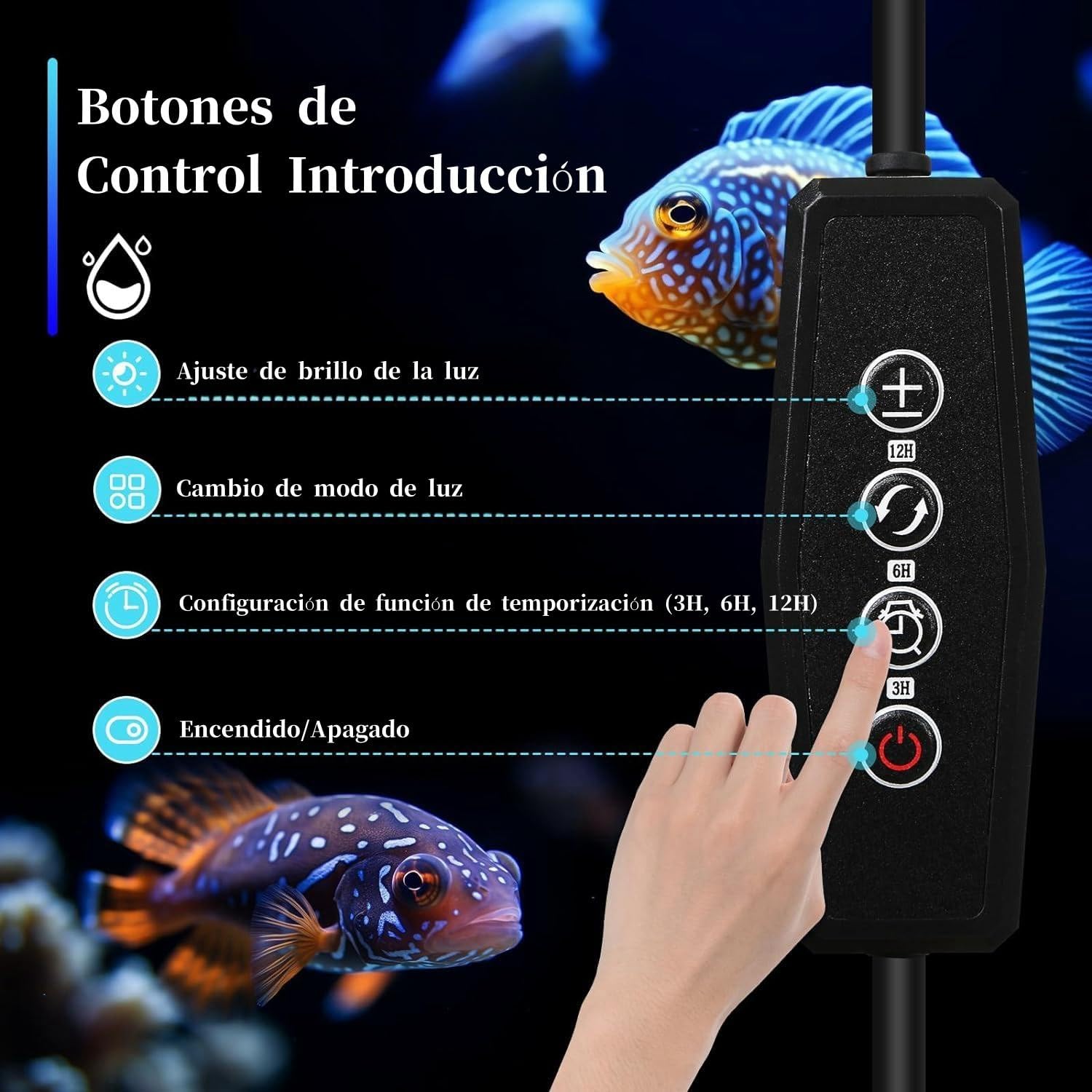
Image: Inline remote control with button functions.
- Power On/Off Button (⏻): Press once to turn the light on or off.
- Brightness Adjustment Buttons (+ / -):
- Press + to increase brightness (10% → 20% → 40% → 60% → 80% → 100%).
- Press - to decrease brightness (100% → 80% → 60% → 40% → 20% → 10%).

Image: Brightness adjustment levels.
- Color Light Mode Switch Button (↻): Press this button to cycle through the three available light modes:
- First press: Full Spectrum Mode (all LEDs).
- Second press: Growth Mode (white and blue LEDs).
- Third press: Moonlight Mode (blue LEDs only).
- Timer Setting Button (⏱): This button sets the automatic on/off cycle.
- First press: 3-hour timer.
- Second press: 6-hour timer.
- Third press: 12-hour timer.
To cancel the timer, unplug the power. The light will revert to its default setting (off) when reconnected.
Maintenance
- Cleaning: Regularly wipe the light fixture with a soft, dry cloth to remove dust and water spots. Ensure the light is unplugged before cleaning. Do not use abrasive cleaners or immerse the light in water.
- LED Longevity: The high-quality 5730 LED beads are designed for long-term use (up to 30,000 hours). Avoid frequently turning the light on and off to maximize lifespan.
- Heat Dissipation: The light features a high-density ABS housing designed for effective heat dissipation. Ensure the ventilation grooves are not obstructed.

Image: Illustration of the light's heat dissipation design.
Troubleshooting
| Problem | Possible Cause | Solution |
|---|---|---|
| Light does not turn on. | No power, loose connection, faulty USB adapter. | Check USB connection. Try a different USB power source. Ensure the power button is pressed. |
| Light is dim or flickering. | Insufficient power, faulty unit. | Ensure USB power source provides adequate current. Try a different USB power source. |
| Timer function not working as expected. | Incorrect timer setting, power interruption. | Re-set the timer by pressing the timer button. If power was interrupted, the timer resets. |
| Light does not fit aquarium. | Brackets not adjusted correctly, tank size outside specified range. | Adjust the extendable brackets. Verify your aquarium size is within 12-20 inches (30-60 CM). |
Specifications
| Feature | Detail |
|---|---|
| Model Name | 26CM (Q9-1LTD-O2ZZ) |
| Wattage | 10 Watts |
| Voltage | 5 Volts |
| Light Source Type | LED (5730 beads) |
| Number of Light Sources | 56 (30 White, 10 Blue, 4 Red, 2 Green, 2 Pink) |
| Color Temperature | 6500 Kelvin (White LEDs) |
| Color Rendering Index (CRI) | 90 |
| Material | Acrylonitrile Butadiene Styrene (ABS) |
| Product Dimensions | 11.81 x 3.15 x 3.15 inches (30 x 8 x 8 cm) |
| Item Weight | 15.2 ounces (431 Grams) |
| Aquarium Compatibility | 12-20 inches (30-60 CM) |
| Power Source | Corded Electric (USB) |
| Indoor/Outdoor Usage | Indoor |

Image: Product dimensions and cable lengths.
Warranty and Support
For warranty information or technical support, please contact Zingbabu customer service through the retailer where the product was purchased. You may also visit the official Zingbabu store on Amazon for more information: Zingbabu Store.