1. Introduction
This user manual provides comprehensive instructions for the installation, operation, and maintenance of your new Generic 10.25-inch Car Touchscreen Multimedia Receiver. This unit is specifically designed for BMW X1 F48 models manufactured between 2016 and 2017, equipped with the NBT system and a 6-pin LVDS plug.
The multimedia receiver features a high-definition capacitive touchscreen, integrates wireless Apple CarPlay and Android Auto, and operates on an Android 14 system. It enhances your in-car entertainment and navigation experience while retaining essential original vehicle functions.
2. Compatibility and System Verification
Before proceeding with installation, it is crucial to verify your vehicle's system compatibility. This unit is compatible only with BMW X1 F48 models (2016-2017) that have the NBT system and a 6-pin LVDS plug.
Refer to the image below to identify your car's system type and LVDS plug configuration. Incorrect system identification may lead to incompatibility or installation issues.

Figure 2.1: BMW System Identification Guide. This image illustrates various BMW car systems (CCC, CIC, NBT, EVO) and their respective LVDS plug types. The NBT system with a 6-pin LVDS plug is marked as compatible with this multimedia receiver.
3. Package Contents
Please ensure all items listed below are present in your package before beginning installation:
- 1 x Car Multimedia Player (10.25-inch screen)
- 1 x Microphone (MIC)
- 1 x Power Cable
- 1 x 4G Antenna
- 1 x GPS Antenna
- 1 x USB Cable
- 1 x AUX Cable
- 1 x Plastic Base
- 2 x Screws
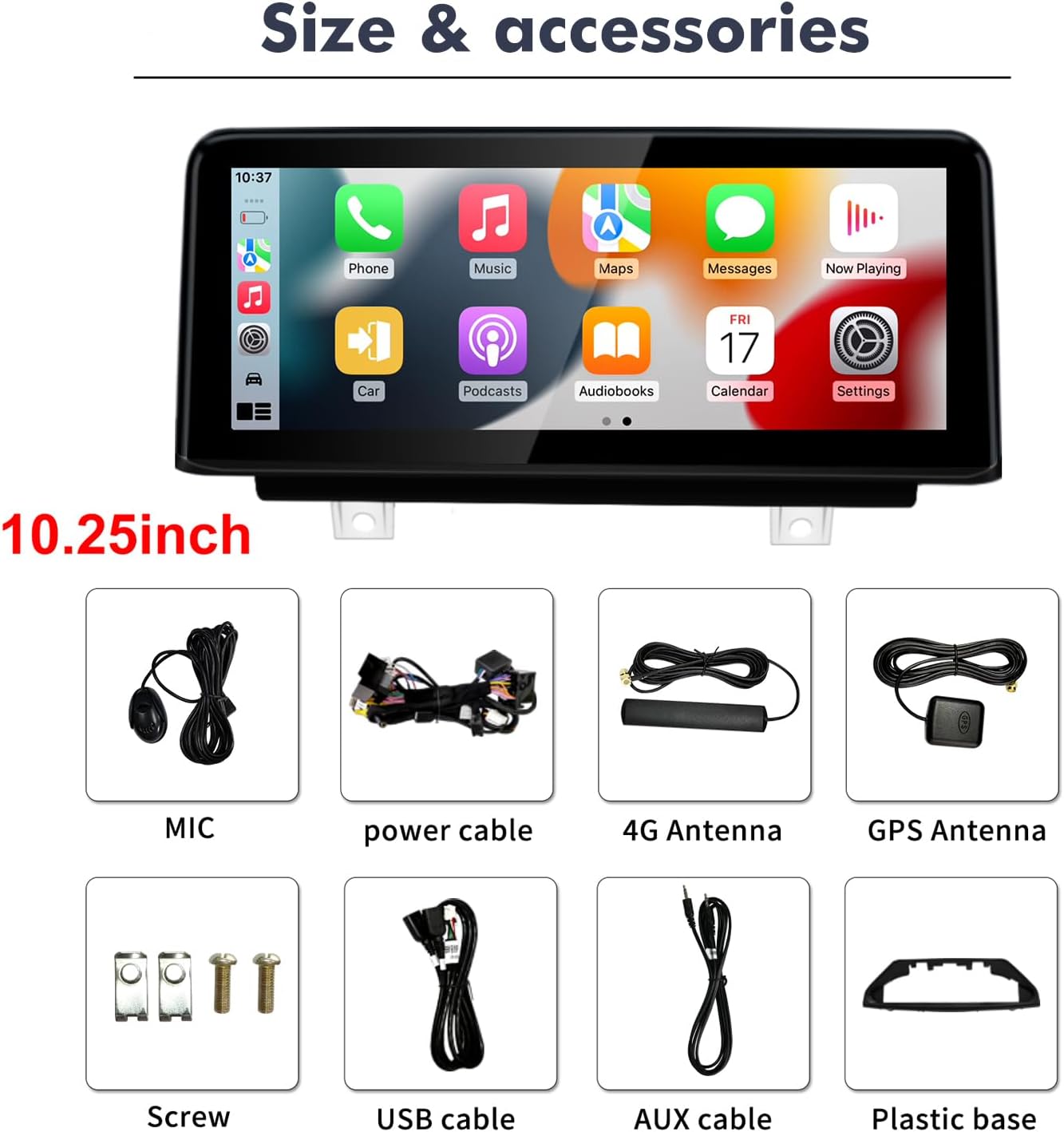
Figure 3.1: Package Contents. This image displays the main 10.25-inch multimedia player unit along with all the accessories included in the package, such as cables, antennas, microphone, and mounting hardware.
4. Setup and Installation
Installation of the multimedia receiver involves replacing the original car screen. It is recommended that installation be performed by a qualified professional to ensure correct wiring and avoid damage to your vehicle or the unit.
4.1 General Installation Steps (Consult a professional for detailed vehicle-specific instructions):
- Preparation: Ensure the vehicle's ignition is off and the battery is disconnected before starting any electrical work.
- Remove Original Screen: Carefully remove the original car screen and associated trim panels.
- Connect Wiring: Connect the provided power cable, AUX cable, USB cable, 4G antenna, GPS antenna, and microphone to the new multimedia player. Ensure all connections are secure and correctly routed.
- LVDS Connection: Connect the 6-pin LVDS plug from the vehicle to the new unit. This is critical for retaining original system functionality.
- Mount New Unit: Secure the new 10.25-inch multimedia player using the provided plastic base and screws.
- Test Functionality: Before reassembling all trim panels, reconnect the battery and test all functions of the new unit, including original car system integration, CarPlay/Android Auto, Bluetooth, and navigation.
- Reassemble: Once all functions are verified, carefully reassemble the vehicle's trim panels.

Figure 4.1: Before and After Installation. This image provides a visual comparison of the car's dashboard with the original screen versus the new 10.25-inch multimedia receiver installed, demonstrating the integrated appearance.
5. Operating Instructions
This section details the primary functions and how to operate your multimedia receiver.

Figure 5.0: Multimedia Receiver User Interface. This image displays the main screen of the unit, showcasing the layout of applications and system information.
5.1 Wireless Apple CarPlay & Android Auto
The unit supports both wireless Apple CarPlay and Android Auto. Once connected, you can access navigation, make calls, send messages, and play music directly from your smartphone via the car's touchscreen or voice commands (Siri/Google Assistant).
- Connection: Enable Bluetooth and Wi-Fi on your smartphone. Pair your phone with the multimedia receiver via Bluetooth. Follow the on-screen prompts to initiate CarPlay or Android Auto.
- Mirror Projection: The unit also supports mirror projection, allowing you to display your smartphone screen directly on the car's display.
5.2 Bluetooth Calls and Music
Connect your mobile phone via Bluetooth for hands-free calling and wireless music streaming.
- Pairing: Go to the Bluetooth settings on the unit and your phone. Search for available devices and select the multimedia receiver. Confirm the pairing code.
- Calls: Use the external microphone for clear hands-free communication.
- Music: Stream audio directly from your Bluetooth-enabled device.
5.3 Built-in GPS Navigation
The unit features built-in GPS navigation. You can download various navigation applications like Google Maps, Waze, or iGO from the Google Play Store. Offline maps are supported after downloading.
- Online Navigation: Requires an internet connection (via Wi-Fi or 4G antenna).
- Offline Navigation: Download maps to the unit's storage for use without an internet connection.
5.4 HD Video Player
Enjoy high-definition video playback. The unit is compatible with various video formats, providing clear and vibrant visuals.
5.5 Built-in DSP Processor
The integrated Digital Signal Processor (DSP) module enhances audio quality, offering multi-dimensional surround lossless audio for an improved listening experience.
5.6 Split Screen Functionality
The unit supports split-screen mode, allowing you to run two applications simultaneously, such as navigation and music playback.

Figure 5.1: Split Screen and Original Function Support. This image demonstrates the split-screen capability, showing two applications running concurrently. It also highlights the unit's compatibility with original car features like camera systems, steering wheel controls, and iDrive rotation control.
5.7 Retention of Original Car Functions
This multimedia receiver is designed to integrate seamlessly with your BMW's existing systems, retaining the following original functions:
- Original car radio and amplifier functions.
- Factory joystick control.
- Original camera and compatibility with aftermarket rearview cameras and DVR systems.
- Original steering wheel controls.
- Original iDrive rotation control.
6. Maintenance
To ensure the longevity and optimal performance of your multimedia receiver, follow these maintenance guidelines:
- Screen Cleaning: Use a soft, lint-free cloth slightly dampened with water or a screen cleaner specifically designed for electronic displays. Avoid harsh chemicals or abrasive materials.
- Software Updates: Periodically check for software updates to ensure the system runs efficiently and has the latest features and security patches.
- Avoid Extreme Temperatures: Do not expose the unit to extreme heat or cold for extended periods.
- Cable Connections: Ensure all cables remain securely connected. Loose connections can lead to intermittent functionality.
7. Troubleshooting
If you encounter issues with your multimedia receiver, please refer to the following common troubleshooting tips. Many problems can be resolved by checking cable connections and settings.
- No Power/Screen Blank:
- Check all power cable connections.
- Ensure the vehicle's battery is properly connected and charged.
- Verify the vehicle's fuse for the stereo system.
- No Sound:
- Check AUX cable connection.
- Ensure the volume is not muted or set too low on both the unit and the original car system.
- Verify the correct audio input source is selected.
- CarPlay/Android Auto Not Connecting:
- Ensure Bluetooth and Wi-Fi are enabled on your smartphone and the unit.
- Forget the device on your phone and re-pair.
- Restart both your phone and the multimedia receiver.
- Original Car Functions Not Working:
- Verify the LVDS cable connection.
- Ensure all original car wiring is correctly reconnected to the new unit's harness.
If problems persist after attempting these steps, please contact customer support for further assistance.
8. Specifications
| Feature | Detail |
|---|---|
| Model Number | 8581 |
| Operating System | Android 14 |
| Screen Size | 10.25 inches |
| Screen Resolution | 1920 x 720 |
| Connectivity Technology | Bluetooth, Wi-Fi |
| Controller Type | Android |
| Special Features | Built-In Bluetooth, Touchscreen, Wireless CarPlay, Android Auto, GPS Navigation, DSP Processor |
| Compatible Devices | Smartphone |
| Audio Output Mode | Stereo |
| Control Method | Touch |
9. Warranty and Support
Your Generic 10.25-inch Car Touchscreen Multimedia Receiver comes with comprehensive support and warranty coverage:
- Money-Back Guarantee: 30-day money-back policy.
- Replacement Warranty: 12-month replacement warranty for manufacturing defects.
- Technical Support: Lifetime technical support is provided.
For any questions regarding installation, operation, or troubleshooting, please contact our customer service team. We aim to respond within 24 hours to assist you in resolving any issues.


