
1. Product Overview
The KARTOOSH Rechargeable Wall Sconces are a set of two battery-operated, wireless lighting fixtures designed for indoor use. They feature a detachable magnetic design for easy installation and recharging, adjustable color temperature, stepless dimming, and multiple control options including remote and touch. The sconces are equipped with a 350° rotating head for directional lighting and include a sleep timer function.
2. Package Contents
- 2 x KARTOOSH Wall Sconces
- 2 x Remote Controls
- Magnetic Mounting Plates
- Screw Brackets
- Mounting Hardware
- USB-C Charging Cable (Adapter not included)
3. Setup and Installation
These wall sconces are designed for wireless installation, eliminating the need for an electrician or complex wiring. The magnetic design allows for easy attachment and removal of the light unit for charging.
3.1 Mounting the Sconce
- Prepare the Wall: Choose a suitable location on your wall. Ensure the surface is clean and dry.
- Install Magnetic Plate: Use the provided screw brackets to securely drill the metal magnetic plate to the desired wall location.
- Attach Sconce: Align the sconce with the installed magnetic plate. The sconce will snap onto the plate magnetically.

Image: The KARTOOSH wall sconce installed, highlighting its wireless operation and remote control functionality.

Image: Visual instructions for wireless installation, demonstrating how to mount the magnetic plate and attach the sconce.
3.2 Initial Charging
Before first use, ensure the sconce's battery is fully charged.
- Remove Charging Case: Gently press the designated button or area on the sconce to detach the magnetic charging case.
- Connect USB-C Cable: Use the provided USB-C cable to connect the charging case to a 5V USB power adapter (not included).
- Monitor Indicator Lights:
- Green Light Blinking: Indicates the device is currently charging.
- All 3 Green Lights On: Indicates the device is fully charged.
- Red Indicator Light: Indicates low battery or no power; please charge the device.
- Reattach Charging Case: Once fully charged, reattach the charging case to the sconce magnetically.
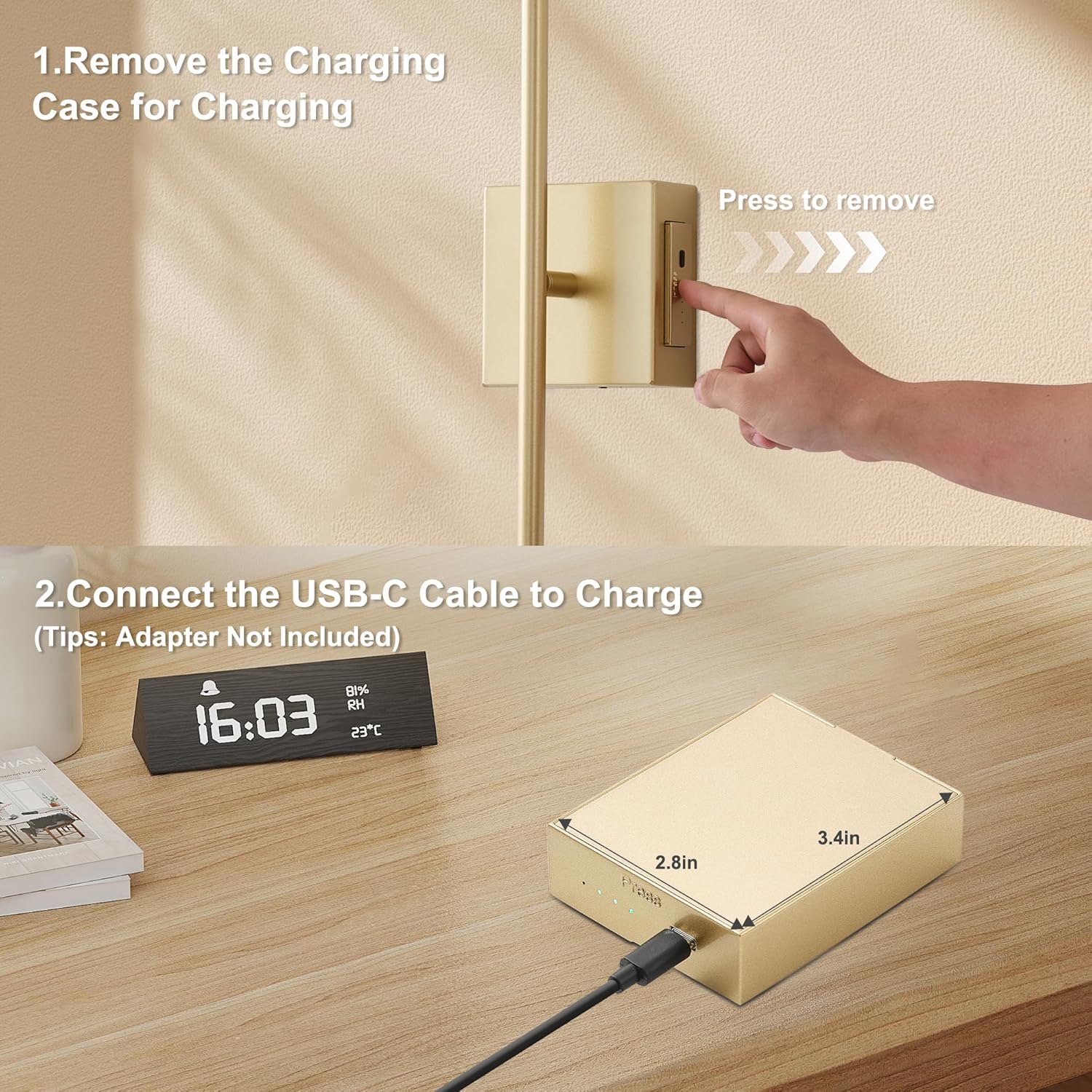
Image: Steps for removing the charging case and connecting the USB-C cable for charging.

Image: Detailed view of the charging case with indicator lights for charging status.
4. Operating Instructions
The KARTOOSH Wall Sconces can be controlled via touch or the included wireless remote control.
4.1 Touch Control
- Power ON/OFF: Tap the touch button on the sconce to turn the light on or off.
- Stepless Dimming: Long press the touch button to adjust brightness continuously from 25% to 100%. Release when desired brightness is reached.
4.2 Remote Control
Ensure the remote control is aimed at the IR receiver on the sconce for optimal functionality.
- Power ON/OFF: Press the "ON" or "OFF" button.
- Dimming: Use the brightness adjustment buttons to increase or decrease light intensity (25% to 100%).
- Color Temperature Adjustment: Press "K+" to increase color temperature (cooler white) or "K-" to decrease color temperature (warmer white). Available settings are 3000K (Warm White), 4000K (Neutral White), and 6000K (Cool White).
- Night Light Mode: Press the moon icon button to activate night light mode, which provides warm light at 15% brightness.
- Timer Setting: Press the timer button to set the sconce to automatically turn off after 30, 60, or 120 minutes.

Image: Overview of touch and remote control functions for the sconce.
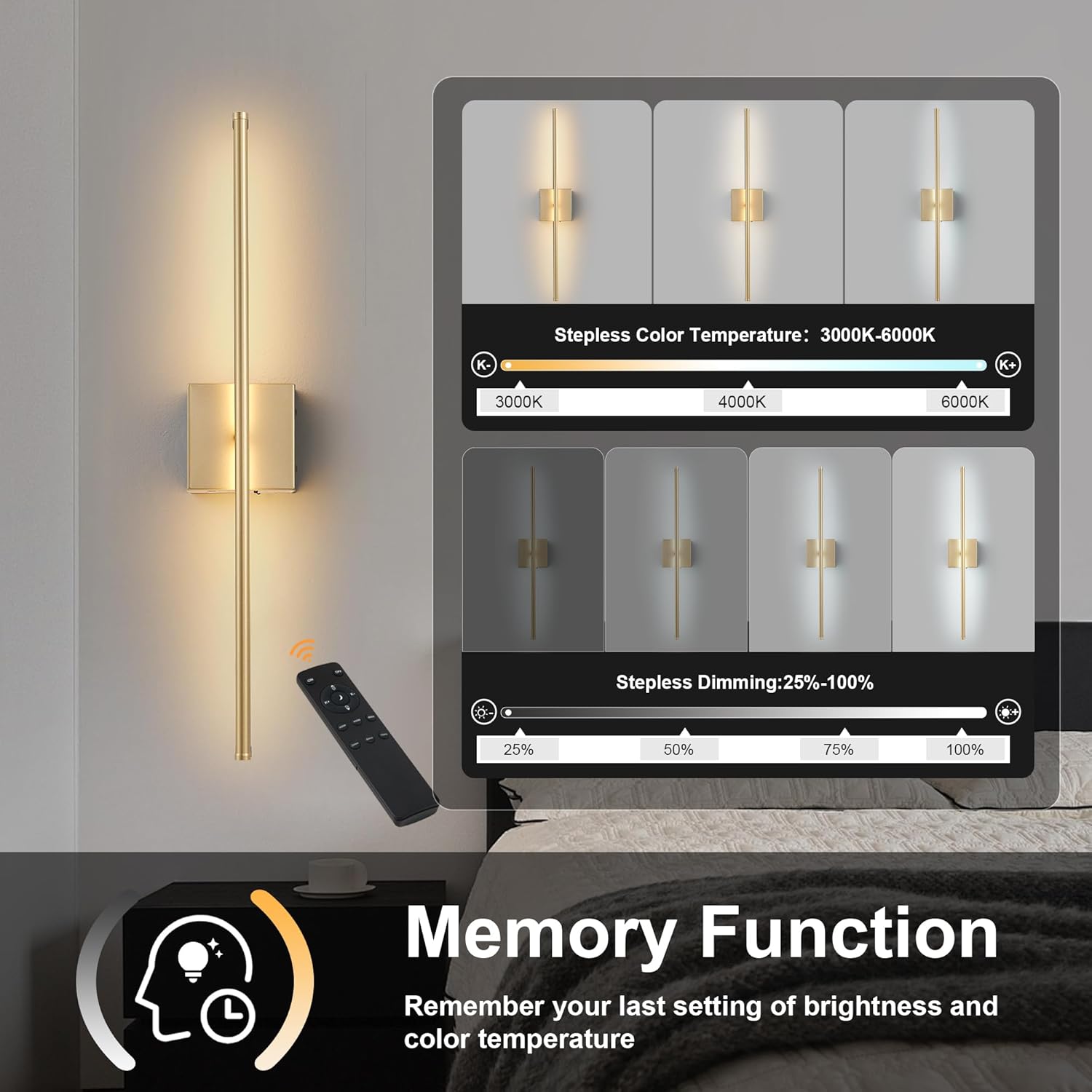
Image: Demonstrates the range of color temperatures and dimming levels.
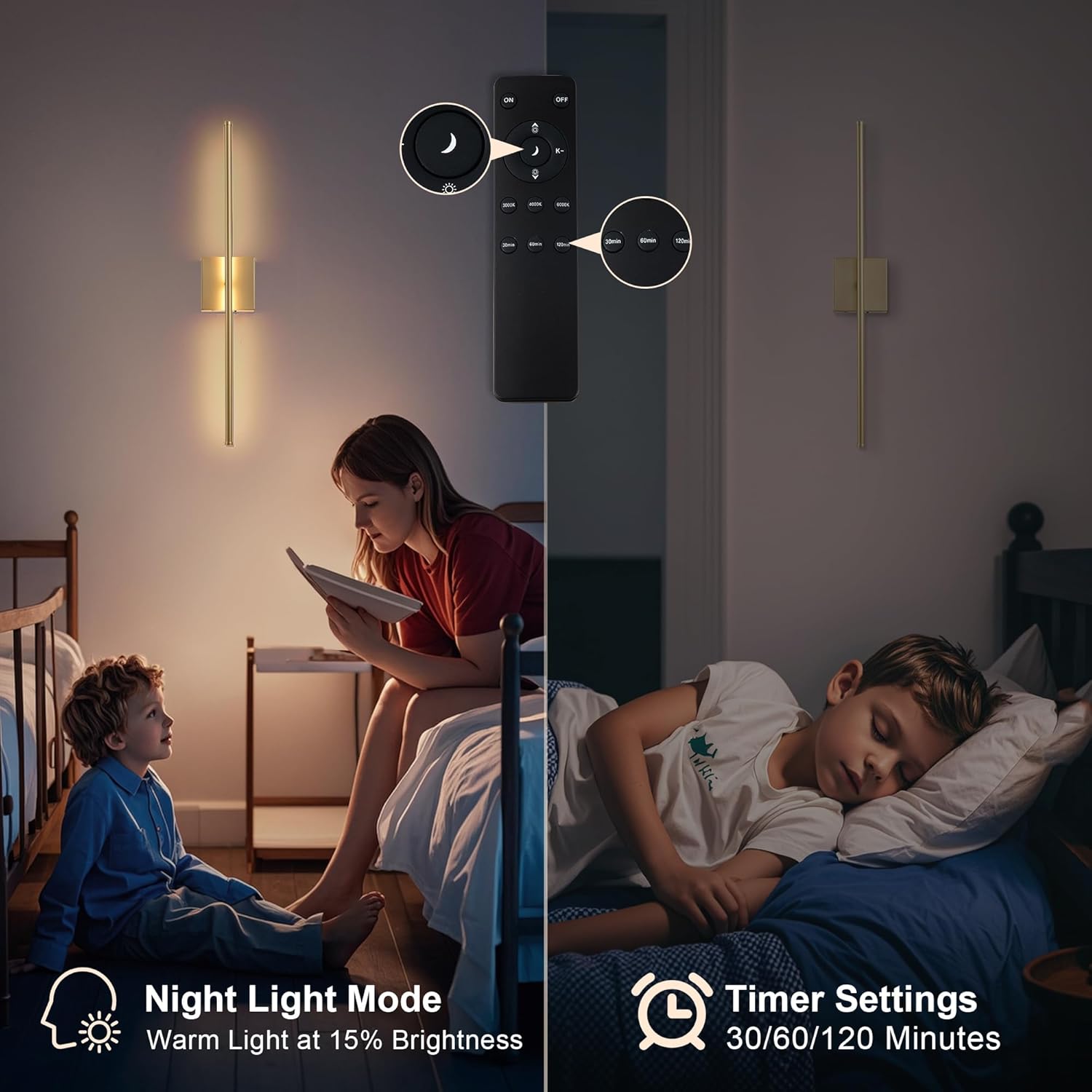
Image: Illustrates the night light mode and timer settings in use.
4.3 Memory Function
The wall sconce remembers your last brightness and color temperature settings, restoring them automatically when turned on again.
4.4 350° Rotation
The light head can be rotated 350 degrees to direct illumination precisely where needed.
5. Maintenance
5.1 Charging the Battery
To maintain optimal performance, charge the battery when the red indicator light appears or when light output diminishes. A full charge typically takes 6-8 hours using a USB-C connection.
| Brightness Level | Approximate Run Time |
|---|---|
| Lowest Setting (25%) | Up to 55 hours |
| Full Brightness (100%) | Up to 15 hours |
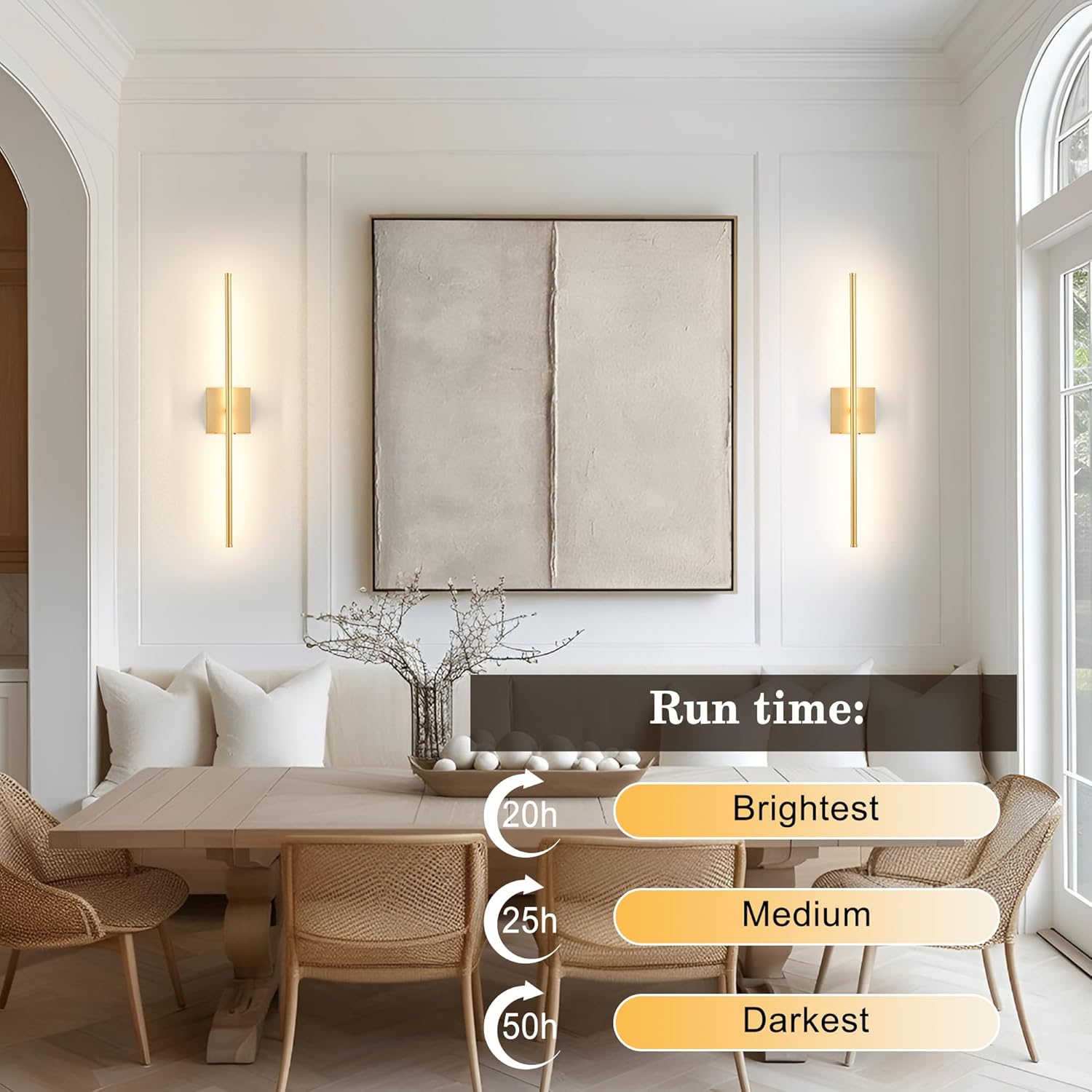
Image: Visual guide to battery run times based on brightness settings.
5.2 Cleaning
Wipe the sconce with a soft, dry cloth. Do not use abrasive cleaners or solvents, as these may damage the finish.
6. Troubleshooting
- Light does not turn on:
- Ensure the battery is charged. Check the indicator lights on the charging case.
- Verify the charging case is securely attached to the sconce.
- Remote control not responding:
- Ensure the remote is aimed directly at the IR receiver on the sconce.
- Check the remote control battery.
- Ensure there are no obstructions between the remote and the sconce.
- Battery not holding charge:
- Ensure the USB-C cable and power adapter are functioning correctly.
- If the issue persists, contact customer support.
- Light flickers or dims unexpectedly:
- The battery may be low. Recharge the sconce.
7. Specifications
| Feature | Detail |
|---|---|
| Brand | KARTOOSH |
| Model Number | ZM321BGD80 |
| Color | Gold |
| Material | Metal |
| Style | Modern |
| Light Fixture Form | Sconce |
| Room Type | Bedroom, Dining Room, Entryway, Living Room |
| Specific Uses | Indoor use only |
| Power Source | Battery Powered |
| Special Features | Adjustable Color Temperature, Dimmable, Night light function, Rechargeable, Timer |
| Control Method | Remote, Touch |
| Light Source | LED |
| Light Color | Warm White to Cool White (3000K-6000K) |
| Wattage | 5 watts |
| Switch Type | Push Button |
| Mounting Type | Wall Mount |
| Included Components | Remote Control, Wall Sconces |
| Item Dimensions (L x W x H) | 32.2"L x 4.72"W x 3.5"H |
| Number of Items | 2 |
| Unit Count | 2 Count |
| Size | 32.2 Inches |

Image: Key features and dimensions of the KARTOOSH Wall Sconce.
8. Warranty
KARTOOSH provides a 2-year manufacturer's warranty for this product, covering defects in materials and workmanship under normal use. Please retain your proof of purchase for warranty claims.
9. Customer Support
For any questions, concerns, or technical assistance, please contact KARTOOSH customer support through the retailer's platform or visit the official KARTOOSH website for contact information.
Online Store: KARTOOSH Amazon Store